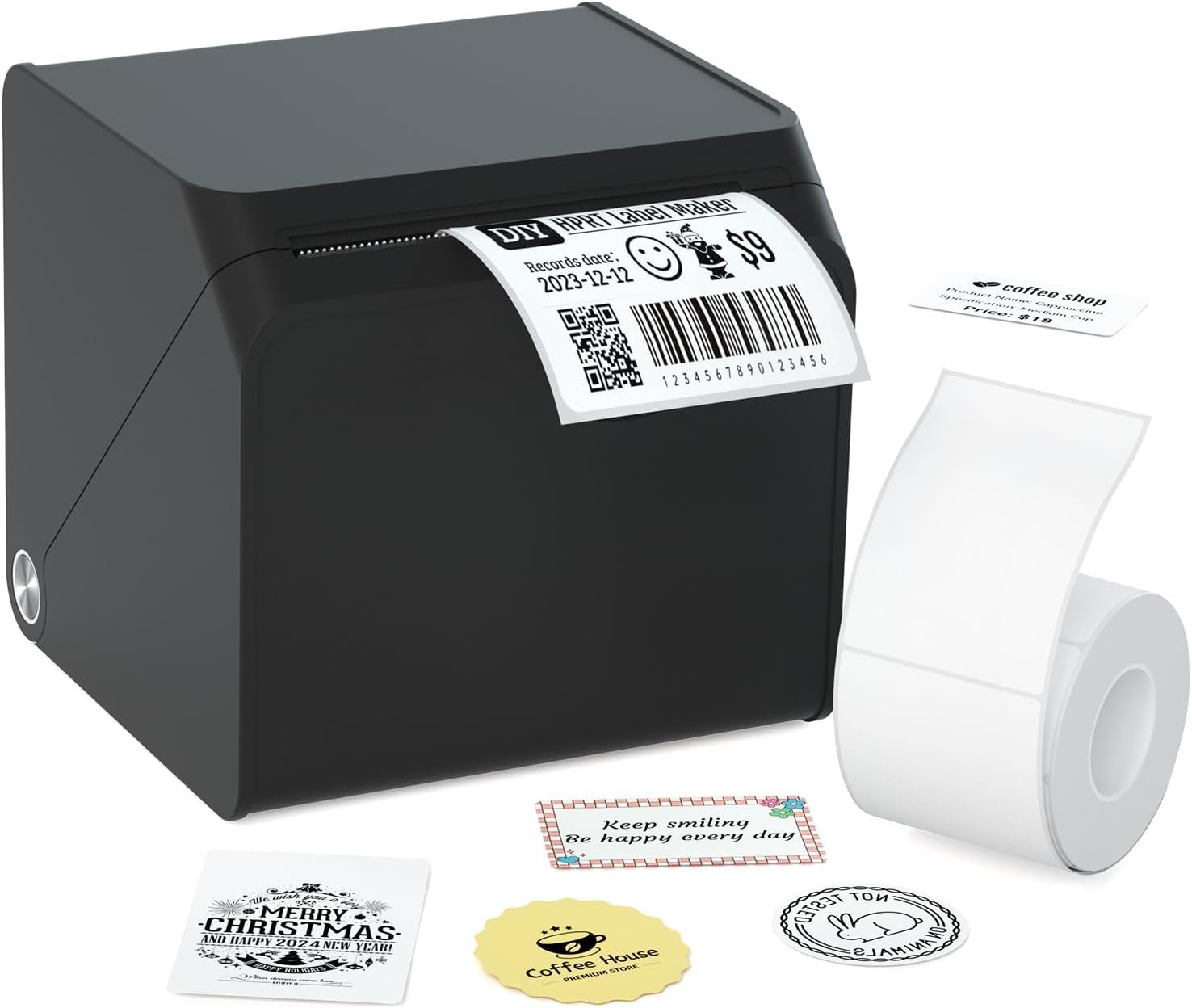
HPRT T260LR Label Printer Review: Bluetooth Portable Thermal Label Maker
Choosing the Right Label Printer: A Guide to Meeting Your Printing Needs
In today’s fast-paced environments, selecting the right label printer is critical for maintaining efficiency and organization. Whether you’re managing a small business, running an office, or organizing a home workspace, the right printer can significantly impact productivity and workflow. Label printers serve a wide range of purposes, from creating price tags for retail inventory to labeling storage bins and shipping packages. The key to finding the perfect match lies in understanding your specific requirements: what types of labels will you need, how frequently will you print, and what environments will the printer operate in? For instance, a portable label maker like the HPRT T260LR is ideal for users who need flexibility and mobility, while heavier-duty industrial printers are better suited for high-volume operations. Print quality, speed, and connectivity options also play a crucial role in decision-making. A printer that supports Bluetooth connectivity, for example, can streamline workflows by allowing wireless label creation from smartphones or tablets. Additionally, the type of printing technology—such as thermal printing—can influence the printer’s suitability for specific tasks, like creating QR code labels or barcode stickers. This review evaluates the HPRT T260LR label printer based on its design, performance, and compatibility with common use cases, helping buyers determine whether it aligns with their needs.
Quick Overview
| Feature | Details |
|---|---|
| Printer Type | Thermal label printer |
| Printing Technology | Thermal printing (inkless) |
| Supported Functions | Label printing only |
| Print Resolution | 203 dpi (black and white) |
| Print Speed | 75 ppm (monochrome) |
| Media Sizes | 1.75 x 2.5 inches, 1.97 x 3.15 inches |
| Connectivity | Bluetooth, USB-C |
| Battery Type | Lithium-ion (included) |
| Dimensions | 3.15″D x 3.35″W x 3.15″H |
| Weight | 12.6 ounces |
| Included Components | Label paper roll, USB-C cable, user manual |
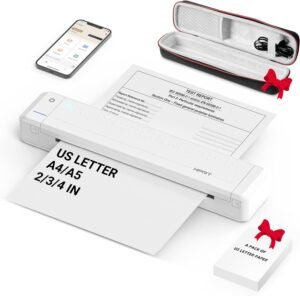
The HPRT T260LR is designed for users who prioritize portability and wireless convenience. Its compact size and thermal printing technology make it suitable for environments where ink-based printers are impractical. The Bluetooth connectivity and app integration simplify label creation, while the included lithium-ion battery ensures mobility without access to power outlets. These features collectively position the printer as a versatile tool for small businesses, home offices, and educational institutions.

Intended Usage and Environmental Fit
The HPRT T260LR is engineered for users who require a portable solution for label creation in diverse settings. Its lightweight design and compact form factor make it ideal for individuals who need to print labels on the go, such as teachers organizing classroom supplies, students managing personal projects, or professionals labeling storage containers during relocation. The printer’s thermal printing technology eliminates the need for ink cartridges, reducing maintenance requirements and making it well-suited for environments where frequent refills or replacements are inconvenient. Additionally, its Bluetooth connectivity and app-based interface provide flexibility for users who prefer digital label customization without the need for physical access to a computer. However, its portability comes with limitations in terms of media size and print volume, which may affect its suitability for high-demand scenarios like large-scale inventory management.

Portability and Mobility
The HPRT T260LR’s compact dimensions—measuring 3.15″D x 3.35″W x 3.15″H—make it exceptionally easy to transport and store. Its lightweight design (12.6 ounces) ensures that it can be carried between locations without strain, which is particularly beneficial for users who frequently move between workspaces or need to label items in multiple environments. The built-in lithium-ion battery allows for uninterrupted operation even in areas without immediate access to power outlets, enhancing its utility for field work or temporary setups. However, the battery life is limited to a single charge, which may require users to recharge the device periodically, especially for extended use.
Environmental Suitability
The printer’s thermal printing technology and lack of ink requirements make it well-suited for environments where traditional inkjet or laser printers are impractical. It is particularly effective for tasks like creating QR code labels, barcode stickers, and price tags, which are common in retail, logistics, and educational settings. Its ability to operate on a single charge also makes it a viable option for users who need to label items in remote locations or during power outages. However, its thermal printing method may not be ideal for long-term archival of labels, as thermal paper can degrade over time when exposed to heat or light.
Use Cases for Home and Small Business
The HPRT T260LR is an excellent choice for home users and small business owners who need a reliable, low-maintenance solution for label creation. Its ability to print high-quality labels without ink or toner reduces the need for frequent consumable replacements, which is a significant advantage for users who prioritize cost-effectiveness. The printer’s compatibility with smartphones via Bluetooth and the HereLabel app allows for seamless label customization, making it a convenient tool for tasks like organizing storage bins, labeling office supplies, or creating shipping labels. However, its limited media size and print speed may make it less suitable for users who require large volumes of labels or high-resolution graphics.
Limitations in High-Volume Environments
While the HPRT T260LR is well-suited for low to moderate print volumes, it may not be the best option for users who require high-speed, high-volume label production. The printer’s maximum print speed of 75 ppm (monochrome) is adequate for small business operations but may fall short in environments where large batches of labels are needed, such as in warehouses or manufacturing facilities. Additionally, the printer’s single-tray design and limited media size capacity (10 sheets) may restrict its efficiency in scenarios requiring continuous, high-throughput labeling. These limitations suggest that the HPRT T260LR is best suited for users who prioritize portability and simplicity over high-volume output capabilities.
Print Technology and Output Quality
The HPRT T260LR utilizes thermal printing technology, which eliminates the need for ink cartridges and reduces maintenance requirements. This method of printing relies on heat-sensitive paper to produce labels, resulting in clear, high-contrast output without the need for color inks. The printer’s maximum black and white print resolution of 203 dpi ensures that text and simple graphics are rendered with sufficient clarity for most label applications. However, thermal printing may not be ideal for long-term archival, as the paper can degrade over time when exposed to heat, light, or humidity. The printer’s ability to produce crisp, legible labels makes it well-suited for tasks such as creating QR code labels, barcode stickers, and price tags, which are commonly used in retail, logistics, and educational environments. Despite its limitations in color output and durability, the HPRT T260LR’s thermal printing technology provides a reliable, low-maintenance solution for users who prioritize simplicity and cost-effectiveness.

Thermal Printing vs. Inkjet/Laser Alternatives
Thermal printing, as used by the HPRT T260LR, offers distinct advantages over inkjet or laser printing technologies. Unlike inkjet printers, which require regular ink refills and may experience clogging issues, the HPRT T260LR’s inkless design minimizes maintenance and operational costs. Similarly, laser printers, while offering high-quality color output, typically require toner cartridges and are more suited for large-volume printing tasks. The HPRT T260LR’s thermal printing method is particularly effective for monochrome labels, as it produces sharp, high-contrast text without the need for color inks. However, this technology is not ideal for applications requiring long-term durability or color accuracy, making it less suitable for tasks such as creating archival documents or high-resolution graphics.
Print Resolution and Label Clarity
The HPRT T260LR’s maximum black and white print resolution of 203 dpi ensures that labels are printed with sufficient clarity for most use cases. This resolution is adequate for producing text-based labels, such as price tags, inventory stickers, and shipping labels, where readability is critical. However, the printer’s thermal printing method may result in slightly less detail compared to laser or inkjet printers, which can produce higher-resolution graphics. For users who require high-quality, high-resolution labels, such as those involving intricate designs or barcodes, the HPRT T260LR’s performance may fall short. Nevertheless, its ability to produce crisp, legible labels makes it a practical choice for environments where simplicity and cost-effectiveness are prioritized.
Media Compatibility and Label Options
The HPRT T260LR supports a range of label sizes, including 1.75 x 2.5 inches and 1.97 x 3.15 inches, making it suitable for various labeling tasks. The printer’s compatibility with thermal paper ensures that labels are printed with high contrast and clarity, which is essential for applications such as warehouse inventory management and retail pricing. However, the printer’s reliance on thermal paper may limit its versatility, as it cannot accommodate standard office paper or other media types commonly used in inkjet or laser printers. This restriction means that users must ensure they have the correct thermal paper rolls on hand for optimal performance, which could be a drawback for those who require more flexible media options.
Connectivity and Device Compatibility
The HPRT T260LR’s Bluetooth connectivity and app integration provide users with a convenient way to create and customize labels without the need for a computer. The HereLabel app, available on both Android and iOS devices, allows for seamless label creation, editing, and printing, which is particularly beneficial for users who prefer mobile workflows. This feature enhances the printer’s usability in environments where access to a desktop computer is limited, such as in small offices or home workspaces. However, the printer’s reliance on Bluetooth connectivity may introduce potential latency or connectivity issues, especially in areas with limited Wi-Fi or Bluetooth signal strength. Additionally, while the app simplifies label customization, it may not offer the same level of advanced formatting options as desktop printing software, which could be a limitation for users with more complex labeling needs.

Bluetooth Connectivity and App Integration
The HPRT T260LR’s Bluetooth connectivity enables wireless label printing from smartphones and tablets, streamlining the label creation process for users who prefer mobile workflows. The HereLabel app, available for both Android and iOS devices, allows for easy customization of labels, including text formatting, barcode generation, and QR code creation. This integration reduces the need for physical access to a computer, making the printer ideal for users who manage labels on the go. However, the app’s functionality is limited to basic label creation, which may not suffice for users requiring advanced formatting or design capabilities typically found in desktop printing software.
USB-C Port and Physical Connectivity
In addition to Bluetooth connectivity, the HPRT T260LR includes a USB-C port for direct printing from computers or other compatible devices. This feature provides an alternative method for users who prefer to create labels using desktop software or need to print labels without relying on mobile apps. The USB-C interface ensures stable data transfer and compatibility with modern computing devices, making it a useful option for users who require more control over label design and formatting. However, the printer’s reliance on a single USB-C port may limit its versatility for users who need to connect multiple devices simultaneously or integrate it with more complex printing workflows.
Compatibility with Smartphones and Tablets
The HPRT T260LR’s compatibility with smartphones and tablets via Bluetooth and the HereLabel app makes it an excellent choice for users who need to create labels on the go. The app’s intuitive interface allows for quick customization of labels, including the addition of text, barcodes, and QR codes, which is particularly useful for tasks such as inventory management or retail pricing. However, the app’s limited feature set may not cater to users who require more advanced formatting options or integration with enterprise-level label design software. This limitation suggests that while the printer is well-suited for casual or small-scale labeling tasks, it may not meet the needs of users who require more sophisticated label creation capabilities.

Pros and Cons
Pros
- Portable and Lightweight Design: The HPRT T260LR’s compact size and lightweight construction make it easy to transport and store, ideal for users who need mobility.
- Thermal Printing Technology: Eliminates the need for ink cartridges, reducing maintenance and operational costs.
- Bluetooth Connectivity: Allows wireless label printing from smartphones and tablets, enhancing convenience and flexibility.
- High-Quality Monochrome Output: Produces clear, legible labels with a resolution of 203 dpi, suitable for most labeling tasks.
- App Integration: The HereLabel app simplifies label customization and printing, providing a user-friendly interface for mobile users.
- Single-Charge Operation: The built-in lithium-ion battery ensures uninterrupted printing without access to power outlets.
- Cost-Effective for Low-Volume Use: Minimal consumable costs make it an economical choice for infrequent label printing needs.
- Versatile Label Sizes: Supports multiple media sizes, accommodating a range of labeling applications.
Cons
- Limited Media Size Capacity: The single-tray design and limited media size capacity may restrict efficiency in high-volume printing scenarios.
- Thermal Paper Dependency: Requires thermal paper rolls, which may not be compatible with standard office paper or other media types.
- No Duplex Printing: The printer only supports single-sided printing, which may be a drawback for users requiring double-sided labels.
- Bluetooth Connectivity Limitations: Potential latency or connectivity issues may affect performance in areas with weak signal strength.
- Lower Print Speed for High-Volume Tasks: The 75 ppm print speed may not be sufficient for users requiring faster label production.
- Limited App Features: The HereLabel app offers basic label creation tools, which may not meet the needs of users requiring advanced formatting options.
- Short Battery Life: The lithium-ion battery provides limited runtime, necessitating frequent recharging for extended use.
Final Verdict: Who This Printer Is Best For (and Who Should Skip It)
The HPRT T260LR label printer is best suited for users who prioritize portability, simplicity, and low-maintenance operation. Its thermal printing technology, Bluetooth connectivity, and app integration make it an excellent choice for small businesses, home offices, and educational institutions that require occasional label creation without the complexity of ink or toner systems. The printer’s compact design and lightweight construction also make it ideal for users who need to label items in multiple locations or during temporary setups. However, its limitations in media size capacity, print speed, and app functionality suggest that it may not be the best option for users who require high-volume, high-resolution label production or advanced design capabilities. For those who need a reliable, low-maintenance solution for occasional labeling tasks, the HPRT T260LR offers a practical and cost-effective alternative to traditional inkjet or laser printers.
The HPRT T260LR is not recommended for users who require high-speed, high-volume printing, such as warehouse managers or manufacturing facilities. Its reliance on thermal paper and single-tray design may also be a drawback for users who need more flexible media options or dual-sided printing capabilities. Additionally, users who require advanced label design features or integration with enterprise-level software may find the HereLabel app insufficient for their needs. Overall, the printer’s strengths in portability and simplicity make it a suitable choice for specific use cases, but its limitations in scalability and versatility mean it may not meet the demands of more complex or high-volume printing environments.

Frequently Asked Questions (FAQs)
What types of labels can the HPRT T260LR print?
The HPRT T260LR label printer is capable of printing monochrome labels, including price tags, shipping labels, QR code labels, and barcode stickers. It supports media sizes of 1.75 x 2.5 inches and 1.97 x 3.15 inches, making it suitable for a range of labeling tasks.
Is the HPRT T260LR suitable for home use?
Yes, the HPRT T260LR is well-suited for home use due to its compact design, portability, and Bluetooth connectivity. It is ideal for organizing storage bins, labeling office supplies, and creating personal labels without the need for ink cartridges.
How does the HPRT T260LR connect to devices?
The HPRT T260LR connects to devices via Bluetooth for wireless printing from smartphones and tablets, and it also includes a USB-C port for direct printing from computers. The HereLabel app allows for seamless label customization and printing.
Does the HPRT T260LR require ink or toner?
No, the HPRT T260LR uses thermal printing technology, which eliminates the need for ink or toner. It relies on heat-sensitive paper to produce labels, reducing maintenance and operational costs.
What is the maximum print speed of the HPRT T260LR?
The HPRT T260LR has a maximum print speed of 75 ppm (pages per minute) in monochrome mode. This speed is suitable for low to moderate volume printing tasks but may not meet the demands of high-speed, high-volume environments.
Can the HPRT T260LR print on standard office paper?
No, the HPRT T260LR is designed to work with thermal paper rolls and cannot print on standard office paper. Users must ensure they have the correct thermal paper media for optimal performance.
What are the dimensions of the HPRT T260LR?
The HPRT T260LR measures 3.15 inches in depth, 3.35 inches in width, and 3.15 inches in height. Its compact size makes it easy to transport and store in various environments.
How long does the battery last on the HPRT T260LR?
The HPRT T260LR’s built-in lithium-ion battery provides sufficient power for moderate use, though frequent recharging may be necessary for extended or high-volume printing sessions.