Inateck Bluetooth Thermal Label Printer Review: Efficiency, Compatibility, and Versatility for 2026
The Importance of Choosing the Right Printer for Modern Workflows
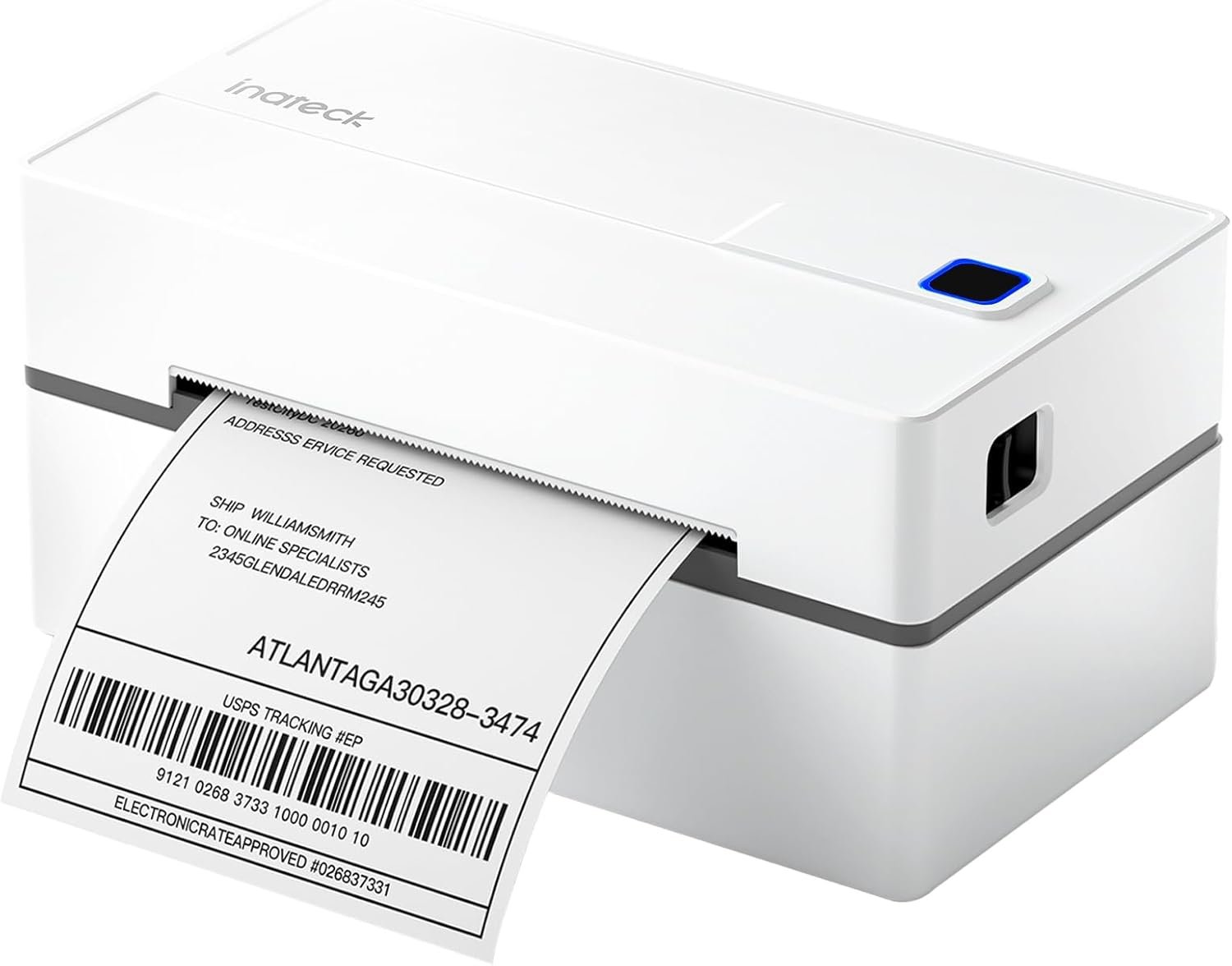
In today’s fast-paced business environment, the right printer can significantly impact operational efficiency. Whether managing a small home office, running an e-commerce business, or handling logistics for a larger enterprise, selecting a printer that meets specific needs is crucial. Printers must balance speed, reliability, and compatibility with modern workflows. For tasks like shipping label creation, thermal label printers offer distinct advantages over traditional inkjet or laser models. Their ability to produce high-quality, monochrome prints without ink or toner makes them ideal for environments requiring frequent, cost-effective label production. This review evaluates the Inateck Bluetooth Thermal Label Printer, focusing on its performance in key areas such as connectivity, print quality, and versatility. By analyzing technical specifications, compatibility with major platforms, and real-world usage scenarios, this assessment helps buyers determine if this printer aligns with their specific requirements. From small businesses needing efficient shipping solutions to professionals requiring reliable label creation tools, understanding the printer’s capabilities ensures informed purchasing decisions.
Quick Overview
| Feature | Details |
|---|---|
| Printer Type | Thermal Label Printer |
| Connectivity | Bluetooth, USB |
| Print Technology | Thermal |
| Print Speed | 150 mm/s |
| Print Resolution | 203 DPI |
| Media Sizes | 40-110 mm |
| Compatibility | iOS, Android, Windows, macOS, Chrome OS |
| Duty Cycle | Continuous use for label production |
| Ink System | Thermal (no ink or toner required) |
| Warranty | Limited warranty |
| Dimensions | 7.17 x 3.9 x 3.43 inches |
| Weight | 1.62 pounds |
The Inateck Thermal Label Printer is designed for users requiring efficient, cost-effective label production. Its thermal printing technology, combined with Bluetooth and USB connectivity, ensures compatibility with a wide range of devices. The ability to print shipping labels, QR codes, and barcodes makes it suitable for e-commerce, logistics, and small business environments. The printer’s compact size and included cutter simplify label handling, while its integration with major shipping platforms streamlines workflow for online retailers and delivery services.

Connectivity and Compatibility: Seamless Integration Across Devices
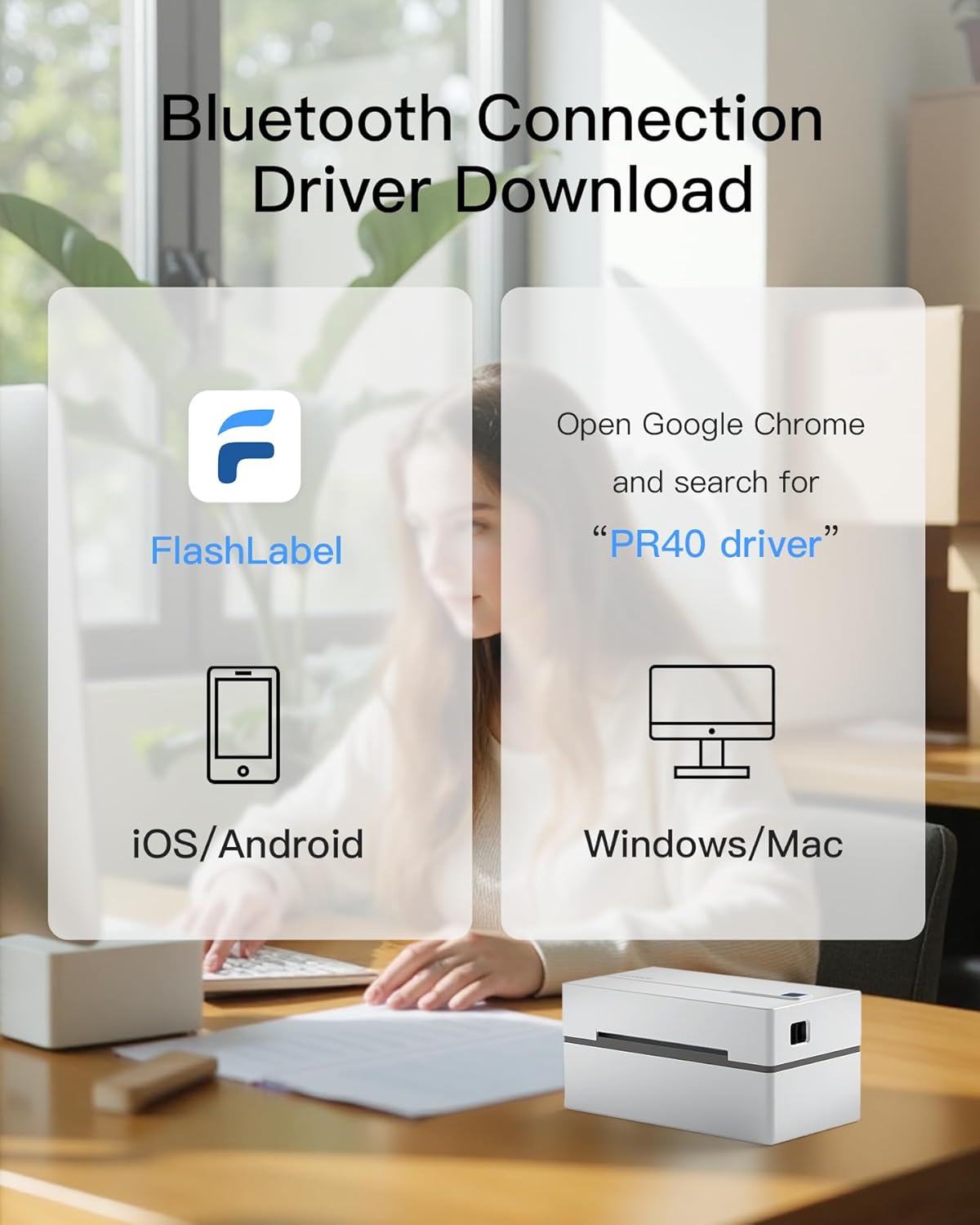
The Inateck Thermal Label Printer’s connectivity options are a key factor in its appeal, offering both Bluetooth and USB compatibility for diverse device ecosystems. Bluetooth pairing is essential for mobile users, enabling wireless label creation on smartphones and tablets. However, the printer’s Bluetooth functionality requires the use of the FlashLabel app for pairing, which may complicate the setup process for users unfamiliar with third-party applications. For desktop users, USB connectivity provides a straightforward method for label design and printing, particularly on operating systems like Windows and macOS. The inclusion of a USB A-C adapter enhances convenience, though macOS users are limited to USB-only connections, as Bluetooth printing is not supported. This dual connectivity approach ensures broad compatibility, catering to both mobile and desktop workflows. The printer’s integration with major shipping platforms like USPS, UPS, and FedEx further simplifies label creation, reducing manual input and minimizing errors during order fulfillment.
Bluetooth Pairing and App Dependency
The Inateck printer’s Bluetooth functionality relies on the FlashLabel app for pairing, which may present a barrier for users who prefer direct Bluetooth connections. While the app provides a user-friendly interface for label design and printing, the dependency on third-party software could be a drawback for those seeking a more streamlined setup process. The app’s role in managing Bluetooth pairing ensures compatibility with iOS and Android devices, but users may need to troubleshoot app-specific issues if connectivity problems arise. This approach prioritizes ease of use for mobile users, though it may not suit those requiring direct device-to-printer connections without additional software.
USB Connectivity and Cross-Platform Support
For users prioritizing direct hardware integration, the USB connectivity option offers a reliable alternative. The printer’s USB port supports Windows 7 and later, macOS, and Chrome OS, ensuring compatibility with a wide range of operating systems. The included USB A-C adapter simplifies setup, particularly for users without built-in Bluetooth capabilities. While macOS users are limited to USB-only connections, the printer’s ability to function seamlessly with desktop environments makes it a practical choice for office settings. The USB interface also facilitates label design and printing without the need for additional software, though it may lack the convenience of wireless connectivity for mobile workflows.
Platform Integration for E-Commerce and Logistics
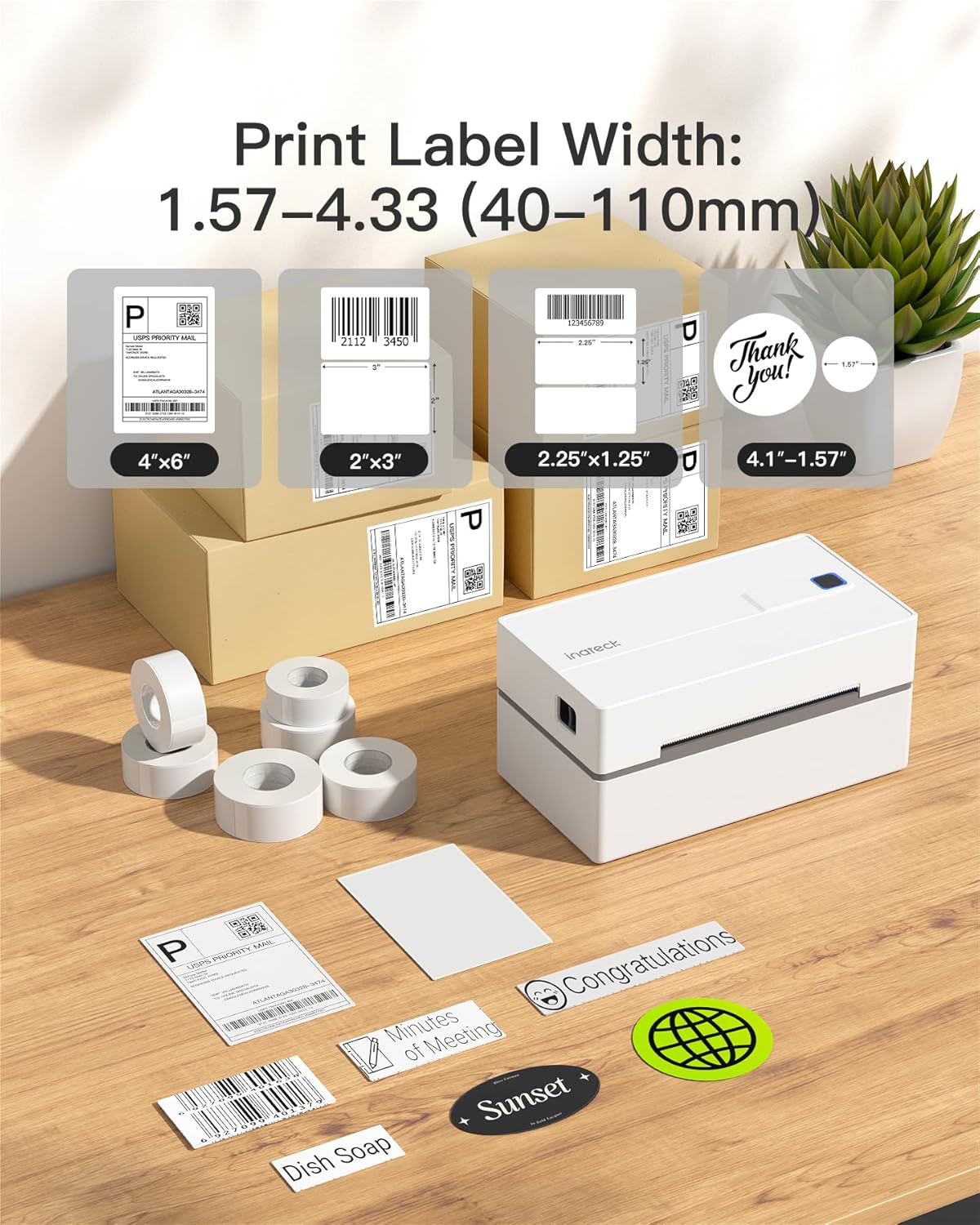
The printer’s compatibility with major shipping platforms like Amazon, Shopify, and eBay is a significant advantage for e-commerce and logistics professionals. Integration with these platforms allows users to generate shipping labels directly from their online stores or order management systems, reducing manual data entry and potential errors. The printer’s ability to support both fan-fold and roll labels with widths ranging from 40 to 110 mm ensures versatility for different label requirements. This integration streamlines the order fulfillment process, making it an essential tool for businesses handling frequent shipments and inventory management.
Cross-Device Compatibility for Diverse Workflows
The Inateck printer’s support for multiple operating systems and devices makes it a versatile option for users with mixed work environments. Whether managing a home office, running a small business, or handling logistics for a larger enterprise, the printer’s ability to connect to smartphones, tablets, and desktop computers ensures seamless label creation across platforms. This cross-device compatibility is particularly beneficial for users who need to switch between mobile and desktop workflows, as it eliminates the need for separate printing solutions. The printer’s adaptability to different usage scenarios highlights its value in environments requiring flexible, reliable label production.
Print Quality and Performance: Speed, Resolution, and Durability
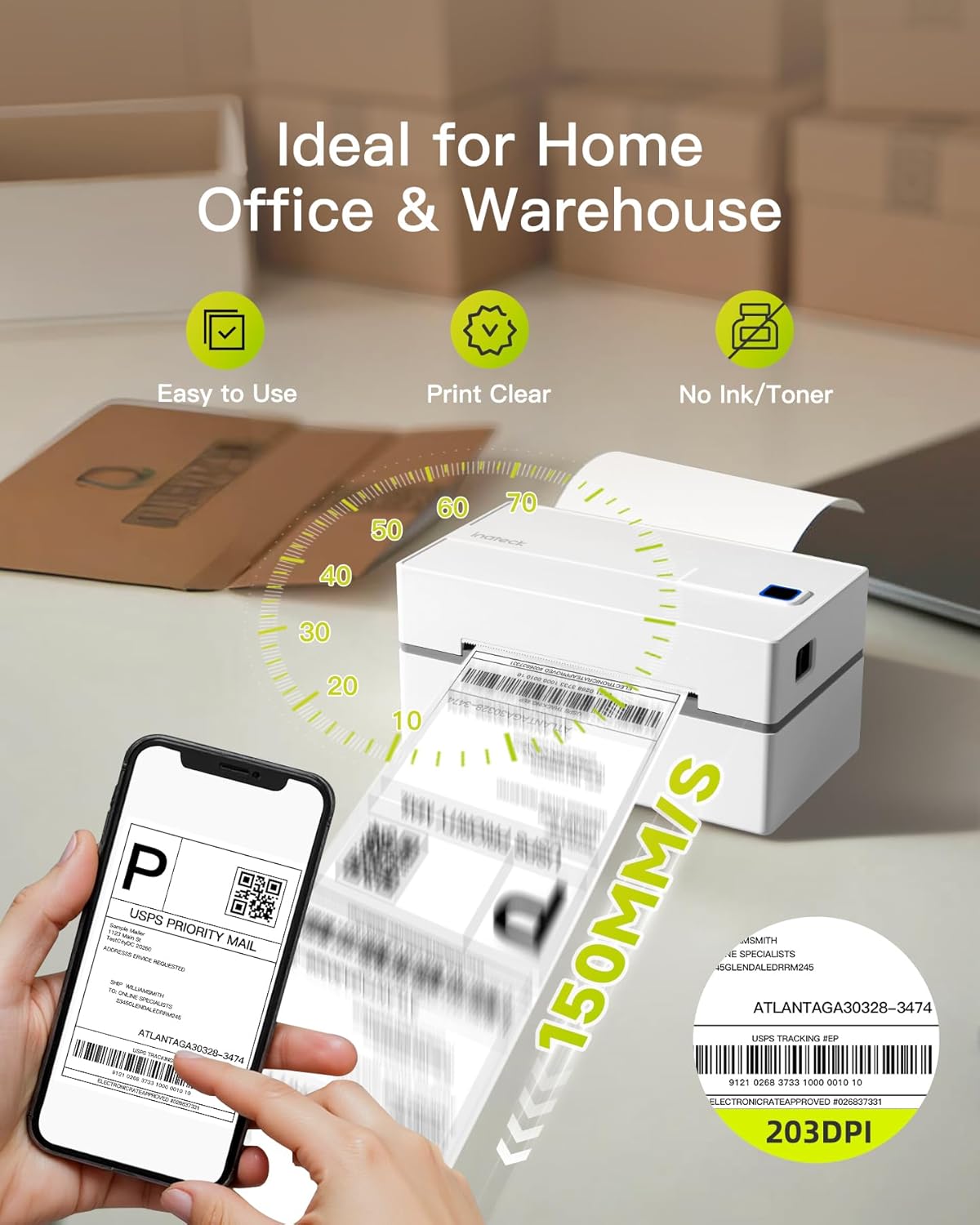
The Inateck Thermal Label Printer’s performance is defined by its thermal printing technology, which delivers consistent, high-quality monochrome prints without the need for ink or toner. The printer’s 150 mm/s print speed ensures efficient label production, making it suitable for environments with frequent printing demands. Its 203 DPI resolution provides clear, legible text and graphics, which is critical for shipping labels, barcodes, and QR codes. The printer’s ability to produce durable, long-lasting labels is another key advantage, as thermal printing ensures that printed content remains readable under various conditions. This reliability is particularly important for logistics and e-commerce operations, where labels must withstand handling and environmental factors. The printer’s design also includes features like gap detection and out-of-paper alerts, which help prevent errors and ensure smooth operation. These performance characteristics make the printer a practical choice for users requiring consistent, high-quality label production.

Thermal Printing Technology and Monochrome Output
Thermal printing technology is central to the Inateck printer’s performance, offering a cost-effective solution for monochrome label production. Unlike inkjet or laser printers, thermal printers use heat to create images on specialized labels, eliminating the need for ink or toner. This method ensures that printed content remains legible for extended periods, even in challenging environments. The printer’s 203 DPI resolution provides sharp, clear text and graphics, which is essential for shipping labels, barcodes, and QR codes. The monochrome output is well-suited for applications where color is unnecessary, making it an efficient choice for businesses focused on streamlined label creation. The absence of ink or toner also reduces maintenance requirements, as users do not need to replace consumables frequently.
Print Speed and Efficiency for High-Volume Use
The Inateck printer’s 150 mm/s print speed is a notable feature for users requiring rapid label production. This speed is particularly beneficial in high-volume environments such as e-commerce warehouses or logistics operations, where efficiency is critical. The printer’s ability to process labels quickly without compromising quality ensures that users can maintain productivity without delays. However, the printer’s performance may be limited in scenarios requiring frequent, high-speed printing, as thermal printers generally have slower speeds compared to laser or inkjet models. Despite this limitation, the printer’s speed is adequate for most label production tasks, making it a practical choice for businesses with moderate printing demands.
Durability and Reliability in Label Production
Durability is a key consideration for users requiring long-term label production, and the Inateck printer’s thermal printing technology ensures that printed labels remain readable under various conditions. The printer’s design includes features like gap detection and out-of-paper alerts, which help prevent errors and ensure smooth operation. These features contribute to the printer’s reliability, reducing the likelihood of jams or misfeeds during label creation. The printer’s ability to handle both fan-fold and roll labels with widths ranging from 40 to 110 mm further enhances its versatility. This durability and reliability make the printer a suitable choice for environments where consistent, high-quality label production is essential.

Pros and Cons: Evaluating the Inateck Thermal Label Printer
Pros
- Thermal Printing Efficiency: The printer’s thermal technology eliminates the need for ink or toner, reducing maintenance and operational costs. This makes it ideal for environments where frequent label production is required without the hassle of consumable replacements.
- Versatile Connectivity Options: With both Bluetooth and USB connectivity, the printer offers flexibility for users with different device preferences. Bluetooth pairing via the FlashLabel app simplifies mobile label creation, while USB provides a reliable connection for desktop workflows.
- Compatibility with Major Shipping Platforms: Integration with platforms like USPS, UPS, FedEx, and marketplaces such as Amazon and Shopify streamlines label creation, reducing manual input and minimizing errors in order fulfillment.
- User-Friendly Design: Features like gap detection, out-of-paper alerts, and an integrated cutter simplify label handling. The built-in status indicator ensures users can monitor the printer’s operation without constant manual checks.
- Compact and Portable: The printer’s lightweight design and compact size make it easy to move between workspaces, ideal for users requiring a portable solution for label production.
- High Print Resolution: The 203 DPI resolution ensures clear, legible text and graphics, which is critical for shipping labels, barcodes, and QR codes.
- Durable Label Output: Thermal printing ensures that labels remain readable under various conditions, making them suitable for logistics and e-commerce applications.
Cons
- Limited Media Size Range: While the printer supports media widths from 40 to 110 mm, this range may not accommodate all label sizes required by certain industries or applications.
- Bluetooth Pairing Dependency: The need to use the FlashLabel app for Bluetooth pairing may complicate the setup process for users who prefer direct device-to-printer connections.
- No Duplex Printing: The printer’s design only supports single-sided printing, which may be a drawback for users requiring double-sided labels.
- USB-Only for macOS: macOS users are restricted to USB connectivity, as Bluetooth printing is not supported, which may limit flexibility for certain workflows.
- No Ink System: While the absence of ink or toner reduces maintenance, it also means the printer cannot produce color labels, limiting its use for applications requiring colored output.
- Limited Warranty Coverage: The limited warranty may not provide sufficient support for users requiring extended coverage or repair services.
Final Verdict: Who This Printer Is Best For (and Who Should Skip It)
The Inateck Bluetooth Thermal Label Printer is best suited for small businesses, e-commerce operations, and logistics professionals requiring efficient, cost-effective label production. Its thermal printing technology, combined with Bluetooth and USB connectivity, makes it an ideal choice for users managing frequent shipments, inventory, or order fulfillment. The printer’s integration with major shipping platforms like USPS, UPS, and FedEx streamlines label creation, reducing manual input and potential errors. Its compact design and user-friendly features, such as gap detection and an integrated cutter, further enhance its appeal for environments prioritizing simplicity and reliability. However, this printer may not be the best fit for users requiring high-volume printing, color labels, or advanced duplex capabilities. The limited media size range and reliance on third-party apps for Bluetooth pairing could also be drawbacks for certain applications. Overall, the Inateck printer is a practical solution for users focused on monochrome label production with minimal maintenance, making it a valuable tool for specific business needs in 2026.

Additional Considerations for Potential Buyers
The Inateck Thermal Label Printer’s performance is well-suited for environments where label production is a regular, albeit not high-volume, task. Its thermal printing technology ensures that labels remain legible under various conditions, making it a reliable choice for logistics and e-commerce applications. The printer’s ability to handle both fan-fold and roll labels with widths ranging from 40 to 110 mm provides versatility for different label requirements. However, users requiring frequent, high-speed printing or color output may find the printer’s limitations restrictive. The printer’s compatibility with major shipping platforms is a significant advantage for businesses managing online orders, as it simplifies label creation and reduces manual input. For users prioritizing portability and ease of use, the printer’s compact size and straightforward setup make it a convenient option. Nevertheless, the lack of duplex printing and limited media size range may be drawbacks for those with more complex label needs. Overall, the printer’s strengths in efficiency, cost-effectiveness, and platform integration make it a practical choice for specific business applications in 2026.
Long-Term Reliability and Maintenance
The Inateck Thermal Label Printer’s reliability is supported by its thermal printing technology, which minimizes mechanical wear and tear compared to inkjet or laser printers. The absence of ink or toner systems reduces the need for frequent consumable replacements, lowering long-term maintenance costs. The printer’s design includes features like gap detection and out-of-paper alerts, which help prevent operational errors and ensure smooth label production. However, the reliance on thermal labels may require users to manage label stock regularly, as the printer does not include a built-in label feeder. The printer’s compact size and lightweight construction contribute to its durability, though users in high-volume environments may need to consider the printer’s duty cycle and recommended usage limits. While the printer’s reliability is adequate for most label production tasks, its long-term performance may be influenced by the quality of the thermal labels used and the frequency of use. For users requiring consistent, long-term label production, the printer’s design and maintenance requirements align with its intended use case in 2026.
Environmental and Cost Considerations
The Inateck Thermal Label Printer’s environmental impact is influenced by its thermal printing technology, which does not require ink or toner, reducing waste and resource consumption. The absence of consumables also lowers long-term operating costs, making it a cost-effective solution for businesses focused on sustainability and efficiency. However, the reliance on thermal labels, which are typically single-use, may raise concerns about waste generation. Users should consider the environmental impact of label production and disposal, particularly in industries with high label usage. The printer’s energy efficiency and minimal maintenance requirements further contribute to its cost-effectiveness, though the initial purchase price and the cost of thermal labels should be factored into long-term budgeting. For businesses prioritizing eco-friendly operations, the printer’s design and sustainability benefits align with its intended use case in 2026.
Conclusion: A Practical Solution for Label Production Needs
The Inateck Bluetooth Thermal Label Printer is a practical solution for users requiring efficient, cost-effective label production. Its thermal printing technology, combined with Bluetooth and USB connectivity, ensures compatibility with a wide range of devices and platforms. The printer’s integration with major shipping platforms like USPS, UPS, and FedEx streamlines label creation, reducing manual input and potential errors. Its compact design and user-friendly features, such as gap detection and an integrated cutter, enhance its appeal for environments prioritizing simplicity and reliability. While the printer may not be the best fit for high-volume printing or color label requirements, its strengths in efficiency, cost-effectiveness, and platform integration make it a valuable tool for specific business needs in 2026. For users focused on monochrome label production with minimal maintenance, the Inateck printer is a reliable choice that aligns with its intended use case.
Frequently Asked Questions (FAQs)
Can the Inateck Thermal Label Printer be used for printing shipping labels?
Yes, the Inateck Thermal Label Printer is specifically designed for printing shipping labels. It supports widths ranging from 40 to 110 mm, making it suitable for various label sizes required by major shipping platforms like USPS, UPS, and FedEx. The printer’s integration with these platforms streamlines the label creation process for e-commerce and logistics operations.
How do I pair the Inateck printer with my smartphone?
To pair the Inateck Thermal Label Printer with your smartphone, download the FlashLabel app from the App Store or Google Play. Open the app, select the printer model, and follow the on-screen instructions to connect via Bluetooth. Note that direct Bluetooth pairing is not supported; the app must be used for the connection process.
What are the compatibility requirements for using the printer with Windows and macOS?
The Inateck Thermal Label Printer is compatible with Windows 7 and later, macOS, and Chrome OS. For macOS users, USB connectivity is the only option, as Bluetooth printing is not supported. For Windows and Chrome OS users, both Bluetooth and USB connections are available. The printer includes a USB A-C adapter for added convenience.
Does the printer support duplex printing?
No, the Inateck Thermal Label Printer only supports single-sided printing. It is designed for monochrome label production and does not have the capability for duplex printing. This makes it suitable for applications where single-sided labels are sufficient.
What types of media can the printer handle?
The Inateck Thermal Label Printer supports both fan-fold and roll labels with widths ranging from 40 to 110 mm. This versatility allows it to accommodate various label sizes needed for shipping, branding, and organizational purposes.
Is there a warranty provided with the printer?
The Inateck Thermal Label Printer comes with a limited warranty. While specific warranty terms may vary, the printer includes access to a dedicated technical support team for professional customer service assistance, ensuring users have support for any issues that may arise.
How does the printer handle out-of-paper situations?
The Inateck Thermal Label Printer includes an out-of-paper detection feature that alerts users when the label supply is low. This helps prevent printing errors and ensures continuous operation without manual intervention. The printer also has a built-in cutter for easy label trimming.
Can the printer be used for printing QR codes and barcodes?
Yes, the Inateck Thermal Label Printer is capable of printing QR codes and barcodes. Its 203 DPI resolution ensures clear and legible graphics, making it suitable for applications requiring scannable labels and identifiers.