Jiose N43BT Thermal Label Printer Review: 4×6 Desktop Printer for Small Business
The Importance of Choosing the Right Printer for Small Business Operations
In today’s fast-paced business environment, the efficiency of printing operations can significantly impact productivity and customer satisfaction. Whether managing a small e-commerce store, a fulfillment center, or a local retail shop, the right printer can streamline workflows, reduce errors, and ensure consistent output quality. For businesses handling shipping labels, inventory tags, or product barcoding, a dedicated label printer offers advantages over general-purpose printers. Thermal label printers, in particular, provide fast, reliable printing without the need for ink or toner, making them ideal for high-volume, low-maintenance environments. However, selecting the right model requires careful consideration of connectivity options, print resolution, media compatibility, and durability. This review evaluates the Jiose N43BT thermal label printer based on its technical specifications, compatibility with common business workflows, and industry-standard performance benchmarks to help users determine if it meets their operational needs.
Quick Overview
| Feature | Details |
|---|---|
| Printer Type | Thermal label printer |
| Printing Technology | Direct thermal |
| Print Resolution | 203 DPI (monochrome) |
| Print Speed | 152 mm/s (72 ppm) |
| Media Sizes | 1.57″ – 4.25″ (standard 4″x6″) |
| Connectivity | Bluetooth (smartphones), USB (computers) |
| Duty Cycle | Continuous operation for light to moderate use |
| Ink/Toner System | Inkless, no consumables required |
| Warranty | Limited warranty |
| Dimensions | 3″D x 7.1″W x 2.5″H |
| Weight | 15.2 ounces |
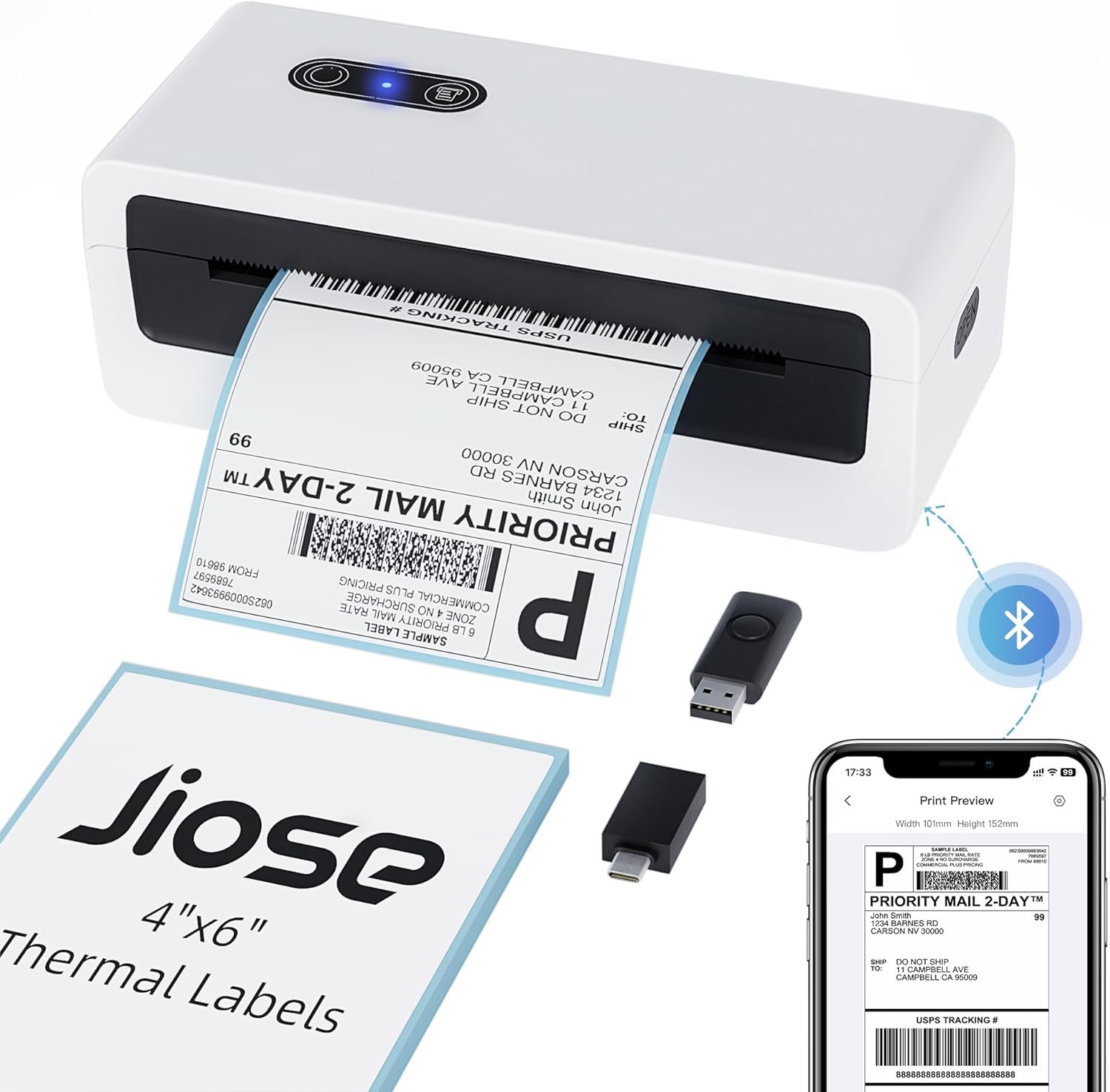
The Jiose N43BT is designed for users requiring fast, reliable label printing with minimal maintenance. Its thermal printing technology eliminates the need for ink or toner, reducing long-term costs. The dual connectivity options provide flexibility for both mobile and desktop workflows, while the 4″x6″ standard size caters to common shipping and inventory labeling needs. These features make it a practical choice for small businesses prioritizing efficiency and simplicity.

Connectivity Options: Bluetooth and USB for Versatile Integration
The Jiose N43BT offers two primary connectivity methods: Bluetooth for smartphone integration and USB for computer compatibility. This dual-connection approach ensures flexibility for users with varying device preferences. Bluetooth connectivity allows seamless printing from iOS and Android devices via the HereLabel app, which simplifies label creation and management. For desktop users, the USB port provides direct compatibility with Windows XP/10/11 and macOS 10.9+, with included drivers and setup guides. While the printer supports both connection types, its reliance on Bluetooth for mobile use may limit advanced customization compared to dedicated label printers with more robust API support. The USB interface, however, offers greater stability for batch printing tasks. Users should consider their workflow requirements—whether prioritizing mobile convenience or desktop integration—to determine the optimal usage scenario.

Bluetooth Integration for Smartphone Users
Bluetooth connectivity enables seamless label printing from smartphones, a critical feature for small business owners managing multiple devices. The HereLabel app provides a user-friendly interface for creating and printing labels, supporting major e-commerce platforms like Amazon and Etsy. This integration reduces the need for additional software, making it ideal for users with limited technical expertise. However, Bluetooth printing may introduce latency in high-volume environments, as data transfer rates can vary depending on signal strength and device compatibility. For users requiring advanced customization, such as dynamic label templates or batch processing, the app’s capabilities may be limited compared to dedicated label printing software.
USB Compatibility for Desktop Workflows
The USB port ensures reliable connectivity for desktop users, supporting Windows and macOS operating systems. The included printer drivers and setup guides simplify installation, even for less tech-savvy users. USB printing offers faster data transfer rates compared to Bluetooth, making it suitable for tasks involving large label batches or frequent printing. However, the printer’s USB interface does not support advanced features like direct printing from applications or network sharing, which may be a limitation for users requiring more integrated workflows. The lack of network connectivity further restricts its use in multi-user environments, making it best suited for single-user operations.
Dual Connectivity Trade-offs
While the dual connectivity options provide flexibility, they also introduce trade-offs in terms of performance and customization. Bluetooth printing is convenient for mobile users but may lack the precision required for complex label designs. USB printing offers greater reliability for desktop tasks but does not support advanced features like label templates or batch processing beyond basic functions. Users should evaluate their specific needs—whether prioritizing mobile convenience or desktop integration—to determine which connectivity method aligns best with their workflow.
Print Quality and Resolution: 203 DPI for Clear, Scannable Labels
The Jiose N43BT delivers 203 DPI monochrome printing, ensuring clear and scannable labels suitable for shipping, inventory, and product tagging. This resolution strikes a balance between print quality and speed, making it ideal for environments requiring high-volume, low-complexity printing. The thermal printing technology produces sharp text and barcodes, which are essential for automated systems like warehouse management software or e-commerce platforms. However, the lack of color printing limits its versatility for applications requiring visual differentiation or branding elements. While the resolution is sufficient for most business needs, users requiring high-precision graphics or photo-quality output may need to consider alternative printing technologies.

Text and Barcode Clarity
The 203 DPI resolution ensures legible text and barcodes, critical for shipping labels and inventory tracking. The printer’s thermal imaging process creates consistent, high-contrast prints without the need for ink or toner, reducing long-term maintenance costs. This makes it particularly suitable for environments where frequent label printing is required, such as fulfillment centers or small retail operations. However, the monochrome output may not be sufficient for applications requiring color-coded labels or visual branding elements, which could necessitate additional printing steps or alternative solutions.
Print Speed and Efficiency
At 152 mm/s (72 ppm), the Jiose N43BT offers a balance between speed and quality, allowing users to process labels quickly without compromising readability. This print speed is well-suited for environments with moderate to high-volume printing needs, such as e-commerce fulfillment or warehouse operations. The lack of ink or toner requirements further enhances efficiency by eliminating the need for regular consumable replacements. However, the printer’s speed may not be sufficient for extremely high-volume operations, where dedicated label printers with faster print speeds are typically preferred.
Media Compatibility and Customization: Flexible Label Options
The Jiose N43BT supports a range of label sizes from 1.57″ to 4.25″, with the 4″x6″ standard size being the most commonly used for shipping and inventory labels. The printer’s compatibility with various label widths allows users to adapt to different labeling requirements without the need for additional hardware. The HereLabel app enables customization of label designs, supporting features like UPC codes, barcodes, and DIY labels for personal or commercial use. While this flexibility is a significant advantage, the reliance on the app for advanced customization may limit the printer’s appeal to users requiring more technical control over label design and formatting.

Standard vs. Custom Label Sizes
The printer’s support for 4″x6″ labels aligns with industry standards for shipping and product tagging, making it a practical choice for small businesses. However, users requiring non-standard label sizes may need to rely on the HereLabel app for custom designs, which could introduce additional steps in the printing process. The app’s user-friendly interface simplifies label creation, but its limitations in advanced formatting options may be a drawback for users with specific design requirements.
Label Material and Environmental Considerations
The printer is designed for use with thermal label materials, which are commonly used in logistics and retail environments. Thermal labels are heat-sensitive and may degrade when exposed to extreme temperatures or direct sunlight, which could affect their longevity in certain environments. Users should consider the storage and usage conditions for printed labels, as the printer’s performance is optimized for standard indoor conditions. The lack of support for adhesive or waterproof labels further restricts its versatility in harsh environments.

Pros & Cons
Pros
- Bluetooth and USB Connectivity: Offers flexibility for both smartphone and desktop users, simplifying label printing across devices.
- High-Speed Printing: 152 mm/s print speed ensures efficient label production for moderate to high-volume operations.
- Inkless Design: Eliminates the need for ink or toner, reducing long-term maintenance and operational costs.
- Monochrome Resolution: 203 DPI provides clear, scannable labels suitable for shipping and inventory tracking.
- User-Friendly App: The HereLabel app simplifies label creation and management, even for less technical users.
- Compact Design: Lightweight and portable, making it ideal for small businesses with limited workspace.
Cons
- Limited Color Printing: Monochrome output restricts versatility for applications requiring visual differentiation or branding.
- No Advanced Customization: The HereLabel app lacks advanced formatting options for complex label designs.
- Environmental Sensitivity: Thermal labels degrade in extreme temperatures, limiting use in harsh conditions.
- No Network Connectivity: Lacks support for network printing, making it unsuitable for multi-user environments.
- Limited Media Compatibility: While it supports various label widths, it does not accommodate adhesive or waterproof labels.
- No Duplex Printing: Single-sided printing may require additional steps for double-sided labeling needs.
Final Verdict: Who This Printer Is Best For (and Who Should Skip It)
The Jiose N43BT thermal label printer is an excellent choice for small businesses requiring fast, reliable label printing with minimal maintenance. Its dual connectivity options, inkless design, and 203 DPI resolution make it well-suited for e-commerce sellers, fulfillment centers, and retail operations that prioritize efficiency and cost-effectiveness. The HereLabel app further enhances usability by simplifying label creation and management. However, users requiring color printing, advanced customization, or network connectivity should consider alternative solutions. The printer’s limitations in media compatibility and environmental resilience make it less ideal for harsh industrial environments or applications requiring long-term label durability. For businesses with moderate printing needs and a focus on simplicity, the Jiose N43BT offers a practical, affordable solution that balances performance and ease of use.
Frequently Asked Questions (FAQs)
Does the Jiose N43BT support color printing?
The Jiose N43BT is a monochrome thermal label printer and does not support color printing. It produces high-contrast black-and-white labels suitable for shipping and inventory tracking but lacks the capability for color-coded or branded labels.
Can the printer handle custom label sizes?
The Jiose N43BT supports label widths from 1.57″ to 4.25″, with the 4″x6″ size being standard. Users can create custom labels through the HereLabel app, but the printer does not accommodate non-standard label materials like adhesive or waterproof options.
How does the Bluetooth connectivity work for mobile printing?
The Jiose N43BT connects to smartphones via Bluetooth using the HereLabel app, which simplifies label creation and printing. However, Bluetooth printing may experience latency in high-volume environments compared to USB connections for desktop use.
What operating systems are compatible with this printer?
The Jiose N43BT is compatible with Windows XP/10/11 and macOS 10.9 and newer. It includes USB drivers and setup guides for easy integration, though it does not support Surface tablets or network printing capabilities.
Is the printer suitable for industrial environments?
The Jiose N43BT is designed for light to moderate use in small business settings. Its thermal labels may degrade in extreme temperatures or direct sunlight, making it less suitable for harsh industrial environments requiring long-term label durability.
Can the printer print on multiple media types?
The Jiose N43BT is optimized for thermal label media and does not support adhesive or waterproof labels. It is best suited for standard indoor environments where labels are used for shipping, inventory, or product tagging.
What is the print speed of the Jiose N43BT?
The Jiose N43BT prints at 152 mm/s (72 ppm), offering a balance between speed and quality. This print speed is suitable for moderate to high-volume operations but may not meet the demands of extremely high-volume printing environments.
Does the printer require regular maintenance?
The Jiose N43BT is designed for low-maintenance operation due to its inkless thermal printing technology. Users should periodically check label media compatibility and ensure proper storage conditions to avoid label degradation in extreme environments.