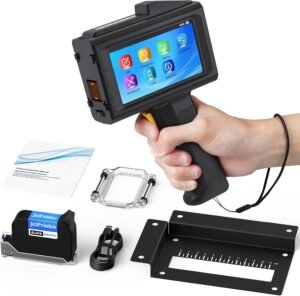
Bluetooth Thermal Label Printer for E-commerce and Shipping

The Importance of Choosing the Right Printer for Modern Workflows
In today’s fast-paced business environment, selecting the right printer is critical for maintaining efficiency and meeting operational demands. Whether managing a small online store, processing shipping labels, or handling inventory tracking, the right printing solution can significantly impact productivity. Printers must balance speed, reliability, and cost-effectiveness to support varying workloads, from high-volume commercial operations to low-volume personal use. Key factors such as print technology, connectivity options, media compatibility, and maintenance requirements all play a role in determining a printer’s suitability for specific tasks. For users requiring frequent label printing, a thermal label printer offers distinct advantages over traditional inkjet or laser models. Its ability to produce high-quality, durable labels without the need for ink or toner makes it an ideal choice for e-commerce, logistics, and retail applications. Understanding these technical specifications and how they align with specific printing needs is essential for making an informed decision.
Quick Overview
| Feature | Details |
|---|---|
| Printer Type | Bluetooth Thermal Label Printer |
| Printing Technology | Thermal printing with no ink or toner |
| Print Resolution | 203 dpi monochrome output |
| Print Speed | 70 ppm (monochrome/color) |
| Media Sizes | 4 x 6 inches labels, 1”–4.4” width |
| Connectivity | Bluetooth 5.0 for Mac, Windows, iOS, Android, Linux, Chrome OS |
| Duty Cycle | Designed for high-volume label printing |
| Warranty | 1-year manufacturer warranty |
| Supported Platforms | USPS, ShipStation, Shippo, Amazon, eBay, Etsy, Shopify, PayPal |
| Maximum Input Capacity | 50 sheets |
| Printer Output | Monochrome labels |
| Additional Functions | “Label Expert” app for label creation and editing |
The RD560’s thermal printing technology and Bluetooth connectivity make it well-suited for users requiring frequent label printing across multiple devices. Its compatibility with major e-commerce platforms and shipping services ensures seamless integration into existing workflows, while the absence of ink or toner reduces long-term maintenance costs and complexity.

Connectivity and Device Compatibility
The RD560’s Bluetooth 5.0 technology enables seamless wireless printing across a wide range of devices, including Mac, Windows, iOS, Android, Linux, and Chrome OS. This broad compatibility ensures that users can print labels from smartphones, tablets, and computers without the need for physical connections or additional hardware. The printer’s ability to support non-Bluetooth desktops through Bluetooth-enabled peripherals further expands its usability. For businesses operating in multiple locations or requiring mobile printing capabilities, this connectivity profile offers significant flexibility. Additionally, the printer’s integration with major e-commerce platforms such as Amazon, eBay, and Shopify simplifies the label creation and printing process, reducing manual input and potential errors.

Bluetooth Integration and Cross-Platform Support
The RD560’s Bluetooth 5.0 technology provides a stable and fast wireless connection, ensuring consistent printing performance across different operating systems. This is particularly beneficial for users who manage multiple devices or need to print labels on the go. The printer’s compatibility with Linux and Chrome OS expands its appeal to users with specialized computing needs, such as developers or remote workers. The absence of a dedicated USB port means users must rely on Bluetooth for connectivity, which may be a limitation for those requiring direct hardware connections.
“Label Expert” App for Mobile and Tablet Users
The “Label Expert” app enhances the printer’s functionality by enabling users to create, edit, and customize labels directly on their mobile devices. This app supports text, symbols, icons, and barcode generation, making it ideal for users who need to produce a variety of label formats. The ability to import PDF files and share content from social media or shipping platforms streamlines the label creation process. However, the app’s reliance on mobile devices may limit its utility for users who prefer desktop-based label design tools.
Platform Integration for E-commerce and Shipping
The RD560’s compatibility with major e-commerce platforms such as Amazon, eBay, and Shopify simplifies the label creation and printing workflow for online sellers. Users can generate labels directly from these platforms and print them using the RD560, reducing the need for manual input and minimizing errors. The printer’s support for USPS, ShipStation, Shippo, and other shipping services ensures that users can print labels in the required format for their chosen carrier. However, the need to select the correct label size before printing may require additional user attention to avoid formatting issues.
Print Quality and Resolution
The RD560 delivers monochrome print output at a resolution of 203 dpi, which is sufficient for most label printing applications. This resolution ensures that text and basic graphics remain legible, even when printed on smaller label sizes. The thermal printing technology produces clear and professional-quality labels without the need for ink or toner, reducing long-term maintenance costs. However, the lack of color printing capabilities may limit its use for applications requiring colored labels or barcodes. The printer’s ability to produce high-speed, high-volume output is well-suited for environments with frequent label printing needs, such as warehouses or shipping centers.

Monochrome Output and Text Clarity
The RD560’s 203 dpi resolution provides adequate clarity for monochrome text and simple graphics, making it suitable for most label printing tasks. This resolution ensures that labels remain legible and professional-looking, even when printed on smaller sizes. The thermal printing process produces consistent and durable labels, which is particularly beneficial for environments where labels may be exposed to environmental factors such as temperature changes or humidity.
High-Speed Printing for High-Volume Environments
The RD560’s print speed of 70 ppm (monochrome/color) makes it well-suited for high-volume label printing environments. This speed allows users to process large numbers of labels quickly, reducing downtime and improving overall productivity. The printer’s ability to handle continuous printing without requiring frequent maintenance or supply replacements further enhances its efficiency in busy operations. However, the absence of color printing capabilities may limit its use in applications requiring more detailed or visually complex labels.
Media Compatibility and Label Options
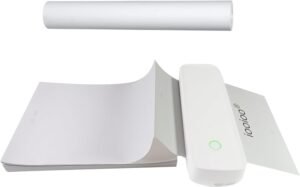
The RD560 supports a range of label sizes, from 1” to 4.4” width, with the primary focus on 4 x 6 inch shipping labels. This versatility allows the printer to accommodate various labeling needs, including product labels, address labels, and barcode labels. The use of thermal printing technology eliminates the need for ink or toner, reducing long-term maintenance costs and complexity. However, the printer’s reliance on thermal paper may be a limitation for users requiring labels with different material properties or durability requirements.

Support for Multiple Label Sizes and Formats
The RD56,0’s ability to print labels from 1” to 4.4” width provides flexibility for users with varying labeling needs. This range includes common sizes such as 3×2”, 2×2”, and 1×1”, making it suitable for a wide array of applications. The printer’s compatibility with 4 x 6 inch shipping labels ensures that users can meet the requirements of major shipping platforms like USPS and UPS. However, the need to select the correct label size before printing may require additional user attention to avoid formatting issues.
Thermal Paper and Durability Considerations
The RD560’s thermal printing technology requires the use of thermal paper, which is sensitive to heat and light. While this paper type produces high-quality labels, it may not be suitable for environments with extreme temperature variations or prolonged exposure to sunlight. Users requiring labels with enhanced durability or resistance to environmental factors may need to consider alternative media options. The printer’s reliance on thermal paper also means that users must manage the supply of label sheets, which can add to the overall maintenance requirements.

Pros and Cons
Pros
- Broad Device Compatibility: The RD560 supports Bluetooth 5.0 connectivity across Mac, Windows, iOS, Android, Linux, and Chrome OS, ensuring seamless printing across multiple platforms.
- Cost-Effective Operation: The thermal printing technology eliminates the need for ink or toner, reducing long-term maintenance costs and supply expenses.
- High-Speed Label Printing: With a print speed of 70 ppm, the printer is well-suited for high-volume environments requiring frequent label production.
- Integrated Label Creation App: The “Label Expert” app simplifies the label design process, allowing users to create and edit labels directly on mobile devices.
- Compatibility with E-commerce Platforms: The printer’s integration with major shipping and selling platforms like Amazon, eBay, and Shopify streamlines the label creation and printing workflow.
- Durable Thermal Output: The 203 dpi resolution ensures clear and professional-quality labels, suitable for most shipping and product labeling needs.
Cons
- Limited Color Printing: The RD560 only supports monochrome output, which may be a limitation for users requiring colored labels or more detailed graphics.
- Dependence on Thermal Paper: The printer requires thermal paper, which may not be suitable for all environments or durability requirements.
- No USB Port: The absence of a USB port means users must rely solely on Bluetooth connectivity, which may be less convenient for some applications.
- Manual Label Size Selection: Users must select the correct label size before printing, which may require additional attention to avoid formatting issues.
- Single-Sided Printing Only: The printer does not support duplex printing, limiting its use for applications requiring double-sided labels.
Final Verdict: Who This Printer Is Best For (and Who Should Skip It)
The RD560 is best suited for small to medium-sized businesses and individual sellers who require frequent label printing for e-commerce, shipping, and inventory management. Its broad device compatibility, cost-effective thermal printing, and integration with major shipping platforms make it an ideal choice for users looking to streamline their labeling workflows. However, users requiring color printing, duplex functionality, or alternative media types may find the RD560 less suitable. The printer’s reliance on thermal paper and the need for manual label size selection may also be drawbacks for users with specific durability or formatting requirements. Overall, the RD560 is a reliable and efficient solution for label printing needs, particularly in environments where speed, cost-effectiveness, and compatibility with e-commerce platforms are priorities.

Frequently Asked Questions (FAQs)
Can the RD560 print labels for Amazon and eBay?
Yes, the RD560 is compatible with major e-commerce platforms including Amazon, eBay, and Shopify. Users can generate labels directly from these platforms and print them using the RD560, ensuring accurate formatting for shipping and selling needs.
Does the RD560 require ink or toner?
No, the RD560 uses thermal printing technology, which eliminates the need for ink or toner. This reduces long-term maintenance costs and simplifies the printing process.
What label sizes does the RD560 support?
The RD560 supports labels ranging from 1” to 4.4” in width, including common sizes like 4×6 inches, 3×2 inches, 2×2 inches, and 1×1 inches. Users must select the correct label size before printing to ensure proper formatting.
How does the “Label Expert” app enhance label creation?
The “Label Expert” app allows users to create and edit labels directly on their mobile devices. It supports text, symbols, icons, and barcode generation, and can import PDF files for seamless label design.
Is the RD560 compatible with non-Bluetooth devices?
The RD560 supports Bluetooth 5.0 connectivity, which works with devices running Mac, Windows, iOS, Android, Linux, and Chrome OS. It can also be used with non-Bluetooth desktops through Bluetooth-enabled peripherals.
What is the print speed of the RD560?
The RD560 prints at a speed of 70 ppm for both monochrome and color output, making it suitable for high-volume label printing in busy environments.
Does the RD560 support duplex printing?
No, the RD560 only supports single-sided printing. It does not have the capability for duplex or double-sided label printing.
What type of paper does the RD560 use?
The RD560 requires thermal paper for printing. This type of paper is sensitive to heat and light, so users should consider environmental factors when using the printer.