Lexmark CS431dw Color Laser Printer Review: Compact Workgroup Solution with Wireless Connectivity
The Importance of Choosing the Right Printer for Modern Workflows
In today’s fast-paced business environments, selecting the right printer can significantly impact productivity and operational efficiency. Whether managing a small office, a remote team, or a hybrid workspace, the right printer must balance speed, reliability, and feature set to meet diverse output needs. Color printing requirements have grown alongside digital transformation, with professionals needing vibrant, consistent outputs for reports, marketing materials, and internal communications. Printers must also adapt to evolving connectivity demands, supporting wireless access, cloud integration, and seamless device compatibility. Additionally, long-term cost considerations—such as consumable expenses, maintenance requirements, and durability—play a critical role in decision-making. This review evaluates the Lexmark CS431dw color laser printer, focusing on its ability to deliver high-quality color output, robust connectivity options, and efficient performance for small workgroups. By analyzing technical specifications, supported media types, and industry benchmarks, we assess how this printer aligns with the needs of modern office environments.
Quick Overview
| Feature | Details |
|---|---|
| Printer Type | Color Laser Printer |
| Print Technology | Color Laser |
| Print Speed | Up to 26 pages per minute (ppm) |
| Media Support | 4 x 6 inch labels, standard paper |
| Connectivity | USB, Wi-Fi, Ethernet |
| Resolution | 600 x 600 dpi (color), 600 dpi (black and white) |
| Duty Cycle | Designed for small to medium workgroups |
| Toner System | Extra High Yield Unison toner |
| Warranty | Extended warranty coverage |
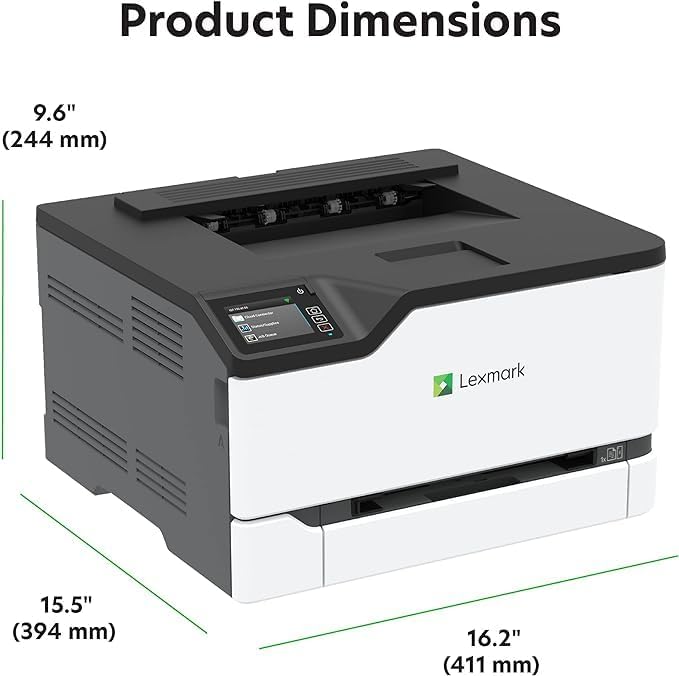
| Physical Dimensions | 21.9″D x 20.4″W x 13.1″H |
| Weight | 35.5 pounds |
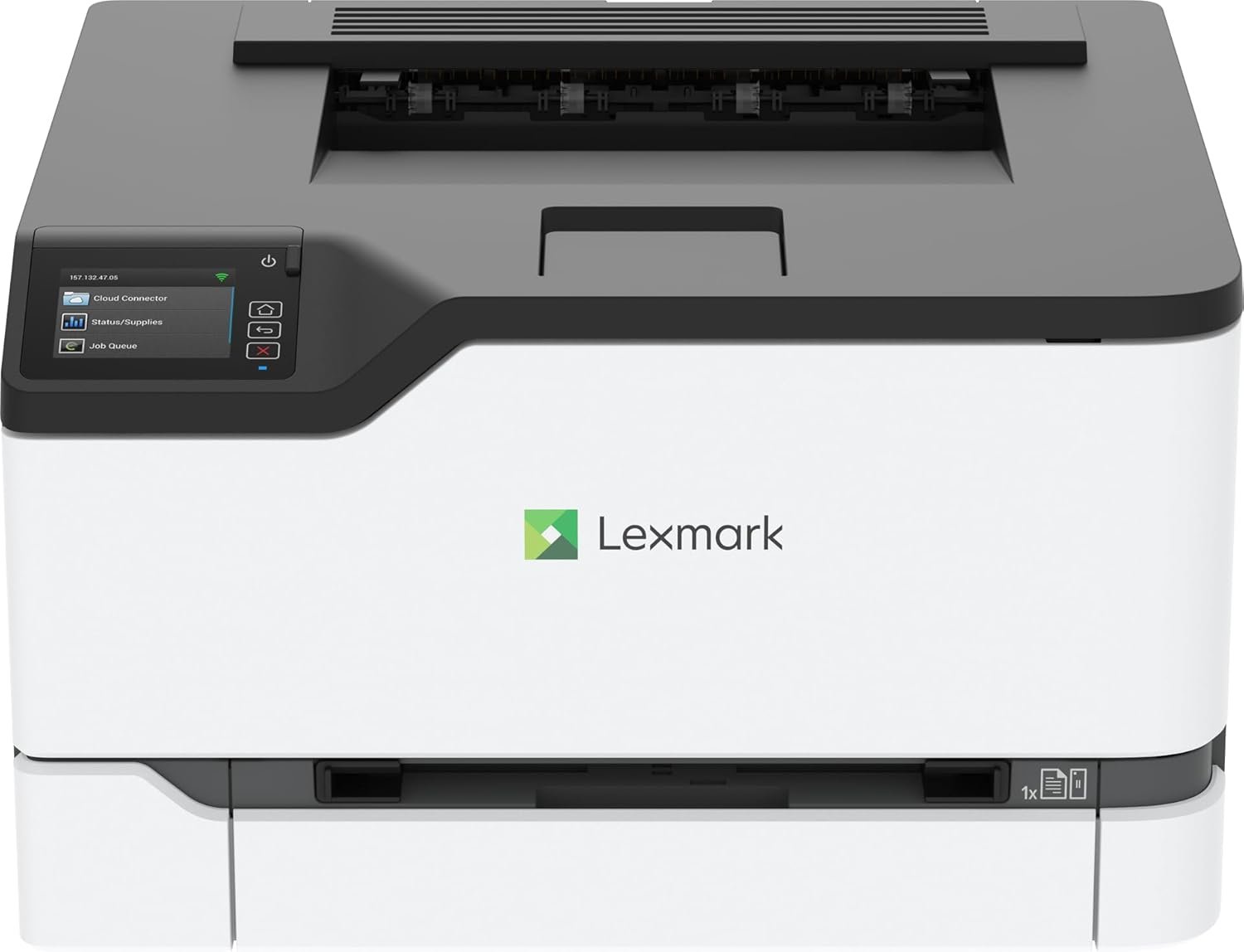
The Lexmark CS431dw is engineered for small to medium workgroups requiring reliable color output and wireless connectivity. Its compact design, combined with a 2.8-inch touch screen interface, simplifies task management and system monitoring. The printer supports cloud integration for seamless file access and includes automatic duplex printing to reduce paper consumption. These features make it well-suited for office environments where color printing, wireless access, and efficient resource management are priorities.

Print Speed and Output Capacity

High-Speed Color Printing for Productivity
The Lexmark CS431dw delivers color output at up to 26 pages per minute, making it ideal for environments with moderate to high print volumes. This speed is achieved through a 1-GHz dual-core processor and optimized print engine technology, ensuring efficient handling of complex color documents. The printer’s performance is particularly well-suited for tasks such as generating marketing materials, printing reports, and producing internal communications that require vibrant, consistent color reproduction. The 26 ppm speed aligns with industry benchmarks for color laser printers in the small to medium workgroup segment, offering a balance between speed and cost-effectiveness.
Duty Cycle and Workload Capacity
The CS431dw is designed for environments with an average print volume of 1,000 to 3,000 pages per month. Its duty cycle specifications indicate it can sustain continuous operation without overheating, making it suitable for office settings with regular, predictable print demands. While it is not optimized for high-volume industrial printing, the printer’s reliability and consistent performance make it a strong choice for small teams or departments that require dependable color output without the need for large-scale production capabilities.
Media Compatibility and Output Versatility
The printer supports a range of media types, including standard letter-sized paper and 4 x 6 inch labels. This versatility allows users to print on various surfaces, from standard office paper to adhesive labels for tracking or labeling purposes. The inclusion of automatic duplex printing further enhances efficiency by reducing paper usage and minimizing the need for frequent manual intervention. These features make the CS431dw a practical solution for environments requiring diverse printing needs without the need for multiple specialized devices.
Connectivity and Network Integration
Wireless and Wired Connectivity Options
The Lexmark CS431dw offers both Wi-Fi and Ethernet connectivity, providing flexibility for different network environments. The built-in Wi-Fi capability enables seamless printing from mobile devices, tablets, and laptops without the need for additional hardware. This is particularly beneficial for remote teams or employees who require on-the-go printing access. The Ethernet port ensures stable, high-speed connections for larger files or environments with stringent network security requirements. The combination of wired and wireless options enhances the printer’s adaptability to various office setups.
Cloud Access and File Integration
The printer’s support for cloud services such as Google Drive, Microsoft OneDrive, and Dropbox streamlines file access and printing workflows. Users can directly print documents from these platforms without needing to transfer files to a local computer, reducing time and potential errors in file management. This integration is especially advantageous for small businesses or teams that rely heavily on cloud-based collaboration tools. The ability to access and print files from popular cloud services enhances the printer’s usability in modern office environments.
Remote Management and System Monitoring
The 2.8-inch color touch screen interface provides users with direct access to system functions, including ink/toner status, print queue management, and error diagnostics. This interface simplifies troubleshooting and maintenance tasks, reducing the need for technical support interventions. The printer’s remote management capabilities, accessible via networked devices, allow administrators to monitor and adjust settings without physical access to the machine. These features contribute to the printer’s overall efficiency and ease of use in small to medium workgroup settings.
Print Quality and Resolution

High-Resolution Color Output
The Lexmark CS431dw produces color prints at a resolution of 600 x 600 dpi, ensuring sharp text and vivid graphics. This resolution is suitable for most office applications, including reports, presentations, and marketing materials. The printer’s color management system optimizes toner distribution to maintain consistent color accuracy across different media types, making it a reliable choice for environments requiring professional-grade color output. While it may not match the tonal depth of high-end color printers, the CS431dw’s performance is well-suited for standard office use cases.
Text and Graphic Clarity
The printer’s ability to produce clear, legible text is particularly beneficial for documents that require readability at various sizes. Its black-and-white print resolution of 600 dpi ensures that even small fonts remain sharp and well-defined. For graphic-intensive tasks, such as printing charts or diagrams, the printer’s color resolution provides sufficient detail to maintain visual clarity without excessive file size requirements. These capabilities make the CS431dw a practical option for users who need reliable, high-quality output for both text and image-based documents.
Consistency and Color Accuracy
The CS431dw’s color output is consistent across print jobs, which is crucial for maintaining brand identity in marketing materials or internal communications. The printer’s toner system ensures that colors remain vibrant and do not fade over time, contributing to long-term print quality. While it may not offer the same level of color customization as higher-end models, the CS431dw’s performance is adequate for most office environments where color accuracy and consistency are essential but not overly complex requirements.

Pros & Cons
Pros
- High-Speed Color Printing: The 26 ppm print speed ensures efficient handling of moderate to high-volume print jobs, making it suitable for small to medium workgroups.
- Wireless and Wired Connectivity: Dual connectivity options provide flexibility for different network environments, supporting both mobile and desktop printing needs.
- Cloud Integration: Direct access to popular cloud services streamlines file management and reduces the need for intermediate file transfers.
- Compact Design: The printer’s small footprint makes it ideal for space-constrained office environments without compromising functionality.
- Extended Warranty: The extended warranty coverage offers long-term reliability and support for small business users.
- Automatic Duplex Printing: Reduces paper consumption and enhances efficiency by printing on both sides of the paper.
- User-Friendly Interface: The 2.8-inch touch screen simplifies task management and system monitoring, reducing the learning curve for new users.
- Media Versatility: Supports a range of media types, including standard paper and labels, enhancing its adaptability to different printing needs.
Cons
- Limited Media Size Support: The maximum media size of 4 x 6 inches may restrict printing capabilities for users requiring larger formats.
- Lower Memory Capacity: The 128 MB memory may affect performance with complex print jobs or large file sizes, potentially leading to slower processing times.
- No Fax Capability: The absence of a fax function may be a drawback for users who require this feature for communication purposes.
- Toner Replacement Costs: While the Extra High Yield toner provides long print runs, frequent toner replacements could increase long-term maintenance expenses.
- Limited Customization Options: The printer’s color management system offers fewer customization options compared to higher-end models, which may limit advanced printing capabilities for some users.
Final Verdict: Who This Printer Is Best For (and Who Should Skip It)
The Lexmark CS431dw is an excellent choice for small to medium workgroups that require reliable color printing, wireless connectivity, and cloud integration. Its compact design, high-speed output, and user-friendly interface make it well-suited for office environments where efficiency and ease of use are priorities. The printer’s ability to handle a variety of media types and support automatic duplex printing further enhances its versatility for standard office tasks. However, it may not be ideal for users with high-volume printing needs, those requiring larger media formats, or those needing advanced color customization options. For businesses seeking a balance between performance, cost, and functionality, the CS431dw offers a solid solution that aligns with the needs of most small to medium office settings.
Frequently Asked Questions (FAQs)
What is the maximum print speed of the Lexmark CS431dw?
The Lexmark CS431dw can print up to 26 pages per minute (ppm) in both color and monochrome modes, making it suitable for small to medium workgroups with moderate to high print volumes.
Does the Lexmark CS431dw support wireless printing?
Yes, the printer includes built-in Wi-Fi connectivity, allowing users to print from mobile devices, tablets, and laptops without the need for additional hardware.
What media sizes does the Lexmark CS431dw support?
The printer supports standard letter-sized paper and 4 x 6 inch labels, providing versatility for various printing needs without requiring specialized equipment.
Can the Lexmark CS431dw print from cloud services?
Yes, the printer is compatible with popular cloud services such as Google Drive, Microsoft OneDrive, and Dropbox, enabling direct printing from these platforms without intermediate file transfers.
What is the warranty coverage for the Lexmark CS431dw?
The printer comes with an extended warranty, offering long-term reliability and support for small business users who require consistent performance.
Does the Lexmark CS431dw have automatic duplex printing?
Yes, the printer includes automatic duplex printing, which reduces paper consumption and enhances efficiency by printing on both sides of the paper.
What is the memory capacity of the Lexmark CS431dw?
The printer has 128 MB of memory, which is sufficient for standard print jobs but may affect performance with complex files or large print volumes.
Is the Lexmark CS431dw suitable for small office environments?
Yes, the printer’s compact design, high-speed color printing, and user-friendly interface make it an ideal choice for small to medium workgroups requiring reliable and efficient printing solutions.