Lexmark MS431dw Laser Printer: Fast, Secure, and Efficient for Offices
The Importance of Choosing the Right Printer for Your Workflow
In today’s fast-paced business environment, selecting the right printer can significantly impact productivity and operational efficiency. Whether you’re managing a small office, a remote team, or a growing startup, the right printer must balance speed, reliability, and adaptability to meet diverse printing needs. Printers are no longer just for basic document output—they must integrate seamlessly with modern workflows, support multi-function capabilities, and maintain consistent performance under varying workloads. For businesses relying on high-volume printing, factors such as print speed, media compatibility, and connectivity options become critical decision points. Additionally, the durability of the printer and its ability to handle continuous use without degradation are essential for long-term cost-effectiveness. This review evaluates the Lexmark MS431dw laser printer, focusing on how it addresses these core requirements while offering a compact design and advanced connectivity features tailored for office environments. By analyzing its technical specifications, user-centric design, and performance benchmarks, this assessment provides a comprehensive overview to help users determine whether the MS431dw aligns with their specific printing needs.
Quick Overview
| Feature | Details |
|---|---|
| Printer Type | Black and white laser printer |
| Printing Technology | Laser |
| Print Speed | Up to 42 pages per minute (ppm) |
| Connectivity | Ethernet, Wi-Fi, USB |
| Media Compatibility | A4, Letter, Legal, A6, envelopes, and more |
| Duplex Printing | Automatic two-sided printing |
| Security Features | Full-spectrum security architecture |
| Duty Cycle | Recommended monthly volume: 800–8,000 pages |
| Memory | 64 MB |
| Warranty | Limited warranty |
| Dimensions | 14.3″D x 14.5″W x 8.7″H |
| Weight | 20.6 pounds |
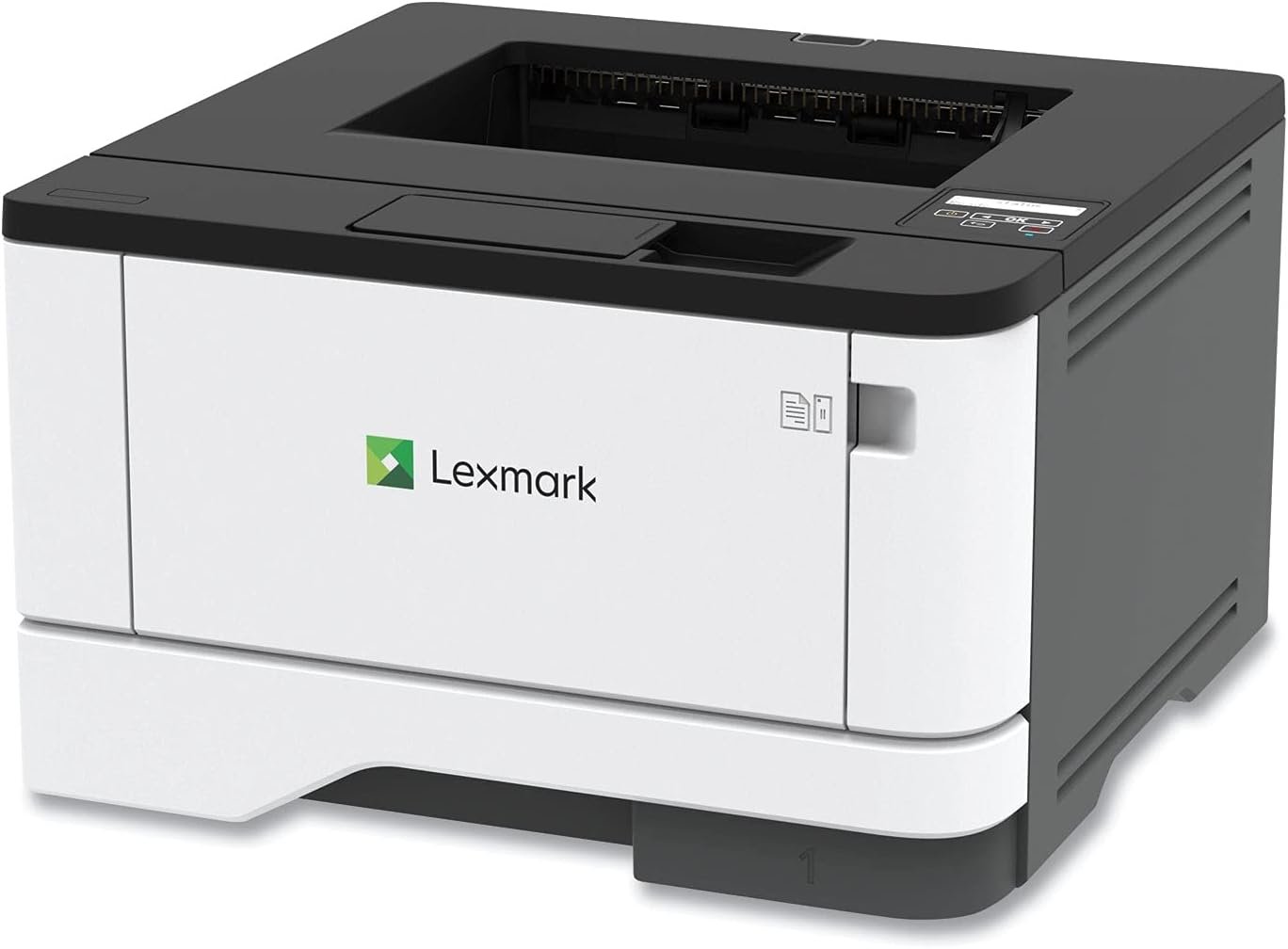
The Lexmark MS431dw combines compact design with robust performance, making it suitable for office environments where space is limited but print volume is moderate to high. Its Ethernet, Wi-Fi, and USB connectivity options ensure compatibility with a wide range of devices, while automatic duplex printing and energy-saving modes contribute to operational efficiency and sustainability. These features collectively position the printer as a versatile solution for businesses seeking reliable, fast, and secure printing capabilities without compromising on space or cost.
Connectivity and Network Integration
The Lexmark MS431dw offers a versatile connectivity suite that ensures seamless integration into modern office environments. With built-in Ethernet, Wi-Fi, and USB ports, the printer supports wired and wireless connections, catering to both traditional and mobile printing needs. Ethernet connectivity provides a stable, high-speed network link, ideal for large-scale office setups where multiple users may access the printer simultaneously. Wi-Fi capabilities enable easy setup and remote printing from mobile devices, reducing the need for physical proximity to the printer. The USB port allows direct printing from laptops or desktops, offering a straightforward solution for users who prefer a direct connection. This combination of connectivity options ensures that the MS431dw can adapt to various network infrastructures and user preferences, enhancing its usability across different office configurations.
Network-Ready Design for Multi-User Environments
The MS431dw’s network-ready design simplifies deployment in multi-user office settings. Its Ethernet and Wi-Fi capabilities allow multiple devices to access the printer simultaneously, reducing wait times and improving workflow efficiency. The printer’s two-line display provides real-time status updates, enabling users to monitor print jobs and manage settings without requiring direct physical access. This feature is particularly beneficial in environments where users may need to adjust print configurations or troubleshoot issues remotely. Additionally, the printer’s compatibility with cloud printing services expands its utility, allowing users to send print jobs from anywhere with an internet connection. These capabilities ensure that the MS431dw remains a reliable and efficient solution for businesses with varying connectivity needs.
Mobile-Friendly Printing for Remote Work
The MS431dw’s mobile-friendly features make it well-suited for remote work environments and hybrid office setups. Its Wi-Fi connectivity allows users to print from smartphones, tablets, and laptops without the need for additional hardware or complex configurations. The printer’s support for cloud printing services further enhances its flexibility, enabling users to send print jobs from web-based platforms or mobile apps. This is particularly advantageous for teams with remote workers who require access to printed documents without being physically present at the office. The printer’s ease of setup and intuitive interface also contribute to its appeal for users who prioritize convenience and efficiency in their printing workflows.
Security and Data Protection
The Lexmark MS431dw incorporates a full-spectrum security architecture to protect sensitive data and ensure compliance with enterprise security standards. This includes features such as secure print release, which requires users to authenticate before retrieving printed documents, and encryption for data transmitted over the network. The printer also supports secure firmware updates and user authentication protocols to prevent unauthorized access. These security measures are essential for businesses handling confidential information, as they help mitigate risks associated with data breaches and unauthorized printing. The inclusion of these security features aligns with industry best practices, making the MS431dw a reliable choice for organizations with stringent data protection requirements.
Print Speed and Throughput Capacity
The Lexmark MS431dw is engineered to deliver high-speed printing, with a maximum output of 42 pages per minute (ppm) in monochrome mode. This performance level is ideal for environments with moderate to high print volumes, such as small to medium-sized offices or departments with frequent document output needs. The printer’s duty cycle, which specifies the recommended monthly print volume of 800–8,000 pages, ensures that it can handle continuous use without compromising reliability. This capacity makes the MS431dw suitable for environments where print jobs are frequent but not overwhelming, balancing speed with longevity.
Handling High-Volume Workloads
While the MS431dw’s 42 ppm speed is competitive for its class, it is important to consider its suitability for high-volume printing scenarios. The printer’s recommended monthly volume of 8,000 pages is designed to optimize performance and longevity, ensuring that it can sustain consistent output without overheating or experiencing mechanical wear. For businesses with print volumes exceeding this threshold, the MS431dw may not be the optimal choice, as it is intended for environments where print demands are more moderate. However, for users who require reliable, fast printing without the need for industrial-grade hardware, the MS431dw offers a balanced solution that meets most office requirements.
Print Quality and Resolution
The Lexmark MS431dw delivers consistent print quality with a maximum black-and-white resolution of 2400 dots per inch (dpi). This resolution ensures sharp text and clear graphics, making it suitable for both everyday documents and professional reports. The printer’s toner-based printing system produces uniform, smudge-free output, which is particularly beneficial for businesses that prioritize document clarity and readability. While the MS431dw is not designed for photo printing, its resolution and toner distribution are adequate for standard office use, such as invoices, forms, and internal communications. The combination of speed and print quality makes the MS431dw a practical choice for environments where reliability and clarity are key priorities.
Media Compatibility and Paper Handling
The Lexmark MS431dw supports a wide range of media sizes and paper types, enhancing its versatility for different printing tasks. It is compatible with standard A4, Letter, Legal, and A6 paper sizes, as well as various envelope types including DL, C5, and Executive envelopes. This media compatibility ensures that the printer can handle both everyday printing and specialized tasks such as mailing or form printing. The printer’s automatic duplex printing feature further improves efficiency by reducing paper usage and minimizing the need for manual intervention. The included 100-sheet input tray and optional 550-sheet tray provide flexibility in managing print volumes, making the MS431dw suitable for environments with varying paper requirements.
Handling Different Paper Types
The MS431dw’s ability to handle different paper types is a significant advantage for users who require versatility in their printing tasks. The printer’s toner system ensures consistent adhesion across various paper weights and finishes, reducing the risk of jams or misfeeds. While the printer is optimized for standard office paper, its compatibility with envelopes and specialty paper allows it to adapt to a broader range of use cases. This flexibility is particularly beneficial for businesses that frequently print forms, labels, or documents requiring specific paper formats. The printer’s design also minimizes the risk of paper jams, contributing to its reliability in environments with mixed media requirements.
Paper Tray and Output Capacity
The Lexmark MS431dw features a 100-sheet input tray and an optional 550-sheet tray, providing ample capacity for managing print jobs without frequent refills. This design is ideal for environments where print volumes are consistent but not excessively high, as it reduces downtime associated with manual paper loading. The printer’s output capacity of 100 sheets ensures that printed documents are readily available for retrieval, minimizing delays in document access. The combination of input and output trays enhances the printer’s efficiency, making it well-suited for offices that prioritize seamless workflow and minimal interruptions. These features collectively contribute to the MS431dw’s appeal as a practical solution for businesses with moderate printing needs.
Durability and Longevity
The Lexmark MS431dw is built with a steel frame and long-life imaging components, ensuring durability and reliability in demanding environments. The steel frame provides structural integrity, reducing the risk of mechanical failure due to physical stress or environmental factors. The long-life imaging components, such as the toner cartridge and print engine, are designed to withstand continuous use, minimizing the need for frequent replacements. This construction is particularly beneficial for businesses that require consistent performance over extended periods, as it reduces maintenance costs and downtime. The printer’s energy-saving modes also contribute to its longevity by optimizing power consumption and reducing wear on internal components.
Warranty and Support Coverage
The MS431dw comes with a limited warranty that provides basic coverage for manufacturing defects and malfunctions. While the warranty does not extend to consumable parts such as toner cartridges, it offers peace of mind for users concerned about unexpected hardware failures. The printer’s design and build quality suggest that it is intended for moderate use rather than heavy-duty industrial applications, which aligns with its recommended monthly print volume. For businesses that require extended support, the limited warranty may be a consideration, as it does not include comprehensive service or replacement policies for consumables. However, the printer’s reliability and ease of maintenance make it a practical choice for most office environments.
Maintenance and Consumables
The Lexmark MS431dw requires regular maintenance to ensure optimal performance, primarily involving the replacement of toner cartridges and cleaning of internal components. The printer’s design simplifies maintenance tasks, with accessible toner compartments and user-friendly controls that minimize the risk of errors during servicing. While the printer does not include a built-in toner recycling system, its energy-saving modes and efficient toner usage help reduce long-term costs. Users should also be aware that the printer’s limited warranty does not cover consumable parts, which may impact ongoing maintenance expenses. Overall, the MS431dw’s maintenance requirements are manageable, making it a suitable choice for businesses that prioritize ease of upkeep and operational efficiency.
Pros & Cons
Pros
- Compact Design: The MS431dw’s compact footprint makes it ideal for small offices or spaces with limited room, without sacrificing performance.
- High-Speed Printing: With a maximum print speed of 42 ppm, it efficiently handles moderate to high print volumes, improving workflow efficiency.
- Versatile Connectivity: The printer supports Ethernet, Wi-Fi, and USB connections, ensuring compatibility with a wide range of devices and network environments.
- Automatic Duplex Printing: Standard two-sided printing reduces paper usage and minimizes the need for manual intervention, enhancing sustainability.
- Energy-Efficient Operation: Built-in energy-saving modes contribute to lower power consumption, aligning with environmental standards and reducing operational costs.
- Robust Security Features: The full-spectrum security architecture provides protection against data breaches and unauthorized access, meeting enterprise security requirements.
- User-Friendly Interface: The two-line display allows for easy configuration and monitoring of print settings, simplifying user interaction.
Cons
- Limited High-Volume Capacity: While the MS431dw is suitable for moderate print volumes, its recommended monthly volume of 8,000 pages may not meet the needs of high-volume environments.
- No Built-In Toner Recycling: The printer lacks a toner recycling system, which could increase long-term costs for frequent users.
- Limited Warranty Coverage: The limited warranty does not cover consumable parts such as toner cartridges, which may affect maintenance expenses.
- No Photo Printing Capability: The printer is designed for monochrome printing and does not support color or photo printing, limiting its versatility for certain tasks.
- Dependent on Network Stability: Wi-Fi and Ethernet connectivity require a stable network environment, which may pose challenges in less reliable settings.
Final Verdict: Who This Printer Is Best For (and Who Should Skip It)
The Lexmark MS431dw is best suited for small to medium-sized offices with moderate print volumes that require a balance of speed, reliability, and connectivity. Its compact design, automatic duplex printing, and energy-efficient operation make it an ideal choice for environments where space is limited but print efficiency is essential. The printer’s support for Ethernet, Wi-Fi, and USB connections ensures compatibility with a wide range of devices, while its security features provide peace of mind for businesses handling sensitive data. However, the MS431dw may not be the best fit for high-volume printing environments or businesses requiring advanced color printing capabilities. Users with strict sustainability goals or those needing extended warranty coverage for consumables may also find the MS431dw less suitable. Overall, the MS431dw is a practical and reliable solution for businesses seeking a versatile, efficient, and secure printing option in a compact form factor.
Frequently Asked Questions (FAQs)
What connectivity options does the Lexmark MS431dw offer?
The Lexmark MS431dw provides Ethernet, Wi-Fi, and USB connectivity options, allowing users to print from a variety of devices and network environments. This versatility makes it suitable for both wired and wireless printing needs in office settings.
What is the maximum print speed of the Lexmark MS431dw?
The Lexmark MS431dw can print up to 42 pages per minute (ppm) in monochrome mode, making it efficient for moderate to high print volumes while maintaining consistent output quality.
Does the Lexmark MS431dw support automatic duplex printing?
Yes, the Lexmark MS431dw includes automatic two-sided printing as a standard feature, reducing paper usage and enhancing sustainability without requiring manual intervention.
What security features are included in the Lexmark MS431dw?
The Lexmark MS431dw incorporates a full-spectrum security architecture, including secure print release, encryption for network data, and user authentication protocols to protect sensitive information and prevent unauthorized access.
What is the recommended monthly print volume for the Lexmark MS431dw?
The Lexmark MS431dw is recommended for a monthly print volume of 800 to 8,000 pages, ensuring optimal performance and longevity for moderate to high-volume office environments.
Does the Lexmark MS431dw have a built-in toner recycling system?
No, the Lexmark MS431dw does not include a built-in toner recycling system. Users will need to replace toner cartridges as needed, which may impact long-term maintenance costs.
What is the warranty coverage for the Lexmark MS431dw?
The Lexmark MS431dw comes with a limited warranty that covers manufacturing defects and malfunctions. However, it does not include coverage for consumable parts such as toner cartridges, which may affect ongoing maintenance expenses.