Liene PixCut S1 Color Sticker Printer Review: AI-Driven Printing for Creative Projects
The Importance of Choosing the Right Printer for Creative and Productive Work
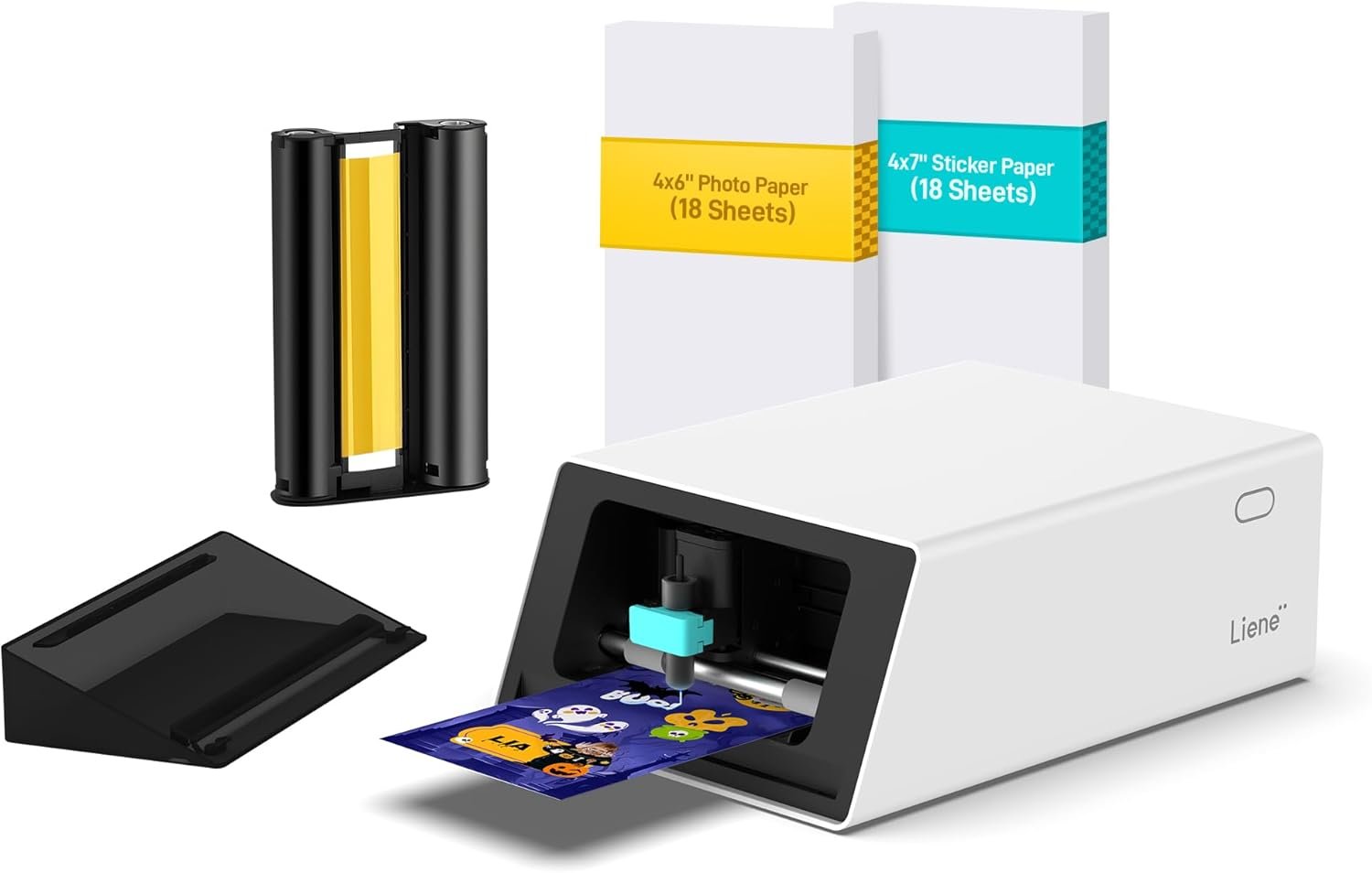
In today’s fast-paced world, the right printer can significantly impact both productivity and creativity. Whether you’re a DIY enthusiast, a small business owner, or a student, having a printer that meets your specific needs is crucial. The Liene PixCut S1 Color Sticker Printer & Cutting Machine stands out as a versatile solution for users looking to combine printing and cutting in a single device. This all-in-one system is designed to streamline creative workflows, making it easier to produce high-quality stickers, labels, and custom designs. With its integration of thermal dye-sublimation technology and AI-driven features, the PixCut S1 caters to a wide range of applications, from home projects to professional use. Understanding the key factors that influence printer performance, such as print resolution, connectivity options, and media compatibility, is essential for making an informed decision. This review will explore how the PixCut S1 addresses these needs, offering insights into its capabilities and limitations to help users determine if it’s the right fit for their specific requirements.
Quick Overview
| Feature | Details |
|---|---|
| Printer Type | Color sticker printer and cutting machine |
| Printing Technology | Thermal dye-sublimation |
| Print Resolution | 300 dpi color and black-and-white |
| Print Speed | 1 ppm color and monochrome |
| Media Sizes | 4×7 inches (maximum), 4×6 inches (standard) |
| Connectivity | Bluetooth (Android, iOS) |
| Included Components | Blade, photo paper, sticker paper, ink cartridge, and cutting tool |
| Warranty | Limited warranty |
| Duty Cycle | Designed for home and small office use |
| Ink System | Dye-based inks (CMY) |
| Supported Media | Labels, stickers, custom designs |
The Liene PixCut S1 combines high-resolution printing with precise cutting capabilities, making it ideal for users who need to produce durable, high-quality stickers and labels. Its thermal dye-sublimation technology ensures vibrant colors and long-lasting prints, while the Bluetooth connectivity allows for seamless integration with mobile devices. The included media and components provide a convenient starting point for creative projects, reducing the need for additional purchases. This combination of features positions the PixCut S1 as a practical solution for both casual and semi-professional users.

AI-Driven Design for Creative Freedom
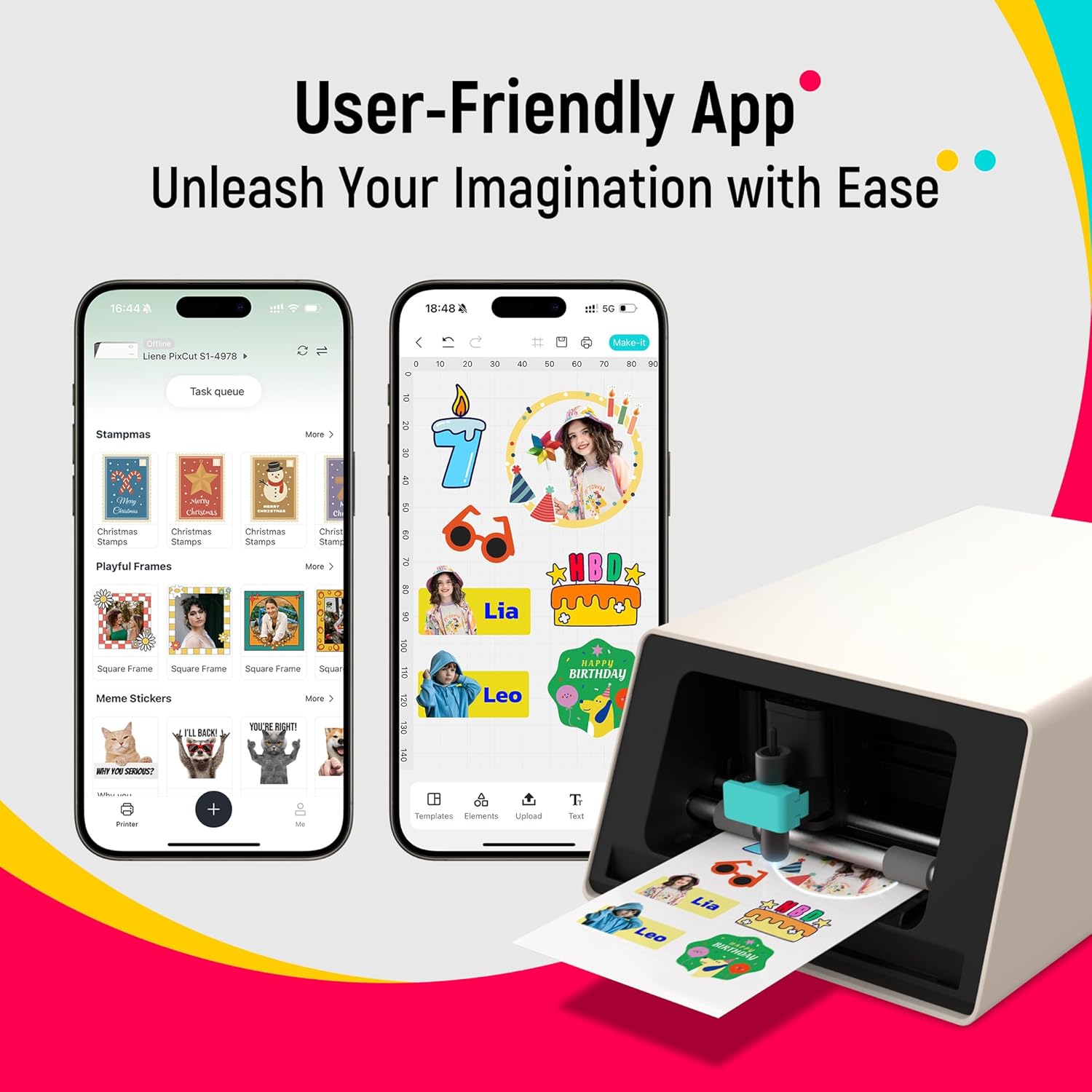
The Liene PixCut S1 leverages advanced artificial intelligence to streamline the creative process, offering users unprecedented control over their designs. The AI image extraction feature automatically identifies and isolates subjects from photos, enabling seamless integration into sticker and label formats. This functionality eliminates the need for manual editing, saving time and effort for users who may not have extensive design experience. Additionally, the AI-powered styling options allow users to transform ordinary images into artistic creations with just a few clicks. Whether it’s converting a selfie into an anime character or generating festive holiday illustrations, the AI Lab ensures that creative possibilities are virtually limitless. These intelligent tools are particularly beneficial for individuals who rely on visual creativity for their projects, such as educators, artists, and small business owners.

AI Image Extraction and Styling
The AI image extraction feature of the PixCut S1 is a game-changer for users looking to create custom stickers and labels. By automatically recognizing and isolating subjects from photos, this technology ensures that the final prints are clean and professional-looking. This is especially useful for creating stickers that require precise edges and minimal background clutter. The AI Lab further enhances the user experience by providing a variety of style options, allowing users to experiment with different artistic effects without the need for advanced design software. For example, a user can upload a photo of a family member and instantly transform it into a cartoon character, making it ideal for creating personalized gifts or social media content. This level of automation makes the PixCut S1 accessible to a wide range of users, from casual creators to those with more advanced design needs.
Seamless Integration with Mobile Devices
The PixCut S1’s Bluetooth connectivity simplifies the printing process, allowing users to create and print stickers directly from their smartphones or tablets. This feature is particularly advantageous for users who prefer to work on the go or have limited space for traditional desktop printers. The intuitive app interface enables users to edit images, apply AI-generated styles, and manage print settings with ease. The ability to print from mobile devices also makes the PixCut S1 an excellent choice for users who need to produce stickers and labels for events, marketing materials, or personal projects. By eliminating the need for a computer, the PixCut S1 caters to a broader audience, including those who may not have access to or prefer not to use desktop computers.
Customization and Personalization Options
The PixCut S1’s AI Lab offers a range of customization and personalization options, allowing users to tailor their designs to suit specific needs. From creating phone skins to designing custom labels, the printer’s versatility makes it suitable for a variety of applications. The AI-driven styling options enable users to experiment with different artistic effects, ensuring that their creations are unique and eye-catching. This level of customization is particularly beneficial for users who want to create personalized gifts or promotional materials. The ability to generate multiple versions of a design based on different styles also encourages creativity and experimentation. Whether it’s for a birthday party, a school project, or a business promotion, the PixCut S1 provides the tools necessary to bring ideas to life with minimal effort.
High-Resolution Printing for Professional-Quality Results
The Liene PixCut S1 delivers professional-grade print quality through its thermal dye-sublimation technology, which produces vibrant, true-to-life colors with a resolution of 300 dpi. This high-resolution printing capability ensures that every detail is captured with precision, making the PixCut S1 suitable for both casual and professional use. The use of dye-based inks (CMY) allows for a wide color gamut, resulting in prints that are both visually appealing and long-lasting. The four-layer thermal dye-sublimation process not only enhances color vibrancy but also contributes to the durability of the final product, making it ideal for users who require stickers and labels that can withstand regular use. This combination of high-resolution printing and durable output makes the PixCut S1 a reliable choice for users who prioritize quality and longevity in their printed materials.

Vibrant and Durable Output
The PixCut S1’s thermal dye-sublimation technology ensures that printed stickers and labels are not only visually striking but also highly durable. The process involves transferring ink onto the media, resulting in a smooth, continuous tone that is resistant to fading and water damage. This makes the PixCut S1 particularly well-suited for environments where printed materials are exposed to various conditions, such as outdoor events or commercial applications. The durability of the prints also means that users can rely on the PixCut S1 for long-term use without worrying about the quality of their creations. This is especially important for users who need to produce stickers and labels that will be used repeatedly or displayed in public spaces.
Color Accuracy and Detail Retention
The 300 dpi resolution of the PixCut S1 ensures that printed materials maintain their color accuracy and detail retention, even when viewed up close. This level of detail is crucial for users who require high-quality prints for professional purposes, such as creating branding materials or promotional items. The ability to capture fine details in both text and graphics makes the PixCut S1 a versatile tool for a wide range of applications. Whether it’s for creating custom labels for a business or designing personalized gifts, the PixCut S1’s high-resolution printing capabilities ensure that the final product meets the highest standards of quality. This attention to detail is particularly beneficial for users who are looking to create prints that are both aesthetically pleasing and functional.
Compatibility with Various Media Types
The PixCut S1’s compatibility with a variety of media types further enhances its appeal for users with diverse printing needs. The printer supports labels and stickers, making it an excellent choice for those who need to create custom designs for different applications. The included media options, such as 4×6 inch photo paper and 4×7 inch sticker paper, provide users with the flexibility to choose the most suitable material for their projects. This versatility is especially advantageous for users who may not have a specific type of media in mind, as the PixCut S1’s ability to work with different materials ensures that it can adapt to a wide range of creative and practical uses. The combination of high-resolution printing and media compatibility makes the PixCut S1 a reliable and flexible solution for both casual and professional users.
Practical Considerations for Home and Small Office Use
When evaluating the Liene PixCut S1 for home or small office use, several practical considerations must be taken into account. The printer’s design and functionality are tailored to meet the needs of users who may not require high-volume printing but benefit from a versatile, user-friendly device. The included media and components provide a convenient starting point, reducing the need for additional purchases. However, the printer’s maximum print speed of 1 ppm may be a limiting factor for users who require faster output, particularly in a professional setting. The limited media capacity, with a maximum input sheet capacity of 18 sheets, also means that users may need to frequently reload the printer, which could be inconvenient for those with higher printing demands. These factors make the PixCut S1 more suitable for individuals or small businesses with moderate printing needs rather than for high-volume environments.

Media Capacity and Reload Frequency
The PixCut S1’s media capacity of 18 sheets is designed for users who print in smaller batches, making it ideal for home use or small office environments. However, this limited capacity may require frequent reloading, which can be inconvenient for users who need to print large quantities. The need to regularly replace media can also impact the overall efficiency of the printing process, particularly for those who rely on the printer for multiple tasks throughout the day. While the included media provides a convenient starting point, users may need to invest in additional supplies to accommodate their specific printing needs. This consideration is important for users who are looking for a printer that can handle a variety of tasks without the need for constant maintenance.
Connectivity and App Integration
The PixCut S1’s Bluetooth connectivity simplifies the printing process, allowing users to create and print stickers directly from their mobile devices. This feature is particularly beneficial for users who prefer to work on the go or have limited space for traditional desktop printers. The intuitive app interface enables users to edit images, apply AI-generated styles, and manage print settings with ease. However, the reliance on Bluetooth connectivity means that users must ensure their devices are within range and properly paired to avoid any disruptions in the printing process. While this setup is convenient for casual use, it may not be suitable for environments where a more stable and wired connection is required. The app integration is a significant advantage for users who value convenience and mobility, but it also introduces potential limitations in terms of connectivity reliability.
Maintenance and Consumable Costs
The PixCut S1’s maintenance requirements are relatively low, as it does not require frequent ink refills or complex servicing. The included ink cartridge and media provide a convenient starting point, reducing the initial setup time and effort. However, the printer’s reliance on dye-based inks means that users may need to replace the ink cartridge periodically, depending on their printing frequency. While the included media and components offer a good value for initial use, ongoing consumable costs could add up over time, particularly for users with higher printing demands. This aspect is important to consider for users who are looking for a printer that minimizes long-term maintenance and consumable expenses. The PixCut S1’s design prioritizes ease of use and accessibility, but users should be aware of the potential costs associated with regular ink and media replacements.

Pros and Cons of the Liene PixCut S1
Pros
- AI-Driven Design Tools: The PixCut S1’s AI image extraction and styling features enable users to create professional-quality stickers and labels with minimal effort, making it accessible for both beginners and experienced designers.
- High-Resolution Printing: The 300 dpi thermal dye-sublimation technology ensures vibrant, detailed prints that are resistant to fading and water damage, suitable for both personal and professional use.
- Convenient Connectivity: The Bluetooth integration allows for seamless printing from mobile devices, providing flexibility for users who prefer to work on the go or have limited space for traditional printers.
- Durable Output: The four-layer thermal dye-sublimation process results in long-lasting prints that maintain their color integrity over time, making them ideal for frequent use or display in various environments.
- User-Friendly App Interface: The intuitive app simplifies the printing process, enabling users to edit images, apply styles, and manage print settings without the need for complex software or technical expertise.
- Versatile Media Compatibility: The printer supports a range of media types, including labels and stickers, offering flexibility for different creative and practical applications.
- Included Components: The starter kit provides users with essential media and tools, reducing the need for additional purchases and streamlining the initial setup process.
- Compact Design: The PixCut S1’s compact size makes it suitable for home and small office environments, where space is a premium.
Cons
- Slow Print Speed: The PixCut S1’s maximum print speed of 1 ppm may be a limitation for users who require faster output, particularly in professional settings with high-volume printing needs.
- Limited Media Capacity: The 18-sheet input capacity means users may need to frequently reload the printer, which can be inconvenient for those with higher printing demands.
- Dependence on Bluetooth Connectivity: While Bluetooth offers convenience, it may introduce potential connectivity issues if devices are out of range or if pairing problems occur.
- Ongoing Consumable Costs: The need to replace dye-based ink cartridges and media over time can result in additional expenses, especially for frequent users.
- Limited Duplex Printing: The PixCut S1 only supports simplex printing, which may be a drawback for users who require double-sided prints for certain applications.
- No Built-in Scanner: The lack of a built-in scanner may limit the printer’s functionality for users who need to digitize physical documents or photos.
- Restricted Media Sizes: While the printer supports 4×7 inch media, users may need to adjust their projects to fit within these dimensions, which could be a limitation for larger designs.
- Limited Warranty Coverage: The limited warranty may not provide sufficient support for users who encounter long-term issues with the printer’s performance or components.
Final Verdict: Who This Printer Is Best For (and Who Should Skip It)
The Liene PixCut S1 Color Sticker Printer & Cutting Machine is best suited for users who prioritize creative freedom, ease of use, and high-quality output in a compact, all-in-one device. It is an excellent choice for DIY enthusiasts, educators, and small business owners who need to produce stickers, labels, and custom designs without the need for complex software or extensive technical knowledge. The AI-driven features and thermal dye-sublimation technology make it ideal for those who value vibrant, durable prints and seamless mobile integration. Additionally, the compact design and included components make it a practical solution for home and small office environments where space is limited.
However, the PixCut S1 may not be the best fit for users with high-volume printing needs or those who require faster output. The slow print speed and limited media capacity could be drawbacks for professionals or businesses that rely on consistent, large-scale printing. Similarly, users who need duplex printing or a built-in scanner may find the PixCut S1 lacking in functionality. The reliance on Bluetooth connectivity and the ongoing costs of consumables are also factors to consider for those seeking a more robust or long-term printing solution. Overall, the PixCut S1 is a versatile and user-friendly printer that excels in creative and casual use, but its limitations make it less suitable for high-demand environments or users with specific technical requirements.
Frequently Asked Questions (FAQs)
What printing technology does the Liene PixCut S1 use?
The Liene PixCut S1 utilizes thermal dye-sublimation technology to produce high-resolution, vibrant prints with a resolution of 300 dpi. This method ensures color accuracy and durability, making it suitable for stickers, labels, and custom designs.
Can the PixCut S1 print from a smartphone?
Yes, the PixCut S1 connects via Bluetooth to compatible Android and iOS devices, allowing users to edit and print designs directly from their smartphones or tablets without the need for a computer.
What are the media size options for the PixCut S1?
The PixCut S1 supports media sizes up to 4×7 inches, with standard 4×6 inch photo paper and 4×7 inch sticker paper included in the starter kit. This provides flexibility for various creative and practical applications.
How does the AI Lab feature work on the PixCut S1?
The AI Lab on the PixCut S1 automatically extracts subjects from photos and applies AI-generated styles to create custom stickers and labels. Users can choose from multiple design options to transform their images into artistic creations with minimal effort.
Is the PixCut S1 suitable for home use?
Yes, the PixCut S1 is designed for home use with its compact size and user-friendly interface. It is ideal for DIY projects, creating personalized gifts, and producing custom labels for home and small office environments.
What is the maximum print speed of the PixCut S1?
The PixCut S1 has a maximum print speed of 1 ppm for both color and monochrome prints. This speed is suitable for small to medium print volumes but may not meet the demands of high-volume printing environments.
Does the PixCut S1 support duplex printing?
No, the PixCut S1 only supports simplex printing. Users will need to manually flip the media for double-sided prints, which may be a limitation for certain applications.
What is the warranty coverage for the PixCut S1?
The PixCut S1 comes with a limited warranty, which covers defects in materials and workmanship. Users should refer to the manufacturer’s warranty terms for specific details and support options.