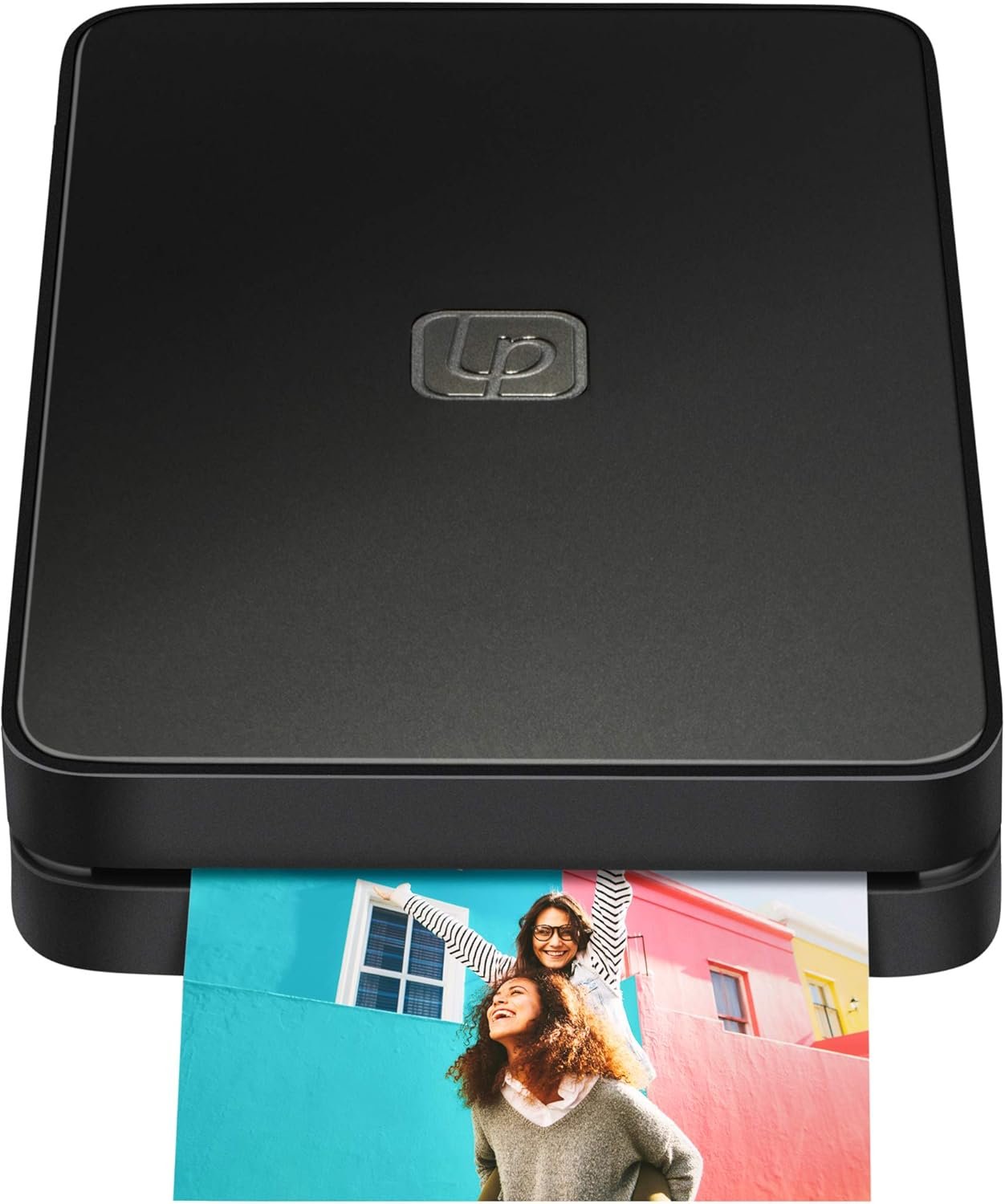
Lifeprint 2×3 Portable Photo Printer Review: Augmented Reality & Bluetooth Printing
The Importance of Choosing the Right Printer
In today’s fast-paced digital world, the ability to produce high-quality physical prints remains a critical need for both personal and professional users. Whether it’s capturing memories at a family gathering, creating marketing materials for a small business, or managing administrative tasks in an office environment, the right printer can significantly impact workflow efficiency and output satisfaction. However, the vast array of available printers—spanning from high-speed laser systems to compact thermal printers—requires careful evaluation to align with specific needs. Key considerations include print quality expectations, speed requirements, connectivity options, and ongoing maintenance demands. For users prioritizing portability and instant sharing, a printer that combines compact design with advanced features like augmented reality can offer unique value. This review examines the Lifeprint 2×3 Portable Photo and Video Printer, a device designed to bridge the gap between digital media and physical output through innovative technology and user-centric design. By analyzing its specifications, technical capabilities, and market positioning, this evaluation provides a data-driven framework for determining whether this printer meets the needs of its target audience in 2026.
Quick Overview
| Feature | Details |
|---|---|
| Printer Type | Portable photo and video printer |
| Printing Technology | Zink thermal printing |
| Supported Functions | Print only (no scan or copy) |
| Print Resolution | 300×300 dpi (color), 313 x 400 dpi (black and white) |
| Print Speed | 1 ppm (color), 1 ppm (monochrome) |
| Media Size | 2×3 inches (glossy photo paper) |
| Connectivity | Bluetooth 4.0 (up to 30 feet) |
| Power Consumption | 3.7 watts |
| Included Components | 1 printer, 1 USB cable, 10 pack Zink paper |
| Warranty | Limited warranty |
| Duty Cycle | Designed for low-volume, intermittent use |
| Ink System | Zink thermal imaging (no traditional ink or toner) |
| Smart Home Compatibility | Yes |
The Lifeprint 2×3’s compact design and Zink technology make it ideal for users seeking instant, high-quality photo prints without the need for traditional ink or toner. Its Bluetooth connectivity and 2×3 media size cater to social media enthusiasts, event organizers, and casual photographers looking to share memories in physical form. However, its low print speed and limited media compatibility may restrict its utility for high-volume or professional applications.

Print Quality and Output Capabilities
The Lifeprint 2×3’s Zink thermal printing technology is a defining factor in its print quality and output capabilities. Zink technology uses color-dye microencapsulation to produce vibrant, long-lasting prints without the need for separate ink cartridges. This system ensures consistent color accuracy and resistance to fading, making it well-suited for casual and semi-professional use. The printer’s maximum color resolution of 300×300 dpi and black-and-white resolution of 313 x 400 dpi provide sufficient detail for most photo prints, though it may fall short for high-resolution professional work. Additionally, the 2×3-inch media size is optimized for small, high-impact prints, which aligns with its focus on social media and event photography. While the lack of a physical print head or ink system reduces maintenance requirements, it also limits the ability to customize media types or adjust print settings beyond basic parameters. This makes the Lifeprint 2×3 an excellent choice for users prioritizing simplicity and ease of use over advanced customization options.

Color Accuracy and Fade Resistance
Zink thermal printing technology is designed to produce prints with excellent color accuracy and fade resistance. The microencapsulated dyes used in Zink paper are formulated to maintain their vibrancy under normal lighting conditions, though prolonged exposure to direct sunlight or UV light may cause gradual fading. This characteristic makes the Lifeprint 2×3 suitable for creating prints that are intended for indoor display or short-term use, such as event invitations or social media shares. However, for users requiring long-term archival quality, the printer’s output may not meet the standards of traditional inkjet or laser printers, which often offer more durable print media options. The printer’s lack of a physical print head also means that users cannot replace or refill the imaging system, which could be a drawback for those seeking extended print longevity.
Media Compatibility and Output Size
The Lifeprint 2×3 is designed to work exclusively with Zink thermal paper, which is preloaded with the necessary color-dye microcapsules for printing. This eliminates the need for separate ink or toner cartridges, reducing maintenance and operational costs. The 2×3-inch media size is ideal for creating small, high-impact prints that are easy to handle and display. However, this size may be too small for users requiring larger prints or those who prefer standard A4 or letter-sized media. The printer’s limited media compatibility also means that users cannot customize the paper type or adjust the print area to accommodate different media formats. This restriction may limit the printer’s versatility for users who need to print a variety of document types or media sizes.
Print Speed and Throughput
The Lifeprint 2×3’s print speed of 1 page per minute (ppm) is relatively slow compared to more advanced printers, which can print multiple pages per minute. This low print speed is a direct result of the Zink thermal printing process, which requires the printer to heat the media and activate the color-dye microcapsules in a controlled manner. While this ensures high-quality output, it may be a limitation for users who need to produce prints in a short timeframe. The printer’s duty cycle is designed for low-volume, intermittent use, making it suitable for casual or occasional printing rather than continuous, high-volume operations. Users requiring faster print speeds should consider alternative printers with more advanced print engines and higher throughput capabilities.
Connectivity and Device Compatibility
The Lifeprint 2×3’s Bluetooth 4.0 connectivity is a key feature that enhances its usability in various environments. This wireless technology allows users to print directly from their smartphones or tablets without the need for physical cables, making it convenient for on-the-go printing. The Bluetooth range of up to 30 feet provides flexibility for users to print from a distance, though it may be limited in larger spaces or environments with interference. The printer’s compatibility with both iOS and Android devices ensures broad accessibility, though users should verify the specific device requirements before purchase. While the lack of Wi-Fi or cloud connectivity may be a drawback for users seeking more advanced network capabilities, the Bluetooth option offers a simple and reliable solution for direct printing. This makes the Lifeprint 2×3 particularly well-suited for users who prioritize ease of use and portability over complex connectivity features.

Bluetooth Range and Stability
The Lifeprint 2×3’s Bluetooth 4.0 connectivity provides a reliable and stable connection for printing from smartphones and tablets. The maximum range of 30 feet allows users to print from a distance, though performance may vary in environments with physical obstructions or interference from other wireless devices. The printer’s ability to maintain a stable connection is crucial for ensuring smooth and uninterrupted printing, especially when dealing with larger media files or high-resolution images. While the Bluetooth connection is sufficient for casual use, users requiring more advanced network features such as Wi-Fi or cloud printing may find the Lifeprint 2×3 lacking in this regard. The printer’s reliance on Bluetooth also means that users cannot take advantage of more complex printing workflows that require direct network access or cloud-based management.
Device Compatibility and App Integration
The Lifeprint 2×3 is designed to work seamlessly with both iOS and Android devices, offering a wide range of compatibility for users who rely on smartphones and tablets for printing. The printer’s app integration allows for easy setup, media management, and print queue control, making it accessible for users of all skill levels. However, the lack of support for more advanced operating systems or desktop applications may limit its utility for users who prefer to print from computers. The printer’s app-based interface also means that users cannot take advantage of more sophisticated printing features such as duplex printing or advanced media settings. This makes the Lifeprint 2×3 an excellent choice for users who prioritize simplicity and ease of use over complex printing options.
Network and Cloud Printing Limitations
The Lifeprint 2×3’s reliance on Bluetooth connectivity means that it does not support Wi-Fi or cloud printing features, which may be a drawback for users who require more advanced network capabilities. While Bluetooth is sufficient for direct printing from mobile devices, it limits the ability to integrate the printer into a broader network environment or manage prints remotely. This lack of network connectivity also means that users cannot take advantage of cloud-based printing services or print from multiple devices simultaneously. For users who need to print from computers or integrate the printer into a home or office network, the Lifeprint 2×3 may not meet their requirements. However, its simplicity and portability make it an ideal choice for users who prioritize ease of use over advanced connectivity options.
Portability and Design Considerations
The Lifeprint 2×3’s compact and lightweight design is a major advantage for users who prioritize portability and ease of transport. Weighing just 0.29 kilograms (10.2 ounces), the printer is easy to carry and store, making it ideal for use at events, travel, or home environments. The 0.89 x 2.95 x 4.61-inch dimensions allow for convenient placement on tables, counters, or even in a backpack, ensuring that users can bring the printer to wherever they need it. The printer’s design also includes a single-tray system for loading Zink paper, which simplifies the printing process and reduces the need for frequent maintenance. While the lack of a built-in battery may be a drawback for users requiring extended use without a power source, the included lithium polymer batteries provide a convenient power solution for on-the-go printing. This makes the Lifeprint 2×3 particularly well-suited for users who need a portable printing solution for casual or event-based use.

Weight and Size for On-the-Go Use
The Lifeprint 2×3’s lightweight design and compact dimensions make it an excellent choice for users who need a portable printing solution. Weighing just 0.29 kilograms, the printer is easy to carry and store, ensuring that users can bring it to events, travel, or home environments without significant inconvenience. The 0.89 x 2.95 x 4.61-inch size allows for convenient placement on tables, counters, or even in a backpack, making it ideal for users who need to print on the move. The printer’s design also includes a single-tray system for loading Zink paper, which simplifies the printing process and reduces the need for frequent maintenance. This combination of portability and ease of use makes the Lifeprint 2×3 particularly well-suited for users who prioritize convenience and mobility in their printing needs.
Battery Life and Power Requirements
The Lifeprint 2×3 is powered by a built-in lithium polymer battery, which provides a convenient power solution for on-the-go printing. The battery life is sufficient for occasional use, though it may not be ideal for extended or high-volume printing sessions. The printer’s power consumption of 3.7 watts is relatively low, which helps to conserve battery life and reduce energy costs. However, the lack of a built-in battery may be a drawback for users who require extended use without a power source, as the included batteries may need frequent recharging or replacement. This makes the Lifeprint 2×3 an excellent choice for users who need a portable printing solution for casual or event-based use, but it may not be suitable for users requiring continuous or long-term printing operations.
Design for Casual and Event Use
The Lifeprint 2×3’s design is optimized for casual and event-based use, making it an ideal choice for users who need a portable printing solution for social gatherings, parties, or travel. The printer’s compact size and lightweight design allow for easy transport and setup, ensuring that users can bring it to wherever they need it. The single-tray system for loading Zink paper simplifies the printing process and reduces the need for frequent maintenance, making it user-friendly for both casual and semi-professional users. While the lack of advanced features such as duplex printing or network connectivity may be a drawback for some, the Lifeprint 2×3’s simplicity and ease of use make it an excellent choice for users who prioritize convenience and mobility in their printing needs.

Pros and Cons
Pros
- Portable Design: The Lifeprint 2×3’s compact and lightweight form factor makes it ideal for on-the-go printing, allowing users to bring it to events, travel, or home environments without significant inconvenience. This portability is a major advantage for users who need a convenient printing solution for casual or event-based use.
- Zink Thermal Printing Technology: The printer’s use of Zink technology eliminates the need for traditional ink or toner cartridges, reducing maintenance requirements and operational costs. This makes it a cost-effective option for users who prioritize simplicity and ease of use.
- Bluetooth Connectivity: The Lifeprint 2×3’s Bluetooth 4.0 connectivity provides a reliable and stable connection for printing from smartphones and tablets, offering a convenient solution for direct printing without the need for physical cables. This feature enhances the printer’s usability in various environments.
- Augmented Reality Integration: The Lifeprint 2×3’s augmented reality feature allows users to create magical, interactive photo prints that can be shared with friends and family. This unique feature adds a creative dimension to the printing experience, making it appealing for social media enthusiasts and event organizers.
- Simple User Interface: The printer’s app-based interface simplifies the printing process, making it accessible for users of all skill levels. The lack of complex settings or advanced features ensures a straightforward and user-friendly experience.
- High-Quality Output: The Zink thermal printing technology ensures vibrant, long-lasting prints with excellent color accuracy and fade resistance. This makes the Lifeprint 2×3 suitable for creating high-quality photo prints for personal or semi-professional use.
Cons
- Limited Print Speed: The Lifeprint 2×3’s print speed of 1 page per minute is relatively slow compared to more advanced printers. This may be a drawback for users who need to produce prints in a short timeframe or require faster throughput for high-volume operations.
- Restricted Media Compatibility: The printer is designed to work exclusively with Zink thermal paper, which limits the ability to customize media types or adjust print settings beyond basic parameters. This restriction may be a drawback for users who require more flexibility in media options.
- No Network or Cloud Printing Support: The Lifeprint 2×3’s reliance on Bluetooth connectivity means it does not support Wi-Fi or cloud printing features. This may be a drawback for users who require more advanced network capabilities or need to integrate the printer into a broader network environment.
- Single-Use Battery Requirement: The printer’s built-in lithium polymer battery provides a convenient power solution for on-the-go printing, but it may not be ideal for extended or high-volume use. Users may need to frequently recharge or replace the battery, which could be inconvenient for long-term or continuous printing operations.
- Limited Duty Cycle: The Lifeprint 2×3 is designed for low-volume, intermittent use, making it less suitable for continuous or high-volume printing operations. This may be a drawback for users requiring a printer that can handle more demanding workloads.
- No Duplex Printing Option: The Lifeprint 2×3 is a simplex printer, meaning it cannot produce double-sided prints. This may be a limitation for users who need to print on both sides of the media for space efficiency or cost savings.
Final Verdict: Who This Printer Is Best For (and Who Should Skip It)
The Lifeprint 2×3 Portable Photo and Video Printer is best suited for users who prioritize portability, ease of use, and the ability to create high-quality photo prints with minimal maintenance. Its Zink thermal printing technology, Bluetooth connectivity, and augmented reality features make it an excellent choice for social media enthusiasts, event organizers, and casual photographers looking to share memories in physical form. The printer’s compact design and lightweight build also make it ideal for users who need a convenient printing solution for on-the-go use, such as at parties, concerts, or travel destinations. However, the Lifeprint 2×3 is not well-suited for users requiring high-speed printing, advanced connectivity options, or extended duty cycles. Its limited media compatibility, slow print speed, and lack of network or cloud printing support may make it a less ideal choice for professional photographers, office environments, or users needing to produce large volumes of prints. For those seeking a simple, portable solution for casual printing needs, the Lifeprint 2×3 offers a compelling combination of features and usability that aligns with its intended purpose in 2026.

Frequently Asked Questions (FAQs)
What is Zink technology and how does it affect print quality?
Zink technology uses color-dye microencapsulation to produce vibrant, long-lasting prints without traditional ink or toner. This method ensures consistent color accuracy and fade resistance, making it ideal for casual and semi-professional use. However, it may not meet the standards of archival quality required for long-term preservation.
How does the Lifeprint 2×3 handle Bluetooth connectivity?
The Lifeprint 2×3 uses Bluetooth 4.0 for wireless printing up to 30 feet. This provides a stable connection for printing from iOS and Android devices, though it lacks Wi-Fi or cloud printing support, limiting network integration options.
Can the Lifeprint 2×3 print larger media sizes?
The Lifeprint 2×3 is designed to work exclusively with 2×3-inch Zink thermal paper. It does not support standard A4 or letter-sized media, making it suitable for small, high-impact prints rather than larger formats.
What are the limitations of the Lifeprint 2×3’s print speed?
The Lifeprint 2×3 prints at 1 page per minute (ppm), which is relatively slow compared to more advanced printers. This low speed is a direct result of the Zink thermal printing process, which prioritizes print quality over throughput.
Is the Lifeprint 2×3 suitable for professional photography?
The Lifeprint 2×3 is not well-suited for professional photography due to its limited media compatibility, slow print speed, and lack of advanced connectivity options. It is better suited for casual use, social media sharing, and event-based printing.
How does the Lifeprint 2×3’s portability compare to other photo printers?
The Lifeprint 2×3’s compact design and lightweight build (0.29 kg) make it highly portable, ideal for on-the-go use. However, its reliance on Bluetooth connectivity and limited media options may restrict its versatility compared to more advanced portable printers.
What are the battery requirements for the Lifeprint 2×3?
The Lifeprint 2×3 uses a built-in lithium polymer battery, which provides power for on-the-go printing. However, it does not support continuous use without recharging, making it less suitable for high-volume or extended printing sessions.
Can the Lifeprint 2×3 produce double-sided prints?
The Lifeprint 2×3 is a simplex printer and does not support duplex printing. This means it cannot produce double-sided prints, which may be a limitation for users requiring space-efficient or cost-effective printing solutions.