Mvgges Y42BT-Black Thermal Label Printer Review: 4×6 Shipping Label Printer for Small Business and Home Use
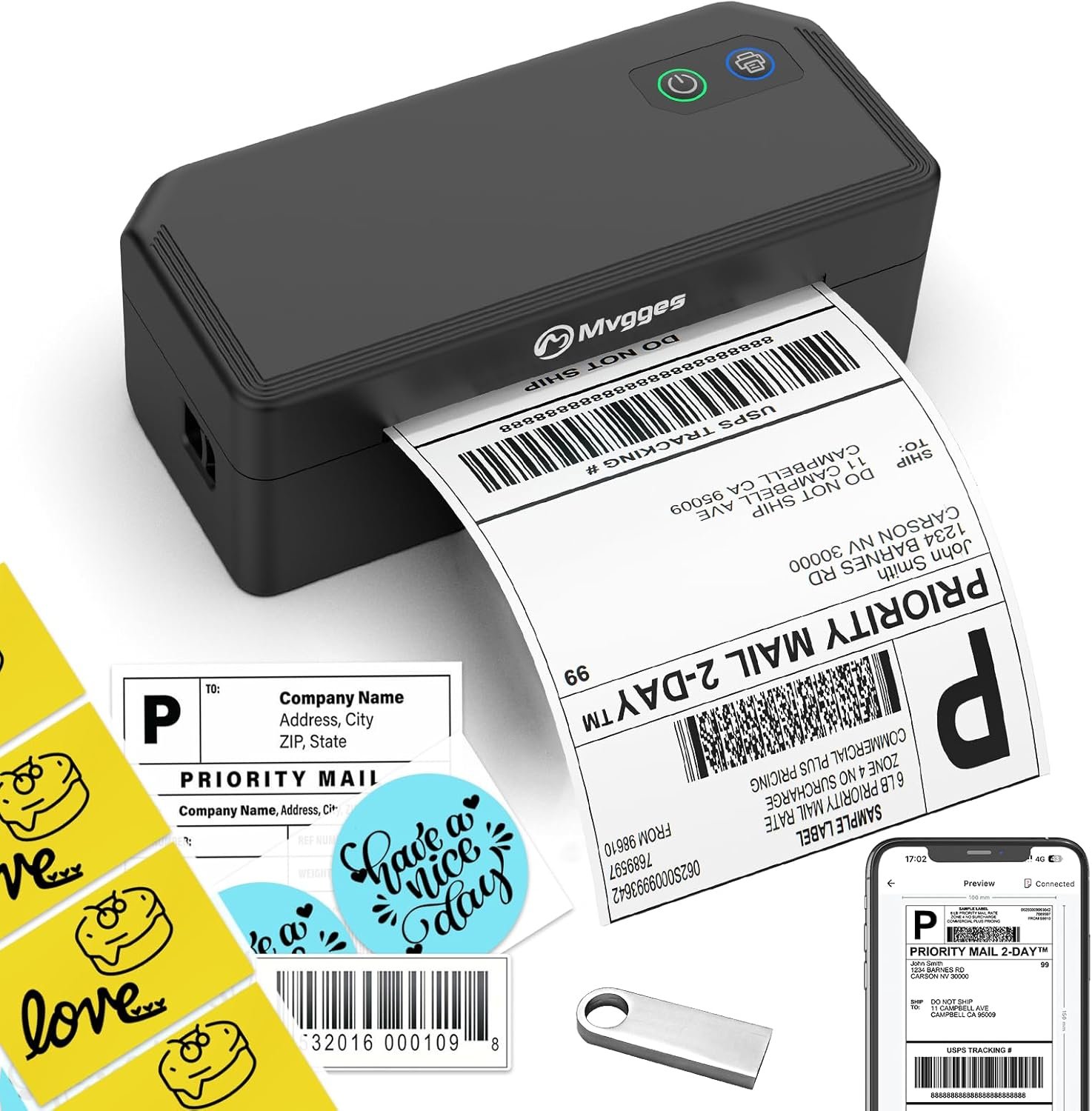
The Importance of Choosing the Right Label Printer for Small Business and Home Use
In today’s fast-paced business environment, the ability to produce accurate, high-quality labels quickly can make a significant difference in operational efficiency. Whether managing an e-commerce store, running a small shipping business, or organizing personal inventory, a reliable label printer is essential. The Mvgges Y42BT-Black thermal label printer is designed to meet the needs of users who require consistent, high-speed output for shipping labels, inventory tags, and other small-format printing tasks. Its combination of thermal printing technology, multi-platform compatibility, and compact design makes it a compelling option for users who prioritize speed, simplicity, and cost-effectiveness. However, selecting the right printer involves evaluating factors such as print resolution, media compatibility, connectivity options, and long-term maintenance requirements. This review provides an in-depth analysis of the Mvgges Y42BT-Black, focusing on its technical specifications, real-world usage scenarios, and performance benchmarks to help users make an informed decision.
Quick Overview
| Feature | Details |
|---|---|
| Printer Type | Thermal label printer |
| Connectivity | Bluetooth, USB |
| Print Technology | Thermal direct |
| Print Resolution | 203 DPI (black and white) |
| Media Size | 4 x 6 inches |
| Print Speed | 160 mm/s (72 labels per minute) |
| Media Compatibility | Thermal paper only |
| Duty Cycle | Continuous use with thermal paper |
| Ink/Toner System | No ink or toner required |
| Warranty | Not specified in product documentation |
The Mvgges Y42BT-Black is a compact, all-in-one thermal label printer designed for users who need to generate shipping labels, inventory tags, and other small-format prints. Its thermal printing technology eliminates the need for ink or toner, reducing maintenance and operational costs. The printer’s 4×6 inch media size is ideal for standard shipping labels, while its 72 labels per minute speed ensures efficient output for small to medium-volume tasks. The Bluetooth and USB connectivity options provide flexibility for users working across multiple devices, making it a practical choice for home offices and small businesses.

Print Quality and Resolution: Delivering Clear, Scannable Output
The Mvgges Y42BT-Black employs thermal direct printing technology, which ensures high-contrast, monochrome output without the need for ink or toner. This technology is particularly well-suited for printing shipping labels, barcodes, and QR codes, as it produces sharp, scannable results. The printer’s 203 DPI resolution provides sufficient detail for most label applications, though it may not meet the requirements of users needing high-resolution graphics or photographic-quality prints. The thermal paper used with this printer is designed to produce consistent, fade-resistant images, making it ideal for long-term storage and tracking purposes. However, the lack of color printing capabilities limits its versatility for tasks requiring colored labels or branding elements.

Monochrome Printing Capabilities
The Mvgges Y42BT-Black’s thermal printing process relies on heat to create images on thermal paper, resulting in a black-and-white output that is both clear and durable. This method is particularly effective for printing shipping labels, as it ensures that text and barcodes remain legible even after extended storage. The 203 DPI resolution provides sufficient detail for most label applications, though users with higher resolution requirements may find the output lacking. The printer’s ability to automatically adjust label positioning also helps minimize paper waste, ensuring efficient use of media.
Media Compatibility and Paper Requirements
The Mvgges Y42BT-Black is designed to work exclusively with thermal paper, which is a key consideration for users planning to integrate this printer into their workflow. Thermal paper is commonly used in shipping and logistics environments due to its cost-effectiveness and ease of use, though it may not be suitable for all applications. The printer’s support for 4×6 inch labels makes it ideal for standard shipping labels, while its compatibility with thermal paper ensures consistent, high-quality output. However, users who require alternative media types, such as glossy or colored paper, may find this printer’s limitations restrictive.
Printing Speed and Efficiency: Meeting Small to Medium-Volume Needs
The Mvgges Y42BT-Black is engineered for speed, with a printing rate of 160 mm/s that translates to up to 72 labels per minute. This performance level is well-suited for small to medium-volume printing tasks, such as generating shipping labels for e-commerce orders or inventory tags for retail operations. The printer’s high-speed output reduces the time required to complete printing jobs, making it a practical choice for users who prioritize efficiency. However, the printer’s thermal printing technology and reliance on thermal paper may impact its suitability for high-volume or continuous use environments, where alternative technologies like laser or inkjet printing might offer better performance.

Duty Cycle and Continuous Use
The Mvgges Y42BT-Black is designed for continuous use in environments where thermal paper is the preferred media type. Its thermal printing technology allows for uninterrupted operation, provided that the printer has access to a steady supply of thermal paper. However, users who require extended printing sessions or high-volume output should consider the printer’s duty cycle limitations. While the printer is suitable for small to medium-volume tasks, its performance in high-volume settings may not match that of more robust label printers designed for industrial use.
Energy Efficiency and Operational Costs
The Mvgges Y42BT-Black’s thermal printing technology reduces the need for consumables such as ink or toner, lowering long-term operational costs. This makes it an attractive option for users who prioritize cost-effectiveness and minimal maintenance. However, the reliance on thermal paper, which can be more expensive than traditional paper, may offset some of these savings. Additionally, the printer’s energy consumption is relatively low, contributing to its overall efficiency for small to medium-volume printing tasks.
Connectivity and Compatibility: Seamless Integration Across Devices
The Mvgges Y42BT-Black offers both Bluetooth and USB connectivity options, making it compatible with a wide range of devices, including Android, iOS, Windows, and Mac systems. This flexibility allows users to integrate the printer into their existing workflows without the need for additional hardware or complex setup processes. The inclusion of the Flashlabel Pro app for mobile devices further enhances its usability, enabling users to print labels directly from their smartphones or tablets. However, the printer’s lack of Wi-Fi connectivity may limit its suitability for users who require wireless printing across multiple devices.

Multi-Platform Compatibility
The Mvgges Y42BT-Black’s compatibility with multiple operating systems ensures that it can be integrated into a variety of work environments. Its USB connection provides a straightforward method for connecting to desktop computers, while Bluetooth connectivity offers a convenient alternative for mobile users. The Flashlabel Pro app simplifies the printing process for users who prefer to manage labels via their smartphones or tablets. However, the absence of Wi-Fi support means that users who require wireless printing across multiple devices may need to rely on physical connections or third-party solutions.
Software and User Experience
The Mvgges Y42BT-Black includes a USB drive with driver software and installation videos, ensuring that users can set up the printer without technical expertise. The included user manual provides clear instructions for operation, while the Flashlabel Pro app offers a user-friendly interface for managing printing tasks. However, the lack of advanced software features may limit the printer’s appeal to users who require more sophisticated printing capabilities or integration with enterprise-level systems.

Pros & Cons
Pros
- Thermal Printing Efficiency: The Mvgges Y42BT-Black’s thermal direct technology eliminates the need for ink or toner, reducing maintenance and operational costs. This makes it an attractive option for users who prioritize cost-effectiveness and simplicity.
- High-Speed Output: With a printing speed of 160 mm/s, the printer can produce up to 72 labels per minute, making it suitable for small to medium-volume printing tasks. This speed helps streamline operations for e-commerce and small business users.
- Multi-Platform Compatibility: The printer supports both Bluetooth and USB connections, allowing seamless integration with Android, iOS, Windows, and Mac systems. The Flashlabel Pro app further enhances its usability for mobile users.
- Automatic Label Positioning: The printer’s ability to automatically adjust label positioning helps minimize paper waste, ensuring efficient use of thermal paper and reducing material costs.
- Compact and Portable Design: The Mvgges Y42BT-Black’s compact size and lightweight build make it easy to set up and use in home offices or small business environments. Its portability is an advantage for users who need to move the printer between locations.
Cons
- Limited Media Compatibility: The printer is designed exclusively for thermal paper, which may not be suitable for all label applications. Users requiring alternative media types, such as glossy or colored paper, may find this limitation restrictive.
- No Color Printing Capabilities: The Mvgges Y42BT-Black only supports black-and-white printing, which limits its versatility for tasks requiring colored labels or branding elements.
- Dependence on Thermal Paper: While thermal paper is cost-effective, it may not be suitable for all environments. Users who require long-term storage or archival purposes may need to consider alternative media options.
- No Wi-Fi Connectivity: The printer’s lack of Wi-Fi support means that users who require wireless printing across multiple devices must rely on physical connections or third-party solutions.
- Limited Software Features: The printer’s software and app options are relatively basic, which may not meet the needs of users requiring advanced printing capabilities or integration with enterprise-level systems.
Final Verdict: Who This Printer Is Best For (and Who Should Skip It)
The Mvgges Y42BT-Black thermal label printer is an excellent choice for users who prioritize speed, simplicity, and cost-effectiveness in their printing tasks. Its high-speed output, multi-platform compatibility, and automatic label positioning make it ideal for small businesses, home offices, and e-commerce sellers who need to generate shipping labels, inventory tags, and other small-format prints. The printer’s reliance on thermal paper and lack of color printing capabilities make it less suitable for environments requiring long-term archival or colored labels. Additionally, users who require Wi-Fi connectivity or advanced software features may find the printer’s limitations restrictive. For those seeking a reliable, low-maintenance solution for standard shipping and labeling needs, the Mvgges Y42BT-Black offers a practical and efficient option. However, users with high-volume printing requirements or complex printing needs should consider alternative printers that offer greater versatility and performance.

Frequently Asked Questions (FAQs)
Is the Mvgges Y42BT-Black compatible with Android and iOS devices?
Yes, the Mvgges Y42BT-Black supports Bluetooth connectivity for Android and iOS devices, allowing users to print labels directly from their smartphones or tablets using the Flashlabel Pro app. USB connectivity is also available for desktop computers running Windows or macOS.
What types of labels can the Mvgges Y42BT-Black print?
The Mvgges Y42BT-Black is designed to print monochrome shipping labels, barcodes, and QR codes on thermal paper. It supports 4×6 inch labels, making it ideal for e-commerce, shipping, and inventory management tasks. It does not support colored or glossy label media.
How fast does the Mvgges Y42BT-Black print labels?
The printer can produce up to 72 labels per minute with a printing speed of 160 mm/s, making it suitable for small to medium-volume printing tasks. This speed helps streamline operations for users managing multiple shipping orders or inventory tags.
Does the Mvgges Y42BT-Black require ink or toner?
No, the Mvgges Y42BT-Black uses thermal direct printing technology, which eliminates the need for ink or toner. It requires only thermal paper to produce high-contrast, scannable labels without consumables.
Can the Mvgges Y42BT-Black be used for long-term label storage?
Thermal paper used with the Mvgges Y42BT-Black is suitable for short-term label storage and tracking, but it may degrade over time when exposed to light or heat. For long-term archival purposes, users should consider alternative media types or digital storage solutions.
What are the connectivity options for the Mvgges Y42BT-Black?
The Mvgges Y42BT-Black offers both Bluetooth and USB connectivity options. Bluetooth allows pairing with Android and iOS devices via the Flashlabel Pro app, while USB provides a direct connection for desktop computers running Windows or macOS.
Is the Mvgges Y42BT-Black suitable for high-volume printing?
The Mvgges Y42BT-Black is designed for small to medium-volume printing tasks and may not be suitable for high-volume or continuous use environments. Its thermal printing technology and reliance on thermal paper make it less ideal for industrial or large-scale operations.
Does the Mvgges Y42BT-Black support color printing?
No, the Mvgges Y42BT-Black only supports black-and-white printing through its thermal direct technology. It does not have the capability to print in color, making it unsuitable for tasks requiring colored labels or branding elements.