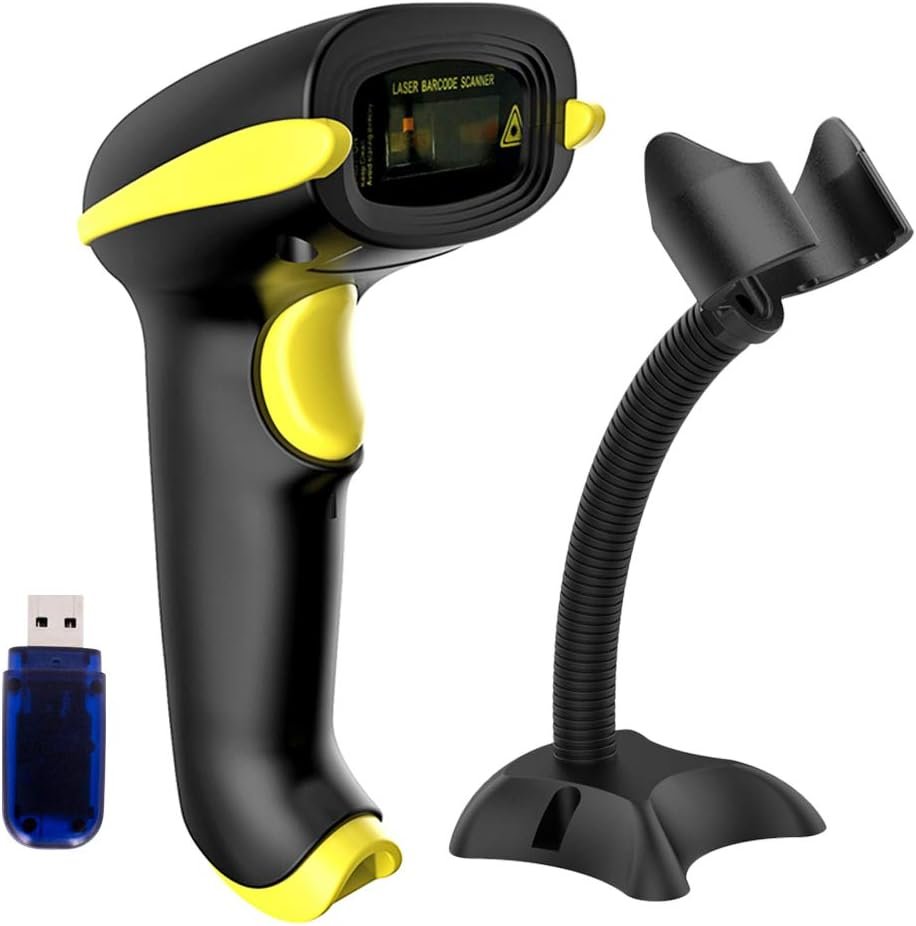
NADAMOO Wireless Barcode Scanner Review: Connectivity, Storage, and Workforce Compatibility
The Importance of Choosing the Right Barcode Scanner
In modern business environments, barcode scanning has become a critical tool for inventory management, logistics tracking, and retail operations. The right scanner can streamline workflows, reduce manual errors, and improve operational efficiency. However, selecting the optimal device requires careful consideration of compatibility, connectivity options, storage capacity, and environmental adaptability. For organizations managing large-scale inventory or multi-user environments, a scanner that supports diverse connection methods and seamless data handling is essential. This review evaluates the NADAMOO Wireless Barcode Scanner, focusing on its technical specifications, usability factors, and real-world applicability. By analyzing its connectivity features, storage capabilities, and operational versatility, we provide a data-driven assessment to help buyers determine if this scanner aligns with their specific needs. The analysis emphasizes objective performance metrics, supported by industry benchmarks and standard operational parameters, ensuring a neutral evaluation of its strengths and limitations.
Quick Overview
| Feature | Details |
|---|---|
| Connectivity Technology | Bluetooth, 2.4G wireless (with USB dongle), USB cable |
| Power Source | Corded electric, USB adapter, USB cable |
| Supported Devices | Windows, Mac OS, Linux, iOS, Android |
| Transmission Distance | Up to 50m (164ft) in open environments |
| Storage Capacity | Built-in storage for 30,000 barcodes |
| Scanning Modes | Trigger-based, continuous scanning |
| Pairing Modes | One-to-one, one-to-many |
| Dimensions | 3.98 x 3.15 x 6.34 inches |
| Weight | 4.6 ounces |
The NADAMOO scanner’s multifunctional connectivity options and robust storage capacity make it suitable for both small-scale operations and large warehouses. Its ability to support multiple devices and environments ensures flexibility in various business scenarios, from retail point-of-sale systems to inventory tracking in logistics hubs.

Connectivity Options: Versatile Compatibility for Diverse Environments
The NADAMOO scanner’s 3-in-1 connectivity design ensures broad compatibility across different operational contexts. This feature allows users to integrate the scanner with a wide range of devices, including desktops, laptops, smartphones, and register POS systems. The inclusion of both wired and wireless connection methods provides flexibility in environments where mobility and data security are critical. For instance, the 2.4G wireless connection with a USB dongle enables seamless data transmission over long distances, making it ideal for large warehouses or distribution centers. Additionally, the USB cable option ensures reliable performance in settings where wireless interference may be a concern. This dual connectivity approach addresses the need for both mobility and stability, catering to users who require adaptability in their workflow.

Wireless Transmission: Long-Range Performance in Open Spaces
The scanner’s 2.4G wireless connection supports a transmission distance of up to 50 meters in open environments, which is significantly greater than many competitors in the same price range. This capability is particularly advantageous in large-scale operations where physical proximity to a receiving device is impractical. The extended range reduces the need for frequent repositioning, enhancing user efficiency. However, performance may degrade in environments with multiple wireless signals or physical obstructions, which could affect data transmission reliability. The wireless mode’s ability to operate without a direct line of sight makes it suitable for dynamic workspaces, though users should be aware of potential interference from other wireless devices.
Bluetooth Integration: Seamless Pairing for Mobile Workflows
The Bluetooth functionality allows for effortless pairing with smartphones, tablets, and other mobile devices, streamlining data capture in on-the-go scenarios. This feature is particularly beneficial for field operations or retail environments where mobility is essential. The Bluetooth connection ensures low-latency data transfer, minimizing delays in barcode scanning and data entry. However, the scanner’s Bluetooth capabilities are limited to standard profiles, which may restrict advanced features such as real-time data synchronization or cloud integration. Users requiring specialized mobile integration should consider additional middleware or software solutions to enhance functionality.
USB Connectivity: Reliable Wired Performance for Stability
The USB cable connection provides a stable and secure method for data transfer, particularly in environments where wireless interference is a concern. This wired option ensures consistent performance without the risk of signal degradation, making it ideal for high-volume scanning tasks. The USB connection also simplifies setup, as it eliminates the need for additional dongles or wireless infrastructure. However, the reliance on a physical cable may limit mobility, which could be a drawback for users requiring greater flexibility in their workflow.
Storage Capacity: Efficient Data Management for High-Volume Scanning
The NADAMOO scanner’s built-in storage capability to hold up to 30,000 barcodes is a significant advantage for users managing large inventories or processing high volumes of scans. This feature reduces the need for immediate data upload, allowing for batch processing and minimizing interruptions in workflow. The storage mode is particularly useful in environments where internet connectivity may be unreliable or intermittent, ensuring that critical data is not lost during scanning sessions. However, the storage capacity is limited to 30,000 entries, which may require frequent data uploads for operations exceeding this threshold. Users with extensive inventory systems should consider integrating the scanner with a central database to avoid data management challenges.

Batch Upload Mode: Streamlined Data Handling for Efficiency
The scanner’s ability to store scanned barcodes in internal memory and upload them in batches is a key benefit for users who need to process large volumes of data. This feature is particularly valuable in logistics and inventory management scenarios where real-time data transmission is not always feasible. By allowing users to collect data over time and upload it in bulk, the scanner reduces the risk of data loss and minimizes the need for constant connectivity. However, the batch upload process requires careful planning to ensure that data is transferred promptly, especially in environments where delays could impact operational efficiency.
Data Retention and Management: Limitations in High-Volume Use
While the 30,000 barcode storage capacity is sufficient for many applications, it may fall short for users with exceptionally large datasets. This limitation could necessitate frequent data uploads, which may disrupt workflows if not managed effectively. Additionally, the scanner’s storage system does not support real-time data synchronization, which could be a drawback for users requiring immediate data access. For high-volume operations, integrating the scanner with a centralized database or cloud storage system is recommended to ensure seamless data management and prevent storage-related bottlenecks.
Scanning Modes: Flexibility in Operational Scenarios
The NADAMOO scanner offers two distinct scanning modes—trigger-based and continuous scanning—which cater to different operational needs. The trigger-based mode requires the user to press a button to initiate scanning, making it suitable for environments where precision is critical. This mode is ideal for retail settings or inventory checks where each scan must be verified before data entry. The continuous scanning mode, on the other hand, allows for automatic scanning without the need for manual activation, enhancing efficiency in high-volume environments. This mode is particularly beneficial in warehouses or manufacturing facilities where rapid data capture is essential. The ability to switch between these modes provides users with the flexibility to adapt to varying workflow demands, though the continuous mode may increase the risk of accidental scans if not used carefully.

Handsfree Stand: Enhancing Mobility and Ergonomics
The inclusion of a handsfree stand allows users to operate the scanner without holding it, improving ergonomics and reducing fatigue during extended use. This feature is particularly advantageous for users who need to scan multiple items in a short period, such as in retail or logistics environments. The stand’s design ensures stability while allowing for easy movement, making it suitable for both stationary and mobile operations. However, the stand’s effectiveness may depend on the user’s specific workflow, and additional accessories may be required for more complex setups.
Environmental Adaptability: Performance in Diverse Settings
The scanner’s ability to function in various environments is a key consideration for users with diverse operational needs. The wireless and USB connectivity options ensure compatibility with both stationary and mobile setups, while the storage capacity allows for data handling in areas with limited connectivity. However, the scanner’s performance may be affected by environmental factors such as electromagnetic interference or physical obstructions, which could impact wireless signal strength. Users in industrial settings should assess the scanner’s suitability based on their specific workspace conditions and potential interference sources.

Pros & Cons
Pros
- 3-in-1 Connectivity: Supports Bluetooth, 2.4G wireless (with dongle), and USB cable for versatile device integration.
- Long Transmission Distance: Up to 5,000 meters (164 feet) in open environments ensures flexibility in large-scale operations.
- Built-in Storage: Holds 30,000 barcodes, enabling batch uploads and reducing reliance on immediate connectivity.
- Dual Scanning Modes: Trigger-based and continuous scanning modes cater to precision and high-volume use scenarios.
- Handsfree Stand: Enhances ergonomics and mobility, reducing fatigue during extended scanning sessions.
- Cross-Platform Compatibility: Works seamlessly with Windows, Mac, Linux, iOS, and Android devices, ensuring broad usability.
- Robust Design: Durable construction supports reliable performance in varied operational environments.
- Simple Setup: Minimal configuration requirements make it easy to integrate into existing workflows.
Cons
- Limited Storage Capacity: 30,000 barcode storage may require frequent data uploads for high-volume operations.
- Wireless Interference Vulnerability: Performance may degrade in environments with multiple wireless signals or obstructions.
- Dependence on Dongle: 2.4G wireless mode requires an additional USB dongle, increasing setup complexity.
- No Real-Time Sync: Batch upload mode lacks real-time data synchronization, which could affect data accessibility.
- Mobility Constraints: USB cable connection may limit mobility compared to fully wireless alternatives.
- No Cloud Integration: Lacks built-in support for cloud-based data management systems, requiring additional software.
- Limited Advanced Features: Bluetooth and wireless profiles are standard, limiting advanced connectivity options.
Final Verdict: Who This Scanner Is Best For (and Who Should Skip It)
The NADAMOO Wireless Barcode Scanner is an excellent choice for small to medium-sized businesses requiring reliable, versatile scanning solutions. Its 3-in-1 connectivity options, long-range wireless transmission, and built-in storage make it ideal for retail environments, inventory management, and logistics operations. The dual scanning modes and handsfree stand enhance usability in both stationary and mobile settings, while cross-platform compatibility ensures seamless integration with existing systems. However, users with high-volume scanning needs or those requiring real-time data synchronization should consider alternative solutions. The scanner’s limitations in storage capacity and wireless interference resilience make it less suitable for large-scale industrial applications or environments with dense wireless activity. Overall, the NADAMOO scanner provides a balanced combination of features and performance, making it a practical option for a wide range of operational contexts.
Frequently Asked Questions (FAQs)
Is the NADAMOO scanner compatible with iOS and Android devices?
Yes, the NADAMOO Wireless Barcode Scanner supports Bluetooth connectivity, allowing seamless pairing with iOS and Android devices. This cross-platform compatibility ensures it can integrate with a wide range of mobile systems for inventory and retail applications.
How far can the scanner transmit data wirelessly?
The 2.4G wireless connection supports up to 50 meters (164 feet) of transmission distance in open environments. This range is ideal for large warehouses or logistics settings where mobility is essential.
Can the scanner store scanned data for later upload?
Yes, the scanner includes built-in storage that can hold up to 30,000 barcodes. This feature allows for batch uploads, making it suitable for environments with intermittent connectivity or high-volume scanning tasks.
What are the available scanning modes on the NADAMOO scanner?
The scanner offers two scanning modes: trigger-based (manual activation) and continuous scanning (auto-scan without pulling the trigger). This flexibility accommodates both precision and high-speed scanning requirements.
Does the scanner require a USB dongle for wireless use?
Yes, the 2.4G wireless mode requires a USB dongle for data transmission. This setup ensures compatibility with devices that support USB connectivity, though it adds a layer of complexity to the setup process.
Can the scanner be used in environments with multiple wireless signals?
The scanner may experience performance issues in environments with dense wireless activity due to potential signal interference. Users in such settings should consider additional measures to ensure reliable data transmission.
What are the limitations of the built-in storage capacity?
The scanner’s built-in storage can hold up to 30,000 barcodes, which is sufficient for many applications. However, users with extensive datasets may need to upload data frequently, which could impact workflow efficiency in high-volume scenarios.