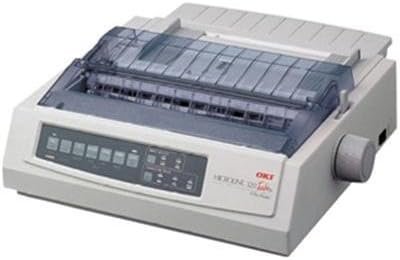
Oki Microline 320 Turbo/N Dot Matrix Printer Review: Reliability and Performance
The Importance of Choosing the Right Printer for Your Workflow
Selecting the appropriate printer is critical for ensuring operational efficiency in both small and large-scale environments. Whether you’re managing point-of-sale transactions, automating data entry, or handling high-volume documentation, the performance of your printing solution directly impacts productivity and cost-effectiveness. Dot matrix printers, like the Oki Microline 320 Turbo/N, remain a staple in industrial and commercial settings due to their durability, low maintenance requirements, and ability to handle demanding workloads. These printers are engineered for environments where reliability is paramount, such as warehouses, manufacturing floors, and financial institutions. However, with a wide range of printing technologies available—from inkjet to laser—understanding the specific needs of your workflow is essential. Factors such as print speed, resolution, connectivity options, and media compatibility play a significant role in determining which printer will best meet your requirements. This review examines the Oki Microline 320 Turbo/N Dot Matrix Printer, focusing on its technical specifications, performance characteristics, and suitability for various applications. By analyzing its features, limitations, and real-world usage patterns, this guide aims to help users make an informed decision about whether this printer is the right fit for their specific needs.
Quick Overview
| Feature | Details |
|---|---|
| Printer Type | Dot Matrix Printer |
| Printing Technology | 9-pin dot matrix |
| Print Resolution | 240 x 216 dpi |
| Print Speed | 435 cps (characters per second) |
| Media Sizes | Letter/A4 |
| Connectivity | USB, Parallel, OkiLAN 6120e Internal Print Server |
| Duty Cycle | High-speed, industrial-grade |
| Ink System | Ribbon-based |
| Supported Media | Paper (plain) |
| Duplex Printing | Simplex |
| Warranty | Limited warranty |
The Oki Microline 320 Turbo/N is designed for environments requiring high-speed, reliable printing. Its 9-pin dot matrix technology and 435 cps print speed make it suitable for applications such as point-of-sale transactions, inventory management, and data logging. The printer’s ability to handle letter and A4 media sizes, combined with its network-ready capabilities via the internal print server, ensures compatibility with a wide range of operational demands. While it lacks duplex printing and advanced connectivity options beyond USB and parallel ports, its robust build and long-duty cycle make it a durable choice for industrial settings.
Print Technology and Output Quality
Dot matrix printers like the Oki Microline 320 Turbo/N are known for their ability to produce clear, legible text on a variety of media types. The 9-pin print head and 240 x 216 dpi resolution ensure that printed output meets the requirements of most industrial and commercial applications. This printer is particularly well-suited for environments where text clarity is more important than high-resolution graphics, such as financial reports, shipping labels, and inventory records. The use of a ribbon-based ink system allows for consistent print quality over extended periods, as long as the ribbon remains in good condition. While the printer does not support color printing, its monochrome output is reliable and suitable for applications that require high-speed, high-volume printing without the need for color.
Media Compatibility and Print Speed
The Oki Microline 320 Turbo/N supports a range of media sizes, including letter and A4 paper, making it versatile for different office and industrial environments. Its 435 cps print speed ensures that it can handle high-volume printing tasks efficiently, which is particularly beneficial in settings such as warehouses and manufacturing facilities where large quantities of data need to be printed quickly. The printer’s ability to operate on plain paper without requiring specialized media further reduces maintenance costs and downtime. However, users should be aware that the printer’s performance may be affected by the type and quality of paper used, as well as environmental factors such as humidity and temperature. For optimal results, it is recommended to use high-quality, non-bleed paper to maintain print clarity and prevent jams.
Durability and Longevity
One of the key advantages of the Oki Microline 320 Turbo/N is its industrial-grade build, which is designed to withstand the rigors of continuous use. The printer’s high-duty cycle allows it to run for extended periods without requiring frequent maintenance or replacement. This makes it an ideal choice for environments where downtime is costly, such as retail and wholesale operations. The printer’s robust construction and reliable print engine contribute to its long service life, reducing the need for frequent repairs or replacements. However, the lack of advanced features such as automatic paper feed or duplex printing may limit its suitability for applications that require more complex printing tasks. Despite these limitations, the printer’s reliability and durability make it a solid choice for users who prioritize consistent, high-speed printing over advanced functionality.
Connectivity and Network Capabilities
The Oki Microline 320 Turbo/N offers a range of connectivity options that enhance its versatility in different environments. The printer is equipped with both USB and parallel ports, allowing it to be connected to a variety of devices, including computers, laptops, and legacy systems. Additionally, the inclusion of an internal OkiLAN 6120e print server enables the printer to be integrated into a company network or accessed via the internet, which is particularly useful for remote printing or centralized print management. This network-ready capability ensures that the printer can be used in environments where multiple users or devices require access to the same printing resources. However, the printer’s reliance on older connectivity standards may limit its compatibility with newer devices or systems that require more advanced networking protocols. For users who require seamless integration with modern IT infrastructures, additional networking hardware may be necessary to ensure full compatibility.
Compatibility with Legacy Systems
The Oki Microline 320 Turbo/N’s support for parallel and USB connections makes it compatible with a wide range of legacy systems and modern devices. This versatility is particularly beneficial for businesses that have a mix of older and newer equipment, as it allows for seamless integration without the need for extensive hardware upgrades. The printer’s ability to operate on standard USB and parallel ports ensures that it can be easily connected to existing infrastructure, reducing the cost and complexity of implementation. However, users should be aware that the printer’s network capabilities are limited to the internal OkiLAN 6120e print server, which may require additional configuration or hardware to support more advanced networking features. For environments that require extensive network connectivity, the printer may need to be paired with external networking solutions to maximize its potential.
Remote Access and Print Management
The OkiLAN 6120e internal print server provides the Oki Microline 320 Turbo/N with the ability to be accessed remotely, which is a significant advantage for users who need to manage printing tasks from different locations. This feature allows for centralized print management, enabling users to monitor and control print jobs from a networked environment. However, the printer’s remote access capabilities are limited to the internal print server, which may not support more advanced features such as cloud printing or mobile device integration. For users who require more flexible remote printing options, additional software or hardware may be necessary to expand the printer’s capabilities. Despite these limitations, the printer’s network-ready design ensures that it can be integrated into existing IT infrastructures with minimal effort.
Pros and Cons
Pros
- High-Speed Printing: The Oki Microline 320 Turbo/N’s 435 cps print speed makes it ideal for environments that require rapid, high-volume printing, such as retail and manufacturing settings.
- Industrial Durability: The printer’s robust build and high-duty cycle ensure long-term reliability, reducing the need for frequent maintenance and downtime.
- Network-Ready: The inclusion of an internal OkiLAN 6120e print server allows for seamless integration into company networks, enabling remote printing and centralized management.
- Versatile Media Support: The printer’s ability to handle letter and A4 media sizes, along with its compatibility with plain paper, makes it suitable for a wide range of applications.
- Cost-Effective: The use of a ribbon-based ink system and the printer’s low maintenance requirements contribute to its cost-effectiveness over time.
- Compatibility with Legacy Systems: The printer’s support for parallel and USB connections ensures compatibility with both older and newer devices, making it a versatile choice for mixed environments.
Cons
- Limited Connectivity Options: While the printer supports USB and parallel connections, its network capabilities are limited to the internal OkiLAN 6120e print server, which may not meet the needs of users requiring more advanced networking features.
- No Duplex Printing: The printer’s simplex printing capability may be a drawback for users who require double-sided printing, as it increases paper usage and reduces efficiency.
- No Color Printing: The printer’s monochrome output is suitable for text-based applications but may not meet the needs of users requiring color printing for reports or presentations.
- Limited Software Features: The printer’s reliance on basic print server functionality means it lacks advanced features such as cloud printing or mobile device integration, which may be necessary for modern workflows.
- Manual Maintenance Requirements: While the printer is durable, users may need to manually replace ribbons and manage paper jams, which can increase maintenance time and effort.
Final Verdict: Who This Printer Is Best For (and Who Should Skip It)
The Oki Microline 320 Turbo/N Dot Matrix Printer is an excellent choice for users who require high-speed, reliable printing in industrial and commercial environments. Its 9-pin dot matrix technology, 435 cps print speed, and industrial-grade build make it particularly well-suited for applications such as point-of-sale transactions, inventory management, and data logging. The printer’s network-ready design and compatibility with legacy systems ensure that it can be integrated into a variety of operational setups without significant modifications. However, its limitations in connectivity options, lack of duplex printing, and absence of color capabilities may make it less suitable for environments that require advanced printing features or color output.
Users who prioritize reliability, cost-effectiveness, and long-term durability over advanced connectivity or color printing will find the Oki Microline 320 Turbo/N to be a strong contender. Conversely, businesses or individuals requiring color printing, duplex capabilities, or more modern networking features may need to consider alternative printers that better meet these specific needs. Overall, the printer’s performance and reliability make it a solid choice for users who value consistent, high-speed printing in demanding environments.
Frequently Asked Questions (FAQs)
What is the print speed of the Oki Microline 320 Turbo/N Dot Matrix Printer?
The Oki Microline 320 Turbo/N Dot Matrix Printer offers a print speed of 435 characters per second (cps), making it suitable for high-volume printing tasks in industrial and commercial environments.
What connectivity options are available for the Oki Microline 320 Turbo/N?
The printer supports USB, parallel, and internal OkiLAN 6120e print server connectivity, allowing for integration into both legacy systems and modern network environments.
Can the Oki Microline 320 Turbo/N print on letter and A4 paper?
Yes, the printer is designed to handle letter and A4 media sizes, making it versatile for various office and industrial applications.
Does the Oki Microline 320 Turbo/N support color printing?
No, the printer is a monochrome dot matrix printer and does not support color printing. It is designed for high-speed, high-quality text output.
What type of ink system does the Oki Microline 320 Turbo/N use?
The printer uses a ribbon-based ink system, which ensures consistent print quality over extended periods when properly maintained.
Is the Oki Microline 320 Turbo/N suitable for remote printing?
The printer includes an internal OkiLAN 6120e print server, allowing for remote printing and network integration, though additional hardware may be required for advanced cloud or mobile printing features.
What are the limitations of the Oki Microline 320 Turbo/N?
The printer lacks duplex printing, color capabilities, and advanced networking features, which may limit its suitability for applications requiring these functions.
How durable is the Oki Microline 320 Turbo/N?
The printer is built for industrial use with a high-duty cycle, ensuring long-term reliability and minimal maintenance in demanding environments.