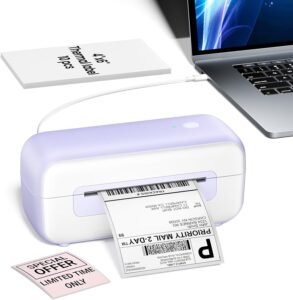
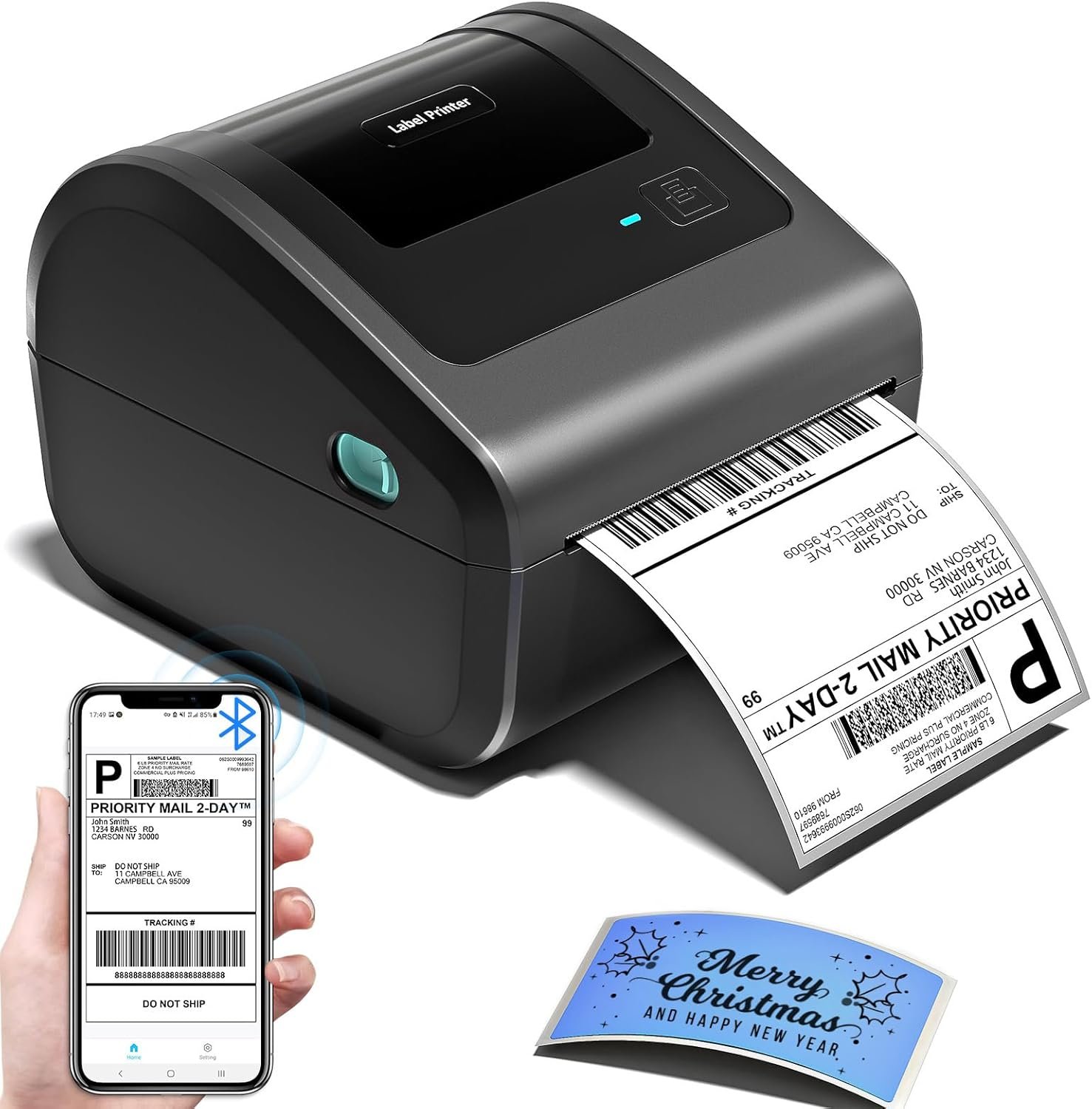
Bluetooth Shipping Label Printer 4×6 D450BT Review: Thermal Label Printer for Small Business
The Importance of Choosing the Right Printer for Your Workflow
In today’s fast-paced business environment, the right printer can significantly impact productivity and operational efficiency. Whether managing a small home office, running an e-commerce store, or coordinating warehouse logistics, the choice of printing technology directly affects output quality, speed, and cost-effectiveness. For tasks requiring high-volume, accurate, and consistent labeling—such as shipping packages, inventory management, or product pricing—the selection of a printer must align with specific workload demands. Thermal label printers, in particular, offer distinct advantages over inkjet or laser models due to their low maintenance, no-ink operation, and durability in industrial environments. However, factors such as connectivity options, print speed, media compatibility, and ease of integration with digital workflows play critical roles in determining a printer’s suitability for different use cases. This review evaluates the Omezizy D450BT Bluetooth shipping label printer, focusing on its design, technical specifications, and real-world applicability for businesses and individuals managing label-based tasks. By analyzing its performance metrics, connectivity features, and media compatibility, this guide helps users determine whether the D450BT aligns with their operational needs in 2026.
Quick Overview
| Feature | Details |
|---|---|
| Printer Type | Thermal label printer |
| Printing Technology | Thermal printing |
| Print Resolution | 203 dots per inch (black and white) |
| Print Speed | 72 labels per minute |
| Media Sizes | 1.75 x 2.5 inches to 4 x 6 inches |
| Connectivity | Bluetooth, USB |
| Duty Cycle | Continuous operation for light to moderate use |
| Ink/Toner System | No ink/toner required; thermal labels only |
| Warranty | Manufacturer warranty (terms not specified) |
The D450BT thermal label printer is designed for users requiring reliable, no-maintenance printing of shipping labels, barcodes, and product tags. Its compact size, dual connectivity options, and compatibility with major operating systems make it suitable for small businesses, home offices, and logistics operations. The built-in paper compartment and support for multiple media sizes enhance its versatility for tasks such as package labeling, inventory tracking, and pricing tags. However, its thermal printing technology and limited media options may restrict its use in high-volume or color-intensive environments.

Connectivity Options: Bluetooth and USB for Seamless Integration
The D450BT’s dual connectivity—Bluetooth and USB—provides flexibility for users across different computing platforms. Bluetooth integration allows for wireless printing from mobile devices, including iOS, Android, and Windows systems, eliminating the need for physical cables. This feature is particularly advantageous for users managing multiple devices or requiring mobility during label creation. The printer’s ability to pair instantly with these platforms reduces setup time and ensures compatibility with popular e-commerce platforms like Shopify and Etsy, which are critical for small business operations. Additionally, the USB port offers a reliable wired connection for users prioritizing stability over wireless convenience. However, the absence of Wi-Fi connectivity limits its use in fully networked environments, making it less suitable for large-scale operations requiring centralized printing management.

Bluetooth Pairing and Cross-Platform Compatibility
The D450BT’s Bluetooth connectivity supports pairing with a wide range of devices, including Android, iOS, Windows, macOS, and Linux systems. This cross-platform compatibility ensures that users can integrate the printer with their existing workflow without additional hardware or software. The printer’s ability to maintain stable connections with mobile devices enhances its utility for tasks such as on-the-go package labeling or real-time inventory updates. However, Bluetooth performance may vary depending on environmental factors, such as interference from other wireless devices, which could affect print reliability in crowded office spaces.
USB Port for Stable, Wired Printing
The USB port provides a direct, wired connection for users seeking consistent performance. This option is ideal for environments where wireless connectivity is unreliable or where users prefer the simplicity of a physical connection. The USB interface also supports all major operating systems, ensuring compatibility with both legacy and modern computing platforms. While the USB connection offers greater stability, it requires users to manage physical cables, which may be less convenient for mobile or frequently repositioned setups.
Integration with E-Commerce Platforms
The D450BT’s compatibility with platforms like Shopify, Etsy, and Amazon makes it a valuable tool for small businesses engaged in online sales. These integrations streamline the labeling process by allowing users to generate shipping labels directly from their e-commerce dashboards. However, the printer’s reliance on thermal labels and limited media sizes may require users to manage additional label stock or adjust label dimensions to fit specific package requirements.
Print Speed and Output Capacity: Balancing Efficiency and Workload
The D450BT’s print speed of 72 labels per minute is well-suited for moderate to high-volume label creation tasks. This speed ensures that users can quickly generate shipping labels, barcode tags, and product tags without significant delays. However, the printer’s performance is optimized for continuous operation within light to moderate workloads, making it less ideal for environments requiring extremely high print throughput. The printer’s duty cycle, while not explicitly specified, suggests that it is designed for regular use rather than constant, uninterrupted operation. This limitation means the D450BT may not be the best choice for large warehouses or logistics centers with massive label production demands. Instead, it excels in smaller-scale operations where speed and reliability are prioritized over raw output capacity.

Thermal Printing Efficiency for Label Tasks
Thermal printing technology enables the D450BT to produce high-quality labels without the need for ink or toner, reducing maintenance and operational costs. The printer’s 203 dots per inch resolution ensures clear, legible text and barcodes, which is critical for shipping and inventory management. However, thermal labels are sensitive to heat and light exposure, which could affect their longevity in certain environments. Users must consider the storage and handling conditions for printed labels to ensure they remain legible for their intended use period.
Media Compatibility and Label Management
The D450BT supports a range of label sizes, from 1.75 x 2.5 inches to 4 x 6 inches, allowing flexibility for different labeling needs. The built-in paper compartment holds up to 250 labels, reducing the frequency of label refills and minimizing downtime. However, the printer’s reliance on pre-cut labels means users must carefully manage label stock to avoid interruptions in the printing process. The lack of a dedicated label tray for continuous feeding could be a drawback for users requiring frequent label printing without manual intervention.
Media Compatibility and Label Options: Versatility for Diverse Applications
The D450BT’s support for multiple label sizes—ranging from 1.75 x 2.5 inches to 4 x 6 inches—makes it adaptable to various labeling tasks. This versatility is particularly beneficial for users managing different package dimensions or product types that require specific label formats. The printer’s ability to handle both narrow and wide labels enhances its utility for applications such as shipping, inventory tracking, and pricing tags. However, the reliance on pre-cut labels means users must ensure they have the correct label sizes on hand for each task, which could increase the complexity of label management. Additionally, the lack of a dedicated label tray for continuous feeding may limit its efficiency for high-volume label printing without manual intervention.

Label Material and Environmental Considerations
The D450BT is designed to work with thermal labels, which are known for their durability and resistance to fading under normal conditions. However, thermal labels are susceptible to damage from excessive heat, direct sunlight, and chemical exposure, which could affect their readability in certain environments. Users must consider the storage and handling conditions for printed labels to ensure they remain legible for their intended use period. For applications requiring long-term label retention, such as product tags or warehouse inventory, users may need to opt for alternative label materials or additional protective measures.
Built-In Paper Compartment and Label Management
The D450BT’s built-in paper compartment holds up to 250 labels, reducing the need for frequent refills and minimizing downtime during label creation. This feature is particularly advantageous for users who require consistent label printing without manual intervention. However, the printer’s reliance on pre-cut labels means users must manage their label stock carefully to avoid interruptions in the printing process. The lack of a dedicated label tray for continuous feeding could be a drawback for users requiring frequent label printing without manual intervention, making the D450BT more suitable for smaller-scale operations rather than large-volume environments.

Pros and Cons: Evaluating the D450BT’s Strengths and Limitations
Pros
- No Ink/Toner Required: The D450BT uses thermal labels instead of ink or toner, reducing maintenance costs and eliminating the need for frequent consumable replacements.
- Dual Connectivity: Bluetooth and USB ports provide flexibility for users across different computing platforms, enhancing integration with mobile and desktop workflows.
- Compact Design: The printer’s compact size (7.3 x 6.3 x 5.35 inches) makes it ideal for small offices or home environments where space is limited.
- Cross-Platform Compatibility: The printer supports iOS, Android, Windows, macOS, and Linux systems, ensuring seamless integration with a wide range of devices.
- High Print Resolution: The 203 dots per inch resolution ensures clear, legible text and barcodes, which is essential for shipping and inventory management.
- Built-In Label Holder: The integrated paper compartment holds up to 250 labels, reducing the need for frequent refills and minimizing downtime.
- Support for Multiple Media Sizes: The printer accommodates label sizes from 1.75 x 2.5 inches to 4 x 6 inches, offering versatility for different labeling tasks.
Cons
- Limited Media Compatibility: The D450BT is restricted to thermal labels and does not support continuous feeding for uncut label sheets, which may complicate label management.
- No Duplex Printing: The printer only produces single-sided labels, which may be a drawback for users requiring double-sided printing.
- No Color Printing: The thermal printing technology is limited to monochrome output, making it unsuitable for color-coded labels or graphics.
- No Wi-Fi Connectivity: The absence of Wi-Fi support limits its use in fully networked environments or for centralized printing management.
- Duty Cycle Restrictions: The printer is optimized for light to moderate use rather than continuous, high-volume operations, which may affect its suitability for large-scale logistics.
- Dependence on Pre-Cut Labels: The reliance on pre-cut labels requires users to manage label stock carefully, which could increase complexity for frequent label printing.
Final Verdict: Who This Printer Is Best For (and Who Should Skip It)
The Omezizy D450BT thermal label printer is best suited for small businesses, home offices, and individuals managing moderate to high-volume label creation tasks. Its compact design, dual connectivity options, and support for multiple label sizes make it ideal for shipping packages, inventory tracking, and product pricing. The printer’s no-ink operation and built-in label holder reduce maintenance and downtime, making it a cost-effective solution for users prioritizing reliability and ease of use. However, the D450BT is not the best choice for environments requiring continuous, high-volume printing or color-coded labels. Its reliance on thermal labels and lack of Wi-Fi connectivity may also limit its use in fully networked or industrial settings. For users needing advanced features such as color printing, duplex functionality, or centralized printing management, alternative printers with more robust capabilities would be a better fit.

Frequently Asked Questions (FAQs)
Is the D450BT compatible with iOS and Android devices?
Yes, the D450BT supports Bluetooth connectivity for iOS and Android devices, allowing seamless printing from mobile phones and tablets. It also includes a USB port for direct connection to computers.
What label sizes does the D450BT support?
The D450BT accommodates label sizes ranging from 1.75 x 2.5 inches to 4 x 6 inches, making it suitable for various labeling tasks such as shipping, inventory, and product tags.
Does the D450BT require ink or toner?
No, the D450BT uses thermal labels instead of ink or toner, eliminating the need for consumables and reducing maintenance requirements.
Can the D450BT print color labels?
The D450BT is a thermal label printer that only produces monochrome output. It does not support color printing or graphics, making it suitable for text-based and barcode labels.
How many labels can the D450BT hold at once?
The built-in paper compartment of the D450BT can hold up to 250 labels, reducing the frequency of label refills and minimizing downtime during printing.
Is the D450BT suitable for large-scale warehouse operations?
The D450BT is optimized for moderate use and may not be ideal for high-volume, continuous printing in large warehouses. Its duty cycle is suited for regular, light to moderate label creation tasks.
Can the D450BT connect to Wi-Fi networks?
No, the D450BT does not support Wi-Fi connectivity. It relies on Bluetooth and USB for printing, making it less suitable for fully networked environments.
What is the print speed of the D450BT?
The D450BT prints at a speed of 72 labels per minute, which is efficient for moderate to high-volume label creation tasks but may not meet the demands of extremely high-speed operations.