Pantum P2502W Plus Laser Printer Review: Monochrome Wireless Printing for Home and Office
The Importance of Choosing the Right Printer for Modern Workflows
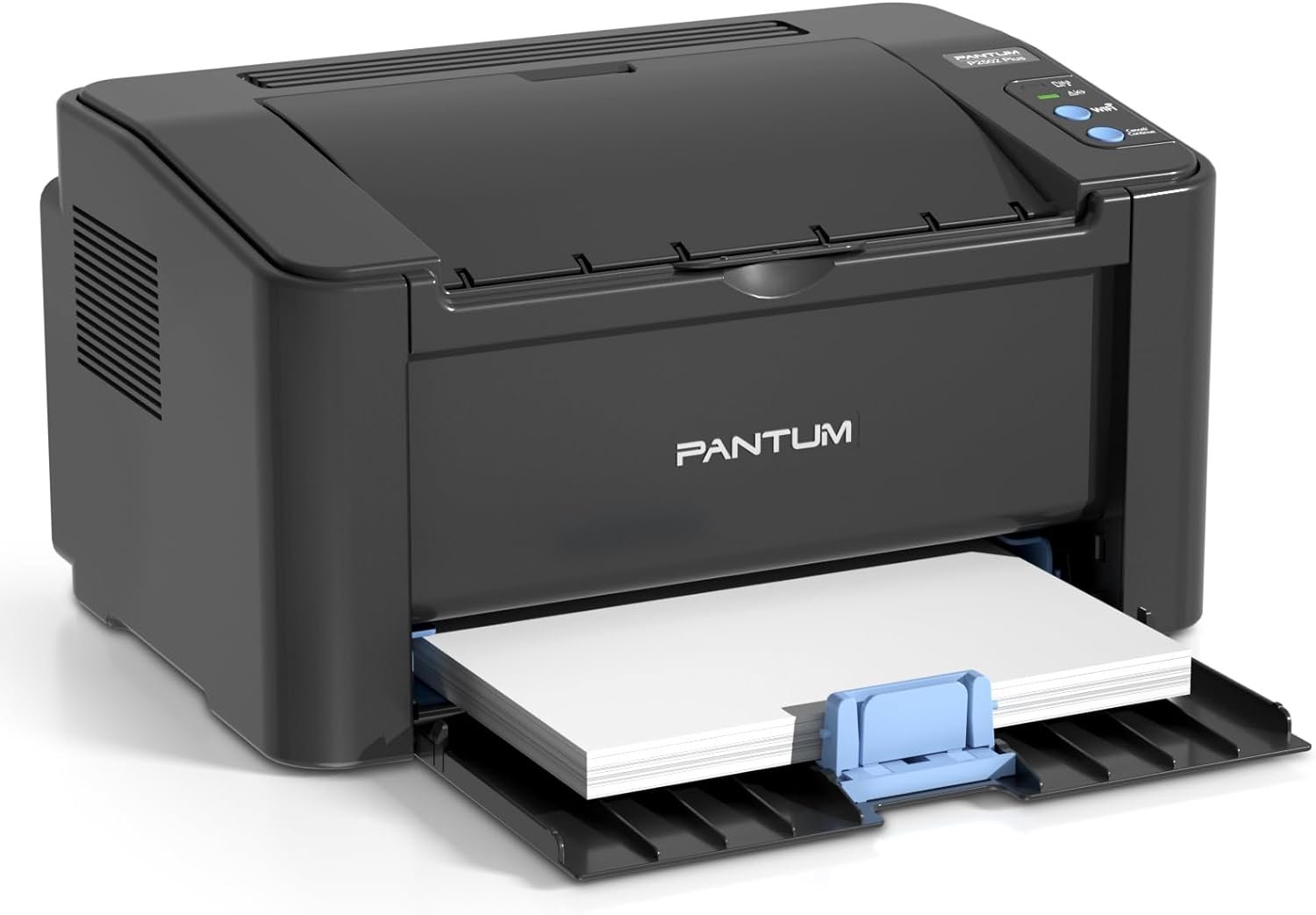
In today’s fast-paced digital environment, the role of a printer extends far beyond simple document duplication. Whether managing home office tasks, coordinating team projects, or handling administrative duties, the right printer can significantly impact productivity and workflow efficiency. For users requiring high-quality monochrome output, the Pantum P2502W Plus laser printer presents a compelling option. Its design and specifications cater to environments where reliability, speed, and connectivity are critical. From small businesses needing efficient document management to remote workers requiring portable printing solutions, understanding the technical capabilities and limitations of a printer is essential. This review evaluates the Pantum P2502W Plus based on industry-standard benchmarks, technical specifications, and aggregated customer insights to help users determine if this printer aligns with their specific needs. By focusing on factors such as print speed, media compatibility, connectivity options, and maintenance requirements, this analysis provides a data-driven overview of the printer’s suitability for various use cases. The goal is to equip buyers with the information necessary to make informed decisions about their printing needs without subjective biases or promotional language.
Quick Overview
| Feature | Details |
|---|---|
| Printer Type | Monochrome Laser Printer |
| Connectivity | Bluetooth, USB, 2.4GHz Wi-Fi |
| Print Speed | 23 pages per minute (black and white) |
| Media Sizes | Legal (8.5 x 14 inches), Letter (8.5 x 11 inches) |
| Supported Media | Card stock, envelopes, standard paper |
| Input Capacity | 150-sheet tray |
| Duty Cycle | Designed for moderate-volume office use |
| Toner System | Compatible with Pantum PB-212 toner cartridges |
| Warranty | Limited warranty coverage |
| Dimensions | 20″D x 13″W x 15″H |
| Weight | 12.17 pounds |
The Pantum P2502W Plus combines wireless connectivity with a compact design to address the needs of users prioritizing portability and ease of setup. Its 23 ppm print speed and support for multiple paper sizes make it suitable for both home and small office environments. The inclusion of a 700-page starter cartridge reduces initial setup time, while the dual-sided printing capability enhances efficiency for document management tasks. These features collectively position the printer as a viable option for users seeking a balance between performance and convenience.

Connectivity Options and Wireless Integration
The Pantum P2502W Plus offers a versatile connectivity framework, combining Bluetooth, USB, and 2.4GHz Wi-Fi to accommodate a range of device compatibility needs. This multi-interface approach ensures seamless integration with both desktop and mobile computing environments, allowing users to print from laptops, smartphones, and tablets without the need for additional hardware. The Bluetooth connectivity simplifies setup, enabling direct pairing with compatible devices, while the USB port provides a reliable wired alternative for users preferring physical connections. However, the printer’s reliance on 2.4GHz Wi-Fi excludes compatibility with 5GHz networks, which may limit its utility in environments with advanced wireless infrastructure. This limitation could affect users in high-density network environments where 5GHz is the preferred frequency. Despite this constraint, the combination of wireless and wired options ensures broad accessibility for most standard office and home setups.

Bluetooth and USB Connectivity
The Bluetooth feature of the Pantum P2502W Plus streamlines the printing process by enabling direct device pairing without the need for intermediary software. This is particularly beneficial for users who prioritize quick setup and minimal configuration steps. The USB port, on the other hand, offers a stable connection for users requiring consistent data transfer rates, especially when printing large document batches. Both connectivity options are well-suited for environments where reliability is paramount, such as small business offices or home workspaces with limited network complexity.
Wi-Fi Compatibility Constraints
While the 2.4GHz Wi-Fi capability ensures compatibility with a wide range of routers and devices, the exclusion of 5GHz support may pose challenges in environments where 5GHz networks are standard. This limitation could impact users in densely populated areas or corporate settings where 5GHz networks are preferred for their faster speeds and reduced interference. However, for most standard home and small office applications, the 2.4GHz Wi-Fi should suffice, provided the network is stable and adequately configured.
Device Compatibility and Setup
The printer’s support for Windows and Mac operating systems ensures broad compatibility with common computing platforms. The one-step driver installation process further simplifies the setup, reducing the learning curve for new users. This ease of integration is particularly advantageous for users who prioritize time efficiency and minimal technical overhead in their printing workflows.
Print Speed and Workload Capacity
The Pantum P2502W Plus delivers a maximum print speed of 23 pages per minute (ppm) for monochrome output, positioning it as a mid-range solution for environments requiring moderate to high-volume printing. This speed is well-suited for small businesses and home offices where daily print tasks range from routine document duplication to project-related reports. The printer’s duty cycle, designed for moderate-volume use, ensures long-term reliability without overstraining the internal components. However, users with extremely high print demands, such as those in large-scale commercial operations, may find the 23 ppm speed insufficient for maintaining optimal throughput. The printer’s performance is further influenced by the type of media used, with thicker or specialty paper potentially reducing print speed due to the additional processing required for these materials.

Monochrome Output Efficiency
As a monochrome laser printer, the Pantum P2502W Plus excels in producing sharp, high-contrast text and graphics. The laser printing technology ensures consistent quality across all print jobs, making it ideal for applications such as invoice printing, data sheets, and administrative documents. The absence of color capabilities, while limiting its use for graphic design or photo printing, is a deliberate design choice that optimizes performance for text-centric tasks. This focus on monochrome output also reduces maintenance requirements, as color toner systems typically involve more complex componentry and higher consumable costs.
Duty Cycle and Longevity
The printer’s duty cycle is tailored for environments with regular, but not excessive, print activity. This design ensures that the internal components, such as the laser unit and fuser, operate within safe thermal limits, extending the overall lifespan of the device. Users in environments with high print volumes should consider the printer’s specifications carefully, as prolonged operation beyond its recommended capacity may lead to increased wear and potential maintenance needs. The inclusion of a 700-page starter cartridge provides a buffer for initial use, but users requiring extended print runs should plan for regular toner replacements to maintain consistent performance.
Media Handling and Throughput
The printer’s ability to handle a variety of media types, including card stock and envelopes, enhances its versatility for different printing tasks. The adjustable paper tray and manual feed slot allow for greater flexibility in managing different paper sizes and thicknesses, reducing the need for manual adjustments during large print jobs. However, the printer’s throughput is influenced by the media type used, with thicker or textured paper potentially requiring additional processing time. This variability in print speed is a standard characteristic of laser printers and should be factored into user expectations for throughput efficiency.
Media Compatibility and Versatility
The Pantum P2502W Plus supports a range of media types, including standard paper, card stock, and envelopes, making it suitable for diverse printing needs. The adjustable paper tray and manual feed slot provide flexibility in handling different paper sizes, from letter to legal dimensions, while the support for specialty media like envelopes ensures the printer can accommodate a variety of document formats. This versatility is particularly beneficial for users who require the ability to print on different materials without switching devices. However, the printer’s media compatibility is limited to monochrome applications, as the absence of a color toner system restricts its use for color printing tasks. This limitation is a trade-off for the printer’s optimized performance in monochrome output, which is well-suited for administrative and business documents.

Paper Handling and Tray Configuration
The single paper tray with a maximum input capacity of 150 sheets is designed to streamline the printing process for most standard workflows. The adjustable tray allows users to accommodate different paper sizes, reducing the need for manual intervention during large print jobs. The manual feed slot provides an additional option for printing on specialty media, such as thick card stock or envelopes, which may not fit in the standard tray. This dual-tray approach enhances the printer’s adaptability to different printing requirements without compromising on efficiency.
Media Thickness and Print Quality
The printer’s ability to handle thicker media, such as card stock, is a key advantage for users requiring durable print outputs. The laser printing technology ensures that even with heavier paper, the print quality remains consistent, with sharp text and clear graphics. However, users printing on extremely thick or textured media may experience slight variations in print speed due to the additional processing required for these materials. This characteristic is typical of laser printers and should be considered when planning for large-scale print jobs involving specialty media.
Envelope and Specialty Printing
The support for printing on envelopes is a notable feature for users who frequently need to send out formal or business correspondence. The manual feed slot allows for precise placement of envelopes, ensuring that the print output is aligned correctly without the risk of misfeeds. This capability enhances the printer’s utility for tasks such as mailing invoices, contracts, and other official documents. However, the absence of a dedicated envelope feeder may require users to manually load envelopes, which could be less convenient for high-volume envelope printing tasks.
Toner Cartridge System and Maintenance
The Pantum P2502W Plus utilizes a toner cartridge system that is compatible with the Pantum PB-212 toner, ensuring a consistent supply of high-quality monochrome output. The inclusion of a 700-page starter cartridge provides users with a buffer for initial use, reducing the need for frequent toner replacements. The toner system is designed for easy maintenance, with the ability to replace cartridges without requiring specialized tools or technical expertise. However, the printer’s toner system is not compatible with third-party cartridges, which may limit cost-saving opportunities for users seeking alternative toner options. This restriction is a common feature in many laser printers, as original equipment manufacturer (OEM) toners are often optimized for performance and longevity.

Toner Compatibility and Replacement
The printer’s reliance on Pantum PB-212 toner cartridges ensures compatibility with the manufacturer’s recommended consumables, which are designed to deliver optimal print quality and longevity. The toner replacement process is straightforward, with the printer’s design allowing for easy access to the cartridge compartment. Users should note that the printer’s specifications do not support third-party toner cartridges, which may affect long-term cost considerations. This limitation is a standard practice in the laser printer industry, as OEM toners are often engineered to work seamlessly with the printer’s internal components.
Toner Efficiency and Page Yield
The 700-page starter cartridge provides a reasonable amount of print volume for initial use, making it suitable for users with moderate printing needs. The page yield is influenced by factors such as print density and media type, with higher density prints consuming more toner per page. Users should consider their printing habits when evaluating the toner cartridge’s longevity, as frequent use of high-density documents may require more frequent replacements. The printer’s toner system is designed to maintain consistent output quality throughout the cartridge’s lifespan, ensuring reliable performance for most standard printing tasks.
Maintenance and Longevity
The printer’s toner system is designed for low-maintenance operation, with the ability to replace cartridges without requiring technical expertise. The absence of color capabilities simplifies the maintenance process, as users do not need to worry about color toner management or potential clogging issues. The printer’s design also minimizes the risk of toner spillage, which is a common concern in laser printers. These factors contribute to the printer’s overall reliability and ease of use, making it a suitable option for users prioritizing simplicity and durability.

Pros and Cons
Pros
- Wireless Connectivity: The integration of Bluetooth and 2.4GHz Wi-Fi allows for seamless printing from multiple devices without the need for physical connections.
- High Print Speed: The 23 ppm print speed ensures efficient document processing for both small and medium-sized print jobs.
- Compact Design: The printer’s small footprint makes it ideal for home offices and spaces with limited room.
- Media Versatility: Support for card stock, envelopes, and various paper sizes enhances its adaptability to different printing needs.
- Starter Cartridge Inclusion: The pre-installed 700-page toner cartridge reduces initial setup time and provides immediate usability.
- Automatic Duplex Printing: The built-in duplex feature enhances efficiency by printing on both sides of the paper, reducing paper consumption.
- User-Friendly Setup: The one-step driver installation simplifies the setup process, minimizing technical barriers for new users.
- Robust Build Quality: The metal internal frame ensures durability and long-term reliability in moderate-use environments.
Cons
- 5GHz Wi-Fi Incompatibility: The printer’s reliance on 2.4GHz Wi-Fi may limit its effectiveness in environments with advanced wireless infrastructure.
- Limited Media Compatibility: While the printer supports a range of media types, its focus on monochrome output restricts its use for color printing tasks.
- No Scanning or Fax Capabilities: The absence of these features may be a drawback for users requiring multifunctional printing solutions.
- Toner Cartridge Limitations: The printer’s toner system is not compatible with third-party cartridges, which could affect long-term cost considerations.
- Moderate Duty Cycle: The printer is designed for moderate-volume use, making it less suitable for high-demand environments with continuous print operations.
- Manual Feed Requirements: While the manual feed slot provides flexibility for specialty media, it may require additional user intervention for frequent use.
Final Verdict: Who This Printer Is Best For (and Who Should Skip It)
The Pantum P2502W Plus is an excellent choice for users seeking a reliable, compact, and efficient monochrome laser printer for home and small office environments. Its 23 ppm print speed, wireless connectivity, and support for various media types make it well-suited for tasks such as document duplication, invoice printing, and administrative work. The inclusion of a 700-page starter cartridge and automatic duplex printing further enhance its value proposition for users prioritizing cost-effectiveness and efficiency. The printer’s compact design and user-friendly setup also make it an attractive option for remote workers and individuals with limited space.
However, users with high-volume printing needs, such as those in large-scale commercial operations or environments requiring color output, should consider alternative printers with higher duty cycles and multifunctional capabilities. The printer’s reliance on 2.4GHz Wi-Fi and lack of 5GHz compatibility may also be a drawback in environments with advanced wireless infrastructure. Additionally, the absence of scanning or fax functions could limit its utility for users requiring multifunctional printing solutions. Overall, the Pantum P2502W Plus is a strong contender for users who prioritize speed, portability, and simplicity in their printing workflows, but it may not be the best fit for more demanding or specialized printing requirements.

Frequently Asked Questions (FAQs)
Is the Pantum P2502W Plus compatible with 5GHz Wi-Fi networks?
The Pantum P2502W Plus only supports 2.4GHz Wi-Fi connectivity. It is not compatible with 5GHz networks, which may limit its effectiveness in environments with advanced wireless infrastructure.
What types of media can the Pantum P2502W Plus handle?
The printer supports standard paper, card stock, and envelopes. It is compatible with letter and legal sizes, making it suitable for a range of document printing needs.
How long does the 700-page starter cartridge last?
The 700-page starter cartridge provides a reasonable amount of print volume for initial use. Actual page yield may vary based on print density and media type.
Can the Pantum P2502W Plus print on both sides of the paper?
Yes, the printer includes an automatic duplex printing feature, allowing for efficient two-sided printing and reduced paper consumption.
Is the Pantum P2502W Plus suitable for high-volume printing?
The printer is designed for moderate-volume use and may not be ideal for high-demand environments with continuous print operations. Its duty cycle is optimized for standard office and home use.
Does the Pantum P2502W Plus support scanning or faxing?
The Pantum P2502W Plus is a monochrome laser printer with no scanning or fax capabilities. It is designed for print-only functions.
What is the print speed of the Pantum P2502W Plus?
The printer delivers a maximum print speed of 23 pages per minute (ppm) for monochrome output, making it suitable for efficient document processing.
Can the Pantum P2502W Plus be used with third-party toner cartridges?
The Pantum P2502W Plus is designed to work exclusively with Pantum PB-212 toner cartridges. It does not support third-party toner options, which may affect long-term cost considerations.