Phomemo M08E Portable Thermal Printer Review: 2026 Buyer’s Guide

The Importance of Choosing the Right Printer for Modern Workflows
In today’s fast-paced business environment, the ability to produce high-quality documents quickly and efficiently has become a critical requirement for professionals across industries. Whether managing client contracts on a business trip, generating shipping labels during a delivery run, or preparing class handouts for students, the right printer can significantly impact productivity and operational efficiency. With the rise of remote work and mobile professionals, portable printing solutions have emerged as essential tools for maintaining workflow continuity. However, selecting the optimal printer requires careful consideration of factors such as print technology, connectivity options, media compatibility, and long-term maintenance costs. This review examines the Phomemo M08E portable thermal printer, a device designed to meet the demands of on-the-go printing while balancing performance, usability, and cost-effectiveness. By analyzing its technical specifications, connectivity features, and real-world applications, this guide provides actionable insights for users evaluating thermal printing solutions for personal, office, or field use in 2026.
Quick Overview
| Feature | Details |
|---|---|
| Printer Type | Wireless Bluetooth/USB-C portable thermal printer |
| Print Technology | Inkless thermal printing |
| Supported Media | 8.5” x 11” US Letter thermal paper only |
| Print Resolution | 203 dpi (standard) |
| Print Speed | Up to 50 mm/s (approx. 150 pages per hour) |
| Connectivity | Bluetooth 5.0, USB-C (requires driver installation) |
| Battery Life | 1200mAh rechargeable battery (140 sheets on single charge) |
| Duty Cycle | Continuous printing with thermal paper |
| Warranty | 1-year limited warranty |
| Weight | 1.54 pounds (approx. 700 grams) |
| Dimensions | 2.36 x 11.42 x 1.18 inches (60 x 290 x 30 mm) |
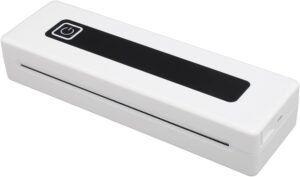
The Phomemo M08E represents a compact thermal printing solution tailored for users requiring mobility without compromising print quality. Its inkless design eliminates the need for costly consumables, while the built-in battery ensures operation in environments without immediate access to power outlets. The device’s compatibility with both Bluetooth and USB-C interfaces provides flexibility for different connectivity needs, though its reliance on thermal paper introduces specific media requirements. These specifications make the M08E particularly well-suited for applications where portability and minimal maintenance are priorities, such as field work, travel, or temporary office setups.

Thermal Printing Technology: A Cost-Effective Alternative
Thermal printing technology has evolved significantly in recent years, offering a reliable and low-maintenance solution for short-run printing tasks. The Phomemo M08E leverages advanced thermal printing principles to produce crisp, high-contrast output without the need for ink or toner. This technology utilizes a heated print head to create images on thermal paper, which is coated with a heat-sensitive layer. The absence of moving parts and consumables reduces mechanical complexity and maintenance requirements, making it an attractive option for users seeking simplicity in their printing workflows. However, thermal printing is inherently limited to black-and-white output, which may be a drawback for applications requiring color printing. Additionally, thermal paper has a shorter shelf life compared to standard copy paper, necessitating careful storage to prevent degradation of print quality over time.

Inkless Operation and Reduced Maintenance
The M08E’s inkless thermal printing system eliminates the need for regular ink or toner refills, reducing long-term operational costs. This design also minimizes the risk of clogging or mechanical failures associated with traditional inkjet or laser printers. The absence of a ribbon or ink cartridge simplifies the maintenance process, as users only need to replace the thermal paper roll when depleted. However, the reliance on thermal paper introduces specific storage and handling requirements, as exposure to heat, light, or humidity can compromise print quality. Users must ensure the paper is stored in a cool, dry environment to maintain its integrity and longevity.
Print Quality and Media Compatibility
Thermal printing produces high-contrast, sharp text and graphics suitable for business documents, labels, and receipts. The M08E’s 203 dpi resolution ensures legibility for most standard print tasks, though it may not match the fine detail capabilities of laser or high-end inkjet printers. The device is designed for use with 8.5” x 11” US Letter thermal paper, which is widely available in office supply stores. However, the limited media compatibility means users cannot utilize standard copy paper, which may be a consideration for those accustomed to traditional printing methods. The printer’s ability to produce consistent, smudge-free output on thermal paper makes it ideal for applications where durability and readability are critical, such as shipping labels or invoices.
Environmental Considerations and Paper Lifespan
Thermal paper contains a chemical coating that can degrade over time, particularly when exposed to heat or light. While the M08E does not require additional chemical treatments, users must be mindful of the paper’s shelf life, which is typically around 2-3 years under optimal storage conditions. This limitation may affect long-term archival use, as thermal prints may fade or become illegible over time. For users requiring permanent documentation, alternative printing methods or archival-quality paper may be necessary. The printer’s design prioritizes convenience and portability over extended media longevity, aligning with its intended use cases for temporary or transactional documents.
Battery Life and Portability: Powering On-the-Go Printing
The Phomemo M08E’s 1200mAh rechargeable battery provides a significant advantage for users requiring mobility without access to power outlets. A single charge enables continuous printing of 140 sheets of 8.5” x 11” thermal paper, making it suitable for short to medium-length printing sessions. This battery capacity is particularly beneficial for field workers, travelers, or remote office setups where access to a power source is limited. The device’s lightweight design and compact dimensions further enhance its portability, allowing users to carry it easily in a backpack, briefcase, or vehicle. However, the battery life may not be sufficient for extended use, such as printing hundreds of pages for a large project, which could require frequent recharging or access to a power source.

Power Management and Charging Options
The M08E’s battery is designed for efficient power management, with a built-in charging circuit that optimizes energy consumption during printing. Users can charge the device via USB-C, which is compatible with most modern laptops and power banks. This flexibility allows for charging in various environments, from office workstations to travel accommodations. However, the absence of a power adapter or wall charger may necessitate reliance on USB-C docks or portable power banks for extended use. The printer’s energy efficiency is a key factor in its portability, as it minimizes the need for frequent recharging while maintaining consistent performance.
Environmental Impact and Sustainability
The M08E’s inkless design contributes to its environmental sustainability by eliminating the need for disposable ink cartridges or toner refills. This reduces electronic waste and the associated environmental impact of traditional printing solutions. However, the reliance on thermal paper raises questions about the sustainability of the media itself, as thermal paper contains chemicals that may have environmental implications during production and disposal. Users concerned about sustainability may need to consider the lifecycle impact of thermal paper versus traditional copy paper, though the M08E’s design prioritizes convenience over extended environmental considerations.
Longevity and Battery Degradation
While the M08E’s battery is designed for reliable performance, its longevity may be affected by frequent charging cycles and usage patterns. Lithium polymer batteries, like those used in the M08E, typically maintain their capacity for several years with proper care. However, prolonged use or exposure to extreme temperatures may reduce battery efficiency over time. Users should monitor battery performance and consider replacing the battery if significant degradation occurs, though the device does not include a replaceable battery. This design choice simplifies maintenance but may require users to replace the entire device if battery life diminishes beyond acceptable levels.
Connectivity Options: Bluetooth and USB-C for Versatile Use
The Phomemo M08E offers dual connectivity options—Bluetooth 5.0 and USB-C—providing flexibility for different printing scenarios. Bluetooth connectivity enables wireless printing from smartphones, tablets, or laptops, eliminating the need for physical cables. This feature is particularly useful for users who prioritize mobility and convenience, as it allows for printing from various devices without the hassle of managing cables. However, Bluetooth printing may be subject to interference from other wireless devices, potentially affecting print reliability in high-density environments. The USB-C interface, while requiring driver installation, offers a more stable connection for desktop users, ensuring consistent performance for document printing.

Bluetooth Printing: Convenience and Limitations
The Bluetooth 5.0 connectivity in the M08E ensures a stable and relatively fast wireless printing experience. Users can print documents, images, and web pages directly from their mobile devices by connecting to the printer via the Phomemo app. This feature is ideal for on-the-go printing, such as generating invoices or boarding passes while traveling. However, the reliance on Bluetooth may introduce latency or connectivity issues in environments with multiple wireless signals, such as crowded office spaces or public venues. Additionally, the range of Bluetooth connectivity is limited compared to wired solutions, which may affect usability in certain scenarios.
USB-C Connectivity: Stability and Compatibility
The USB-C port provides a reliable alternative for users who prefer wired connections. By installing the necessary drivers, users can connect the M08E to their laptops or desktop computers for seamless printing. This method is particularly advantageous for printing large documents or ensuring consistent print quality, as it eliminates the potential for wireless interference. However, the requirement to install drivers may be a barrier for users unfamiliar with printer setup processes, particularly in environments where technical support is limited. The USB-C interface also adds to the device’s weight and size, which may be a consideration for users prioritizing extreme portability.
Cross-Platform Compatibility and Driver Requirements
The M08E’s compatibility with both Bluetooth and USB-C interfaces ensures versatility across different devices and operating systems. However, the need to install drivers for USB-C printing may complicate the setup process for some users. While the Phomemo app simplifies Bluetooth connectivity, the absence of a universal driver may limit the printer’s usability in certain computing environments. Users should verify the availability of drivers for their specific operating system before purchasing, as this factor can significantly impact the overall user experience.
Network and Device Limitations
While the M08E’s connectivity options provide flexibility, they also introduce limitations in terms of network requirements and device compatibility. Bluetooth printing requires a stable wireless signal, and the printer’s performance may be affected by environmental factors such as walls or other obstructions. Similarly, USB-C printing depends on the availability of compatible ports and the correct drivers, which may not be universally supported across all devices. These limitations highlight the importance of considering the user’s specific workflow and connectivity needs before selecting the M08E as a primary printing solution.

Pros & Cons
Pros
- Inkless Thermal Printing: Eliminates the need for ink or toner, reducing long-term operational costs and maintenance requirements.
- Portable Design: Weighs only 1.54 pounds and has compact dimensions, making it ideal for travel, field work, or mobile use.
- Dual Connectivity: Offers Bluetooth 5.0 and USB-C options, providing flexibility for wireless and wired printing.
- Long Battery Life: 1200mAh battery supports 140 sheets of thermal paper on a single charge, suitable for short to medium-length printing sessions.
- High-Contrast Output: Produces crisp, smudge-free prints with 203 dpi resolution, suitable for business documents and labels.
- User-Friendly Setup: Includes a dedicated app for Bluetooth pairing and straightforward USB-C connection instructions for desktop users.
- Lightweight and Durable: Constructed from Acrylonitrile Butadiene Styrene (ABS) material, ensuring durability while maintaining a lightweight profile.
- Cost-Effective for Short Runs: Ideal for applications requiring minimal print volumes, such as receipts, invoices, or temporary documents.
Cons
- Limited Media Compatibility: Only supports thermal paper, which may be less accessible than standard copy paper and has a shorter shelf life.
- Black-and-White Only: Cannot produce color prints, which may be a drawback for users requiring colored output.
- Battery Life Limitations: While sufficient for short sessions, the 1200mAh battery may not support extended printing without recharging.
- Driver Installation Required: USB-C printing necessitates driver installation, which may be a barrier for less technically inclined users.
- Connectivity Range Constraints: Bluetooth printing may be affected by environmental interference, potentially impacting reliability in crowded areas.
- Environmental Impact of Thermal Paper: The chemical composition of thermal paper raises sustainability concerns compared to traditional paper.
- No Replaceable Battery: Battery degradation over time may require replacing the entire device rather than just the power source.
- Limited Print Speed for High-Volume Use: While suitable for moderate workloads, the printer may struggle with large print jobs due to its thermal printing mechanism.
Final Verdict: Who This Printer Is Best For (and Who Should Skip It)
The Phomemo M08E portable thermal printer is an excellent choice for users who prioritize portability, minimal maintenance, and cost-effective short-run printing. Its inkless design, lightweight construction, and dual connectivity options make it particularly well-suited for travelers, field workers, and remote professionals who need to print documents on the go. The 1200mAh battery provides sufficient power for most short to medium-length printing sessions, while the high-contrast output ensures readability for business documents, labels, and receipts. The device’s compatibility with both Bluetooth and USB-C interfaces adds versatility, though users should be prepared to install drivers for USB-C printing.
However, the M08E is not ideal for users requiring color printing, high-volume document production, or extended battery life. Its reliance on thermal paper introduces specific media requirements and environmental considerations, which may be a drawback for those accustomed to traditional printing methods. Additionally, the limited connectivity range and the need for driver installation may pose challenges for users in environments with limited technical support. For individuals or businesses with consistent printing needs that exceed the M08E’s capabilities, alternative solutions such as inkjet or laser printers may offer better long-term value. Overall, the M08E excels in scenarios where portability and simplicity are paramount, making it a compelling option for specific use cases in 2026.

Frequently Asked Questions (FAQs)
What type of printing technology does the Phomemo M08E use?
The Phomemo M08E employs thermal printing technology, which uses a heated print head to produce images on thermal paper without the need for ink or toner. This design eliminates the need for consumables and reduces maintenance requirements.
Can the Phomemo M08E print on regular copy paper?
No, the Phomemo M08E is designed to work exclusively with thermal paper. It does not support standard copy paper, as the thermal printing process requires a heat-sensitive coating found only on thermal paper.
How long does the Phomemo M08E’s battery last?
The built-in 1200mAh rechargeable battery allows the Phomemo M08E to print up to 140 sheets of 8.5” x 11” thermal paper on a single charge, making it suitable for short to medium-length printing sessions.
What connectivity options does the Phomemo M08E offer?
The Phomemo M08E provides both Bluetooth 5.0 and USB-C connectivity. Bluetooth allows wireless printing from smartphones and tablets, while USB-C requires driver installation for desktop printing.
Is the Phomemo M08E suitable for color printing?
No, the Phomemo M08E is a black-and-white thermal printer. It does not support color printing, which may be a limitation for users requiring colored output.
How do I install the thermal paper and clean the print head?
To install thermal paper, use 8.5” x 11” US Letter size with the printing side facing down. Clean the print head using an alcohol wipe to remove adhesive residue or foreign objects, especially around the cutting section.
What are the limitations of using thermal paper with the Phomemo M08E?
Thermal paper has a shorter shelf life compared to standard copy paper and is sensitive to heat, light, and humidity. Proper storage is required to maintain print quality, and the chemical coating may raise environmental concerns.
Can the Phomemo M08E be used for high-volume printing?
The Phomemo M08E is designed for moderate print volumes and may not be suitable for high-volume use. Its thermal printing mechanism and battery life are optimized for short to medium-length printing sessions.