Phomemo M832 Portable Thermal Printer Review: Best for Travel, Home, and Small Business Use
The Importance of Choosing the Right Printer for Your Workflow
In today’s fast-paced digital environment, the ability to produce clear, reliable printed documents quickly and efficiently is critical for both personal and professional use. Whether you’re managing a small business, working remotely, or traveling frequently, the right printer can streamline tasks, reduce errors, and ensure consistent output. Printers vary widely in technology, performance, and design, making it essential to evaluate factors such as print quality, speed, connectivity, and portability. For users who require mobility and simplicity, a portable printer like the Phomemo M832 offers a compelling solution. This device combines thermal printing technology with wireless connectivity, enabling users to print from smartphones, tablets, and computers without the need for ink or toner. However, its suitability depends on specific needs, such as print volume, media compatibility, and environmental conditions. Understanding these factors helps users determine whether the Phomemo M832 aligns with their workflow requirements, whether for home use, office tasks, or on-the-go printing.
Quick Overview
| Feature | Details |
|---|---|
| Printer Type | Thermal portable printer |
| Printing Technology | Thermal printing (no ink/toner required) |
| Supported Functions | Print only |
| Print Resolution | 300 dpi (black and white) |
| Media Sizes | 8.5” x 11” (Letter), A4, 4.33”, 3.14”, 2.08” |
| Connectivity Options | Bluetooth (via Phomemo app), USB Type-C |
| Duty Cycle | Continuous use with thermal paper |
| Ink/Toner System | No ink or toner required |
| Warranty | Limited warranty |
| Weight | 700 grams (1.54 pounds) |
| Dimensions | 12.2” D x 4.3” W x 4.5” H (10.39 x 3.07 x 1.77 inches) |
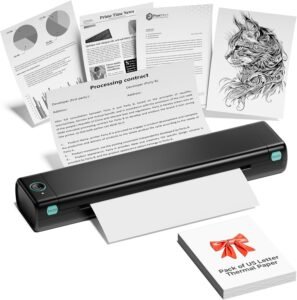
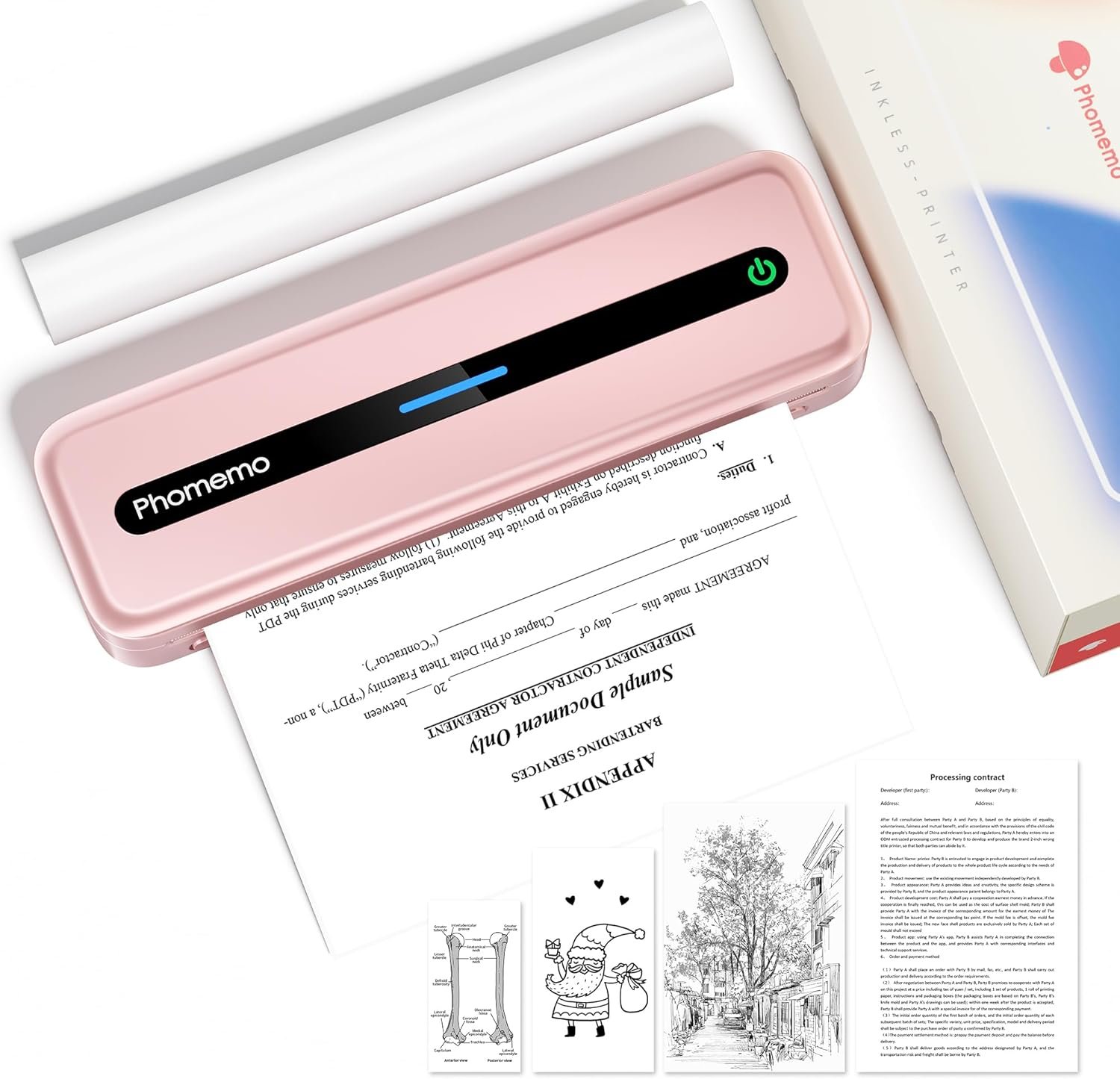
The Phomemo M832 is designed for users who prioritize portability and simplicity. Its thermal printing technology eliminates the need for ink or toner, reducing consumable costs and maintenance. The device’s compact size and built-in battery make it ideal for travel, home, or small business environments. However, its reliance on thermal paper and limited color capabilities may make it less suitable for high-volume or complex printing tasks.

Portability and Battery Life: Ideal for Mobile Use
The Phomemo M832’s compact design and integrated battery make it a strong contender for users who need a printer that can be used on the go. Weighing only 700 grams and featuring a 2600mAh rechargeable battery, the printer is lightweight enough to carry during travel while still offering sufficient power for extended use. According to manufacturer specifications, a fully charged battery can support up to 150 sheets of 8.5” x 11” thermal paper, which is suitable for short trips or frequent on-the-go printing. The included storage case provides additional protection, making it practical for use in various environments. However, the battery life may be insufficient for users who require continuous printing over extended periods without access to a power source.

Battery Capacity and Charging Time
The 2600mAh battery ensures the M832 can operate for several hours without recharging, though the exact duration depends on print volume and paper size. Users should expect a charging time of approximately 2–3 hours to reach full capacity. While this is reasonable for a portable device, it may not meet the needs of users who require longer battery life for extended trips or fieldwork.
Portability for Travel and Field Use
The printer’s lightweight design and included case make it easy to transport, which is ideal for travelers, field workers, or remote professionals. The Bluetooth connectivity simplifies setup, allowing users to print from smartphones or tablets without additional cables. However, the lack of USB connectivity for direct tablet use may limit its versatility in certain scenarios.
Power Source Flexibility
The M832’s reliance on a rechargeable battery means it cannot be used as a standalone power source for other devices. Users must ensure they have access to a power outlet for regular charging, which may be a limitation for those in areas with unreliable electricity.
Print Quality and Resolution: Clear Text for Basic Needs
The Phomemo M832 delivers black-and-white print output with a resolution of 300 dpi, which is sufficient for producing clear, legible text for documents, receipts, and invoices. Thermal printing technology ensures consistent output without the need for ink or toner, making it cost-effective for users who prioritize simplicity. However, the lack of color printing capabilities may limit its use for tasks requiring visual differentiation or branding elements.

Text Clarity and Legibility
The 300 dpi resolution provides adequate text clarity for most basic printing needs. Users can expect sharp, readable text for forms, labels, and simple reports. However, the thermal printing process may result in slight variations in tonal consistency, which could affect the appearance of detailed text or graphics.
Media Compatibility and Paper Quality
The printer supports multiple paper sizes, including standard Letter and A4 formats, as well as narrower thermal rolls. While this flexibility accommodates various use cases, the reliance on thermal paper may limit compatibility with certain media types. Thermal paper is prone to fading over time, which could be a concern for documents requiring long-term archival.
Print Speed and Throughput
The M832’s maximum print speed of 5 ppm (pages per minute) is suitable for low-volume printing tasks. While this may be adequate for home or small business use, it may not meet the demands of high-volume environments where faster printing is required. The printer’s performance is optimized for simplicity rather than speed, which aligns with its intended use cases.
Connectivity and Compatibility: Seamless Integration with Devices
The Phomemo M832 offers Bluetooth and USB connectivity options, allowing users to print from a variety of devices. The Bluetooth connection requires the Phomemo app for setup, which simplifies the process for smartphone and tablet users. However, the lack of direct USB connectivity for tablets may limit its usability in certain scenarios. The USB Type-C interface provides a reliable option for laptop and desktop users, ensuring compatibility with most modern operating systems.

Bluetooth Setup and App Integration
Connecting the M832 via Bluetooth requires the Phomemo app, which guides users through the pairing process. The app simplifies device management and allows users to select print settings, such as paper size and file type. While this setup is user-friendly, the reliance on the app may be a drawback for users who prefer direct device connections.
USB Compatibility and Driver Requirements
For laptop and desktop use, the M832 requires USB Type-C connectivity and the appropriate drivers. The manufacturer provides drivers for Windows, macOS, and Linux systems, ensuring broad compatibility. However, users must download and install drivers separately, which may be an inconvenience for those unfamiliar with software setup.
Cross-Platform Support
The M832 supports Android, iOS, Windows, macOS, and Linux devices, making it a versatile option for users with mixed computing environments. The lack of built-in Wi-Fi connectivity means users must rely on Bluetooth or USB for network-based printing, which may be a limitation for those requiring more advanced connectivity features.

Pros and Cons: Evaluating the Phomemo M832’s Strengths and Limitations
Pros
- Portability and Battery Life: The M832’s compact size and integrated battery make it ideal for travel and on-the-go use, with a 150-sheet print capacity per charge.
- No Ink or Toner Required: Thermal printing eliminates the need for consumables, reducing long-term costs and maintenance.
- Multiple Paper Sizes: Support for Letter, A4, and narrower thermal rolls accommodates various printing needs.
- Simple Setup: The Phomemo app streamlines Bluetooth pairing, making it user-friendly for smartphone and tablet users.
- Built-in Storage Case: The included case provides 360° protection, enhancing durability for mobile use.
- Compatibility with Multiple Devices: The printer works with Android, iOS, Windows, macOS, and Linux systems, ensuring broad usability.
Cons
- Limited Color Printing: The thermal printing technology only supports black-and-white output, which may not meet the needs of users requiring color documents.
- No Direct Tablet USB Connectivity: Tablets cannot connect via USB, requiring Bluetooth or the Phomemo app for setup.
- Thermal Paper Dependency: The printer requires thermal paper, which is prone to fading and may not be compatible with all media types.
- Print Speed Constraints: The 5 ppm print speed is suitable for low-volume tasks but may be inadequate for high-throughput environments.
- No Built-in Wi-Fi: The lack of Wi-Fi connectivity limits network-based printing options, requiring Bluetooth or USB connections.
- Limited Warranty Coverage: The limited warranty may not provide sufficient support for long-term use or repairs.
Final Verdict: Best for Travelers, Home Users, and Small Businesses
The Phomemo M832 is an excellent choice for users who prioritize portability, simplicity, and cost-effectiveness. Its thermal printing technology, combined with Bluetooth and USB connectivity, makes it ideal for travelers, remote workers, and small businesses that require occasional printing without the need for ink or toner. The built-in battery and compact design ensure it can be used in various environments, from home offices to fieldwork scenarios. However, its limitations in color printing, print speed, and connectivity options make it less suitable for high-volume or complex printing tasks. Users who require advanced features such as color output, faster printing, or Wi-Fi connectivity may find the M832 insufficient for their needs. Overall, the M832 is a practical solution for those seeking a lightweight, low-maintenance printer that meets basic printing requirements in diverse settings.

Frequently Asked Questions (FAQs)
Can the Phomemo M832 print color documents?
The Phomemo M832 uses thermal printing technology, which only produces black-and-white output. It does not support color printing, making it suitable for text-based documents, receipts, and invoices rather than color graphics or images.
How long does it take to charge the M832 printer?
The M832 printer’s 2600mAh battery takes approximately 2–3 hours to fully charge. This charging time is sufficient for most short-term travel or home use scenarios, though extended use may require frequent recharging.
What paper sizes does the M832 support?
The M832 printer supports multiple paper sizes, including standard Letter (8.5” x 11”), A4, 4.33”, 3.14”, and 2.08” widths. This versatility makes it suitable for printing receipts, invoices, and various document formats.
Is the M832 compatible with tablets?
The M832 printer can connect to tablets via Bluetooth through the Phomemo app, but it does not support direct USB connectivity for tablets. Users must rely on the app for setup and printing from tablet devices.
What is the print resolution of the M832?
The M832 printer offers a maximum black-and-white print resolution of 300 dpi, which ensures clear and legible text for most basic printing tasks such as forms, labels, and reports.
Can the M832 print shipping labels?
The M832 is not designed for printing shipping labels. It supports thermal paper for standard document printing but lacks the necessary features for label creation, such as barcode or RFID capabilities.
How long does the battery last on a single charge?
A fully charged M832 battery can print up to 150 sheets of 8.5” x 11” thermal paper. This capacity is suitable for short trips or infrequent use, though extended printing sessions may require recharging.
What is the warranty coverage for the M832?
The M832 comes with a limited warranty, which covers manufacturing defects but may not include extended support or repair services. Users should review the warranty terms for specific coverage details.