MS-Z10 Handheld Inkjet Printer Review: Portable, High-Quality Printing for Text, Barcodes, and QR Codes
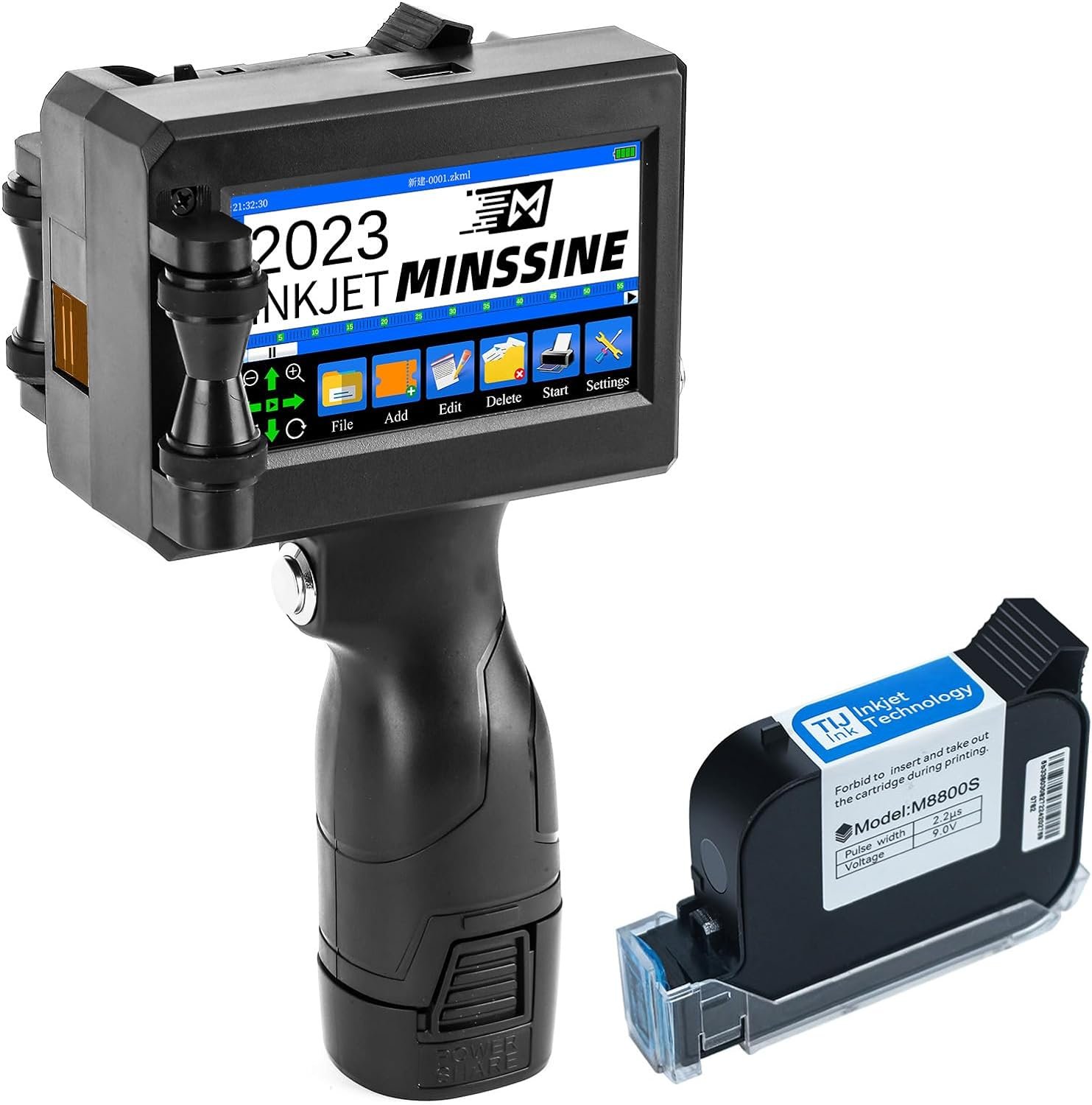
The Importance of Choosing the Right Printer
In today’s fast-paced environments, the ability to produce accurate, durable prints quickly can significantly impact productivity and operational efficiency. Whether in a retail setting, warehouse, or on-the-go scenario, the right printer must balance speed, versatility, and reliability. Modern printing needs often extend beyond traditional office tasks, requiring devices that can handle everything from text labels to complex barcodes and QR codes. This necessitates a deep understanding of print technology, media compatibility, and performance metrics. For instance, a printer used in logistics must deliver consistent results on corrugated surfaces, while a handheld device for retail applications must prioritize portability and ease of use. The MS-Z10 handheld inkjet printer represents a solution tailored for these diverse demands, offering a compact design with advanced printing capabilities. However, selecting the optimal printer requires evaluating factors such as print resolution, media adaptability, connectivity options, and long-term maintenance requirements. This review provides an in-depth analysis of the MS-Z10, focusing on its technical specifications, real-world applications, and suitability for various user profiles. By examining its performance benchmarks, supported media types, and operational constraints, this guide aims to help buyers make informed decisions based on their specific printing needs.
Quick Overview
| Feature | Details |
|---|---|
| Printer Type | Handheld Inkjet Printer |
| Technology | Water-based inkjet printing |
| Supported Functions | Text, barcodes, QR codes, logos, dates, batch numbers |
| Print Resolution | 300, 400, and 600 DPI |
| Media Compatibility | Carton boxes, metal boards, wood, glass, curved surfaces |
| Connectivity | USB, PC compatibility |
| Duty Cycle | Designed for moderate to high-volume applications |
| Ink System | 42ml quick-drying black ink cartridge |
| Support Coverage | 12-hour technical response |
The MS-Z10’s combination of high-resolution printing, versatile media compatibility, and USB connectivity positions it as a practical solution for users requiring on-demand labeling and marking. Its compact design and water-based ink system make it suitable for environments where portability and quick drying are priorities. However, the absence of permanent ink and limited media options may affect its suitability for certain industrial applications.

Print Quality and Resolution
The MS-Z10’s ability to produce high-quality prints is largely determined by its resolution capabilities and ink formulation. The printer supports three distinct print resolutions: 300, 400, and 600 DPI, allowing users to balance print clarity with speed. Higher DPI settings ensure sharper text and more detailed graphics, which is critical for applications requiring precise labeling, such as product packaging or inventory tracking. However, the water-based ink used in the 42ml cartridge may not provide the same level of permanence as permanent inks, which could affect long-term durability on certain surfaces. This trade-off between print quality and ink longevity is a key consideration for users in environments where labels must withstand harsh conditions.

Surface Adaptability and Media Compatibility
The MS-Z10’s versatility in handling different surfaces is a significant advantage for users requiring flexible printing solutions. The printer is designed to work on a wide range of materials, including carton boxes, metal boards, wood, glass, and even curved surfaces. This adaptability is achieved through its adjustable printing height, which ranges from 0.078 inches to 0.5 inches, allowing for precise alignment on uneven or irregular surfaces. The inclusion of an auxiliary positioning plate further enhances stability, ensuring consistent results across diverse materials. However, the effectiveness of printing on non-traditional surfaces may depend on the surface’s texture and absorbency, which could influence ink adhesion and drying time.
Multi-Language Support and Customization
The MS-Z10’s support for multiple languages, including English, Spanish, Japanese, and others, makes it an attractive option for international markets or multilingual environments. Users can customize prints directly on the device or import content via USB, offering flexibility for both simple text labels and complex graphics. This feature is particularly beneficial for businesses operating in regions with diverse linguistic requirements, as it eliminates the need for additional translation tools. However, the reliance on preloaded language options may limit customization for users requiring specialized or localized content.
Ink Drying Time and Water Resistance
The MS-Z10’s quick-drying ink cartridge is engineered to reduce drying time, ensuring that printed surfaces are ready for use shortly after printing. This is particularly useful in environments where rapid turnaround is essential, such as retail or logistics settings. The water-resistant properties of the ink also provide some protection against accidental spills or exposure to moisture, though it is important to note that the ink is not permanent. This characteristic may affect its suitability for applications requiring long-term durability, such as outdoor signage or industrial markings. Users should consider the environmental conditions in which the printer will be used to determine whether the ink’s properties align with their needs.
Portability and User Experience
The MS-Z10’s compact design and lightweight build make it an ideal choice for users who require a portable printing solution. Weighing just 1.2 pounds, the printer is easy to carry and operate in various settings, from warehouse floors to field operations. The 4.3-inch touch screen provides an intuitive interface for navigating print settings and managing tasks, reducing the learning curve for new users. Additionally, the inclusion of essential accessories and a suitcase-style packaging enhances its usability for on-the-go applications. However, the lack of a built-in power source means users must rely on external lithium-ion batteries, which may limit its convenience for extended use without access to charging facilities.

Battery Life and Power Requirements
The MS-Z10 requires a single lithium-ion battery for operation, which is included in the package. While this design eliminates the need for a power outlet, the battery life may vary depending on usage patterns and environmental conditions. Users should be aware that extended printing sessions may drain the battery more quickly, particularly when using higher DPI settings or printing on challenging surfaces. The absence of a built-in power adapter could be a drawback for users who need continuous operation without frequent recharging. However, the printer’s lightweight design and compact size make it easier to transport and use in locations where power sources are limited.
Connectivity and Compatibility
The MS-Z10’s compatibility with PC devices via USB ensures seamless integration into existing workflows, allowing users to print directly from their computers or import custom content. This connectivity option is particularly beneficial for businesses that rely on digital data management systems, as it enables efficient label creation and printing without the need for additional hardware. However, the lack of wireless connectivity or mobile app integration may limit its usability for users who require remote printing capabilities. The printer’s reliance on USB connections also means that users must have a compatible computer on hand, which could be a constraint in environments where mobile devices are the primary computing platform.
Ergonomics and Design
The MS-Z10’s user-friendly design prioritizes ease of use, with a streamlined interface and intuitive controls. The 4.3-inch touch screen allows for straightforward navigation of print settings, while the compact form factor ensures that the printer can be operated in tight spaces. The inclusion of an auxiliary positioning plate enhances stability during printing, reducing the risk of misalignment on uneven surfaces. However, the absence of a built-in display for real-time print monitoring may require users to frequently check the screen for status updates. The printer’s overall design is well-suited for users who value portability and simplicity, though its ergonomic features may not meet the needs of users requiring advanced customization options.

Pros and Cons
Pros
- Portability and Lightweight Design: The MS-Z10’s compact size and lightweight build make it easy to carry and use in various environments, from warehouses to retail settings. This portability is particularly advantageous for users who need to print on-the-go without the constraints of a fixed workstation.
- Quick-Drying Ink for Efficient Printing: The 42ml quick-drying ink cartridge ensures that printed surfaces are ready for use shortly after printing, reducing downtime and increasing productivity. This feature is especially beneficial in high-volume environments where rapid turnaround is essential.
- Multi-Language Support and Customization: The printer’s support for multiple languages, including English, Spanish, Japanese, and others, allows for versatile labeling solutions. Users can customize prints directly on the device or import content via USB, making it suitable for international markets and multilingual applications.
- Versatile Surface Compatibility: The MS-Z10 is designed to work on a wide range of materials, including carton boxes, metal boards, wood, glass, and curved surfaces. This adaptability is achieved through its adjustable printing height and auxiliary positioning plate, ensuring consistent results across different surfaces.
- User-Friendly Interface and Accessories: The 4.3-inch touch screen provides an intuitive interface for managing print settings and tasks, while the included accessories enhance its usability for on-the-go applications. The suitcase-style packaging also adds convenience for transport and storage.
- Water-Resistant Ink for Environmental Protection: The water-resistant properties of the ink provide some protection against accidental spills or exposure to moisture, though it is important to note that the ink is not permanent. This characteristic may be beneficial for users in environments where occasional exposure to moisture is a concern.
Cons
- Limited Media Compatibility: While the MS-Z10 is designed for versatility, its performance on non-traditional surfaces may depend on the surface’s texture and absorbency. Users may encounter challenges with certain materials that do not provide optimal ink adhesion or drying results.
- Non-Permanent Ink and Water Resistance: The quick-drying ink used in the MS-Z10 is not permanent, which may affect its suitability for applications requiring long-term durability. The water-resistant properties of the ink provide some protection, but this does not guarantee permanent results in all conditions.
- No Built-In Power Source: The MS-Z10 requires an external lithium-ion battery for operation, which means users must manage charging logistics. This could be a drawback for users who need continuous operation without access to charging facilities.
- Limited Connectivity Options: The printer’s reliance on USB connectivity for PC compatibility may limit its usability for users who require wireless or mobile app integration. This constraint could be a disadvantage in environments where mobile devices are the primary computing platform.
- No Built-In Display for Real-Time Monitoring: The absence of a built-in display for real-time print monitoring requires users to frequently check the touch screen for status updates. This could be inconvenient for users who prefer a more hands-free printing experience.
Final Verdict: Who This Printer Is Best For (and Who Should Skip It)
The MS-Z10 handheld inkjet printer is best suited for users requiring a portable, versatile solution for on-demand labeling and marking. Its compact design, quick-drying ink, and support for multiple languages make it ideal for applications in retail, logistics, and DIY workshops. The printer’s ability to handle a variety of surfaces, including curved and uneven materials, further expands its utility in environments where traditional printers may not be feasible. However, users who prioritize long-term durability, wireless connectivity, or advanced customization options may find the MS-Z10 less suitable. The printer’s non-permanent ink and reliance on external batteries could be limiting factors for industrial or outdoor applications where permanent markings are required. For those seeking a balance between portability and performance, the MS-Z10 offers a practical solution, though its limitations should be carefully considered based on specific operational needs.

Frequently Asked Questions (FAQs)
What surfaces can the MS-Z10 printer work on?
The MS-Z10 is designed to print on a variety of surfaces, including carton boxes, metal boards, wood, glass, and even curved surfaces. Its adjustable printing height and auxiliary positioning plate ensure compatibility with uneven or irregular materials, though performance may vary based on surface texture and absorbency.
How long does the ink in the MS-Z10 cartridge last?
The 42ml quick-drying ink cartridge provides a page yield of 1000 prints, depending on usage patterns. The ink dries rapidly, ensuring water-resistant results, though it is not permanent. Users should consider environmental conditions and surface compatibility to maximize ink longevity.
Can the MS-Z10 print in multiple languages?
Yes, the MS-Z10 supports multiple languages, including English, Spanish, Japanese, and others. Users can customize prints directly on the device or import content via USB, making it suitable for international markets and multilingual applications.
Is the MS-Z10 suitable for outdoor use?
The printer’s water-resistant ink provides some protection against accidental spills, but the ink is not permanent. For outdoor environments requiring long-term durability, users should consider alternative printing solutions with permanent ink systems.
What connectivity options does the MS-Z10 offer?
The MS-Z10 is compatible with PC devices via USB, allowing for seamless integration into existing workflows. It does not support wireless connectivity or mobile app integration, so users must have a compatible computer on hand for printing.
How does the MS-Z10 handle curved or uneven surfaces?
The MS-Z10’s adjustable printing height and auxiliary positioning plate enable printing on curved or uneven surfaces. However, the effectiveness may depend on the surface’s texture and absorbency, which could influence ink adhesion and drying time.
What is the battery life of the MS-Z10?
The MS-Z10 requires a single lithium-ion battery for operation, which is included in the package. Battery life may vary based on usage patterns and environmental conditions, with extended printing sessions potentially draining the battery more quickly.
Is the MS-Z10 suitable for industrial applications?
The MS-Z10’s non-permanent ink and limited media compatibility may affect its suitability for industrial applications requiring long-term durability. Users should evaluate the printer’s performance on specific materials and environmental conditions to determine its appropriateness for such settings.