Seiko Instruments Smart Label Printer 650 Review: Thermal Label Printing for Office and Logistics
The Importance of Choosing the Right Label Printer
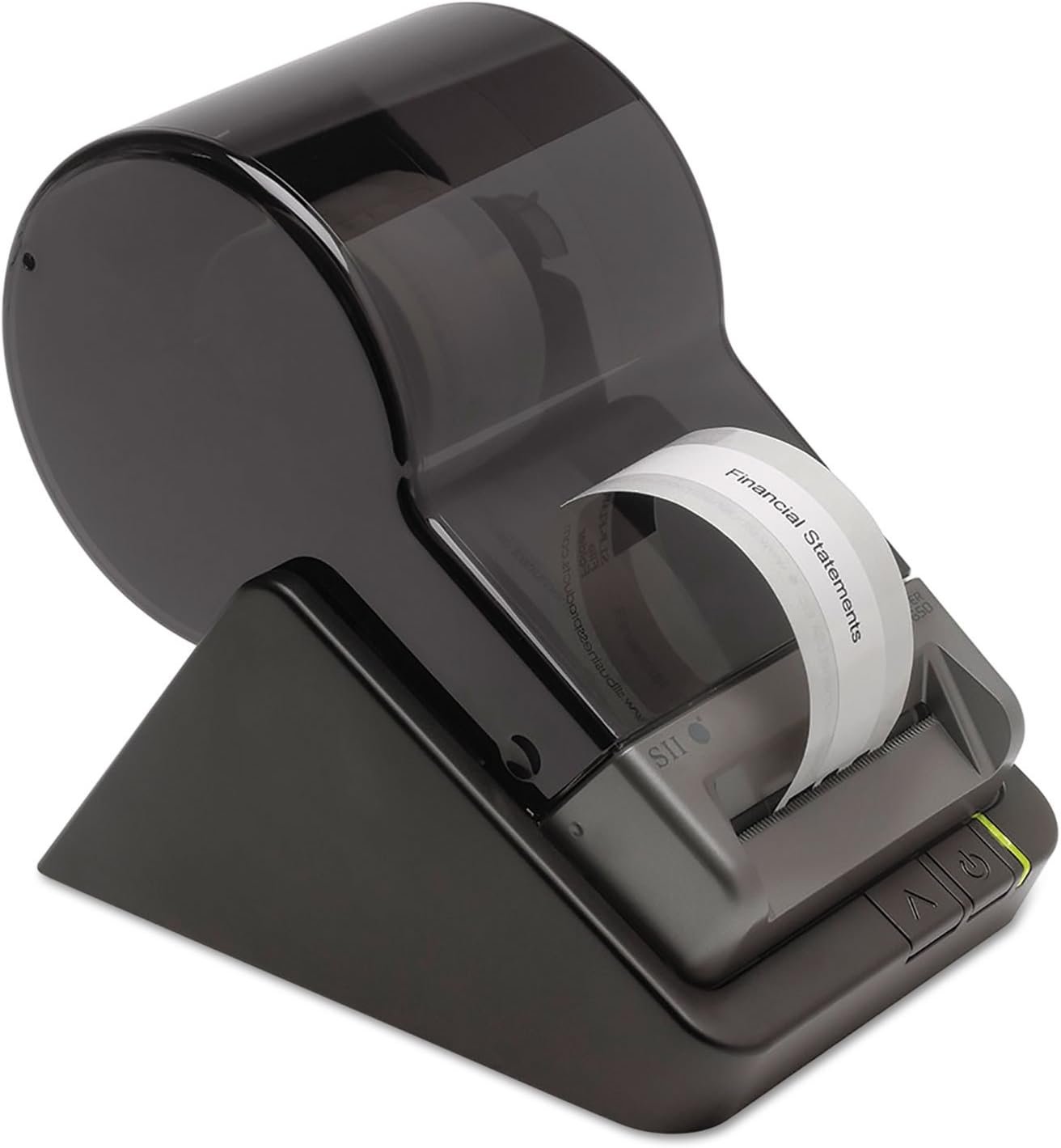
In modern office environments, label printing is a critical task that demands reliability, speed, and adaptability. Whether managing inventory, preparing shipping packages, or organizing digital media, the right label printer can significantly impact workflow efficiency. Businesses and individuals alike face diverse printing needs, from high-volume label production to one-off customizations. A printer that meets these demands must balance technical specifications with user-friendly design. For instance, thermal printing technology offers advantages over inkjet or laser systems by eliminating the need for consumables like ink or toner. This reduces maintenance and operational costs, making it ideal for environments where frequent label printing is required. However, factors such as print speed, media compatibility, and connectivity options also play a crucial role in determining suitability. The Seiko Instruments Smart Label Printer 650 represents a specialized solution for users seeking a compact, efficient, and cost-effective labeling system. By analyzing its technical specifications, user experience, and market positioning, this review provides a comprehensive evaluation of its strengths and limitations for various applications.
Quick Overview
| Feature | Details |
|---|---|
| Printer Type | Thermal label printer |
| Printing Technology | Direct thermal |
| Supported Functions | Label printing only |
| Print Resolution | 300 dpi (monochrome) |
| Print Speed | 3.94 inches/second |
| Media Sizes | 2.25 x 3.5 inches |
| Connectivity | USB (Windows, Mac, Linux) |
| Duty Cycle | Continuous operation |
| Warranty | 3-year full warranty |
| Ink Type | No ink required |
| Media Compatibility | Direct thermal labels |
| Power Supply | AC adapter |
| Dimensions | 6.8″D x 4.5″W x 5.8″H |
| Weight | 1.08 pounds |
The Seiko Instruments Smart Label Printer 650 is designed for users requiring a compact, no-maintenance solution for label printing. Its direct thermal technology eliminates the need for ink or toner, reducing long-term costs and simplifying maintenance. The USB connectivity ensures compatibility with major operating systems, while its small footprint makes it suitable for office spaces with limited room. The printer’s ability to handle bulk label rolls up to 1,000 labels supports high-volume operations without requiring frequent refills. These features collectively position the printer as a practical choice for businesses and individuals with consistent labeling needs.

Print Technology Suitability: Thermal vs. Alternative Systems
Thermal printing technology offers distinct advantages for label production, particularly in environments where cost-effectiveness and reliability are priorities. The Seiko Instruments Smart Label Printer 650 employs direct thermal printing, which uses heat to produce images on heat-sensitive label media. This method eliminates the need for ink, toner, or ribbons, reducing maintenance requirements and operational costs. Compared to inkjet or laser printers, thermal systems are generally faster and more durable for label printing tasks. However, direct thermal labels have a limited lifespan in environments with high exposure to heat, light, or chemicals, which may affect long-term usability. For users prioritizing low maintenance and simplicity, the Smart Label Printer 650’s thermal technology is a strong contender. Its design ensures consistent print quality without the need for regular consumable replacements, making it ideal for applications such as inventory tracking, shipping labels, and media organization. However, users requiring archival-quality labels or those in harsh environments may need to consider alternative printing methods.

Thermal Label Longevity and Environmental Factors
Direct thermal labels produced by the Smart Label Printer 650 are susceptible to degradation when exposed to heat, sunlight, or chemical agents. This limitation makes the printer less suitable for applications requiring long-term label retention, such as product packaging or industrial labeling. The printer’s specifications indicate that its thermal printing process relies on heat-sensitive media, which may not be appropriate for environments with extreme temperature fluctuations. For example, labels printed for outdoor use or storage in warehouses with high ambient temperatures may fade or deteriorate over time. Users should consider the intended application and environmental conditions before selecting this printer. While the absence of ink or toner reduces maintenance, it also restricts the printer’s versatility in scenarios where durable, long-lasting labels are required.
Comparison to Inkjet and Laser Systems
Unlike inkjet or laser printers, the Smart Label Printer 650 does not require consumables like ink or toner, which simplifies maintenance and reduces ongoing costs. This makes it particularly suitable for users who prioritize low operational expenses and minimal upkeep. However, thermal printing generally produces lower print quality compared to inkjet or laser systems, especially when printing detailed graphics or barcodes. The printer’s 300 dpi resolution is adequate for standard label applications, such as shipping or inventory tags, but may not meet the demands of high-precision printing tasks. For users requiring high-resolution graphics or color output, alternative printing technologies may be more appropriate. The Smart Label Printer 650’s thermal system is optimized for monochrome label production, making it a practical choice for environments where simplicity and cost-effectiveness are paramount.
Print Speed and Workload Capacity: Meeting Daily Demands
The Seiko Instruments Smart Label Printer 650 is designed for users who need a reliable solution for high-volume label printing without compromising on speed. Its print speed of 3.94 inches per second ensures efficient label production, making it suitable for environments with frequent labeling tasks. This performance level is adequate for small to medium-sized operations, such as office settings or logistics hubs, where labels are required for shipping, inventory, or file organization. However, the printer’s speed may not meet the demands of large-scale industrial applications that require faster throughput. The printer’s duty cycle, which refers to its ability to operate continuously without overheating, is optimized for moderate usage. While the 3-year warranty suggests a focus on durability, users should consider the printer’s capacity to handle extended workloads without performance degradation. For applications requiring rapid label production, the Smart Label Printer 650 provides a balanced solution that prioritizes reliability over extreme speed.
Continuous Operation and Duty Cycle
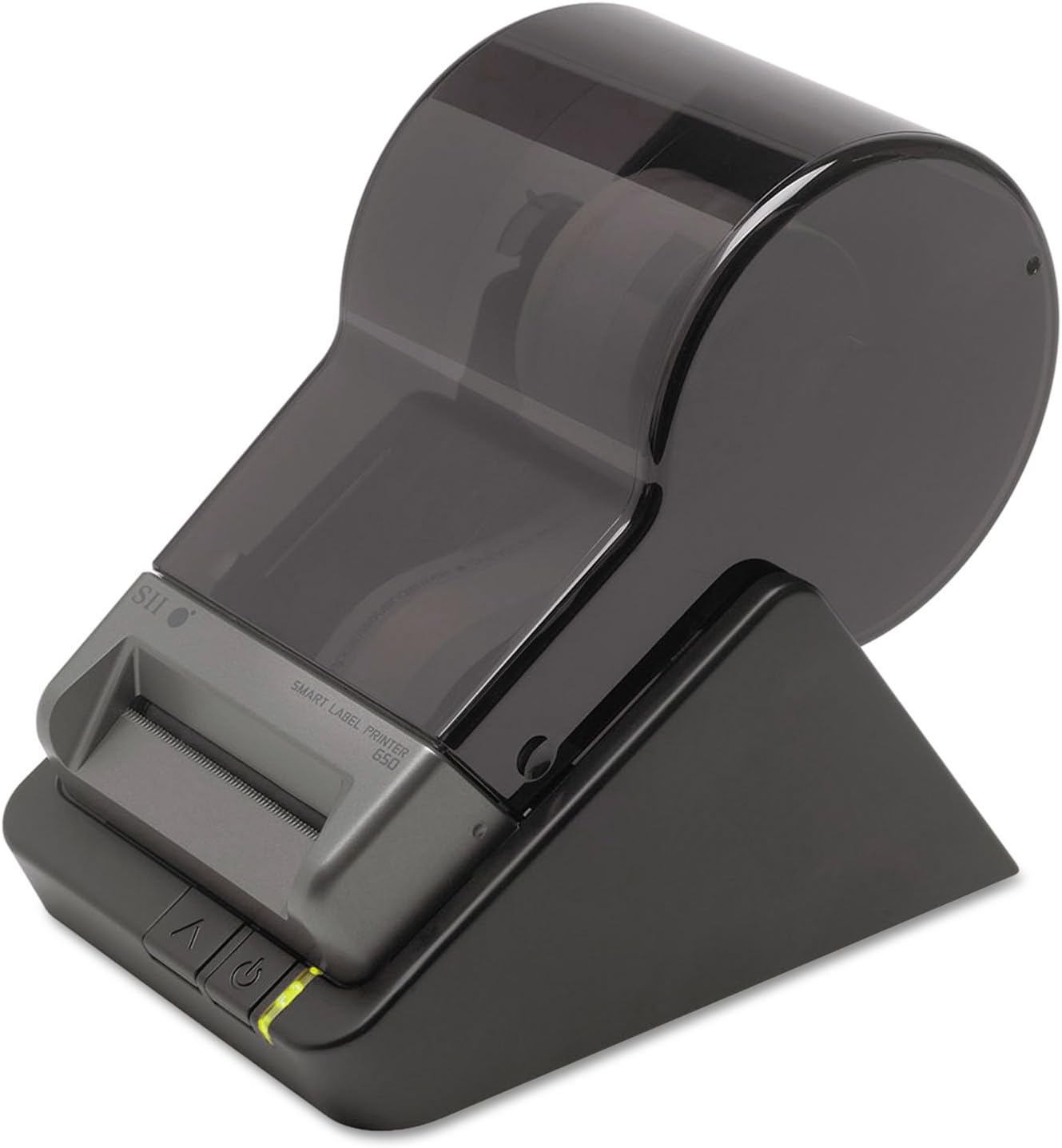
The Smart Label Printer 650 is engineered for continuous operation, making it suitable for environments with consistent labeling needs. Its duty cycle specifications indicate that it can handle prolonged use without overheating, which is essential for users requiring round-the-clock label production. However, the printer’s performance may be affected by prolonged use without adequate cooling, particularly in high-temperature environments. The 3-year warranty provides some assurance of reliability, but users should be mindful of the printer’s thermal limitations. For applications involving frequent, extended printing sessions, the printer’s design ensures stability, though it may not match the endurance of industrial-grade printers used in high-volume manufacturing settings.
Workload Capacity for Different Applications
The Smart Label Printer 650’s workload capacity is well-suited for office environments and small-scale logistics operations. Its ability to handle bulk label rolls up to 1,000 labels supports high-volume printing without requiring frequent refills. This makes it an ideal choice for tasks such as shipping label creation, inventory management, and media organization. However, for users requiring rapid label production in high-volume industrial settings, the printer’s speed may fall short. The printer’s design prioritizes simplicity and ease of use, which is beneficial for users who value straightforward operation over advanced features. While it may not match the throughput of specialized industrial printers, its reliability and ease of maintenance make it a practical option for most standard labeling applications.
Connectivity Options and Device Compatibility
The Seiko Instruments Smart Label Printer 650 offers USB connectivity, ensuring compatibility with a wide range of operating systems, including Windows, Mac OS, and Linux. This feature is particularly advantageous for users who require a printer that can integrate seamlessly with existing workstations or software applications. The USB interface provides a stable connection for data transfer, making it suitable for environments where direct printing from a computer is preferred. However, the printer’s reliance on USB connectivity may limit its versatility compared to printers with additional networking capabilities. For users who need remote printing or integration with cloud-based systems, the Smart Label Printer 650 may require additional software or hardware to achieve full functionality. The printer’s design emphasizes ease of use, with a user-friendly interface that simplifies the printing process for both novice and experienced users.

USB Compatibility and Software Integration
The printer’s USB connectivity ensures compatibility with major operating systems, allowing users to print labels directly from their computers without the need for additional hardware. This makes it an ideal choice for office environments where users frequently need to generate labels for shipping, inventory, or file organization. The included Smart Label Software supports integration with word processing, spreadsheet, and database applications, enabling users to create and format labels efficiently. While the software provides basic design tools, its capabilities are limited compared to advanced label design software used in professional settings. For users who require more complex label formatting or automation features, the printer’s software may not meet all expectations. However, its simplicity and ease of use make it a practical option for users with straightforward labeling needs.
Limitations of USB-Only Connectivity
The Smart Label Printer 650’s reliance on USB connectivity may restrict its usability in environments requiring wireless or network-based printing. While the USB interface ensures a stable connection, it limits the printer’s ability to integrate with modern workspaces that prioritize mobility and remote access. For users who need to print labels from multiple devices or share printing tasks across a network, the printer’s design may not fully meet these requirements. Additionally, the absence of Wi-Fi or Ethernet connectivity means that the printer cannot be used in settings where wireless printing is essential. However, the printer’s focus on simplicity and ease of use compensates for these limitations, making it a suitable choice for users who prioritize straightforward operation over advanced connectivity features.
Media Compatibility and Label Types
The Seiko Instruments Smart Label Printer 650 is designed to work with a variety of direct thermal label media, offering flexibility for different labeling applications. The printer supports labels in clear, opaque, removable, and bulk roll formats, making it suitable for tasks such as shipping labels, file folder labels, and media organization. This media compatibility ensures that users can select the most appropriate label type for their specific needs, whether they require durable, long-lasting labels or temporary, removable options. However, the printer’s reliance on direct thermal media means that it cannot accommodate labels requiring inkjet or laser printing technologies. This limitation may affect users who need to print on specialized media or require archival-quality labels. The printer’s design emphasizes simplicity and ease of use, which is beneficial for users who prioritize straightforward operation over advanced media compatibility options.

Label Media Options and Use Cases
The Smart Label Printer 650’s support for multiple label media types makes it versatile for a range of applications. Users can choose from clear, opaque, removable, and bulk roll labels, each suited for specific use cases. For example, clear labels are ideal for organizing digital media such as video tapes and cassettes, while removable labels are suitable for temporary applications like name badges or event signage. The ability to use bulk rolls up to 1,000 labels supports high-volume printing without requiring frequent refills, which is beneficial for small to medium-sized operations. However, the printer’s reliance on direct thermal media means that users cannot use labels designed for inkjet or laser printers, which may limit its versatility in certain scenarios. For users who need to print on specialized media or require archival-quality labels, alternative printing technologies may be more appropriate.
Compatibility with Standard Label Sizes
The printer’s supported media sizes, including 2.25 x 3.5 inches, are standard for most label applications, ensuring compatibility with a wide range of label formats. This makes it suitable for tasks such as shipping labels, inventory tags, and file folder labels, where consistency in size is essential. The printer’s design allows for easy loading and changing of labels, which simplifies the printing process for users who frequently switch between different label types. However, the printer’s media compatibility is limited to direct thermal labels, which may not meet the needs of users requiring specialized label sizes or materials. For applications requiring custom label dimensions or non-standard media, the printer’s design may not offer the necessary flexibility. Despite these limitations, the printer’s focus on simplicity and ease of use makes it a practical choice for most standard labeling tasks.

Pros & Cons
Pros
- No Ink or Toner Required: The direct thermal printing technology eliminates the need for ink, toner, or ribbons, reducing maintenance and operational costs.
- USB Compatibility: The printer connects seamlessly with Windows, Mac, and Linux systems, ensuring broad device compatibility.
- User-Friendly Design: The sleek, compact design frees up space while maintaining ease of use for loading and changing labels.
- 3-Year Warranty: A full warranty provides long-term reliability and peace of mind for users.
- High-Volume Labeling: The ability to use bulk rolls up to 1,000 labels supports efficient, continuous printing for high-demand environments.
- Integrated Software: The Smart Label Software allows users to create, format, and save labels directly from their computers, simplifying the printing process.
- Versatile Media Options: The printer supports a range of label types, including clear, opaque, and removable, catering to various labeling needs.
- Low Maintenance: The absence of consumables reduces the need for frequent servicing, making it ideal for environments with limited technical resources.
Cons
- Limited Media Compatibility: The printer is restricted to direct thermal labels, which may not suit applications requiring inkjet or laser printing.
- Thermal Label Durability: Direct thermal labels degrade in high-heat or chemical environments, limiting their suitability for long-term use.
- No Color Printing: The printer produces monochrome labels, which may not meet the needs of users requiring color output.
- USB-Only Connectivity: The lack of wireless or network capabilities may limit its usability in environments requiring remote printing.
- Print Speed Limitations: While suitable for moderate-volume tasks, the printer’s speed may not meet the demands of high-volume industrial applications.
- Software Limitations: The included software provides basic label design tools but lacks advanced formatting or automation features.
Final Verdict: Who This Printer Is Best For (and Who Should Skip It)
The Seiko Instruments Smart Label Printer 650 is an excellent choice for users requiring a compact, low-maintenance solution for standard label printing tasks. Its direct thermal technology, USB connectivity, and support for bulk label rolls make it ideal for office environments, small businesses, and logistics operations where simplicity and cost-effectiveness are priorities. The printer’s user-friendly design and 3-year warranty further enhance its appeal for users who value reliability and ease of use. However, its limitations in media compatibility, print speed, and color output make it unsuitable for industrial applications or users requiring archival-quality labels. For those needing advanced printing capabilities or long-term label durability, alternative solutions may be more appropriate. Overall, the Smart Label Printer 650 provides a practical and efficient labeling solution for most standard applications, making it a valuable asset for users with consistent, moderate-volume labeling needs.
Frequently Asked Questions (FAQs)
What printing technology does the Seiko Instruments Smart Label Printer 650 use?
The Smart Label Printer 650 utilizes direct thermal printing technology, which produces labels without the need for ink, toner, or ribbons. This method uses heat to create images on heat-sensitive label media, ensuring simplicity and low maintenance for users.
Is the Smart Label Printer 650 compatible with Windows, Mac, and Linux systems?
Yes, the printer connects via USB and is compatible with Windows, Mac OS, and Linux operating systems. This ensures broad device compatibility for users across different computing environments.
What types of labels can the Smart Label Printer 650 handle?
The printer supports a variety of direct thermal label media, including clear, opaque, removable, and bulk rolls. These options are suitable for shipping labels, file folder labels, and media organization tasks.
Does the Smart Label Printer 650 require regular maintenance?
The printer requires minimal maintenance due to its direct thermal printing technology, which eliminates the need for ink, toner, or ribbons. However, users should ensure proper storage of label media to avoid degradation in high-heat environments.
What is the maximum print speed of the Smart Label Printer 650?
The printer achieves a maximum print speed of 3.94 inches per second, making it suitable for moderate-volume labeling tasks. This speed is adequate for office environments and small-scale logistics operations.
Can the Smart Label Printer 650 print color labels?
No, the printer produces monochrome labels only. It is designed for black-and-white label printing, making it ideal for standard labeling tasks but unsuitable for applications requiring color output.
What is the warranty period for the Smart Label Printer 650?
The printer comes with a 3-year full warranty, providing long-term reliability and support for users. This warranty covers manufacturing defects and ensures the printer’s durability for standard usage.
Is the Smart Label Printer 650 suitable for high-volume industrial applications?
The printer is well-suited for moderate-volume tasks but may not meet the demands of high-volume industrial applications. Its design prioritizes simplicity and ease of use, making it ideal for office settings rather than large-scale production environments.