Portable Thermal Printer Review: Upgraded Q302 for Home, Office, and Travel
The Importance of Choosing the Right Printer for Modern Workflows
In today’s fast-paced work environments, the ability to produce high-quality documents quickly and reliably is essential. Whether you’re managing a small business, working from home, or traveling for professional duties, a printer that meets your specific needs can significantly impact productivity. The right printer must balance speed, print quality, portability, and connectivity to accommodate diverse tasks—from generating invoices to printing labels. For users who require mobility, a compact, wireless printer with versatile media support becomes a critical tool. The Upgraded Q302 Portable Printer aims to address these demands with its thermal printing technology, lightweight design, and multi-connection capabilities. However, understanding its strengths and limitations in terms of print resolution, battery life, and compatibility is crucial for determining whether it aligns with your workflow. This review evaluates the Q302 based on objective specifications, technical benchmarks, and user feedback to help buyers make informed decisions about its suitability for home, office, or on-the-go printing scenarios.
Quick Overview
| Feature | Details |
|---|---|
| Printer Type | Thermal printer (inkless) |
| Supported Functions | Print only (no scanning or copying) |
| Print Resolution | 300 dpi black-on-white |
| Print Speed | 4 pages per minute (monochrome) |
| Media Sizes | A4, US Letter, B5, A5, 4×6 folded paper |
| Connectivity | WiFi, Bluetooth, USB-C |
| Battery Capacity | 2400 mAh (170 sheets continuous print) |
| Dimensions | 10.4″D x 2.2″W x 1.3″H |
| Weight | 15.2 ounces (430 grams) |
| Power Source | Rechargeable lithium polymer batteries |
The Upgraded Q302’s thermal printing technology and compact form factor make it well-suited for users who prioritize portability and wireless connectivity. Its ability to handle multiple paper sizes and support seamless printing from smartphones and computers enhances its versatility. However, its limited print functions and reliance on thermal paper may influence its suitability for specific tasks.

Portability and Design for On-the-Go Printing
The Upgraded Q302’s design emphasizes mobility, making it an ideal choice for users who frequently travel or work in remote locations. Its lightweight build and slim profile allow it to fit easily into backpacks or briefcases, reducing the burden of carrying traditional printers. The 15.2-ounce weight and compact dimensions ensure it can be carried without significant effort, which is particularly beneficial for professionals who need to print documents during business trips or while working from multiple locations. The inclusion of a flannel bag in the included components further enhances its portability by providing a protective carrying solution. However, its reliance on thermal paper and the absence of a built-in power bank limit its utility in scenarios where extended power is required. For users who prioritize mobility and convenience, the Q302’s design is a strong advantage, though its thermal paper dependency may necessitate careful planning for extended use.

Lightweight and Compact Form Factor
The Q302’s ultra-slim profile and lightweight design are its standout features for users who value portability. At just 430 grams, it is significantly lighter than most desktop printers, making it easy to transport without adding substantial weight to luggage. Its dimensions of 10.4 inches in depth, 2.2 inches in width, and 1.3 inches in height allow it to fit into tight spaces, such as a laptop bag or a car’s glove compartment. This compact form factor is particularly beneficial for users who need to print documents while traveling or working remotely. However, the lack of a built-in power bank means users must rely on external power sources or the included USB-C cable for charging, which may be less convenient during extended trips.
Battery Life and Power Flexibility
The Q302’s 2400 mAh battery provides a full charge that can sustain continuous printing of 170 sheets, which is sufficient for short-term tasks but may fall short for extended use. Its PD20W fast-charging capability ensures that users can quickly recharge the device, minimizing downtime. Additionally, the printer’s ability to reverse charge other devices adds a layer of utility, making it a versatile power source in emergencies. However, the battery life may not be sufficient for users who require extended printing sessions without access to a power outlet. For travelers or remote workers who need to print frequently, the Q302’s battery life is adequate for occasional use but may require frequent recharging for prolonged periods.
Thermal Paper Dependency and Media Compatibility
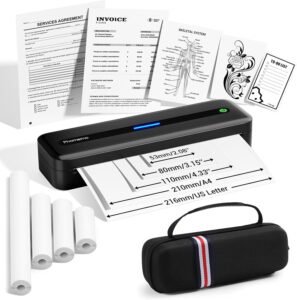
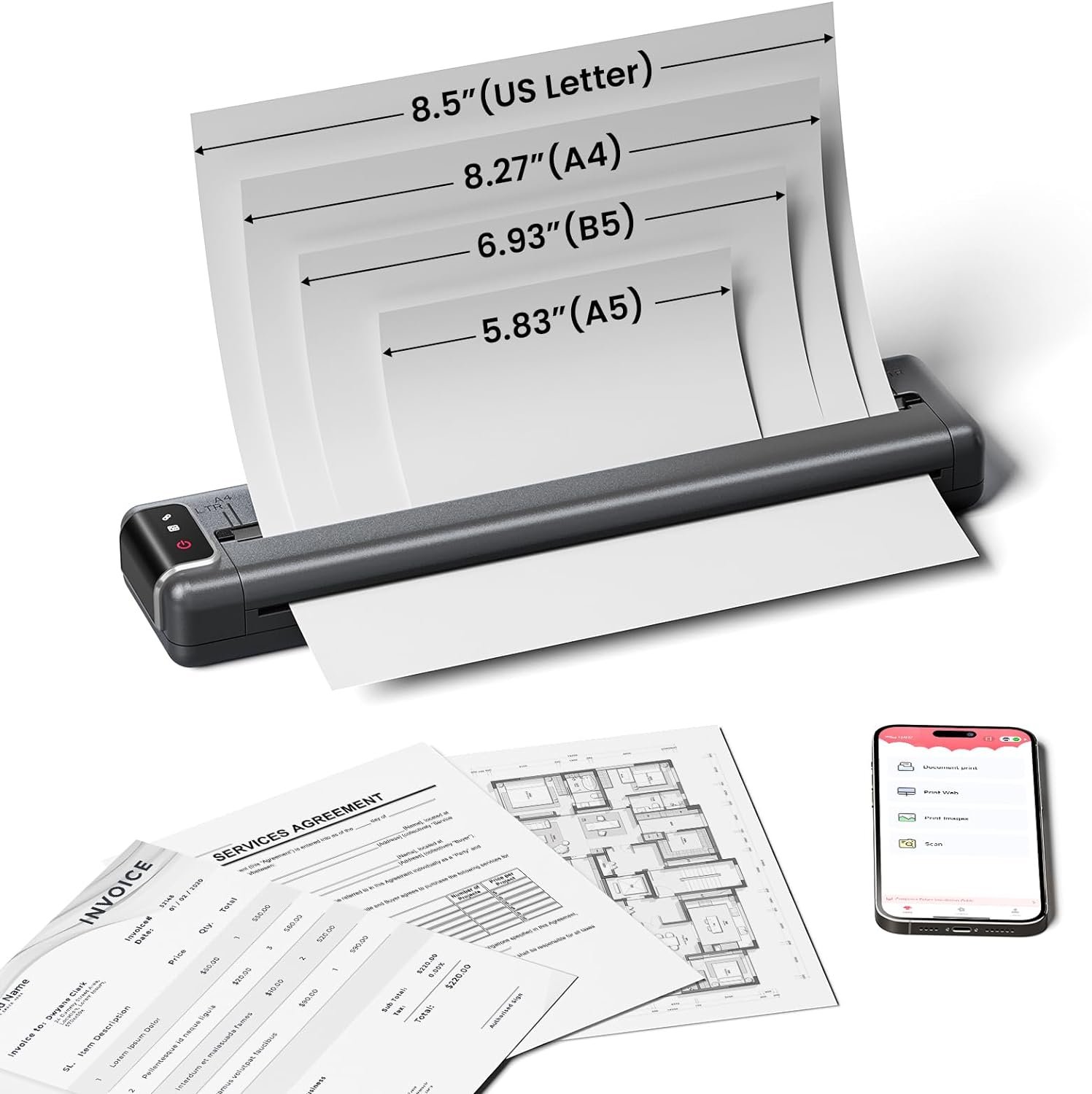
As a thermal printer, the Q302 relies on thermal paper for output, which is a key consideration for users who may have specific paper requirements. The printer supports four paper sizes—A4, US Letter, B5, and A5—allowing it to accommodate a range of document formats. This flexibility is advantageous for users who need to print receipts, labels, or small documents in various sizes. However, the reliance on thermal paper may limit its use for tasks requiring more durable or conventional paper types. Users who frequently print large volumes or need to use standard paper may find the Q302’s media compatibility constraints limiting, especially compared to inkjet or laser printers that support a wider range of paper types.
Connectivity Options and Wireless Printing Capabilities
The Upgraded Q302 offers multiple connectivity options, including WiFi, Bluetooth, and USB-C, which enhance its versatility for different printing scenarios. These connectivity features enable users to print from smartphones, tablets, and computers without the need for physical cables, making it ideal for environments where mobility is a priority. The WiFi and Bluetooth capabilities allow for remote printing, enabling users to send print jobs from their devices to the printer without being physically present. However, the printer’s reliance on a stable WiFi connection for wireless printing may pose challenges in areas with limited connectivity. The USB-C connection provides a reliable alternative for users who prefer a direct wired connection, though it requires the installation of drivers for seamless operation. Overall, the Q302’s connectivity options offer flexibility, but users must consider their specific network environment and device compatibility when choosing the most suitable printing method.

WiFi and Bluetooth Printing for Remote Access
The Q302’s WiFi and Bluetooth connectivity options provide users with the ability to print remotely, which is particularly useful for those who need to generate documents from multiple devices. By connecting to the same WiFi network, users can send print jobs from their smartphones or tablets to the printer without the need for physical proximity. This feature is especially beneficial for remote workers or professionals who frequently travel and require on-demand printing. However, the printer’s reliance on a stable WiFi connection means that users in areas with poor connectivity may experience delays or failed print jobs. Additionally, the Bluetooth connection, while convenient, may have a shorter range compared to WiFi, which could be a limitation for users who need to print from devices located at a distance.
USB-C Connection for Direct Printing
For users who prefer a wired connection, the Q302’s USB-C port offers a reliable alternative to wireless printing. This connection allows for direct printing from computers or laptops, eliminating the need for a WiFi network. The USB-C interface also supports data transfer, which can be useful for transferring files to the printer. However, the first-time setup requires the installation of drivers, which may be a minor inconvenience for some users. Despite this, the USB-C connection provides a stable and fast printing experience, making it an excellent option for users who prioritize reliability over wireless convenience. The combination of WiFi, Bluetooth, and USB-C connectivity ensures that the Q302 can adapt to various printing environments, though users should consider their specific connectivity needs when selecting the most suitable method.
Cloud Integration and Remote Printing Capabilities
The Q302’s ability to connect to the cloud enables remote printing, which is a significant advantage for users who need to print documents from anywhere. By sending print jobs through the cloud, users can access their printer from their smartphone or tablet, even when they are not at their primary workspace. This feature is particularly beneficial for small business owners or freelancers who manage multiple locations. However, the effectiveness of cloud printing depends on the stability of the user’s internet connection, and any disruptions could result in failed print jobs. Additionally, while the cloud integration provides flexibility, it may not be as secure as a direct wired connection, which could be a concern for users handling sensitive documents. Overall, the Q302’s cloud-based printing capabilities enhance its versatility, but users must weigh the benefits of remote access against potential connectivity challenges.
Print Quality and Performance for Text and Documents
The Q302’s thermal printing technology delivers clear, legible output suitable for text-based documents, receipts, and labels. Its 300 dpi resolution ensures that printed text remains sharp and readable, even when printed on thermal paper. This level of resolution is adequate for most standard printing tasks, though it may not meet the demands of users who require high-quality graphics or photographs. The printer’s monochrome output is well-suited for business cards, invoices, and other text-heavy documents, making it a practical choice for users who prioritize speed and simplicity over color printing. However, the lack of color capabilities and the potential for thermal paper to fade over time may limit its use for tasks requiring long-term archival or vibrant visuals. For users who primarily need to print text and basic graphics, the Q302’s print quality is sufficient, though its limitations in color and durability should be considered.

Resolution and Clarity for Text-Based Printing
The Q302’s 300 dpi resolution ensures that printed text remains crisp and legible, even when printed on thermal paper. This level of detail is essential for documents such as contracts, invoices, and labels, where readability is critical. The printer’s ability to produce seamless printouts without visible gaps or inconsistencies enhances its usability for text-heavy tasks. However, the thermal paper used in the Q302 may not retain its clarity as long as traditional paper, which could be a concern for users who need to store printed documents for an extended period. Despite this limitation, the Q302’s resolution and print quality make it a reliable choice for users who prioritize clarity and speed over long-term archival needs.
Suitability for Specific Printing Tasks
The Q302 is well-suited for tasks that require quick, clear text printing, such as generating receipts, labels, and small documents. Its ability to handle multiple paper sizes and support a range of file formats makes it versatile for various use cases. However, the printer’s reliance on thermal paper and its lack of color printing capabilities may limit its effectiveness for tasks such as printing photographs, brochures, or other visually rich content. For users who primarily need to print text-based documents or simple graphics, the Q302 is an efficient and cost-effective solution. However, those with more demanding printing requirements may find the Q302’s limitations in color and durability to be a drawback.

Pros and Cons of the Upgraded Q302 Portable Printer
Pros
- Lightweight and Compact Design: The Q302’s 15.2-ounce weight and slim profile make it easy to transport, ideal for travelers and remote workers who need a portable printing solution. This design reduces the physical burden of carrying a traditional printer, enhancing its usability for on-the-go tasks.
- Versatile Connectivity Options: The printer supports WiFi, Bluetooth, and USB-C connections, providing flexibility for users who prefer wireless printing or direct wired connections. This adaptability ensures compatibility with a wide range of devices, including smartphones, tablets, and computers.
- High Print Resolution: With a 300 dpi resolution, the Q302 produces clear and legible text, making it suitable for documents such as invoices, receipts, and labels. This level of detail ensures that printed content remains readable and professional in appearance.
- Long Battery Life: The 2400 mAh battery allows for continuous printing of 170 sheets on a single charge, which is sufficient for short-term tasks. The PD20W fast-charging feature minimizes downtime, ensuring that users can quickly recharge the device when needed.
- Thermal Paper Compatibility: The printer’s support for multiple paper sizes, including A4, US Letter, B5, and A5, provides flexibility for users who need to print documents in various formats. This adaptability is particularly beneficial for those who handle a range of document types.
- Reversible Charging Capability: The Q302’s ability to reverse charge other devices adds an extra layer of utility, making it a versatile power source in emergency situations. This feature enhances its value beyond just printing, offering additional support for users on the go.
Cons
- Limited Print Functions: The Q302 only supports printing and lacks scanning or copying capabilities, which may limit its usefulness for users who require multifunctional printing solutions. This limitation could be a drawback for those who need to perform additional tasks beyond basic printing.
- Thermal Paper Dependency: The printer’s reliance on thermal paper may pose challenges for users who require more durable or conventional paper types. Thermal paper can fade over time and may not be suitable for long-term archival or high-visibility applications.
- Battery Life Constraints: While the 2400 mAh battery provides sufficient power for short-term use, it may not be adequate for extended printing sessions without access to a power outlet. This limitation could be a concern for users who need to print frequently or for prolonged periods.
- Connectivity Limitations: The Q302’s reliance on a stable WiFi connection for wireless printing may result in delays or failed print jobs in areas with poor connectivity. This dependency could be a drawback for users who require reliable remote printing capabilities.
- Driver Installation Requirement: The first-time setup requires the installation of drivers for USB-C connections, which may be an inconvenience for some users. This additional step could be a barrier for users who prefer a more straightforward setup process.
Final Verdict: Who This Printer Is Best For (and Who Should Skip It)
The Upgraded Q302 Portable Printer is best suited for users who prioritize portability, wireless connectivity, and quick, clear text printing. Its lightweight design and versatile connectivity options make it an excellent choice for travelers, remote workers, and small business owners who need a reliable printing solution for on-the-go tasks. The printer’s ability to handle multiple paper sizes and produce high-resolution text output is particularly beneficial for generating receipts, labels, and small documents. However, its reliance on thermal paper and limited print functions may make it less suitable for users who require multifunctional printing capabilities or need to print color content. Additionally, the battery life constraints and connectivity dependencies could be drawbacks for users who need extended printing sessions or operate in areas with unreliable internet access. For those who primarily need to print text-based documents and value portability and convenience, the Q302 is a strong option. However, users with more demanding printing requirements or who need additional features such as scanning and copying should consider alternative printers that offer a broader range of functionalities.
The Q302’s strengths in portability, connectivity, and print quality make it an ideal choice for specific use cases, but its limitations in durability, color printing, and multifunctionality should be carefully evaluated. While it excels in scenarios where quick, clear text printing is essential, it may not meet the needs of users who require a more comprehensive printing solution. Ultimately, the Q302 is a practical and efficient option for users who prioritize mobility and simplicity, but its suitability depends on the specific printing demands and environments in which it will be used.

Frequently Asked Questions (FAQs)
Can the Q302 printer print color documents?
The Q302 is a thermal printer that only supports monochrome printing. It does not have color printing capabilities, making it suitable for text-based documents, receipts, and labels but not for color graphics or photographs.
How long does it take to charge the Q302 printer?
The Q302 can be fully charged in approximately 2-3 hours using PD20W fast charging. A full charge provides enough power for continuous printing of 170 sheets, which is sufficient for short-term use.
What types of paper can the Q302 printer use?
The Q302 supports thermal paper in four sizes: A4, US Letter, B5, and A5. It can also handle folded thermal paper for 4×6 prints, making it versatile for various document formats.
Is the Q302 printer compatible with both Android and iOS devices?
Yes, the Q302 is compatible with both Android and iOS devices. It supports WiFi and Bluetooth connectivity for wireless printing, and USB-C for direct printing from computers.
Can the Q302 printer be used for printing large volumes of documents?
The Q302 is designed for moderate use, with a continuous print capacity of 170 sheets on a single charge. For large-volume printing, users may need to recharge the device frequently or use a power source to maintain continuous operation.
Does the Q302 printer support cloud-based printing?
Yes, the Q302 allows cloud-based printing through its WiFi and Bluetooth connectivity. Users can send print jobs from their smartphones or tablets to the printer remotely, provided they are on the same network.
What is the print resolution of the Q302 printer?
The Q302 offers a print resolution of 300 dpi, which ensures clear and legible text output. This resolution is suitable for text-based documents, receipts, and labels but may not meet the requirements for high-quality graphics or photographs.
Can the Q302 printer be used as a power bank for other devices?
Yes, the Q302 can be used to charge other devices through its reverse charging capability. This feature provides an additional utility for users who need a backup power source during travel or emergencies.