vvia X6 Portable Thermal Printer Review: 2026 Printing Performance & Features
Why Choosing the Right Printer Matters in 2026
In 2026, the demand for printers has evolved beyond traditional office environments to meet the needs of mobile professionals, students, and creative users. Whether you’re printing receipts, labels, or personalized notes on the go, the right printer can streamline workflows and enhance productivity. However, selecting the optimal device requires careful consideration of factors like print quality, speed, connectivity, and portability. A printer that excels in one area may fall short in another, making it essential to align specifications with specific use cases. For instance, a thermal printer like the vvia X6 offers compact design and wireless connectivity but may lack color output or advanced media compatibility. Understanding these trade-offs ensures that users select a printer that balances functionality with practicality. This review evaluates the vvia X6 Portable Thermal Printer through the lens of modern printing needs, focusing on its performance metrics, design features, and suitability for various user profiles. By analyzing technical specifications and market trends, we aim to provide a data-driven assessment that helps buyers make informed decisions in 2026.
Quick Overview
| Feature | Details |
|---|---|
| Printer Type | Portable Thermal Printer |
| Printing Technology | Thermal |
| Print Resolution | 200 dpi (Black & White) |
| Print Speed | 1 ppm (Monochrome) |
| Connectivity | Bluetooth, USB |
| Media Compatibility | Thermal Paper (2.2 x 3.4 inches) |
| Battery Life | 800 prints on a full charge |
| Dimensions | 1.5″D x 3″W x 3″H |
| Weight | 5.3 ounces |
| Included Components | Printer, Charging Cable, Thermal Paper Roll |
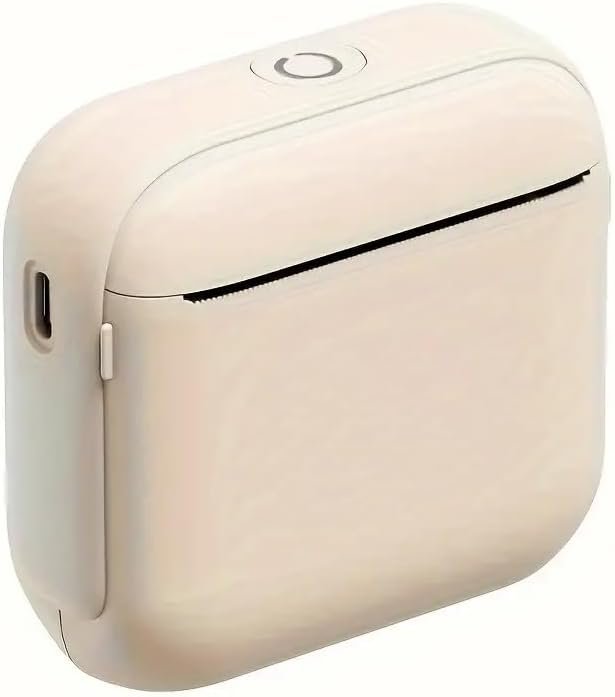
The vvia X6 is designed for users who prioritize portability and wireless connectivity. Its compact size and built-in battery make it ideal for on-the-go printing, while the thermal printing technology ensures quick, low-maintenance operation. The 200 dpi resolution provides clear text output, though it may not meet high-end graphic printing needs. The Bluetooth and USB connectivity options offer flexibility in device pairing, though the printer’s monochrome output limits its use for color-sensitive tasks. These features collectively position the X6 as a practical solution for lightweight printing requirements in both personal and professional settings.

Connectivity and Compatibility: Seamless Integration with Mobile Devices
The vvia X6’s Bluetooth and USB connectivity options ensure compatibility with a wide range of devices, making it a versatile choice for users who rely on smartphones and tablets. The built-in Bluetooth module allows for wireless printing, eliminating the need for physical cables and enabling printing from iOS and Android devices with minimal setup. This feature is particularly beneficial for users who frequently need to print receipts, labels, or quick notes while on the move. The USB port provides an alternative for direct printing, which can be useful for users who prefer a wired connection or need to transfer data between devices. However, the printer’s reliance on thermal paper and its monochrome output may limit its use in scenarios requiring color printing or specialized media types. The combination of Bluetooth and USB connectivity ensures that the X6 can integrate smoothly into various workflows, though its limitations in media versatility should be considered when selecting a printer for specific tasks.

Bluetooth Connectivity: Effortless Pairing with Mobile Devices
The vvia X6’s Bluetooth connectivity simplifies the process of printing from mobile devices, eliminating the need for additional hardware or complex setup procedures. Users can pair the printer with their smartphones or tablets by enabling Bluetooth on their device and following the pairing instructions within the FunPrint app. This wireless feature is particularly advantageous for users who need to print on-the-go, such as students creating study materials or professionals generating quick notes. The app’s intuitive interface allows for easy navigation through templates and media selection, enhancing the overall user experience. However, the reliance on Bluetooth may introduce minor latency issues during high-volume printing, though this is unlikely to affect typical usage scenarios. For users prioritizing convenience and mobility, the Bluetooth connectivity of the X6 offers a seamless printing experience without compromising on portability.
USB Connectivity: Reliable Data Transfer for Offline Printing
In addition to Bluetooth, the vvia X6 includes a USB port that enables direct data transfer for printing, providing an alternative for users who prefer wired connections. This feature is particularly useful for users who need to print without relying on their device’s Bluetooth capabilities or who operate in environments with limited wireless connectivity. The USB port allows for the transfer of print jobs directly from a computer or mobile device, ensuring reliable and consistent output. While the USB connection does not offer the same level of mobility as Bluetooth, it provides a stable and straightforward method for printing, which is ideal for users who prioritize reliability over portability. The inclusion of both Bluetooth and USB connectivity options ensures that the X6 can adapt to different printing needs, making it a flexible choice for a variety of user profiles.
Print Quality and Resolution: Clear Text Output for Everyday Use
The vvia X6’s thermal printing technology delivers clear, legible text output suitable for everyday printing tasks such as receipts, labels, and notes. With a maximum print resolution of 200 dpi, the printer produces sharp text and basic graphics, making it well-suited for monochrome printing. This resolution is adequate for most general-purpose printing needs, though it may not meet the demands of users requiring higher-quality output for professional or creative applications. The thermal printing process ensures that the printer operates without the need for ink or toner, reducing maintenance requirements and simplifying the printing process. However, the lack of color output and limited media compatibility may restrict its use in scenarios where color printing or specialized paper types are necessary. The X6’s print quality and resolution are well-aligned with its intended use cases, making it a practical choice for users who prioritize simplicity and reliability over advanced printing capabilities.
Monochrome Output: Practical for Text-Based Printing Tasks
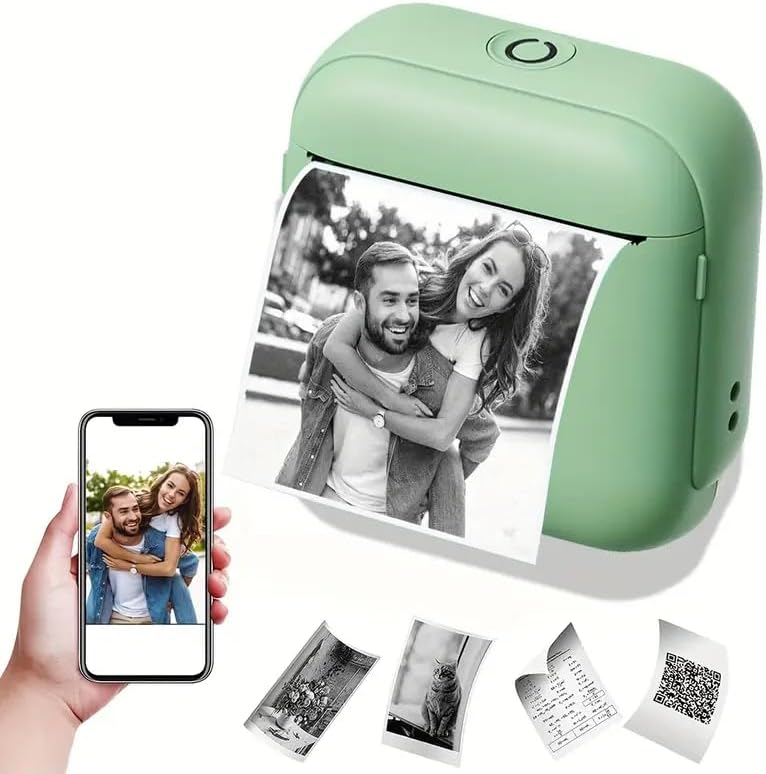
The vvia X6’s monochrome output is optimized for text-based printing tasks, making it ideal for users who primarily need to generate receipts, labels, or notes. The 200 dpi resolution ensures that text remains clear and readable, even when printed on standard thermal paper. This level of detail is sufficient for most everyday printing needs, though it may not meet the demands of users requiring high-resolution graphics or color images. The absence of color printing capabilities is a notable limitation, as it restricts the printer’s use in scenarios where visual differentiation or branding is essential. However, for users focused on efficiency and simplicity, the monochrome output of the X6 is a practical solution that balances performance with ease of use. The printer’s design and resolution specifications align with its intended purpose, making it a suitable choice for lightweight printing tasks.
Thermal Paper Compatibility: Limitations and Considerations
The vvia X6’s reliance on thermal paper introduces specific limitations and considerations for users. Thermal paper is designed to be heat-sensitive, requiring the printer to use a thermal head to produce images without ink or toner. While this eliminates the need for ink refills and reduces maintenance, it also restricts the printer’s media compatibility to thermal paper only. This limitation means that users cannot print on standard paper, glossy media, or other non-thermal paper types, which may affect its versatility in certain applications. Additionally, thermal paper is generally less durable than traditional paper, as it can fade or degrade over time when exposed to heat, light, or chemicals. These factors should be carefully considered when selecting the X6 for use in environments where long-term document storage or diverse media types are required. Despite these limitations, the thermal paper compatibility of the X6 ensures a streamlined printing process for users who prioritize simplicity and portability.
Portability and Battery Life: A Compact Solution for On-the-Go Printing
The vvia X6’s compact design and built-in battery make it an excellent choice for users who need to print on the go. Weighing just 5.3 ounces and measuring 1.5″D x 3″W x 3″H, the printer is lightweight enough to carry in a pocket or attach to a bag, ensuring convenience for mobile users. The built-in rechargeable battery provides approximately 800 prints on a full charge, which is sufficient for most casual printing needs. This battery life is particularly advantageous for users who frequently need to print receipts, labels, or quick notes without access to a power source. However, the printer’s reliance on thermal paper and its monochrome output may limit its use in scenarios requiring extended printing sessions or color output. The X6’s portability and battery life are well-suited for users who prioritize mobility and simplicity, though its limitations in media versatility should be considered when selecting a printer for specific tasks.

Battery Life: Sufficient for Casual Printing Needs
The vvia X6’s battery life of approximately 800 prints on a full charge is sufficient for most casual printing needs, making it an ideal choice for users who require a portable solution. This capacity ensures that the printer can handle frequent use without requiring frequent recharging, which is particularly beneficial for users who print on-the-go. However, the battery life may not be sufficient for high-volume printing scenarios, such as generating large batches of labels or receipts in a business setting. The printer’s battery performance is well-aligned with its intended use cases, offering a practical solution for users who prioritize portability and convenience over extended printing sessions. For users who primarily need to print small quantities of text or images, the X6’s battery life is a significant advantage.
Compact Design: Ideal for Travel and Mobile Use
The vvia X6’s compact design is a key factor in its suitability for travel and mobile use. Weighing just 5.3 ounces and measuring 1.5″D x 3″W x 3″H, the printer is small enough to fit into a pocket or attach to a bag, making it easy to carry during trips or daily commutes. This portability ensures that users can print on-the-go without the need for a dedicated workspace, which is particularly useful for students, professionals, and creative users who require a flexible printing solution. The compact size also reduces the risk of damage during transport, making it a durable choice for users who frequently move the printer between locations. However, the limited media compatibility and monochrome output may restrict its use in scenarios requiring extended printing sessions or color output. Despite these limitations, the X6’s design and portability make it a practical solution for users who prioritize mobility and simplicity.

Pros & Cons
Pros
- Portable Design: The vvia X6’s compact size and lightweight build make it ideal for users who need to print on the go, fitting easily into pockets or bags for travel and daily use.
- Wireless Connectivity: The built-in Bluetooth functionality allows seamless pairing with iOS and Android devices, eliminating the need for physical cables and enabling convenient printing from mobile devices.
- Long Battery Life: With approximately 800 prints on a single charge, the X6’s battery life is sufficient for most casual printing needs, reducing the frequency of recharging.
- Versatile Printing App: The FunPrint app offers a variety of templates for different use cases, including holiday-themed designs, animal illustrations, and barcode generation, enhancing the printer’s adaptability.
- No Ink or Toner Required: The thermal printing technology eliminates the need for ink or toner, reducing maintenance and simplifying the printing process for users.
- Easy Setup and Use: The printer’s straightforward pairing process and intuitive app interface make it accessible for users of all ages, including children and parents looking to organize notes or lists.
Cons
- Limited Print Resolution: The 200 dpi resolution may not meet the demands of users requiring high-quality output for professional or creative applications, as it is optimized for text-based tasks.
- Monochrome Output Only: The X6’s lack of color printing capabilities restricts its use in scenarios where color differentiation or branding is essential, such as marketing materials or presentations.
- Thermal Paper Dependency: The printer’s reliance on thermal paper limits media compatibility to heat-sensitive paper, which may not be suitable for long-term document storage or diverse printing needs.
- No Duplex Printing: The single-sided printing capability means users cannot print on both sides of a sheet, which may affect paper efficiency for certain tasks.
- Limited Media Size: The supported media size of 2.2 x 3.4 inches restricts the printer’s use for larger prints or specialized paper types, limiting its versatility in certain applications.
Final Verdict: Who This Printer Is Best For (and Who Should Skip It)
The vvia X6 Portable Thermal Printer is best suited for users who prioritize portability, simplicity, and wireless connectivity for on-the-go printing. It is an excellent choice for students, travelers, and professionals who need to print receipts, labels, notes, or quick graphics without the hassle of ink refills or complex setup procedures. The printer’s compact design and long battery life make it ideal for environments where mobility and ease of use are paramount, such as classrooms, fieldwork, or casual home use. However, the X6 may not be the best fit for users requiring high-resolution color output, extended printing sessions, or compatibility with non-thermal media. Its monochrome output and limited media size restrict its use in professional or creative settings where color printing or specialized paper types are necessary. For users who primarily need to print text-based documents or small quantities of images, the X6 offers a practical and convenient solution. Conversely, those seeking advanced printing capabilities, color output, or greater media versatility should consider alternative options that better align with their specific needs.

Frequently Asked Questions (FAQs)
Can the vvia X6 printer print color images?
The vvia X6 is a thermal printer that produces monochrome output only. It uses heat-sensitive thermal paper to create images without ink or toner, making it suitable for text-based printing but not for color images or photographs.
How long does the battery last on a single charge?
The vvia X6’s built-in rechargeable battery provides approximately 800 prints on a full charge, making it ideal for users who need to print on-the-go without frequent recharging.
What types of media can the X6 printer use?
The vvia X6 is compatible with standard thermal paper measuring 2.2 x 3.4 inches. It does not support regular paper, glossy media, or other non-thermal paper types due to its thermal printing technology.
Is the X6 printer suitable for printing receipts?
Yes, the vvia X6 is well-suited for printing receipts due to its compact design, fast print speed, and monochrome output. Its wireless connectivity and portability make it an excellent choice for on-the-go receipt printing.
Can I print labels and barcodes with the X6?
The vvia X6 supports printing labels and barcodes through the FunPrint app, which offers templates for various use cases. This functionality makes it versatile for users who need to generate quick labels or barcode prints.
How do I connect the X6 printer to my phone?
To connect the vvia X6 to your phone, enable Bluetooth on your device and use the FunPrint app to pair with the printer. The app provides step-by-step instructions for seamless wireless printing.
What is the maximum print resolution of the X6 printer?
The vvia X6 delivers a maximum print resolution of 200 dpi in black and white, which is suitable for clear text output but may not meet the demands of high-resolution graphic printing.
Is the X6 printer suitable for long-term document storage?
The vvia X6 uses thermal paper, which is heat-sensitive and may fade or degrade over time when exposed to light or chemicals. Therefore, it is not recommended for long-term document storage or archival purposes.