Portable Printer for Travel, Inkless Thermal Printer with A4/A5 Support
The Importance of Choosing the Right Printer for Your Needs
In today’s fast-paced digital environment, the ability to produce physical documents efficiently and reliably is a critical requirement for both personal and professional users. Whether you’re a business professional needing to print on-the-go, a student requiring quick access to printed materials, or a small business owner managing multiple tasks, the right printer can significantly impact productivity and workflow. The proliferation of portable and wireless printing solutions has expanded the range of options available, but selecting the most suitable model requires careful consideration of several factors. These include the type of printing technology, the quality and speed of output, the versatility of connectivity options, and the durability of the device. Additionally, the ongoing costs associated with consumables and maintenance play a crucial role in long-term usability. This review provides an in-depth analysis of the YX80 portable thermal printer, evaluating its features, performance, and suitability for various use cases. By examining technical specifications, supported media types, and connectivity capabilities, this assessment helps users determine whether this printer aligns with their specific printing needs and operational environment.
Quick Overview
| Feature | Details |
|---|---|
| Printer Type | Portable thermal printer |
| Printing Technology | Thermal printing |
| Supported Functions | Print only |
| Print Resolution | 600 dpi (black and white) |
| Print Speed | 10 ppm (monochrome) |
| Media Sizes | A5, Letter (8.5 x 11 inches), A4 |
| Connectivity | Bluetooth, USB |
| Duty Cycle | Continuous printing up to 5 hours and 400 sheets |
| Ink/Toner System | Inkless (thermal paper only) |
| Warranty | Limited warranty |
| Product Dimensions | 1.9″D x 11.4″W x 1.7″H |
| Weight | 1.94 pounds |
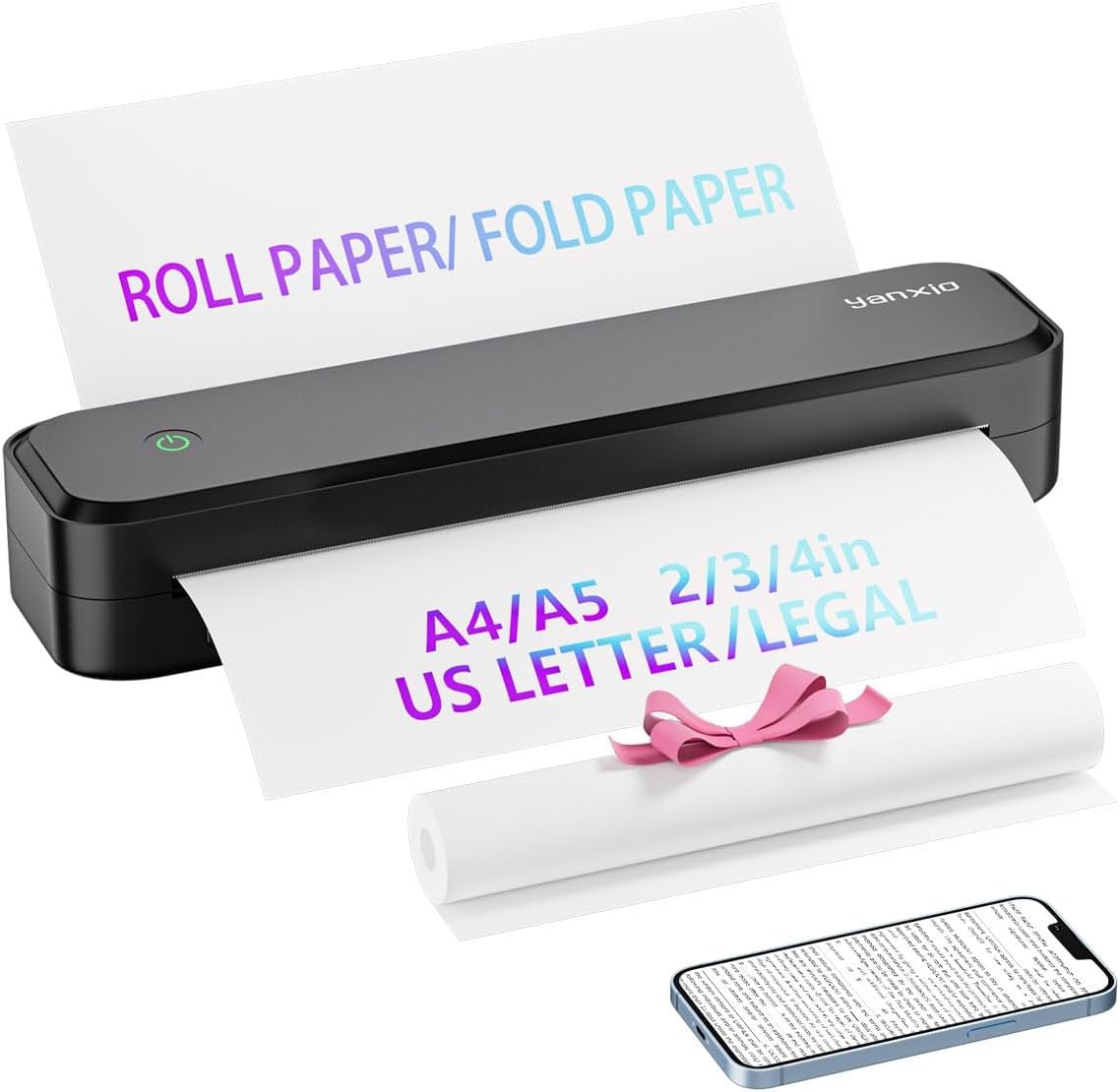
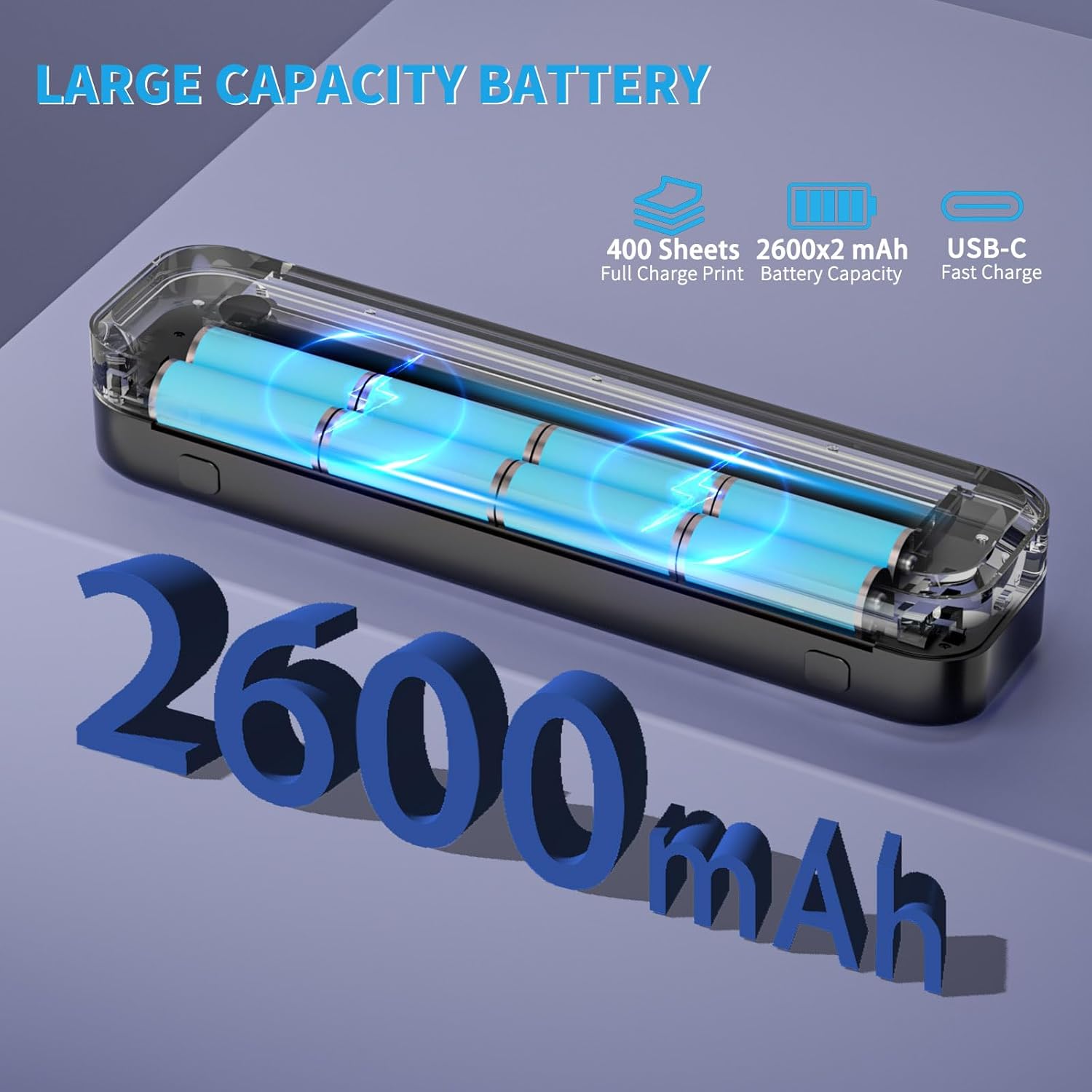
The YX80 is designed as a compact, portable thermal printer that prioritizes convenience and efficiency for users requiring on-the-go printing capabilities. Its support for A4/A5 and Letter-sized thermal paper, combined with Bluetooth and USB connectivity, makes it suitable for both mobile and stationary environments. The 600 dpi resolution ensures clear text output, while the 10 ppm monochrome speed balances performance with energy efficiency. The built-in 2600mAh battery provides up to 5 hours of continuous printing or 400 sheets per charge, making it ideal for travel and frequent use scenarios. However, its reliance on thermal paper instead of traditional inkjet or laser systems may limit its versatility for certain applications.

Print Technology and Media Compatibility
The YX80 employs thermal printing technology, a method that uses heat to produce images on specially coated paper. This approach eliminates the need for ink or toner, reducing maintenance requirements and simplifying the printing process. Thermal printers are particularly well-suited for applications that prioritize speed, reliability, and minimal consumables, such as receipt printing, label creation, and basic document output. The YX80’s support for thermal paper in sizes ranging from 2 inches to 8.5 x 11 inches provides flexibility in output dimensions, catering to a variety of use cases. However, this reliance on thermal paper also imposes limitations, as it cannot accommodate traditional copy paper or glossy media. Users must ensure they have access to the appropriate paper stock, which may affect convenience for those accustomed to standard office paper.

Thermal Printing Limitations and Advantages
Thermal printing offers several advantages, including low maintenance costs and the absence of ink-related complications. The YX80’s design minimizes the need for frequent consumable replacements, making it an attractive option for users seeking a hassle-free printing experience. The absence of ink or toner also reduces the risk of clogging or mechanical failures, contributing to the printer’s reliability. However, thermal paper has inherent drawbacks, such as a shorter shelf life and potential fading over time, which may be a concern for long-term document storage. Additionally, thermal printing is generally less suitable for high-contrast or vibrant graphics, as the output quality is primarily dependent on the paper’s heat-sensitive coating. These factors make the YX80 more appropriate for text-based documents rather than photographic or color-intensive prints.
Media Size and Paper Type Constraints
The YX80’s support for thermal paper in sizes from 2 inches to 8.5 x 11 inches provides a range of options for different printing needs. Letter-sized paper is ideal for business documents, while smaller formats like 4 inches or 3 inches are well-suited for labels, receipts, and small-format graphics. The printer’s ability to handle multiple paper sizes enhances its versatility, allowing users to adapt to various tasks without requiring additional devices. However, the exclusion of traditional copy paper and glossy media means that the YX80 is not suitable for applications requiring a broader range of media types. Users must also consider the availability of thermal paper in their region, as supply chain issues or regional preferences may affect access to the necessary materials.
Connectivity and Compatibility
The YX80 offers both Bluetooth and USB connectivity options, ensuring compatibility with a wide range of devices. Bluetooth connectivity enables wireless printing from smartphones and tablets, making it convenient for users who need to print on-the-go. The USB port provides a direct connection for desktop computers, ensuring stable data transfer and eliminating the need for additional software configuration. This dual connectivity approach enhances the printer’s usability in both mobile and stationary environments, catering to users with varying device preferences. The inclusion of a USB port also allows for straightforward integration with office equipment, such as computers and laptops, without requiring complex setup procedures. However, the reliance on Bluetooth may introduce potential connectivity issues, such as signal interference or pairing difficulties, which users should be aware of when using the printer in crowded environments.
Bluetooth and USB Connectivity Considerations
Bluetooth connectivity provides a convenient wireless solution for mobile users, but it is subject to environmental factors that may affect performance. The YX80’s Bluetooth capabilities allow for seamless printing from iOS and Android devices, eliminating the need for physical cables. However, the range and stability of the Bluetooth connection can be influenced by physical obstructions, other wireless devices, and signal interference. Users should ensure that their devices are within the recommended proximity to maintain a reliable connection. The USB port, on the other hand, offers a more stable and direct method of printing, particularly for users who prioritize speed and reliability. While the USB connection requires a physical cable, it ensures a consistent data transfer rate and minimizes the risk of connectivity issues. This dual approach to connectivity provides flexibility, but users should consider their specific needs and environment when selecting the most appropriate method.
Cross-Platform Compatibility and Software Support
The YX80 is designed to work with a variety of operating systems, including iOS, Android, and Windows, ensuring broad compatibility across different devices. The inclusion of a PC printing driver available on Amazon Cloud simplifies the setup process for users who prefer wired connections. This driver support allows for seamless integration with office computers, enabling users to print documents without the need for additional software installation. However, the reliance on cloud-based drivers may introduce potential compatibility issues, particularly with older or less common operating systems. Users should verify that their devices meet the system requirements for the printer driver to ensure optimal performance. The absence of advanced software features such as print queue management or customization options may also limit the printer’s appeal for users who require more sophisticated printing capabilities.
Portability and Battery Life
The YX80’s compact design and lightweight construction make it an ideal choice for users who prioritize portability. Weighing less than 1.5 pounds, the printer is easy to carry in a briefcase or travel bag, making it suitable for business travelers and remote workers. The built-in 2600mAh battery provides up to 5 hours of continuous printing or 400 sheets per charge, ensuring that users can operate the printer without frequent recharging. This battery capacity is particularly beneficial for users who need to print multiple documents in a single session without access to a power source. However, the battery life may be affected by factors such as printing speed, paper size, and environmental conditions, which users should consider when planning their printing tasks. The printer’s ability to function for up to 7 days with 10-20 pages per day also highlights its suitability for frequent, low-volume use scenarios.

Battery Performance and Charging Considerations
The YX80’s 2600mAh battery is designed to provide sufficient power for extended use, but its performance may vary depending on usage patterns. Continuous printing at the maximum speed of 10 ppm will drain the battery more quickly than intermittent use at lower speeds. Users who require high-volume printing should be prepared to recharge the battery regularly to maintain optimal performance. The printer’s battery life is also influenced by environmental factors such as temperature, which can affect both charging efficiency and operational stability. While the printer is designed for portability, users should be aware that prolonged use without access to a power source may necessitate additional charging intervals. The absence of a built-in power adapter means that users must rely on external power sources for recharging, which could be a consideration for those in remote locations.
Design and Physical Characteristics
The YX80’s compact dimensions of 10.4 x 3.1 x 1.9 inches make it easy to store and transport, accommodating users who need a printer that fits into tight spaces. The printer’s lightweight construction further enhances its portability, allowing users to carry it without significant strain. The design also includes a built-in battery that is not removable, which contributes to the printer’s overall durability and reduces the risk of internal damage. However, this non-removable battery design may limit the ability to replace or upgrade the battery over time, which could be a concern for users who require extended battery life or prefer to maintain their own power sources. The printer’s physical design prioritizes ease of use and accessibility, with straightforward controls and a user-friendly interface that minimizes the learning curve for new users.

Pros & Cons
Pros
- Inkless Operation: The YX80 eliminates the need for ink or toner, reducing maintenance and operational costs. This makes it an attractive option for users seeking a low-maintenance printing solution.
- Portability and Design: Weighing less than 1.5 pounds and featuring compact dimensions, the YX80 is easy to transport and store, making it ideal for travel and remote work environments.
- Dual Connectivity: The inclusion of both Bluetooth and USB ports ensures compatibility with a wide range of devices, including smartphones, tablets, and desktop computers.
- Battery Life: The built-in 2600mAh battery provides up to 5 hours of continuous printing or 400 sheets per charge, supporting extended use without frequent recharging.
- Thermal Paper Compatibility: The support for multiple thermal paper sizes, including A4, A5, and Letter, offers flexibility in output dimensions for various printing needs.
- Print Speed and Resolution: The 10 ppm monochrome speed and 600 dpi resolution ensure clear and efficient text output, suitable for business documents and receipts.
- User-Friendly Interface: The printer’s straightforward design and intuitive controls minimize the learning curve for new users, enhancing overall usability.
- Cost-Effective Printing: The low cost per page, estimated at less than $0.15 per sheet, makes it an economical choice for frequent, low-volume printing.
Cons
- Thermal Paper Dependency: The YX80 requires thermal paper, which is not compatible with traditional copy paper or glossy media, limiting its versatility for certain applications.
- Limited Media Options: The printer does not support a wide range of media types, which may be a drawback for users who require more flexible printing capabilities.
- Battery Constraints: While the battery life is sufficient for moderate use, extended high-volume printing may necessitate frequent recharging, which could be inconvenient for users without access to power sources.
- Connectivity Limitations: The reliance on Bluetooth for wireless printing may introduce potential connectivity issues, such as signal interference or pairing difficulties, particularly in crowded environments.
- No Advanced Features: The printer lacks advanced software features such as print queue management or customization options, which may limit its appeal for users requiring more sophisticated printing capabilities.
- Print Quality Limitations: Thermal printing is generally less suitable for high-contrast or vibrant graphics, making the YX80 more appropriate for text-based documents rather than photographic or color-intensive prints.
- Environmental Factors: The printer’s performance may be affected by temperature and humidity, which could impact both battery life and operational stability in extreme conditions.
Final Verdict: Who This Printer Is Best For (and Who Should Skip It)
The YX80 portable thermal printer is best suited for users who prioritize portability, low maintenance, and cost-effective printing for text-based documents. Its compact design, inkless operation, and dual connectivity options make it an ideal choice for business travelers, remote workers, and students who require on-the-go printing capabilities. The support for thermal paper in multiple sizes also caters to users who need to print receipts, labels, and small-format graphics. However, the printer’s reliance on thermal paper and limited media compatibility may make it unsuitable for users who require a broader range of printing options or high-quality color output. Additionally, the lack of advanced software features and potential connectivity issues could be drawbacks for users who need more sophisticated printing capabilities. Overall, the YX80 is a practical solution for specific use cases, but its limitations should be carefully considered before making a purchase decision.
Frequently Asked Questions (FAQs)
Can the YX80 printer print on regular copy paper?
The YX80 is designed to use thermal paper only, which is a specially coated paper that reacts to heat. It cannot print on regular copy paper or glossy media. Users must ensure they have access to thermal paper for optimal performance.
How long does the YX80 battery last?
The YX80’s built-in 2600mAh battery provides up to 5 hours of continuous printing or 400 sheets per charge. With moderate use of 10-20 pages per day, the printer can operate for more than 7 days on a single charge.
What connectivity options does the YX80 offer?
The YX80 supports both Bluetooth and USB connectivity. Bluetooth allows wireless printing from iOS and Android devices, while USB provides a direct connection for desktop computers. This dual connectivity enhances versatility for different use scenarios.
Is the YX80 suitable for printing photos or graphics?
The YX80 is optimized for text-based documents and receipts due to its thermal printing technology. It is not recommended for high-contrast or vibrant graphics, as thermal printing may not produce the desired quality for such applications.
What are the supported paper sizes for the YX80?
The YX80 can print on thermal paper in sizes ranging from 2 inches to 8.5 x 11 inches. This includes Letter (8.5 x 11 inches), A4, and A5 sizes, making it suitable for various document and label printing needs.
How does the YX80 handle connectivity issues?
The YX80 uses Bluetooth for wireless printing, which may be affected by signal interference or pairing difficulties. For more stable printing, the USB port provides a direct connection, minimizing potential connectivity problems.
Can the YX80 be used for commercial printing?
The YX80 is suitable for light commercial use, such as printing receipts and labels, but its thermal printing technology and limited media compatibility make it less ideal for high-volume or high-quality color printing. It is best suited for specific, low-volume applications.
What is the print speed of the YX80?
The YX80 can print at a maximum speed of 10 ppm (pages per minute) in monochrome mode. This speed is adequate for text-based documents and receipts but may not meet the demands of high-speed printing environments.