
The Importance of Choosing the Right Printer for Modern Workloads
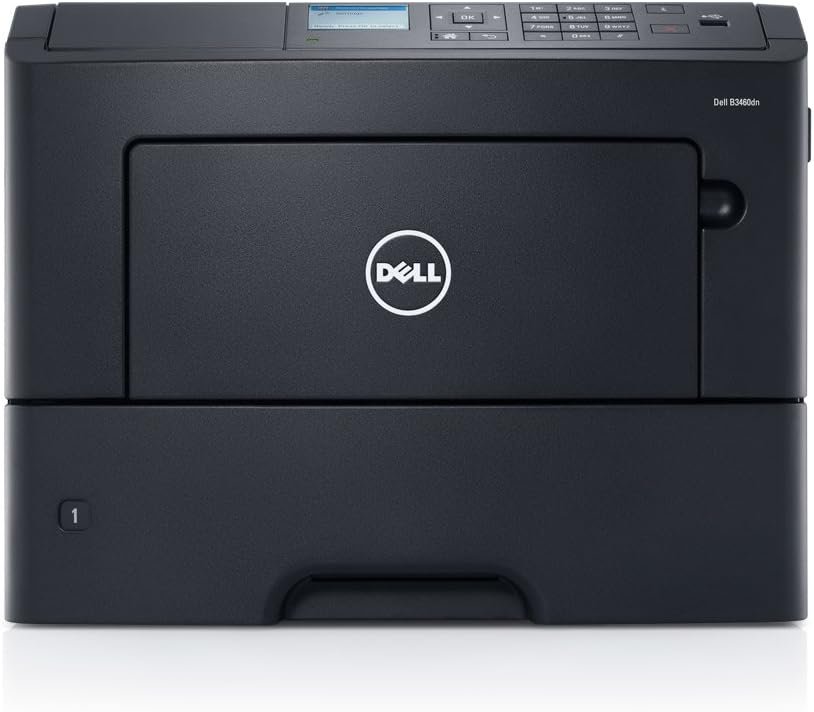
In today’s fast-paced business environment, selecting the right printer can significantly impact productivity and operational efficiency. Whether managing high-volume office tasks or handling specialized print requirements, the performance of a printer directly affects workflow reliability and cost-effectiveness. Modern workplaces demand printers that balance speed, durability, and adaptability to evolving workloads. For instance, a printer that can handle 50 pages per minute (ppm) with high-resolution output is essential for environments requiring rapid document processing, such as legal offices or accounting departments. Conversely, a printer with limited duty cycle or poor media compatibility may struggle with heavy usage or specific print tasks. Understanding the technical specifications, supported media types, and connectivity options is critical for aligning printer capabilities with user needs. Additionally, factors like maintenance requirements, warranty terms, and long-term reliability influence the total cost of ownership. This review evaluates the Dell B3460DN 50ppm mono laser printer, focusing on its technical performance, media compatibility, and suitability for various print environments. By analyzing its specifications and industry benchmarks, we provide an objective assessment to help users determine if this printer meets their operational demands.
Quick Overview
| Feature | Details |
|---|---|
| Printer Type | Monochrome Laser Printer |
| Print Speed | 50 ppm (black and white) |
| Print Resolution | 1200 x 1200 DPI |
| Connectivity | Ethernet |
| Duplex Printing | Automatic |
| Media Support | Paper (plain), Transparencies |
| Maximum Media Size | A3 |
| Input Capacity | 650 sheets |
| Warranty | 90-day depot warranty |
| Consumables | Toner and drum not included |
| Power Consumption | 640 watts |
| Dimensions | 18.6 x 17 x 16.6 inches |
| Weight | 38.8 pounds |
The Dell B3460DN is designed for environments requiring high-speed monochrome printing with reliable duplex functionality. Its Ethernet connectivity ensures seamless integration into networked office systems, while the A3 media support expands its versatility for large-format documents. The 90-day warranty provides limited coverage, though the absence of included toner and drum may require additional investment for long-term use. These specifications make it suitable for mid-sized offices or departments with consistent black-and-white printing needs.
Print Speed and Throughput Performance
The Dell B3460DN’s 50 ppm print speed is a key factor for users prioritizing rapid output. This speed is achieved through a high-speed laser print engine optimized for monochrome printing, which ensures efficient toner transfer and minimal dwell time per page. The printer’s duty cycle, which refers to its ability to handle continuous printing without overheating, is critical for environments with high-volume usage. While the exact duty cycle is not specified, the 650-sheet input capacity and 250-sheet output tray suggest it is designed for moderate to heavy workloads. The 1200 x 1200 DPI resolution ensures sharp text and clear graphics, making it suitable for documents requiring precise formatting. However, users should note that the printer’s maximum speed may decrease under continuous use, as thermal management systems often throttle performance to prevent overheating. This makes the B3460DN ideal for environments with predictable print schedules rather than unpredictable peak demand.
High-Speed Monochrome Printing
The B3460DN’s 50 ppm print speed is ideal for environments requiring rapid output, such as accounting departments or legal offices. This speed is achieved through a laser print engine that efficiently processes and prints data, reducing the time required for each page. The printer’s thermal management system ensures that it maintains optimal performance even during extended use, though it may throttle output to prevent overheating. This makes the B3460DN suitable for environments with predictable print schedules rather than unpredictable peak demand.
Duty Cycle and Continuous Use
The printer’s duty cycle, which refers to its ability to handle continuous printing without overheating, is critical for environments with high-volume usage. While the exact duty cycle is not specified, the 650-sheet input capacity and 250-sheet output tray suggest it is designed for moderate to heavy workloads. The 640-watt power consumption indicates a balance between performance and energy efficiency, though users should be aware that prolonged use may require periodic cooling cycles to maintain reliability.
Resolution and Output Quality
The 1200 x 1200 DPI resolution ensures sharp text and clear graphics, making it suitable for documents requiring precise formatting. This resolution is particularly beneficial for users who need to print detailed reports, spreadsheets, or technical diagrams. However, the printer’s resolution may not be sufficient for high-end graphic design tasks, as it is optimized for monochrome text rather than color or high-resolution images.
Connectivity and Network Integration
The Dell B3460DN’s Ethernet connectivity is a significant advantage for users requiring seamless integration into networked office environments. Ethernet provides a stable and reliable connection, reducing the risk of data transmission errors and ensuring consistent print output. The printer’s network capabilities allow for centralized print management, enabling users to send print jobs from multiple devices without the need for physical proximity. However, the absence of Wi-Fi connectivity may limit its flexibility for remote or mobile users. The single Ethernet port and USB port offer basic connectivity options, though the lack of additional ports may restrict simultaneous device access. This makes the B3460DN suitable for environments where wired connections are standard, such as corporate offices or shared workspaces.
Ethernet Connectivity Benefits
The Ethernet interface enables the B3460DN to integrate seamlessly into existing network infrastructures, reducing the need for physical connections. This is particularly beneficial for users in environments where multiple devices require access to the printer, as it allows for centralized print management. The stability of Ethernet connections minimizes data transmission errors, ensuring that print jobs are processed accurately and efficiently.
Networked Environment Compatibility
The printer’s network capabilities support centralized print management, allowing users to send print jobs from various devices without direct access to the printer. This feature is ideal for office environments where multiple users need to access the same printer. However, the lack of Wi-Fi connectivity may limit its utility for remote or mobile users who require wireless access to the printer.
Port Availability and Device Access
The B3460DN features a single Ethernet port and one USB port, which provides basic connectivity options. While this setup is sufficient for most office environments, it may restrict simultaneous device access. Users requiring additional ports for multiple devices may need to consider alternative solutions or networked print servers to expand connectivity options.
Media Compatibility and Versatility
The Dell B3460DN supports a range of media types, including plain paper and transparencies, making it versatile for different print tasks. The printer’s ability to handle A3-sized media expands its use cases, allowing for larger documents such as blueprints or reports. However, the absence of support for specialty media like glossy paper or labels may limit its applicability for certain print requirements. The automatic duplex printing feature enhances paper efficiency, reducing the need for manual intervention. While the printer’s media compatibility is adequate for most office environments, users requiring specialized media types may need to explore additional accessories or alternative printers.
Supported Media Types
The B3460DN is compatible with plain paper and transparencies, making it suitable for standard office printing tasks. This versatility allows users to handle a variety of document types without the need for additional printers. However, the printer does not support specialty media such as glossy paper or labels, which may limit its use for specific print applications.
A3 Media Support
The ability to handle A3-sized media is a notable feature, as it allows for larger documents such as blueprints or reports. This makes the B3460DN suitable for environments where larger print sizes are required. However, the printer’s design for A3 media may not accommodate other specialty sizes, restricting its adaptability for diverse print needs.
Duplex Printing Efficiency
The automatic duplex printing feature enhances paper efficiency by printing on both sides of the paper without manual intervention. This reduces the need for additional paper and minimizes the environmental impact of printing. However, the duplex functionality may not be suitable for all media types, particularly those that require single-sided printing for specific applications.
Pros and Cons
Pros
- High-Speed Monochrome Printing: The 50 ppm print speed is ideal for environments requiring rapid output, such as accounting departments or legal offices.
- Ethernet Connectivity: The Ethernet interface ensures stable and reliable network integration, reducing the risk of data transmission errors.
- A3 Media Support: The ability to handle A3-sized media expands the printer’s use cases, allowing for larger documents such as blueprints or reports.
- Automatic Duplex Printing: Enhances paper efficiency by printing on both sides of the paper without manual intervention.
- Reliable Thermal Management: The printer’s thermal management system ensures optimal performance during extended use, though it may throttle output to prevent overheating.
- Durable Build: The 38.8-pound weight and robust construction suggest a durable unit suitable for moderate to heavy workloads.
Cons
- Limited Consumables Support: The printer does not include toner or drum, requiring additional investment for long-term use.
- No Wi-Fi Connectivity: The absence of Wi-Fi may limit its flexibility for remote or mobile users who require wireless access.
- Single Ethernet Port: The single Ethernet port may restrict simultaneous device access, necessitating networked print servers for expanded connectivity.
- Limited Media Compatibility: The printer does not support specialty media such as glossy paper or labels, which may limit its use for specific print applications.
- 90-Day Warranty: The limited 90-day warranty may not provide sufficient coverage for extended use, especially compared to competitors offering longer warranty periods.
Final Verdict: Who This Printer Is Best For (and Who Should Skip It)
The Dell B3460DN 50ppm mono laser printer is best suited for mid-sized offices or departments with consistent black-and-white printing needs. Its high-speed monochrome printing, Ethernet connectivity, and A3 media support make it ideal for environments requiring rapid output and larger document handling. The automatic duplex printing feature enhances paper efficiency, reducing costs and environmental impact. However, users requiring specialty media, wireless connectivity, or extended warranty coverage should consider alternative options. The printer’s limited consumables support and 90-day warranty may also be drawbacks for long-term use. While the B3460DN offers reliable performance for standard office tasks, its limitations in connectivity and media compatibility make it less suitable for environments with diverse or specialized print requirements.
Frequently Asked Questions (FAQs)
What is the print speed of the Dell B3460DN laser printer?
The Dell B3460DN laser printer offers a maximum print speed of 50 pages per minute (ppm) for monochrome printing, making it suitable for environments requiring rapid output.
Does the Dell B3460DN support A3 media?
Yes, the printer is compatible with A3-sized media, allowing for larger documents such as blueprints or reports. This feature expands its versatility for various print tasks.
What connectivity options are available for the Dell B3460DN?
The printer features Ethernet connectivity for stable network integration, though it does not support Wi-Fi. This makes it ideal for environments with existing wired networks.
Can the Dell B3460DN print on both sides of the paper?
Yes, the printer includes an automatic duplex printing feature, which enhances paper efficiency by printing on both sides of the paper without manual intervention.
What is the warranty coverage for the Dell B3460DN?
The printer comes with a 90-day depot warranty, which provides limited coverage. Users should consider additional support options for extended use.
Does the Dell B3460DN include toner and drum?
No, the printer does not include toner or drum. These consumables must be purchased separately, which may increase the total cost of ownership.
What is the maximum media size supported by the Dell B3460DN?
The printer supports media up to A3 size, making it suitable for larger documents. It is compatible with plain paper and transparencies.
How does the Dell B3460DN handle continuous printing?
The printer’s thermal management system ensures optimal performance during extended use, though it may throttle output to prevent overheating. This makes it suitable for moderate to heavy workloads.