
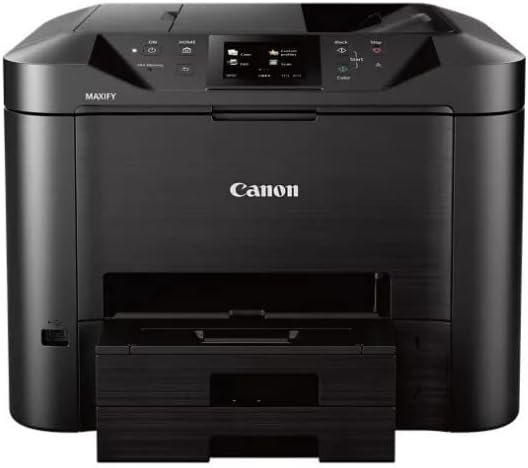
The Importance of Choosing the Right Printer for Your Workflow
In today’s fast-paced business environment, the right printer can significantly impact productivity and operational efficiency. Whether managing a small office, handling remote workloads, or supporting a growing startup, the choice of printing technology directly affects output quality, cost-effectiveness, and workflow integration. A printer that meets specific requirements—such as high-speed printing, reliable connectivity, or versatile media compatibility—can streamline tasks like document management, client communication, and data organization. For users who prioritize multifunctionality, a printer that combines printing, scanning, copying, and faxing into a single device can reduce equipment costs and simplify workflows. However, the decision must balance performance metrics like print resolution, duty cycle, and ink efficiency with practical factors such as connectivity options, media support, and long-term maintenance. This review evaluates the Canon MAXIFY MB5420 Wireless All-in-One Printer, focusing on its technical specifications, usability, and suitability for various business environments. By analyzing its print quality, speed, connectivity, and cost structure, we provide a data-driven assessment to help users determine if this printer aligns with their specific needs.
Quick Overview
| Feature | Details |
|---|---|
| Printer Type | Wireless All-in-One (Print, Scan, Copy, Fax) |
| Printing Technology | Inkjet with XL Ink Tanks |
| Print Speed | 24 ppm (Monochrome), 15.5 ppm (Color) |
| Print Resolution | 600 x 600 dpi (Monochrome), 600 x 600 dpi (Color) |
| Media Sizes | 8.5 x 14 inch, Business Cards, Labels, ID Cards |
| Connectivity | Wi-Fi, Ethernet, USB 2.0 |
| Duty Cycle | 30,000 pages/month |
| Ink System | Removable XL Ink Tanks |
| Warranty | 1 Year |
The Canon MAXIFY MB5420 is designed for small-to-midsize businesses, offering a balance of performance and cost-efficiency. Its inkjet technology, combined with XL ink tanks, ensures long-lasting use for high-volume printing. The wireless connectivity and Ethernet port support seamless integration into office networks, while the dual-sided printing and scanning capabilities reduce paper waste. These features make it suitable for environments requiring multifunctional printing, document management, and remote access without compromising on print quality or operational efficiency.

Print Quality and Resolution: Balancing Speed and Clarity
The Canon MAXIFY MB5420 delivers consistent print quality across both monochrome and color outputs, making it suitable for a range of document types. Its 600 x 600 dpi resolution ensures sharp text and clear graphics, which is critical for business reports, invoices, and client correspondence. The printer’s ability to maintain consistent color accuracy across multiple pages reduces the need for frequent calibration, a key advantage for users handling large print jobs. However, the color resolution may not match high-end professional printers, which could be a consideration for users requiring precise color reproduction for marketing materials or creative work.

Text Clarity and Monochrome Performance
For monochrome printing, the MB5420 excels with its 600 x 600 dpi resolution, producing crisp text and clean line work. This makes it ideal for printing forms, reports, and internal documents where readability is essential. The printer’s quick first print time of 6 seconds ensures minimal downtime, which is particularly beneficial in environments where rapid output is critical. The high page yield of 2,500 pages per XL ink tank also supports cost-effective long-term use, reducing the frequency of ink replacements.
Color Output and Graphic Reproduction
While the MB5420’s color resolution is adequate for standard office use, it may fall short for high-precision color printing. The 600 x 600 dpi output is sufficient for basic color documents, such as presentations or marketing brochures, but may not meet the demands of graphic designers or photographers requiring more detailed color gradients. Users should consider this limitation if their workflow involves frequent color printing at high quality.
Print Speed and Throughput
The MB5420’s print speeds of 24 ppm for monochrome and 15.5 ppm for color are competitive for a multifunctional printer. These speeds ensure timely output for most office tasks, though they may lag behind dedicated laser printers for high-volume color printing. The printer’s 30,000-page monthly duty cycle makes it suitable for environments with moderate to high print demands, but users with extremely high throughput requirements should evaluate alternative models.
Connectivity and Network Integration: Seamless Device Compatibility
The Canon MAXIFY MB5420’s connectivity options enhance its versatility in modern office environments. The built-in Wi-Fi and Ethernet ports allow for seamless integration into both wired and wireless networks, enabling users to print from computers, smartphones, and tablets without the need for additional hardware. The Canon PRINT app further simplifies remote access, allowing users to print from the cloud and scan directly to mobile devices. This level of connectivity is particularly beneficial for small businesses with distributed teams or remote workers who require flexible printing solutions.

Wireless Printing and Mobile Integration
The MB5420’s Wi-Fi connectivity supports printing from mobile devices, making it ideal for users who need to print documents on the go. The Canon PRINT app provides a user-friendly interface for managing print jobs, scanning documents, and accessing printer settings from smartphones and tablets. This feature is especially valuable for professionals who frequently work outside the office and need to maintain document workflows without physical access to a printer.
Ethernet and USB Connectivity
For users preferring wired connections, the MB5420’s Ethernet port offers a stable and secure printing solution. This is particularly useful in environments where network reliability is critical, such as financial institutions or legal offices. The USB 2.0 port provides an alternative for direct printing from computers, ensuring compatibility with older systems that may not support wireless connectivity.
Network Management and Security
The printer’s support for standard Management Information Base (MIB) allows for centralized network management, enabling IT administrators to monitor printer status, track usage, and manage print queues efficiently. This feature is essential for businesses looking to optimize resource allocation and ensure secure printing practices within their network.
Media Compatibility and Versatility: Supporting Diverse Printing Needs
The Canon MAXIFY MB5420’s ability to handle a variety of media types makes it adaptable to different printing requirements. The printer supports standard paper sizes, as well as specialized media such as business cards, labels, and ID cards, expanding its utility beyond traditional office printing. This versatility is particularly valuable for users who need to produce a range of documents, from standard reports to personalized marketing materials.

Support for Specialized Media Types
The MB5420’s compatibility with business cards and labels is a significant advantage for small businesses that require customized printing. The ability to print on ID cards also makes it suitable for environments such as schools or healthcare facilities that need to produce identification documents. However, the printer’s maximum media size of 8.5 x 14 inches may limit its use for larger format printing, which could be a consideration for users requiring A3-sized outputs.
Dual-Sided Printing and Paper Handling
The built-in auto-duplex printing feature reduces paper waste by printing on both sides of a document, which is beneficial for users aiming to minimize costs and environmental impact. The printer’s dual paper trays provide flexibility in managing different media types, allowing users to load standard paper and specialty media simultaneously. This feature is particularly useful for users who frequently switch between document types, such as printing reports on regular paper and labels on specialized media.
Media Handling and Paper Feed
The MB5420’s paper tray capacity of 500 sheets ensures that it can handle moderate to high-volume printing without frequent refills. The printer’s paper feed system is designed to handle a range of media thicknesses, though users should be aware that thicker media may require additional adjustments to ensure proper feeding. This adaptability makes the MB5420 suitable for environments with varying printing needs, such as offices that print both standard documents and specialty media.

Pros & Cons
Pros
- High Page Yield with XL Ink Tanks: The MB5420’s use of XL ink tanks provides a high page yield of 2,500 pages for monochrome and 1,500 pages for color, reducing the frequency of ink replacements and lowering long-term costs.
- Quick First Print Time: The printer’s ability to produce the first print in as little as 6 seconds minimizes downtime, making it ideal for environments where rapid output is critical.
- Dual-Sided Printing and Scanning: The built-in auto-duplex feature reduces paper waste, while the single-pass duplex scanning capability enables efficient multi-page copying and scanning.
- Robust Connectivity Options: The combination of Wi-Fi, Ethernet, and USB 2.0 ports ensures compatibility with a wide range of devices and network environments.
- Network Management Features: The support for standard MIB allows for centralized printer management, enhancing efficiency for IT administrators.
- Versatile Media Compatibility: The printer’s ability to handle business cards, labels, and ID cards expands its utility beyond standard office printing.
Cons
- Limited Color Resolution: While the MB5420’s color resolution is adequate for basic office use, it may not meet the demands of users requiring high-precision color printing.
- No Automatic Document Feeder: The absence of an automatic document feeder may limit the printer’s ability to handle large-volume scanning tasks efficiently.
- Moderate Print Speed for Color: The 15.5 ppm color print speed may lag behind dedicated laser printers for high-volume color printing.
- Fixed Media Size Limitations: The maximum media size of 8.5 x 14 inches may restrict the printer’s use for larger format printing.
- Limited Advanced Networking Features: While the MB5420 supports standard MIB, it lacks more advanced network management capabilities found in higher-end models.
Final Verdict: Who This Printer Is Best For (and Who Should Skip It)
The Canon MAXIFY MB5420 Wireless All-in-One Printer is best suited for small-to-midsize businesses requiring a multifunctional device that balances print quality, speed, and cost-efficiency. Its high page yield with XL ink tanks, quick first print time, and versatile media compatibility make it ideal for environments where document management and remote access are critical. The robust connectivity options and network management features further enhance its usability in office settings with multiple users.
However, users with high-volume color printing needs, such as graphic designers or marketing professionals, may find the MB5420’s color resolution and print speed insufficient. Similarly, businesses requiring advanced networking capabilities or larger format printing should consider alternative models. The absence of an automatic document feeder and limited media size options may also deter users who frequently handle large-scale scanning or specialty media printing. Overall, the MB5420 is a reliable choice for general office use, but its limitations make it less suitable for specialized printing requirements.
Frequently Asked Questions (FAQs)
What is the print resolution of the Canon MAXIFY MB5420?
The Canon MAXIFY MB5420 offers a print resolution of 600 x 600 dpi for both monochrome and color outputs, ensuring clear text and basic color reproduction suitable for standard office use.
Can the Canon MAXIFY MB5420 print on business cards and labels?
Yes, the MB5420 is compatible with business cards, labels, and ID cards, making it versatile for various printing needs beyond standard paper.
How does the Canon MAXIFY MB5420 handle dual-sided printing?
The printer features built-in auto-duplex printing, which automatically prints on both sides of a document, reducing paper waste and improving efficiency for multi-page outputs.
What connectivity options are available for the Canon MAXIFY MB5420?
The MB5420 supports Wi-Fi, Ethernet, and USB 2.0 connectivity, enabling seamless integration with computers, mobile devices, and office networks.
How many pages can the Canon MAXIFY MB5420 print with XL ink tanks?
Using XL ink tanks, the MB5420 can produce up to 2,500 monochrome pages or 1,500 color pages, providing a high page yield for cost-effective long-term use.
Is the Canon MAXIFY MB5420 suitable for high-volume color printing?
The MB5420’s color print speed of 15.5 ppm is adequate for standard office use but may not meet the demands of high-volume color printing required by graphic designers or marketing professionals.
Does the Canon MAXIFY MB5420 support network management features?
Yes, the printer includes standard Management Information Base (MIB) support, allowing for centralized network management and monitoring of printer status and usage.
What is the maximum media size supported by the Canon MAXIFY MB5420?
The MB5420 can handle media up to 8.5 x 14 inches, making it suitable for standard paper sizes but limiting its use for larger format printing.