
The Importance of Choosing the Right Printer
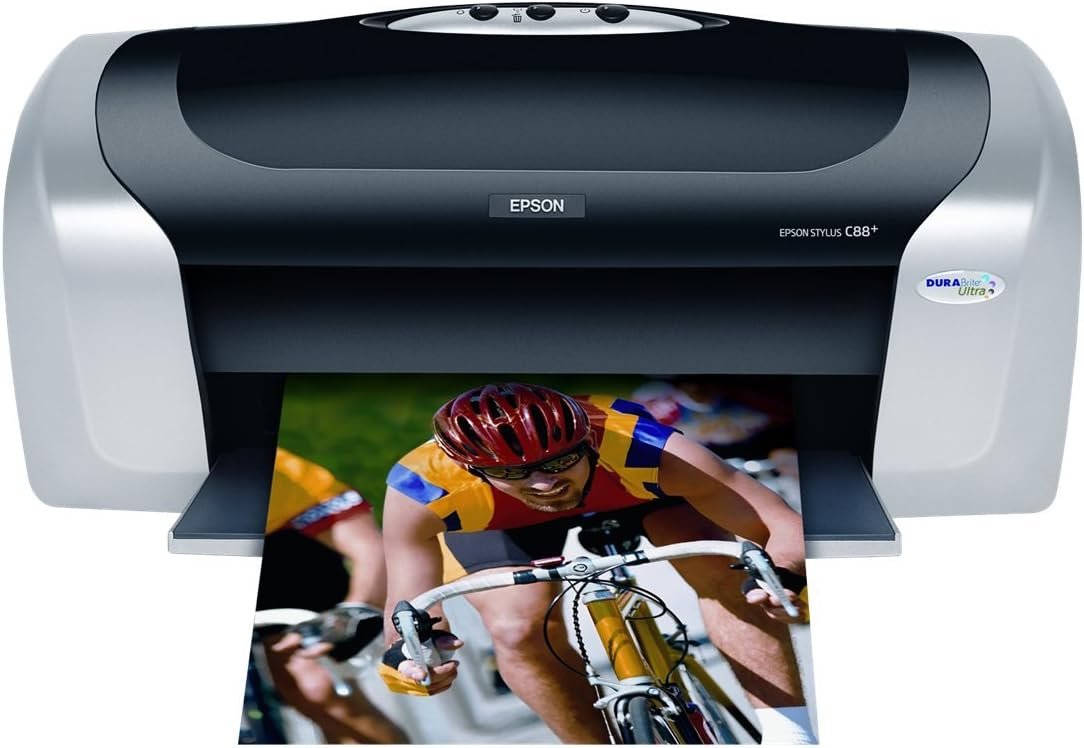
In today’s fast-paced environments, selecting the right printer is essential for maintaining productivity and meeting diverse printing needs. Whether in a home office, small business, or educational setting, the right printer can significantly impact workflow efficiency and output quality. Printers vary widely in their capabilities, from basic text printing to high-resolution photo production, and their performance is often dictated by factors such as print speed, resolution, media compatibility, and reliability. For users requiring consistent, high-quality results, understanding these specifications is critical. The Epson Stylus C88+ represents a mid-range inkjet printer designed to balance performance, versatility, and cost-effectiveness. Its ability to handle both everyday tasks and specialized projects makes it a compelling option for users who need a reliable printer that can adapt to varying workloads. This review evaluates the printer’s key attributes, including its print technology, connectivity options, and media handling capabilities, to help users determine if it aligns with their specific requirements.
Quick Overview
| Feature | Details |
|---|---|
| Printer Type | Inkjet Printer |
| Print Technology | DURABrite Ultra Pigment Ink |
| Print Resolution | 5760 x 1440 dpi |
| Print Speed | 23 ppm (mono), 14 ppm (color) |
| Media Sizes | A4, A5, B5, Letter, Legal, 4×6, 5×7, 8×10, Envelope No. 10 |
| Connectivity | USB 2.0, Parallel Port |
| Input Tray Capacity | 120 sheets |
| Supported Media Types | Plain Paper, Glossy Paper, Matte Paper, Envelopes |
| Ink System | Individual Color Cartridges |
| Warranty | 1-Year Limited Warranty |
| Power Consumption | 19W (Normal), 2.5W (Sleep), 0.8W (Power Off) |
The Epson Stylus C88+ is designed for users who need a versatile printer that can handle both standard and specialized printing tasks. Its combination of high-resolution printing, multiple connectivity options, and support for various media types makes it suitable for both personal and professional environments. The printer’s ability to produce smudge-resistant, fade-resistant prints further enhances its appeal for users requiring long-term document preservation.
Print Quality and Ink Performance
DURABrite Ultra Pigment Ink Technology
The Epson Stylus C88+ utilizes DURABrite Ultra pigment ink, a key differentiator in its print quality capabilities. This ink formulation is engineered to deliver exceptional clarity and color fidelity across a range of media types, including plain paper, glossy photo paper, and matte surfaces. The pigment-based composition ensures that printed images resist fading, smudging, and water damage, making it ideal for both everyday documents and archival purposes. The ink’s quick-drying properties allow users to handle printed materials immediately without the risk of smearing, a critical feature for time-sensitive projects.
High-Resolution Output and Fine Droplet Precision
With a maximum print resolution of 5760 x 1440 dpi, the C88+ produces sharp, detailed outputs that are particularly well-suited for high-quality photographs and intricate graphics. The printer’s ability to dispense ink droplets as small as three picoliters contributes to its precision, enabling fine details to be rendered without visible banding or streaking. This level of resolution is especially beneficial for users who frequently print images or require professional-grade output for presentations and reports.
Media Compatibility and Durability
The printer’s support for a wide range of media types, including glossy, matte, and semi-gloss paper, ensures that users can achieve consistent results across different materials. The DURABrite Ultra ink’s resistance to water and fading extends the lifespan of printed documents, particularly in environments where exposure to light or moisture is a concern. This durability is a significant advantage for users who need to preserve printed materials for extended periods or display them in public spaces.
Print Speed and Workload Capacity
High-Speed Monochrome Printing
The Epson Stylus C88+ is designed to handle high-volume printing tasks efficiently, with a maximum monochrome print speed of 23 pages per minute (ppm). This speed is particularly advantageous for users who need to produce large quantities of text documents, such as financial reports, invoices, or data sheets. The printer’s ability to maintain consistent speed across varying workloads ensures that it can keep up with demanding environments without compromising quality.
Color Print Efficiency and Complexity
While the color print speed of 14 ppm is slightly lower than the monochrome rate, it is still competitive for a mid-range inkjet printer. The printer’s performance in color printing is influenced by the complexity of the document, with intricate graphics and photographs requiring more time to render. However, the use of individual color cartridges allows for targeted ink usage, which can help reduce print time for specific tasks by minimizing unnecessary color output.
Duty Cycle and Environmental Adaptability
The C88+ is built to handle continuous printing operations, with a duty cycle that supports sustained use in office environments. Its power consumption of 19 watts in normal mode ensures that it operates efficiently without excessive energy use. The printer’s operating temperature range of 50°F to 95°F (10°C to 35°C) and storage range of 4°F to 140°F (20°C to 60°C) make it suitable for a variety of environmental conditions, from air-conditioned offices to less controlled spaces.
Connectivity and Compatibility
USB and Parallel Port Options
The Epson Stylus C88+ offers both USB 2.0 and parallel port connectivity, providing flexibility for users with different system requirements. The USB interface is particularly useful for modern computers, offering fast data transfer and plug-and-play functionality. The parallel port, while less common in contemporary systems, remains a valuable option for legacy devices or specialized workstations. The printer’s ability to automatically switch between ports ensures seamless integration into diverse computing environments.
Cross-Platform Support and Software Integration
The printer is compatible with both Windows and Mac operating systems, making it a versatile choice for users with mixed computing setups. The included software, such as ArcSoft Photo Impression and EPSON Scan Assistant, enhances its functionality by providing tools for photo editing, document scanning, and print management. These utilities simplify the process of preparing and outputting high-quality prints, particularly for users who frequently handle image-based projects.
Networking and Remote Printing Capabilities
While the C88+ does not include built-in networking capabilities, its dual connectivity options allow for easy integration into local networks through external routers or switches. This feature is beneficial for users who need to share the printer across multiple devices without requiring advanced networking configurations. The printer’s support for remote printing through USB and parallel ports further expands its usability in collaborative or distributed work environments.
Pros & Cons
Pros
- High-Resolution Printing: The 5760 x 1440 dpi resolution ensures exceptional detail in both text and graphics, making it suitable for professional and creative applications.
- DURABrite Ultra Ink: The pigment-based ink provides smudge resistance, fade resistance, and water resistance, ideal for long-term document preservation.
- Versatile Media Support: The printer supports a wide range of media types, including glossy, matte, and semi-gloss paper, allowing for diverse printing needs.
- Dual Connectivity Options: The combination of USB 2.0 and parallel port connectivity offers flexibility for different computing environments.
- Cross-Platform Compatibility: The printer works seamlessly with both Windows and Mac systems, making it a versatile choice for mixed-use scenarios.
- Energy Efficiency: The low power consumption in sleep and power-off modes helps reduce overall energy use without compromising performance.
- User-Friendly Software: The included software simplifies tasks such as photo editing, scanning, and print management, enhancing productivity.
Cons
- Limited Color Print Speed: The 14 ppm color print speed may be slower than some competing models, which could affect efficiency for high-volume color printing.
- No Built-In Networking: The lack of built-in networking capabilities requires additional hardware for shared printing, which may be a drawback for some users.
- Individual Ink Cartridges: While the individual color cartridges allow for targeted ink replacement, they may result in higher long-term costs compared to bulk ink systems.
- No Duplex Printing: The absence of duplex printing functionality means users must manually flip pages for double-sided output, which can be time-consuming.
- Limited Media Handling: The printer’s input tray is limited to 120 sheets, which may not be sufficient for high-volume environments requiring larger paper capacities.
Final Verdict: Who This Printer Is Best For (and Who Should Skip It)
The Epson Stylus C88+ is an excellent choice for users who require a balance of print quality, versatility, and reliability in a mid-range inkjet printer. Its high-resolution output, durable ink system, and support for various media types make it well-suited for both personal and small business use. The printer’s cross-platform compatibility and dual connectivity options further enhance its appeal for users with mixed computing environments. However, the C88+ may not be the best fit for users who prioritize extremely high color print speeds, require built-in networking capabilities, or need larger media handling capacities. Those who frequently print large volumes of color documents or require duplex printing may find the printer’s limitations restrictive. Overall, the C88+ is a solid option for users seeking a reliable, feature-rich printer that can adapt to a wide range of printing needs.
Frequently Asked Questions (FAQs)
What print resolution does the Epson Stylus C88+ offer?
The Epson Stylus C88+ delivers a maximum print resolution of 5760 x 1440 dpi, ensuring sharp and detailed output for both text and graphics. This high resolution is ideal for producing high-quality photographs and professional documents.
How does the DURABrite Ultra pigment ink improve print durability?
The DURABrite Ultra pigment ink is designed to resist smudging, fading, and water damage. This makes it suitable for long-term document preservation and ensures that prints remain clear and vibrant even when exposed to light or moisture.
What media types can the Epson Stylus C88+ handle?
The printer supports a variety of media types, including plain paper, glossy photo paper, matte paper, semi-gloss paper, and envelopes. This versatility allows users to print on different surfaces while maintaining consistent quality.
Is the Epson Stylus C88+ compatible with both Windows and Mac systems?
Yes, the Epson Stylus C88+ is compatible with both Windows and Mac operating systems. It includes software tools for seamless integration, making it a versatile option for users with mixed computing environments.
What is the maximum print speed for monochrome and color documents?
The Epson Stylus C88+ can print up to 23 pages per minute (ppm) in monochrome mode and 14 ppm in color mode. These speeds are suitable for handling both high-volume text printing and color projects efficiently.
Does the Epson Stylus C88+ support duplex printing?
No, the Epson Stylus C88+ does not include duplex printing functionality. Users must manually flip pages for double-sided printing, which may add to the time required for certain tasks.
What connectivity options are available for the Epson Stylus C88+?
The printer offers both USB 2.0 and parallel port connectivity, providing flexibility for different computing environments. This dual connectivity ensures compatibility with a range of devices and systems.
What is the warranty coverage for the Epson Stylus C88+?
The Epson Stylus C88+ comes with a 1-year limited warranty, providing basic coverage for manufacturing defects and ensuring reliability for typical usage scenarios.