
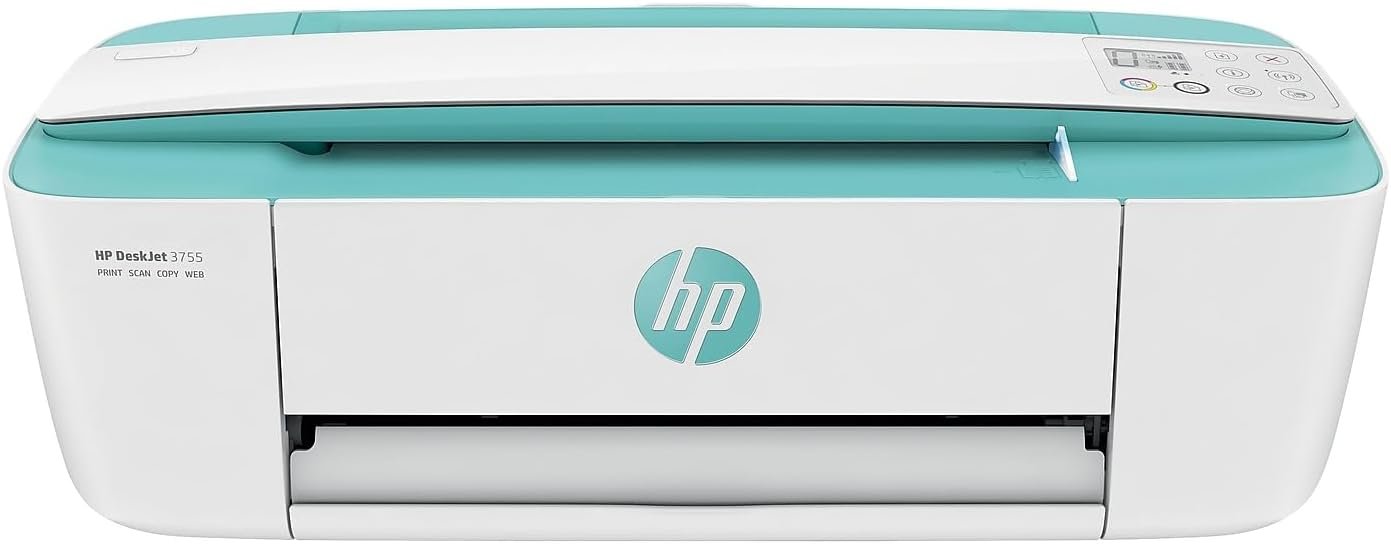
The HP DeskJet 3755 Compact All-in-One Wireless Printer stands out as a versatile, space-efficient solution for households and small offices. Designed with modern printing needs in mind, this printer combines wireless connectivity, Instant Ink compatibility, and a compact footprint to deliver reliable performance for everyday tasks. Whether you’re printing documents, photos, or scanning files, the DeskJet 3755 balances efficiency with ease of use. Its integration with Amazon Alexa and support for mobile printing make it a practical choice for users who prioritize convenience. For those seeking an affordable, all-in-one option that balances speed and print quality without requiring a large workspace, the DeskJet 3755 offers a compelling combination of features and functionality.
Quick Overview
| Feature | Details |
|---|---|
| Printer Type | Inkjet (HP Thermal Inkjet) |
| Supported Functions | Print, Scan, Copy |
| Print Resolution | 4800 x 1200 dpi (Color), 1200 x 1200 dpi (Black) |
| Print Speed | Up to 15 ppm Color, 19 ppm Monochrome |
| Media Sizes | 3×5 in to 8.5×14 in, Envelopes |
| Connectivity | Wi-Fi, USB 2.0, Amazon Alexa |
| Duty Cycle | Designed for home/light office use |
| Ink System | HP Instant Ink Ready Cartridges (120 pages black, 100 pages color) |
| Warranty | One-year limited hardware warranty |
The HP DeskJet 3755 excels in environments where compact design and multifunctionality are priorities. Its ability to handle a range of paper sizes, combined with wireless printing and cloud connectivity, makes it ideal for users who need a printer that fits seamlessly into smaller spaces without compromising on essential features.

Print Speed and Performance for Everyday Tasks

High-Speed Output for Document Workloads
The HP DeskJet 3755 delivers consistent performance across a range of print tasks. Its maximum monochrome speed of 19 ppm (pages per minute) ensures efficient handling of text-heavy documents, such as reports, invoices, and forms. For color printing, the printer maintains a respectable 15 ppm output, which is sufficient for most home or small office workflows. While not the fastest in its class, the 19 ppm monochrome speed is competitive with similarly sized all-in-ones. The printer’s first-page-out times—15 seconds for black and 18 seconds for color—are among the fastest in its category, reducing wait times when starting new jobs.
Color Printing Speed and Image Quality
Color print speed for the HP DeskJet 3755 is rated at up to 15 ppm, which may appear slower than some dedicated color printers. However, this speed is balanced by the printer’s high-resolution output of 4800 x 1200 dpi, ensuring sharp text and detailed graphics. The printer’s color performance is particularly well-suited for light-duty use, such as printing photos, marketing materials, or color-coded documents. While it may not match the speed of laser printers for high-volume color printing, its inkjet technology provides a cost-effective alternative for users who prioritize print quality over raw speed.
Draft Mode and Duty Cycle Considerations
For users who prioritize cost savings over speed, the HP DeskJet 3755 offers a draft mode with speeds of up to 19 ppm black and 15 ppm color. This feature is ideal for everyday printing tasks such as drafts, internal documents, or low-resolution images where speed takes precedence. The printer’s duty cycle is designed for home and light office environments, making it less suitable for heavy-duty commercial use. Its inkjet technology also ensures lower energy consumption compared to laser printers, contributing to its efficiency in typical usage scenarios.
Connectivity and Compatibility for Modern Workflows

Wireless Printing and Mobile Integration
The HP DeskJet 3755 supports Wi-Fi printing, allowing users to print from smartphones and tablets without the need for a wired connection. This wireless capability simplifies setup and reduces cable clutter, making it ideal for users who want to print on the go. The printer’s compatibility with Amazon Alexa further enhances its convenience, enabling voice-activated printing for compatible devices. These features make it an excellent choice for households with multiple users who need to print from different devices simultaneously.
Cloud Printing and Cross-Platform Support
In addition to local wireless printing, the HP DeskJet 3755 supports cloud-based printing through HP’s cloud services and third-party platforms like Google Cloud Print. This flexibility ensures that users can print from anywhere, provided they have an internet connection. The printer’s compatibility with Apple AirPrint and Google Cloud Print adds to its versatility, allowing seamless integration into mixed-platform environments. For users who frequently work across multiple devices or need to print from remote locations, the printer’s connectivity options provide a reliable solution.
Network-Ready Features for Small Offices
The HP DeskJet 3755 is network-ready, making it a practical choice for small offices or home-based businesses that require shared printing. While not designed for large-scale networked environments, its ability to connect directly to a local network or router ensures that multiple users can access the printer simultaneously. The included USB 2.0 port provides an additional option for wired connections, catering to users who prefer a more direct setup. These connectivity features help the printer maintain its relevance in modern workspaces where flexibility and ease of use are key.
Media Support and Paper Handling for Versatile Use

Range of Supported Paper Sizes and Types
The HP DeskJet 3755 supports a wide range of paper sizes, from 3×5 inches to 8.5×14 inches, accommodating everything from standard letter-sized documents to larger formats like legal and 8×10 inch photos. The printer also handles envelopes, making it suitable for a variety of tasks such as mailing or sending correspondence. This versatility ensures that users can print on different media types without needing additional accessories, which is a significant advantage for those with limited workspace.
Handling Stiff Media and Envelopes
While the printer supports a range of media, its handling of stiff materials like thick envelopes or glossy photo paper may vary depending on the user’s specific needs. The included 60-sheet output tray provides ample capacity for most home or small office use cases, but users with higher-volume printing requirements may need to consider a model with additional trays. The printer’s ability to handle envelopes without jams is generally reliable, though users should ensure that the paper is properly aligned and not overloaded to avoid issues.
Paper Handling Limitations for Heavy Use
The HP DeskJet 3755’s paper handling capabilities are optimized for light to moderate use, making it less ideal for high-volume environments. The 60-sheet output tray is sufficient for most personal or small business printing, but users with higher demands may need to invest in a printer with larger trays or additional paper handling features. The printer’s design prioritizes compactness over heavy-duty performance, which aligns with its intended use case of home and small office environments.

Pros & Cons
Pros
- Compact Design: The HP DeskJet 3755’s ultra-compact size makes it ideal for small spaces, fitting easily on desks or countertops.
- HP Instant Ink Compatibility: The printer supports HP’s Instant Ink service, ensuring continuous ink supply at a lower cost compared to traditional cartridges. This subscription model allows users to pay only for the ink they use, with automatic replenishment and reduced waste.
- Versatile Connectivity: With Wi-Fi, USB 2.0, and Amazon Alexa support, the printer offers multiple ways to print from various devices. The Wi-Fi connectivity simplifies setup for users with limited technical expertise, while the Amazon Alexa integration allows voice-activated printing for compatible smart devices.
- High Print Resolution: At 4800 x 1200 dpi, the printer delivers sharp text and vivid color for photos and graphics. This resolution ensures that printed materials maintain a professional appearance, making it suitable for both document printing and creative projects.
- User-Friendly Setup: The printer’s intuitive setup process, including cloud-based configuration via the HP Smart app, simplifies onboarding for new users. The process is streamlined, with minimal steps required to connect the printer to a home network or mobile device.
- Energy-Efficient Operation: The HP DeskJet 3755 consumes minimal power, making it an eco-friendly choice for everyday use. Its energy-efficient design helps reduce electricity bills over time, particularly for users who print infrequently.
Cons
- Limited Media Support: While the printer handles standard paper sizes, its compatibility with specialty media like photo paper or thick stocks is limited. Users requiring specialized materials may need to invest in additional accessories or consider a different model.
- Moderate Color Speed: The 15 ppm color print speed may not meet the demands of users requiring high-volume color printing. For frequent color users, this could lead to longer wait times for large print jobs.
- Shorter Duty Cycle: Designed for home use, the printer may not be suitable for heavy-duty commercial environments. Its duty cycle is optimized for light to moderate use, which could affect performance in high-volume settings.
- Manual Duplexing: The lack of automatic duplex printing requires users to manually flip pages, which can be inconvenient for high-volume printing. This limitation may affect efficiency for users who frequently print double-sided documents.
- Lower Monochrome Speed Compared to Lasers: While the 19 ppm monochrome speed is adequate for most tasks, it may fall short of laser printers in high-volume office settings. Users requiring rapid black-and-white printing for large document volumes may find this limitation significant.
Final Verdict: Who This Printer Is Best For (and Who Should Skip It)
The HP DeskJet 3755 Compact All-in-One Wireless Printer is best suited for users who prioritize compact design, wireless printing, and cost-effective ink management. Its versatility in handling a range of paper sizes and its integration with Amazon Alexa make it an excellent choice for households or small offices where space is limited but multifunctionality is essential. The printer’s high-resolution output and Instant Ink compatibility also make it ideal for users who frequently print photos, marketing materials, or color documents without a large print volume.
However, the HP DeskJet 3755 may not be the best fit for users requiring high-speed color printing, heavy-duty commercial use, or advanced paper handling features. Its lower duty cycle and manual duplexing capabilities make it less suitable for high-volume environments or users who need to print large quantities of documents frequently. Additionally, those with a preference for laser printers or specialized media handling may find the HP DeskJet 3755 lacking in certain aspects. Overall, the printer strikes a balance between performance and practicality for its intended use cases.

Frequently Asked Questions (FAQs)
What are the key features of the HP DeskJet 3755 Compact All-in-One Printer?
The HP DeskJet 3755 features wireless printing, Amazon Alexa integration, HP Instant Ink compatibility, and a compact design. It supports print, scan, and copy functions with a resolution of up to 4800 x 1200 dpi. The printer includes HP Instant Ink-ready cartridges for cost-effective ink management and offers a 1-year hardware warranty.
How does the HP DeskJet 3755 compare to other compact printers in terms of print speed?
The HP DeskJet 3755 offers a maximum monochrome print speed of 19 ppm and a color speed of 15 ppm. While not the fastest in its class, it balances speed with high-resolution output, making it suitable for most home and small office tasks. Its first-page-out times of 15 seconds (black) and 18 seconds (color) are competitive with similarly sized models.
Can the HP DeskJet 3755 handle specialty media like envelopes or photo paper?
The printer supports a range of standard paper sizes, including envelopes, but its media handling is optimized for everyday use. While it can handle some specialty papers, users with specific needs may require a printer designed for advanced media compatibility.
Is the HP DeskJet 3755 suitable for commercial use?
The HP DeskJet 3755 is designed for home and small office environments. Its duty cycle and print speed are not optimized for high-volume commercial use, making it less suitable for businesses with heavy printing demands.
What connectivity options does the HP DeskJet 3755 offer?
The printer supports Wi-Fi printing, USB 2.0 connections, and Amazon Alexa integration for voice-activated printing. It also includes compatibility with Apple AirPrint and Google Cloud Print, offering flexibility for users across different platforms.
How energy-efficient is the HP DeskJet 3755?
The HP DeskJet 3755 consumes minimal power, with an estimated energy consumption of 0.06 Watts during standby mode. This low-power operation makes it an eco-friendly choice for everyday use in home or small office settings.
What are the limitations of using HP Instant Ink with the HP DeskJet 3755?
HP Instant Ink requires a subscription for continuous ink supply, which may not be ideal for users who prefer one-time purchases. Additionally, the service is primarily designed for regular printing usage and may not be cost-effective for sporadic or high-volume print jobs.
Is the HP DeskJet 3755 compatible with mobile printing?
Yes, the HP DeskJet 3755 supports wireless printing from smartphones and tablets. Its integration with Amazon Alexa allows voice-activated printing, making it convenient for users who need to print on the go.