
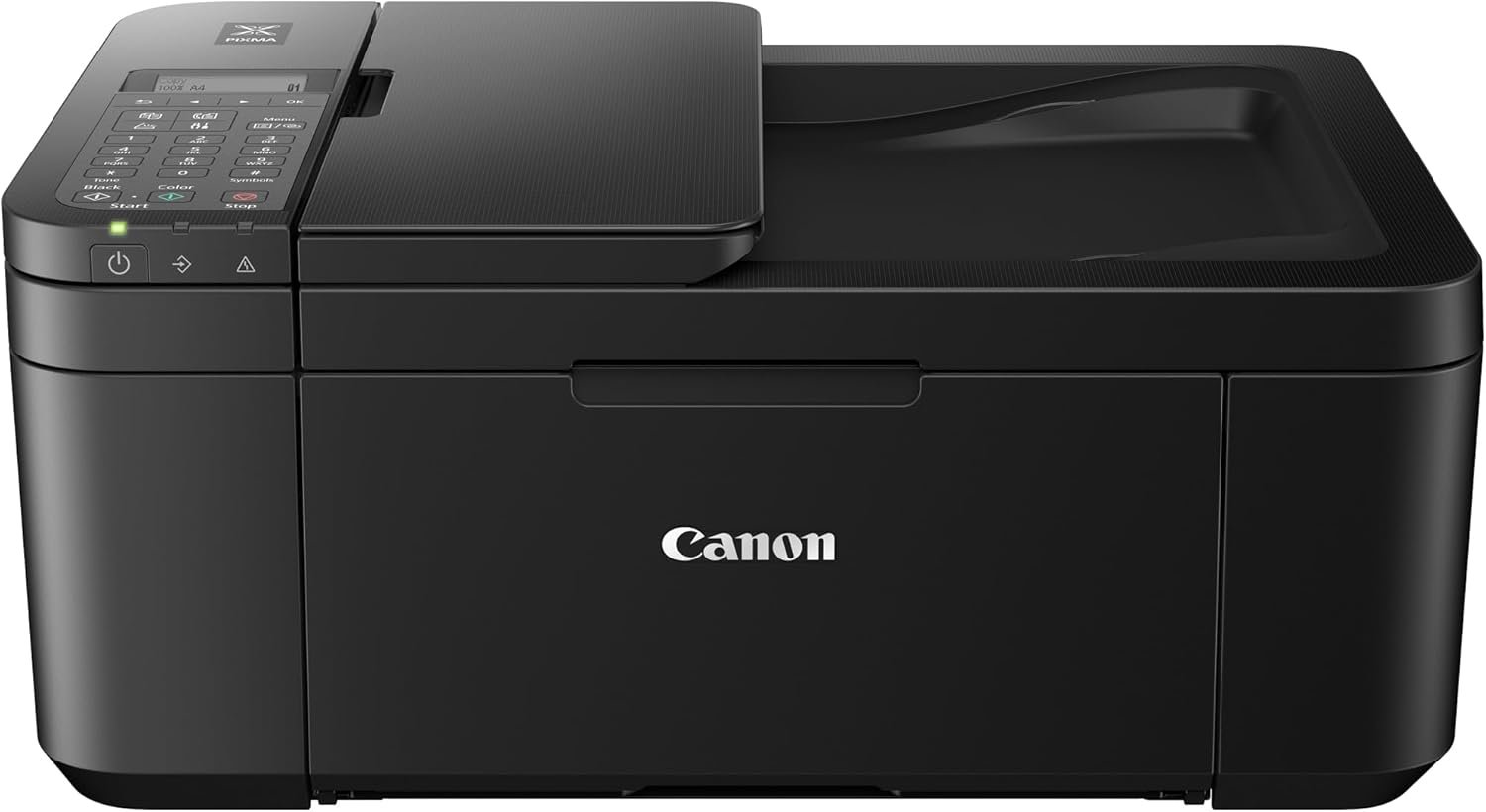
The Canon PIXMA TR4520 Wireless All-in-One Printer: A Compact Solution for Home and Office
In the fast-paced world of modern printing, the right equipment can make a significant difference. Whether you’re managing household print tasks or running a small office, the choice of printer can impact productivity and quality. The Canon PIXMA TR4520 Wireless All-in-One Photo Printer stands out as a compact, versatile option designed to meet the demands of everyday use. With features like wireless connectivity, Alexa integration, and an automatic document feeder (ADF), this printer caters to users who value convenience without compromising on performance. Its ability to handle both text and photo printing makes it a strong contender for those seeking an all-in-one solution. As we explore the specifications, capabilities, and user feedback of the Canon PIXMA TR4520, we’ll uncover how it balances functionality with practicality in a competitive market.
Quick Overview
| Feature | Details |
|---|---|
| Printer Type | Inkjet All-in-One (Print, Scan, Copy, Fax) |
| Print Resolution | 4800 x 1200 dpi (Color), 1200 dpi (Black and White) |
| Print Speed | 4.4 pages per minute (Color), 8.8 ppm (Monochrome) |
| Media Support | Glossy photo paper, standard 4×6 sheets, up to 8.5 x 14 inches |
| Connectivity | USB, Wi-Fi, Amazon Alexa |
| Paper Handling | 1-tray capacity (3 sheets), Automatic Duplex Printing |
| Ink System | Canon PG-243 Black, CL-244 Color Cartridges |
| Warranty | 1-Year Limited Warranty with InstantExchange Program |
The Canon PIXMA TR4520 combines compact design with robust features, making it ideal for users who need a reliable printer without taking up much space. Its wireless connectivity and Alexa integration offer seamless device compatibility, while the ADF simplifies scanning and faxing tasks. For those prioritizing photo quality and convenience, this printer delivers a balanced performance between speed, resolution, and ease of use.

Print Quality: Resolution, Color Accuracy, and Media Compatibility

Inkjet Technology and High-Resolution Output
The Canon PIXMA TR4520 employs inkjet technology, which is well-suited for producing detailed photos and crisp text. Its maximum print resolution of 4800 x 1200 dpi ensures that images are rendered with fine detail, making it a strong choice for users aiming to print high-quality photos. While not as sharp as laser printers, the inkjet system provides a smooth gradient of colors and subtle tonal shifts that are ideal for photographic prints. The printer’s ability to handle glossy photo paper further enhances its appeal for users who frequently print portraits, family photos, or other visual content.
Color Accuracy and Media Compatibility
The printer’s color accuracy is influenced by the type of media used. While it supports glossy photo paper, standard 4×6 sheets are also compatible, offering flexibility for different printing needs. However, users should be aware that the printer’s color output may vary depending on the paper type and ink quality. For best results, it is recommended to use Canon-branded ink cartridges, which are designed to optimize color consistency and longevity. The printer’s resolution also ensures that text documents remain legible, though it may not match the sharpness of laser printers for high-volume printing.
Media Handling and Paper Size Limits
The Canon PIXMA TR4520 supports a range of media sizes, including standard 4×6 sheets and larger up to 8.5 x 14 inches. This versatility allows users to print both small-format photos and larger documents without needing additional equipment. However, the printer’s single-tray design limits simultaneous printing of multiple media types or large quantities, which could be a drawback for users with high-volume requirements. The inclusion of an automatic document feeder (ADF) streamlines scanning and faxing, but it does not extend the printer’s media handling capacity.
Connectivity & Compatibility: Wireless Printing and Voice Integration

Wireless Printing with Mobile Devices
The Canon PIXMA TR4520’s wireless connectivity is a key selling point for users who prioritize mobility. It supports Wi-Fi printing, allowing customers to print directly from smartphones or tablets using the Canon Print app. This feature aligns with the growing trend of mobile-first printing, making it easier for users to manage print tasks on the go. Additionally, the printer’s compatibility with Apple AirPrint and Mopria Print Service ensures broad device support across iOS, Android, and Windows platforms. While these capabilities enhance convenience, they may not be sufficient for users requiring direct network printing from a computer without additional setup.
Amazon Alexa Integration and Voice-Activated Printing
One of the standout features of the Canon PIXMA TR4520 is its integration with Amazon Alexa. This allows users to print documents, photos, and even create custom lists through voice commands, which is particularly useful for households with Alexa-enabled devices. The printer’s ability to monitor ink levels and automatically reorder supplies further simplifies maintenance, reducing the need for manual intervention. However, this feature is limited to Amazon Alexa and does not extend to other voice assistants like Google Assistant or Siri, which may be a consideration for users with mixed smart home ecosystems.
USB and Network Connectivity Options
In addition to wireless printing, the Canon PIXMA TR4520 offers a USB port for direct connectivity with computers. This provides an alternative for users who prefer wired connections or need to print large volumes without relying on a network. The printer’s support for both USB and wireless printing ensures flexibility in different environments, though the lack of Ethernet connectivity may be a drawback for users requiring advanced network features or centralized printing solutions.
Durability & Maintenance: Ink Systems and Long-Term Performance

Ink Cartridge System and Replenishment Options
The Canon PIXMA TR4520 uses a standard ink cartridge system, with separate black and color cartridges (PG-243 and CL-244) designed for high-yield printing. This system ensures consistent ink delivery, though users should be prepared for regular cartridge replacements, especially when printing large volumes. The printer’s Dash Replenishment feature streamlines ink management by automatically detecting low ink levels and placing reorders, eliminating the need for manual tracking. However, this feature is tied to Amazon’s ecosystem and may not appeal to users who prefer offline or alternative ink suppliers.
Longevity and Maintenance Considerations
While the Canon PIXMA TR4520 is designed for everyday use, its durability depends on proper maintenance. Regular cleaning of the printhead and avoiding prolonged periods without use can help prolong the life of the printer. The 1-year limited warranty provides basic coverage for defects, but users should be aware that extended support or repairs may require additional costs. The printer’s compact design and low power consumption (172 watts) make it energy-efficient for home or office use, though performance may degrade over time with heavy usage.
Environmental and Operational Factors
The Canon PIXMA TR4520’s environmental impact is minimal compared to laser printers, as inkjet systems typically consume less energy and produce fewer emissions. However, the printer’s reliance on consumables like ink cartridges may lead to higher long-term costs for frequent users. The printer’s compact size and lightweight design (13 pounds) make it easy to move or store, but its single-tray configuration may limit throughput for users requiring continuous printing. Overall, the printer strikes a balance between convenience and efficiency, though it may not be ideal for high-volume or industrial applications.

Pros & Cons
Pros
- Wireless Connectivity: The Canon PIXMA TR4520 supports Wi-Fi and USB, enabling seamless printing from mobile devices and computers.
- Alexa Integration: Voice-activated printing via Amazon Alexa simplifies routine tasks like creating shopping lists or to-do items.
- High Print Resolution: The 4800 x 1200 dpi output ensures sharp, detailed photos and clear text documents.
- All-in-One Functionality: Combines printing, scanning, copying, and faxing in a compact design suitable for home or small office use.
- Auto Duplex Printing: Automatically prints on both sides of the paper, reducing paper waste and improving efficiency.
- Built-in ADF: Facilitates quick scanning and faxing of multiple documents without manual intervention.
Cons
- Single-Tray Limitation: The printer’s single-tray design may not handle large volumes or multiple media types simultaneously.
- Slower Color Print Speed: At 4.4 pages per minute, it lags behind laser printers for high-speed color printing.
- Ink Cost Considerations: Regular ink cartridge replacements and reliance on Dash Replenishment may increase long-term costs.
- Limited Media Compatibility: While it supports glossy photo paper, compatibility with alternative media types may be restricted.
- No Ethernet Support: The lack of Ethernet connectivity limits network printing capabilities in advanced environments.
Final Verdict: Who This Printer Is Best For (and Who Should Skip It)
The Canon PIXMA TR4520 Wireless All-in-One Photo Printer is an excellent choice for users who prioritize compact design, wireless convenience, and photo-quality output. Its integration with Amazon Alexa, along with features like auto duplex printing and an automatic document feeder, makes it ideal for households or small offices that require occasional photo printing without the bulk of a traditional all-in-one printer. The printer’s high-resolution output and versatile connectivity also make it well-suited for users who frequently print from mobile devices or need to scan documents on the fly.
However, this printer may not be the best fit for users with high-volume printing needs or those requiring faster color output. Its slower print speed compared to laser printers, limited media compatibility, and reliance on ink cartridges could be drawbacks for businesses or individuals with heavy printing demands. Additionally, the lack of Ethernet support and limited smart home compatibility may deter users seeking more advanced networking features. For those who value convenience, photo quality, and Alexa integration over speed and scalability, the Canon PIXMA TR4520 remains a reliable and user-friendly option.

Frequently Asked Questions (FAQs)
Can the Canon PIXMA TR4520 print high-quality photos?
The Canon PIXMA TR4520 uses a 4800 x 1200 dpi inkjet system, which produces detailed photos suitable for most personal and small office use. While it may not match the sharpness of laser printers, its resolution is ideal for standard photo prints on glossy paper.
How does the Canon PIXMA TR4520 integrate with Amazon Alexa?
The printer supports voice-activated printing through Amazon Alexa, allowing users to print documents or create custom lists via voice commands. It also automatically detects low ink levels and places reorders through the Dash Replenishment service.
Is the Canon PIXMA TR4520 suitable for office use?
The printer is well-suited for small offices due to its all-in-one functionality, wireless connectivity, and ADF for scanning. However, it may not be ideal for high-volume or large-scale office printing due to its slower speed and single-tray design.
Can the Canon PIXMA TR4520 handle large print jobs?
The printer’s single-tray design and slower color print speed (4.4 ppm) may limit its effectiveness for large volumes or frequent high-speed printing. It is better suited for occasional use rather than continuous heavy output.
What are the ink cost considerations for the Canon PIXMA TR4520?
The printer uses Canon-branded ink cartridges, which are designed for optimal performance. While the Dash Replenishment service simplifies ink management, users should factor in ongoing costs compared to refillable options.
Does the Canon PIXMA TR4520 support network printing?
The printer supports wireless printing via Wi-Fi and USB connectivity but does not include Ethernet support. This limits advanced networking features but provides flexibility for most home or small office setups.
How does the Canon PIXMA TR4520 compare to other compact photo printers?
The Canon PIXMA TR4520 stands out for its Alexa integration and wireless capabilities, making it a strong choice for users who value convenience. However, it may lack the speed and scalability of other compact photo printers like the Epson WorkForce series.
What are the limitations of using the Canon PIXMA TR4520 for commercial use?
The printer’s slower print speed, limited media handling capacity, and reliance on ink cartridges make it unsuitable for high-volume commercial printing. It is best suited for personal or small-office applications.