
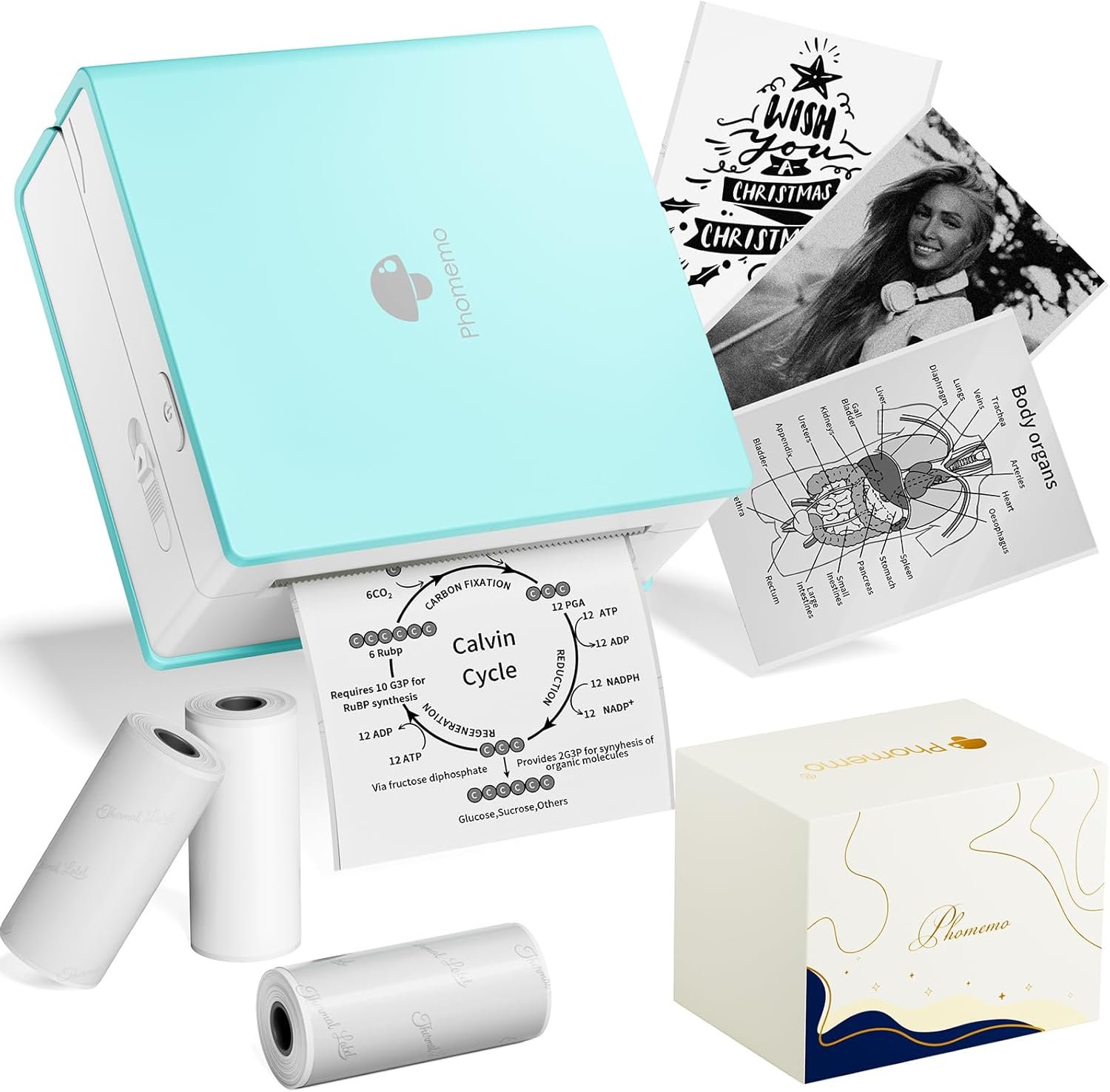
Phomemo Mini Sticker Printer M02 Review
The Phomemo M02 mini sticker printer is a compact, thermal-based device designed for users seeking a portable solution to produce monochrome stickers, labels, and study aids. As the demand for mobile printing solutions grows in both professional and educational environments, this device stands out as a niche yet versatile option. Its unique combination of Bluetooth connectivity and thermal printing technology caters to specific use cases, such as creating flashcards for students or producing quick labels for office organization. While not a traditional printer, the M02’s design prioritizes portability and ease of use over high-volume printing capabilities. For users who require a lightweight, single-purpose tool rather than a multifunctional workstation, the Phomemo M02 represents an attractive option. However, its limited color output and dependency on thermal paper may make it unsuitable for those needing broader printing versatility. This review examines the M02’s design, functionality, and real-world applicability to help users determine if it aligns with their specific printing needs.
Quick Overview
| Feature | Details |
|---|---|
| Printer Type | Thermal sticker printer |
| Connectivity | Bluetooth (iOS 13.0+, Android 7.0+) |
| Print Output | Monochrome (black/white) |
| Resolution | 300 x 300 DPI, 203 DPI for color |
| Print Speed | 1 page/sec (color), 15 pages/sec (monochrome) |
| Media Size | Max. 53 mm x 30 mm (standard thermal paper) |
| Paper Handling | Single-sheet, simplex printing |
| Warranty | 1-year limited warranty |
| Power Source | Rechargeable battery (via USB) |
| Dimensions | 3.31″D x 1.65″W x 3.39″H |
| Special Features | AI app integration, mobile scanning |
The Phomemo M02’s thermal printing technology and compact form factor make it ideal for users who prioritize portability over high-speed output. Its ability to print on transparent or colored thermal paper allows for creative applications like sticker-making and study notes. However, the reliance on thermal media limits its use to monochrome output, making it unsuitable for color printing tasks. The Bluetooth connectivity and mobile app integration enhance its usability in educational settings, where students can quickly generate diagrams or notes. For office use, the printer’s speed and quiet operation make it a practical choice for producing labels or small batches of stickers. Overall, its design caters to niche use cases where portability and simplicity outweigh the limitations of traditional printers.

Design & Portability: A Compact Solution for Mobile Printing Needs

Physical Dimensions and Build Quality
The Phomemo M02’s compact dimensions—3.31 inches in depth, 1.65 inches in width, and 3.39 inches in height—position it as one of the smallest thermal printers available. This size makes it ideal for users who prioritize portability, such as students carrying the device between classes or professionals needing a lightweight tool for on-the-go printing. The sleek, rounded edges and matte finish contribute to its durability while maintaining a lightweight build that feels sturdy enough for daily use. However, the device’s small size does come with trade-offs: its limited paper tray capacity and lack of a built-in power source mean users must carry an external USB cable or rely on the included rechargeable battery, which has a limited runtime.
Portability in Real-World Use Cases
The M02’s design caters to users who need a printer that can easily fit into a backpack, desk drawer, or even a pocket. Its Bluetooth connectivity eliminates the need for wired setups, making it suitable for environments where mobility is key. For example, students can use the printer to create flashcards or study notes during lectures, while office workers can produce labels for organizing files. The portability also makes it a popular choice for creative projects, such as crafting stickers or printing DIY designs during leisure time. However, its limited battery life and reliance on thermal paper may make it less practical for users who require extended use or a broader range of media types.
Print Quality: Monochrome Output with Thermal Precision

Resolution and Detail Retention
The M02’s resolution of 300 x 300 DPI ensures that printed content maintains clarity and sharpness, particularly for text-based applications like study notes or diagrams. While the printer’s maximum resolution of 203 DPI for color output may seem modest compared to laser or inkjet printers, its thermal printing technology excels in producing crisp monochrome prints. This makes the M02 particularly well-suited for tasks requiring precise text reproduction, such as creating study guides or printing textbook graphics. The printer’s ability to maintain consistent line quality across multiple prints further enhances its reliability for users who need a dependable tool for academic or office use.
Grayscale and Monochrome Performance
The M02’s monochrome output is consistently reliable, with no noticeable toner smudging or banding that could affect readability. Its thermal printing process ensures that each print remains smudge-free, making it ideal for creating durable labels or stickers. However, the lack of color output limits its use to black-and-white applications, which may be a drawback for users requiring more vibrant or detailed prints. Additionally, the printer’s reliance on thermal paper—a medium that can degrade over time—means users should consider the longevity of their printed materials, particularly for long-term documentation or archival purposes.
Connectivity & App Integration: Seamless Mobile Printing Experience

Bluetooth Functionality and Compatibility
The Phomemo M02’s Bluetooth connectivity allows for seamless pairing with smartphones and tablets running iOS 13.0+ or Android 7.0+. This feature eliminates the need for additional hardware, making it an attractive option for users who prefer wireless printing. The app interface provides a straightforward way to design and print stickers, with options for scanning textbook graphics or applying AI-assisted filters. However, the limited compatibility to newer iOS and Android versions may exclude some users who need broader device support. Additionally, the Bluetooth connection requires a stable network environment, which could be a limitation in areas with weak signal strength.
AI App Features and Creativity Tools
The M02’s app integrates with the Phomemo ecosystem, offering users access to a library of fonts, filters, and themes for customizing prints. This feature enhances the printer’s versatility by allowing users to create unique stickers, labels, and study aids. The AI-assisted design tools simplify the process of generating visual content, making it accessible even for users with limited design experience. However, the app’s reliance on a membership for exclusive content may deter some users who prefer free design tools. Additionally, the app’s interface is optimized for mobile use, which could be less intuitive for users accustomed to desktop-based design software.

Pros & Cons
Pros
- Portable Design: The M02’s compact size and lightweight build make it easy to carry between classes or office spaces.
- Monochrome Print Quality: The printer produces sharp, smudge-free text and graphics ideal for study notes and labels.
- Bluetooth Connectivity: Wireless printing eliminates the need for additional hardware, streamlining the user experience.
- AI-Assisted Design: The app’s tools simplify sticker creation and customization for users of all skill levels.
- Quiet Operation: The thermal printing process generates minimal noise, making it suitable for shared workspaces.
- Durable Build: The device’s rounded edges and sturdy construction suggest it can withstand daily use in educational or office environments.
Cons
- Limited Color Output: The M02’s monochrome printing capability restricts its use to black-and-white applications only.
- Thermal Paper Dependency: Users must purchase separate thermal paper, which may be less convenient than traditional inkjet or laser media.
- Short Battery Life: The rechargeable battery provides limited runtime, requiring frequent recharging for extended use.
- Single-Sheet Printing: The device’s single-sheet capacity and lack of a built-in paper tray may be inconvenient for users requiring bulk printing.
- App-Specific Features: The AI tools and design options are exclusive to the Phomemo app, limiting compatibility with other design software.
Final Verdict: Who This Printer Is Best For (and Who Should Skip It)
The Phomemo M02 mini sticker printer is best suited for users who prioritize portability and simplicity over high-speed or color output. Its compact design makes it ideal for students needing to create study notes, office workers producing labels, and creatives exploring DIY sticker-making. The thermal printing technology ensures reliable monochrome output for text-based applications, while the Bluetooth connectivity and app integration offer convenience for mobile users. However, its limited color capabilities and dependency on thermal paper may make it unsuitable for those requiring broader printing versatility. Users who need a printer for high-volume use or creative projects involving color prints should consider alternative options. Overall, the M02 is a niche but practical tool for specific use cases where portability and ease of use are paramount.

FAQs

What is the Phomemo M02 mini sticker printer best suited for?
The Phomemo M02 is ideal for users who need a portable, monochrome printer for creating stickers, labels, and study aids. Its thermal printing technology makes it well-suited for academic settings, where students can generate flashcards or diagrams quickly. Office workers will also find it useful for producing labels, while creatives can use it for DIY projects. However, its limited color output and reliance on thermal paper make it unsuitable for high-volume or color-printing needs.
Can the Phomemo M02 print on colored thermal paper?
Yes, the M02 supports printing on both white and colored thermal paper, allowing for creative applications such as single-color designs or patterns. This versatility makes it a good choice for users who want to experiment with different color schemes in their sticker-making or study notes. However, the printer’s monochrome output means it cannot produce full-color prints.
What are the limitations of using thermal paper with the Phomemo M02?
Thermal paper is sensitive to heat, light, and chemical exposure, which can cause it to fade or become unreadable over time. While the M02’s thermal printing technology ensures crisp prints, users should be aware that the longevity of their printed materials may be limited. This makes the printer less suitable for long-term documentation or archival purposes.
How does the Phomemo M02 compare to other portable printers in terms of speed?
The M02’s monochrome print speed of 15 pages per second is significantly faster than most thermal printers on the market, making it a practical choice for lightweight printing tasks. However, its color print speed of 1 page per second is slower than laser or inkjet printers, which may affect its usability for users requiring higher-speed output.
Is the Phomemo M02 suitable for commercial or industrial use?
No, the M02 is designed as a consumer-grade device and is not optimized for high-volume or industrial printing environments. Its single-sheet capacity, limited paper tray, and reliance on thermal media make it unsuitable for commercial applications where durability and efficiency are critical. Users requiring industrial-grade printers should consider alternative options.
What is the warranty and support for the Phomemo M02?
The M02 comes with a 1-year limited warranty, which covers manufacturing defects but does not include damage from misuse or improper handling. Phomemo provides customer support through its official website, though users may need to contact the manufacturer directly for assistance with technical issues or warranty claims.
Can I use the Phomemo M02 for printing photos?
The M02’s thermal printing technology is not designed to produce high-quality or detailed photos. While it can print basic images, the monochrome output and limited resolution may result in a loss of detail. Users seeking to print photos should consider alternative printers with higher-resolution capabilities and color output.
What are the dimensions of the Phomemo M02 mini sticker printer?
The M02 measures 3.31 inches in depth, 1.65 inches in width, and 3.39 inches in height. Its compact size makes it ideal for users who need a portable printer that can easily fit into a backpack, desk drawer, or even a pocket. However, its small size also means that the device lacks a built-in paper tray and requires users to manually load thermal paper.
Frequently Asked Questions (FAQs)
What is the Phomemo M02 mini sticker printer best suited for?
The Phomemo M02 is ideal for users who need a portable, monochrome printer for creating stickers, labels, and study aids. Its thermal printing technology makes it well-suited for academic settings, where students can generate flashcards or diagrams quickly. Office workers will also find it useful for producing labels, while creatives can use it for DIY projects. However, its limited color output and reliance on thermal paper make it unsuitable for high-volume or color-printing needs.
Can the Phomemo M02 print on colored thermal paper?
Yes, the M02 supports printing on both white and colored thermal paper, allowing for creative applications such as single-color designs or patterns. This versatility makes it a good choice for users who want to experiment with different color schemes in their sticker-making or study notes. However, the printer’s monochrome output means it cannot produce full-color prints.
What are the limitations of using thermal paper with the Phomemo M02?
Thermal paper is sensitive to heat, light, and chemical exposure, which can cause it to fade or become unreadable over time. While the M02’s thermal printing technology ensures crisp prints, users should be aware that the longevity of their printed materials may be limited. This makes the printer less suitable for long-term documentation or archival purposes.
How does the Phomemo M02 compare to other portable printers in terms of speed?
The M02’s monochrome print speed of 15 pages per second is significantly faster than most thermal printers on the market, making it a practical choice for lightweight printing tasks. However, its color print speed of 1 page per second is slower than laser or inkjet printers, which may affect its usability for users requiring higher-speed output.
Is the Phomemo M02 suitable for commercial or industrial use?
No, the M02 is designed as a consumer-grade device and is not optimized for high-volume or industrial printing environments. Its single-sheet capacity, limited paper tray, and reliance on thermal media make it unsuitable for commercial applications where durability and efficiency are critical. Users requiring industrial-grade printers should consider alternative options.
What is the warranty and support for the Phomemo M02?
The M02 comes with a 1-year limited warranty, which covers manufacturing defects but does not include damage from misuse or improper handling. Phomemo provides customer support through its official website, though users may need to contact the manufacturer directly for assistance with technical issues or warranty claims.
Can I use the Phomemo M02 for printing photos?
The M02’s thermal printing technology is not designed to produce high-quality or detailed photos. While it can print basic images, the monochrome output and limited resolution may result in a loss of detail. Users seeking to print photos should consider alternative printers with higher-resolution capabilities and color output.
What are the dimensions of the Phomemo M02 mini sticker printer?
The M02 measures 3.31 inches in depth, 1.65 inches in width, and 3.39 inches in height. Its compact size makes it ideal for users who need a portable printer that can easily fit into a backpack, desk drawer, or even a pocket. However, its small size also means that the device lacks a built-in paper tray and requires users to manually load thermal paper.