
Brother QL-800 vs DYMO LabelWriter 550: 40 and 62 Pages Per Minute of Labels
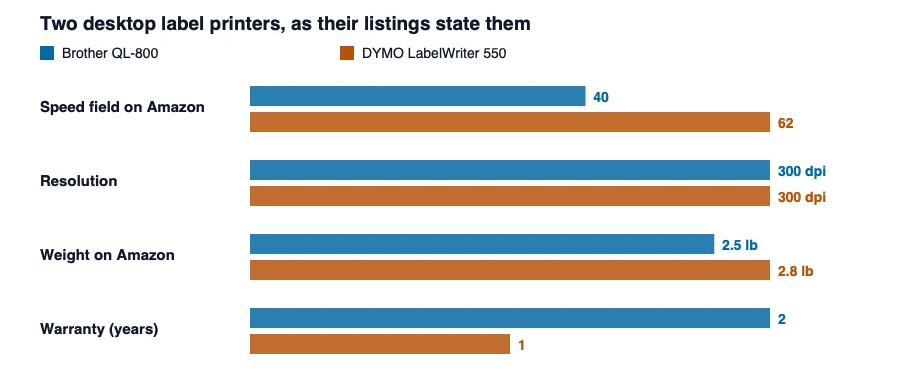
Two desktop label printers at 300 dpi. Amazon states their speed in pages per minute, which neither prints, and the Brother’s own listing says 93 labels where Amazon’s field says 40.
The two listings at a glance
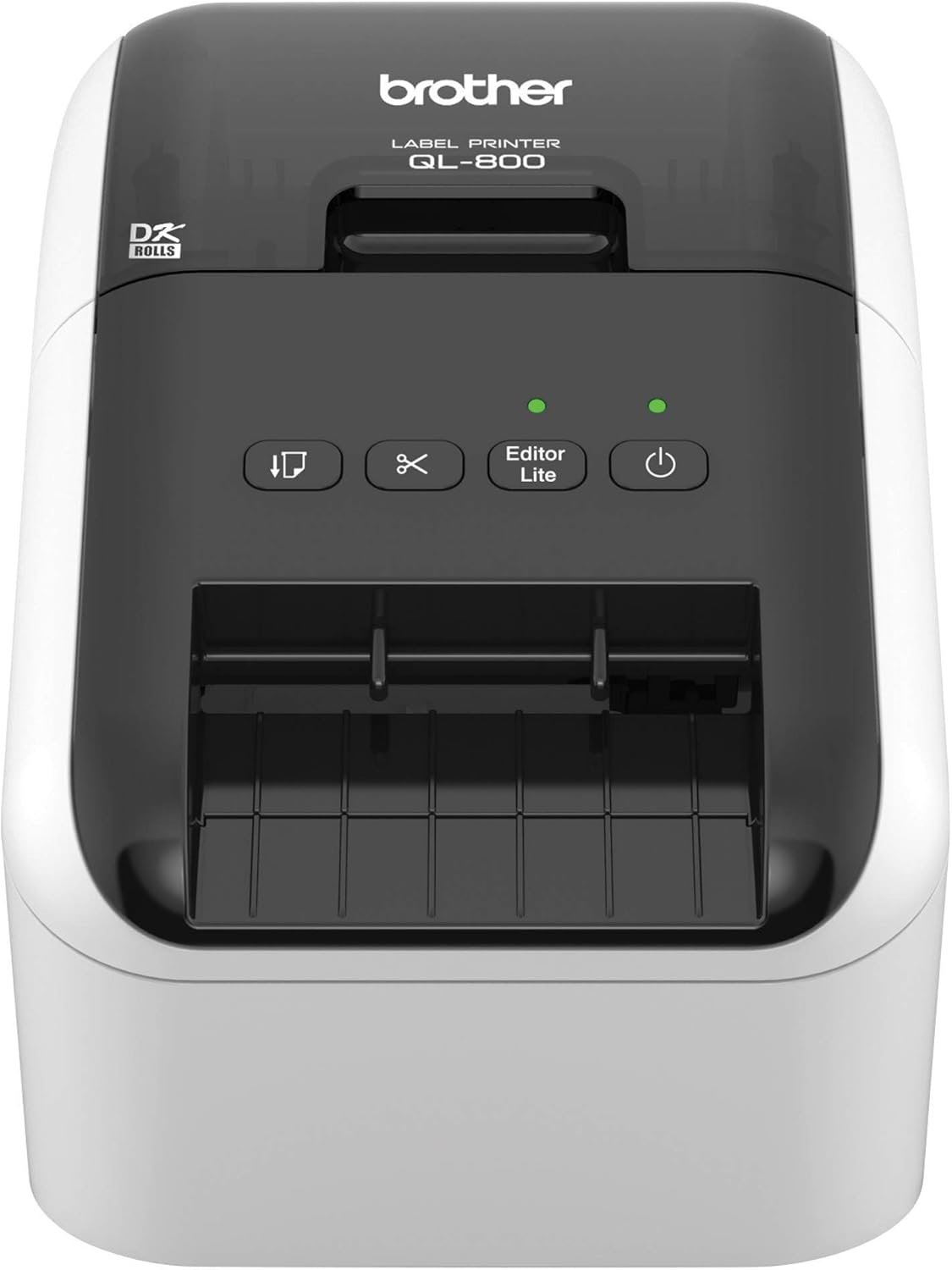
Black and red, auto-cutter, DK labels
Read our review · Check price on Amazon

Direct thermal, authentic DYMO labels
Read our review · Check price on Amazon
Two USB desktop label printers, both 300 dpi, both direct thermal, in the same price band. They are two of the most familiar names in the class, and the headline figures say little: Amazon files 40 against 62 under pages per minute, and neither is pages. This page reads what each listing means by its numbers, and where the review and the listing disagree about the printer itself.
| Figure | Brother QL-800 | DYMO LabelWriter 550 | Label printer class |
|---|---|---|---|
| Speed field on Amazon | 40 (listing only) | 62 (listing only) | 141 state one |
| Speed in the text | 93 labels per minute | not stated in the text we read | — |
| Resolution | 300 dpi (both sources) | 300 dpi (listing); 300 colour and 200 monochrome (review) | 90 state 203, 36 state 300 |
| Weight | 1.1 kg, 2.5 lb (both sources) | 1.3 kg, 2.8 lb (Amazon); 1.4 lb (our review) | 0.7 kg median |
| Dimensions | 4.9″ D x 10.6″ W x 5.6″ H (review: 8.4″ wide) | 7.4″ D x 5″ W x 5.4″ H | — |
| Colours | black and red | black | — |
| Cutter | built-in auto-cutter | not stated | — |
| Labels | Brother DK pre-sized, continuous to 3 ft | authentic DYMO LabelWriter labels only | — |
| Power | 50 W | not stated | — |
| Warranty (review) | two-year limited | limited | — |
| Price band | $75-200 | $75-200 | — |
The speed field is labels, not pages
Amazon’s page for the QL-800 says 40 pages per minute, and its own bullet, and our review, say 93 labels per minute. The same field on the DYMO says 62, with no explanation in the text we read. A label printer does not print pages, and a label is a small thing: the number is labels per minute at some stated label size. So 40 is not what the Brother does, 93 is. If the DYMO’s 62 is also labels a minute, the Brother’s 93 is about half as many again, but the DYMO’s listing does not say that is what 62 means. A ranking that sorted these two by Amazon’s field would put the Brother second. The class report finds 38 listings that give the same field in millimetres per second.
The honest summary is that both machines are described as fast, the Brother quantifies it and the DYMO does not, and the 40 to 62 gap on Amazon is the opposite of what the Brother’s own bullet says. The label and thermal printer class report has the full set of units.
Resolution: two 300s, and a review that says 200
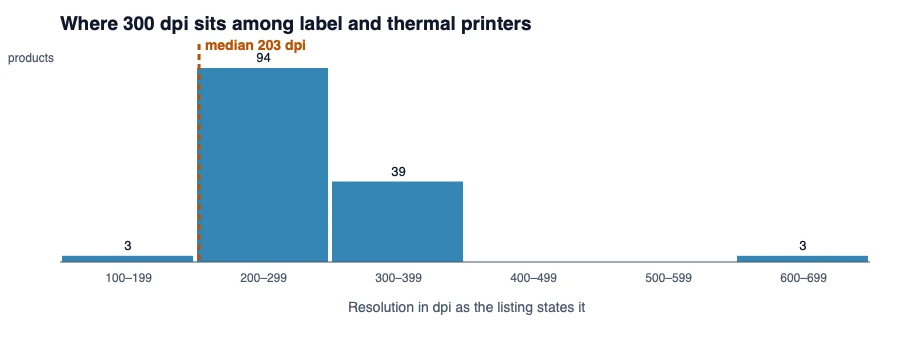
Both Amazon pages say 300 dpi. Our review of the Brother says 300. Our review of the DYMO says “300 dpi (Color), 200 dpi (Monochrome)”, which describes no thermal label printer: the DYMO prints one colour and has no colour resolution. We think the review has two Amazon fields confused, and the listing’s 300 is the figure that stands. Of the 143 label and thermal printers that state a resolution, 36 state 300 and 90 state 203, so these two are in the sharper group.
Weight and size: the review and the listing disagree on the DYMO
The Brother is listed at 2.5 pounds, 1.1 kilograms, on Amazon and 2.5 in our review. The DYMO is listed at 2.8 pounds on Amazon and 1.4 in our review, a gap of nearly a factor of two on one printer. We use Amazon’s figure, 1.3 kilograms, and treat our review’s as the one to correct. The footprints differ in shape: the Brother is 4.9 inches deep and 10.6 wide, a low flat box, and the DYMO 7.4 deep and 5 wide, a taller and narrower one. Our Brother review also gives the width as 8.4 inches where Amazon says 10.6.
What the labels cost you in choice
The listings are explicit about the labels, and it is the biggest difference between them. The Brother is described as working with Brother DK pre-sized labels and continuous tape up to three feet, and the DYMO’s bullet says it “only works with authentic DYMO labels”, which it describes as made from certified paper. A direct thermal printer needs no ink, and its running cost is the label roll. If you want to buy the labels from a third party, the DYMO’s listing says not to. The Brother also states black and red printing and a built-in cutter, which the DYMO’s does not mention.
Fields that do not describe a label printer
Amazon’s tables for the two printers carry fields that belong to other products. The QL-800’s “scanner type” is sheetfed and the LabelWriter’s is portable, though neither scans. The QL-800 is given a duplex setting of “auto”, and a label printer does not print on two sides. Each printer’s “maximum sheet capacity” is the number in its own name, 800 for the QL-800 and 550 for the LabelWriter 550, which is not something a label roll holds. And the “maximum media size” reads “Roll – 2.44″” for the Brother, which is a width, and 7.38 x 5.33 x 8.5 for the DYMO, which reads as three dimensions of an object and not as a label. A shopper filtering on any of these fields would be filtering on noise, which is the reason these pages state a figure only when two sources agree and say which source it is.
Which suits which
The Brother QL-800 suits you if
- you want a speed in labels per minute that the listing actually states, 93;
- you want black and red printing and a built-in cutter, and continuous-length tape;
- a two-year warranty in our review matters, and you want the lighter listed weight.
The DYMO LabelWriter 550 suits you if
- you are content with an authentic-labels-only arrangement and a tonerless printer;
- you want the narrower, taller footprint, 5 inches wide;
- you will confirm the weight, since our review and Amazon differ by a factor of two.
What this comparison cannot tell you
Nothing here was tested. We did not print a label, so we cannot say which prints a clearer barcode, which jams or which is quieter. The speeds and resolutions are the makers’ numbers, and the Brother’s 93 is the only one with a stated unit, which is the thing to check on any label printer’s listing before you read a speed. For each in full, read our review of the Brother QL-800 and our review of the DYMO LabelWriter 550.
Figures are the manufacturers’, as published on each listing and quoted in our reviews; none was measured by us. How we work · Affiliate disclosure