
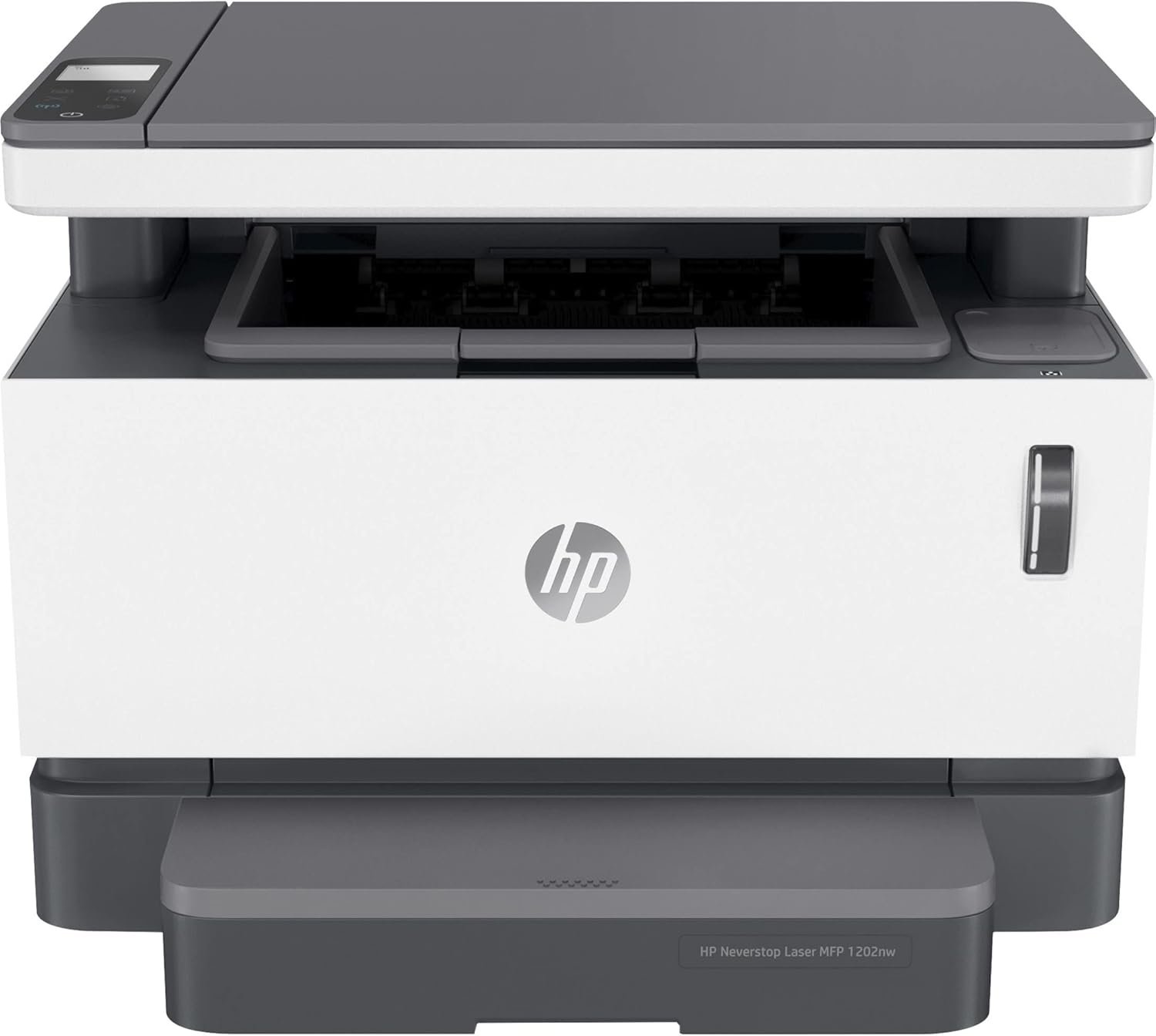
The Importance of Choosing the Right Printer for Your Workflow
In today’s fast-paced business environment, selecting the right printer can significantly impact productivity and operational efficiency. Whether you’re managing a small office, a remote team, or a home-based business, the performance of your printing equipment directly affects document turnaround times, workflow continuity, and overall cost-effectiveness. Printers serve as critical tools for generating reports, invoices, and correspondence, making their reliability, speed, and versatility essential considerations. For organizations handling high volumes of monochrome output, such as accounting firms, legal offices, and administrative departments, the choice of a printer must balance speed, resolution, and durability to meet daily demands. The HP Neverstop 1202nw Laser Multifunction Printer is designed with these requirements in mind, offering a combination of print speed, connectivity options, and media flexibility that caters to specific office environments. However, its suitability depends on factors such as workload volume, media requirements, and long-term maintenance needs. This review evaluates the printer’s technical specifications, performance benchmarks, and compatibility with common office workflows to help users determine whether it aligns with their operational goals.
Quick Overview
| Feature | Details |
|---|---|
| Printer Type | Laser Multifunction Printer |
| Print Technology | Laser |
| Printer Output | Monochrome |
| Max Printspeed Monochrome | 21 pages per minute (ppm) |
| Print Resolution | 600 x 600 dpi |
| Media Sizes | A4, A5, B5, DL Envelope, C5 Envelope, Envelope No. 10, B5 (JIS), Oficio, Custom Size |
| Connectivity | Networkable, USB, Wireless |
| Duplex Printing | Manual |
| Scanner Type | Flatbed |
| Scan Resolution | 600 dpi |
| Input Capacity | 150 sheets |
| Toner System | Black toner |
| Duty Cycle | Up to 20,000 pages |
| Warranty | Limited warranty |
| Dimensions | 15.35 x 16.57 x 18.94 inches |
| Weight | 1 pound |
The HP Neverstop 1202nw is tailored for office environments requiring reliable monochrome printing and scanning. Its 21 ppm print speed and 600 x 600 dpi resolution make it suitable for tasks such as invoice printing, report generation, and document duplication. The support for multiple media sizes and the inclusion of a flatbed scanner enhance its versatility for administrative tasks. However, the lack of automatic duplex printing and limited connectivity options may affect its appeal for users prioritizing energy efficiency or advanced network integration.
Print Speed and Workload Capacity
The HP Neverstop 1202nw is engineered to handle moderate to high-volume monochrome printing tasks, with a maximum print speed of 21 ppm. This specification positions it as a mid-tier laser printer suitable for small to mid-sized offices where document output is a regular requirement. The printer’s duty cycle of up to 20,000 pages ensures it can sustain continuous operation without overheating or mechanical failure, making it ideal for environments with daily print volumes exceeding 500 pages. However, users requiring faster output, such as those in high-turnover industries like finance or logistics, may find this speed insufficient for peak demand periods.
Print Speed Performance in Office Environments
The 21 ppm print speed is a critical factor for users managing large document workflows. In office settings where multiple reports or invoices are generated daily, this speed allows for efficient turnaround without significant delays. The printer’s laser technology ensures consistent print quality even at higher speeds, minimizing the risk of smudged text or misaligned characters. However, the absence of automatic duplex printing may increase paper usage and require manual intervention, which could impact productivity for users prioritizing single-sided printing.
Duty Cycle and Long-Term Reliability
The printer’s duty cycle of 20,000 pages is a key indicator of its ability to handle sustained workloads. This specification suggests that the HP Neverstop 1202nw is designed for environments with daily print volumes exceeding 500 pages, making it suitable for small to mid-sized offices. The laser print engine and toner system are optimized for longevity, reducing the likelihood of mechanical wear and tear. However, users in high-volume environments, such as large corporations or print shops, may need a printer with a higher duty cycle to avoid frequent maintenance or downtime.
Print Speed vs. Toner Efficiency
While the 21 ppm speed is competitive for its class, the printer’s toner efficiency is a consideration for users focused on cost-effectiveness. The laser technology ensures minimal toner waste during printing, but the need for manual duplexing may increase paper consumption. This trade-off between speed and resource usage is important for organizations aiming to balance operational efficiency with sustainability goals. The printer’s toner system is designed for longevity, but users should monitor toner levels to avoid unexpected interruptions.
Print Quality and Resolution
The HP Neverstop 1202nw delivers sharp, high-contrast text at its 600 x 600 dpi print resolution, making it well-suited for monochrome document generation. The laser print engine ensures consistent toner distribution, resulting in clean, legible text that meets professional office standards. This level of resolution is ideal for tasks such as invoice printing, report generation, and document duplication, where clarity and precision are critical. However, the printer’s focus on monochrome output means it is not suitable for color graphics or photographic printing, which may limit its appeal for users requiring versatility in output types.
Text Clarity and Image Sharpness
The 600 x 600 dpi resolution provides excellent text clarity, with minimal halftone patterns that could compromise readability. This specification is particularly beneficial for users requiring high-contrast text for reports, forms, or legal documents. The laser print engine ensures even toner distribution, reducing the likelihood of smudged or faded characters. However, the absence of color printing capabilities means the printer is not suitable for users needing to produce color graphics or marketing materials.
Resolution Consistency Across Media Types
The printer’s ability to maintain consistent resolution across different media types is a key factor in its suitability for office environments. While the specifications list support for A4, A5, B5, and various envelope sizes, the actual print quality may vary depending on paper thickness and finish. Users should consider the printer’s compatibility with different paper types to ensure optimal resolution and text clarity. The flatbed scanner’s 600 dpi resolution also contributes to accurate document digitization, making it a valuable tool for administrative tasks.
Print Quality vs. Speed Trade-offs
The printer’s focus on monochrome output and high resolution comes at the expense of faster print speeds compared to some competitors. While the 21 ppm speed is adequate for most office tasks, users requiring faster output may need to consider printers with higher print speeds. The laser technology ensures consistent print quality, but the trade-off between resolution and speed is important for users prioritizing efficiency over precision.
Connectivity and Device Compatibility
The HP Neverstop 1202nw offers a range of connectivity options, including networkable, USB, and wireless capabilities, making it suitable for diverse office environments. The wireless functionality allows for seamless integration with mobile devices and laptops, while the Ethernet port provides a reliable wired connection for larger networks. The USB port ensures compatibility with older devices that may not support modern wireless protocols. However, the lack of advanced connectivity features, such as cloud printing or mobile app integration, may limit its appeal for users requiring more sophisticated network capabilities.
Network and Wireless Integration
The printer’s support for wireless connectivity enables users to print from laptops, tablets, and smartphones without the need for physical cables. This feature is particularly beneficial for remote workers or teams using mobile devices for document management. The Ethernet port provides a stable connection for environments with high network traffic, ensuring consistent print job delivery. However, the absence of cloud printing capabilities may require users to rely on traditional network setups or third-party software for advanced printing functions.
USB and Mobile Device Compatibility
The USB port ensures compatibility with a wide range of devices, including older laptops and desktops that may not support modern wireless protocols. This feature is valuable for users who prefer direct printing without network dependencies. However, the lack of mobile app integration means users may need to use standard print drivers or third-party applications for seamless mobile printing. The printer’s compatibility with Laptops is a key advantage, but users seeking advanced mobile printing features may find this limitation restrictive.
Connectivity Options for Small to Mid-Sized Offices
The combination of wired and wireless connectivity options makes the HP Neverstop 1202nw suitable for small to mid-sized offices with varying network requirements. The printer’s ability to integrate with both wired and wireless devices ensures flexibility in setup and usage. However, the lack of advanced connectivity features, such as cloud printing or mobile app integration, may require additional configuration for users seeking more sophisticated network capabilities.
Media Support and Flexibility
The HP Neverstop 1202nw supports a wide range of media sizes, including A4, A5, B5, and various envelope types, making it versatile for different office printing needs. This flexibility allows users to print on different paper sizes without requiring additional hardware or manual adjustments. The flatbed scanner’s compatibility with these media types further enhances the printer’s utility for document digitization. However, the absence of automatic duplex printing and limited support for specialty media may affect its appeal for users requiring advanced media handling capabilities.
Media Size Compatibility and Versatility
The printer’s support for A4, A5, B5, and various envelope sizes ensures that users can print on different paper types without the need for additional hardware. This versatility is particularly beneficial for offices requiring printing on multiple paper sizes for different tasks. The inclusion of custom size support further expands the printer’s media compatibility, making it suitable for specialized printing needs. However, the lack of automatic duplex printing may require users to manually flip pages, which could impact efficiency for high-volume printing.
Flatbed Scanner and Document Digitization
The flatbed scanner’s 600 dpi resolution ensures accurate digitization of documents, making it a valuable tool for administrative tasks such as data entry and record-keeping. The support for various media sizes allows users to scan different document types without the need for additional equipment. However, the absence of advanced scanning features, such as OCR (Optical Character Recognition) or multi-page scanning, may limit its appeal for users requiring more sophisticated document management capabilities.
Media Handling Limitations
While the printer’s media support is extensive, the absence of automatic duplex printing and limited support for specialty media may affect its appeal for users requiring advanced media handling capabilities. The manual duplex printing process increases the risk of errors and requires additional time for users to manage. For organizations requiring frequent double-sided printing, this limitation may necessitate the use of additional hardware or manual intervention.
Pros & Cons
Pros
- High Print Speed: The 21 ppm print speed is suitable for moderate to high-volume office environments, ensuring efficient document output.
- Sharp Monochrome Output: The 600 x 600 dpi resolution provides clear, high-contrast text ideal for reports and invoices.
- Versatile Media Support: The printer supports a range of media sizes, including A4, A5, B5, and various envelope types, enhancing its adaptability.
- Multiple Connectivity Options: The combination of wired and wireless connectivity ensures compatibility with different devices and network setups.
- Reliable Laser Technology: The laser print engine ensures consistent toner distribution and long-term durability.
- Flatbed Scanner Integration: The 600 dpi scanner is useful for document digitization and administrative tasks.
- Duty Cycle Capacity: The 20,000-page duty cycle is suitable for small to mid-sized offices requiring sustained printing.
- Compact Design: The printer’s dimensions and weight make it suitable for space-constrained office environments.
Cons
- Lack of Automatic Duplex Printing: The manual duplex feature increases paper usage and requires user intervention for double-sided printing.
- Limited Connectivity Features: The absence of cloud printing or mobile app integration may require additional setup for advanced printing functions.
- No Color Printing Capabilities: The monochrome focus limits the printer’s appeal for users requiring color output.
- Manual Media Handling: The need for manual adjustment of media sizes may affect efficiency for users requiring advanced media handling.
- Flatbed Scanner Limitations: The scanner lacks advanced features such as OCR or multi-page scanning, which may limit its utility for complex document management tasks.
- Toner Efficiency Considerations: While the laser technology minimizes toner waste, the manual duplexing may increase paper consumption, affecting cost-effectiveness.
Final Verdict: Who This Printer Is Best For (and Who Should Skip It)
The HP Neverstop 1202nw Laser Multifunction Printer is best suited for small to mid-sized offices with moderate to high-volume monochrome printing needs. Its 21 ppm speed and 600 x 600 dpi resolution make it ideal for tasks such as invoice printing, report generation, and document duplication. The support for multiple media sizes and the inclusion of a flatbed scanner enhance its versatility for administrative tasks. However, the lack of automatic duplex printing and limited connectivity features may make it less appealing for users requiring advanced printing capabilities or color output. Organizations prioritizing energy efficiency, automatic duplexing, or cloud printing should consider alternative models with more advanced features. For users focused on cost-effective, reliable monochrome printing in a standard office environment, the HP Neverstop 1202nw offers a practical and efficient solution.
The printer’s suitability depends on specific workflow requirements. For example, a small accounting firm handling daily invoices and reports may find the HP Neverstop 1202nw to be an excellent choice due to its speed and resolution. Conversely, a large corporation requiring high-volume color printing or advanced scanning capabilities would likely benefit from a different printer model. The printer’s compact design and limited maintenance requirements also make it a good fit for space-constrained offices or remote work environments. However, users needing more advanced connectivity options, such as cloud printing or mobile app integration, may find the HP Neverstop 1202nw to be a limiting factor in their operations.
Frequently Asked Questions (FAQs)
What is the print speed of the HP Neverstop 1202nw?
The HP Neverstop 1202nw offers a maximum monochrome print speed of 21 pages per minute (ppm), making it suitable for moderate to high-volume office environments.
Does the HP Neverstop 1202nw support automatic duplex printing?
No, the HP Neverstop 1202nw features manual duplex printing, which requires users to manually flip pages for double-sided printing.
What media sizes does the HP Neverstop 1202nw support?
The printer supports a range of media sizes including A4, A5, B5, DL Envelope, C5 Envelope, Envelope No. 10, B5 (JIS), Oficio, and custom sizes.
What is the print resolution of the HP Neverstop 1202nw?
The HP Neverstop 1202nw provides a maximum print resolution of 600 x 600 dpi, ensuring sharp and clear monochrome output for documents and reports.
What connectivity options are available for the HP Neverstop 1202nw?
The printer offers networkable, USB, and wireless connectivity options, allowing for flexible integration with different devices and network setups.
What is the duty cycle of the HP Neverstop 1202nw?
The HP Neverstop 1202nw has a duty cycle of up to 20,000 pages, making it suitable for small to mid-sized offices with sustained printing needs.
Does the HP Neverstop 1202nw include a flatbed scanner?
Yes, the HP Neverstop 1202nw features a flatbed scanner with a resolution of 600 dpi, suitable for document digitization and administrative tasks.
What are the dimensions and weight of the HP Neverstop 1202nw?
The printer measures 15.35 x 16.57 x 18.94 inches and weighs 1 pound, making it a compact and space-efficient option for office environments.