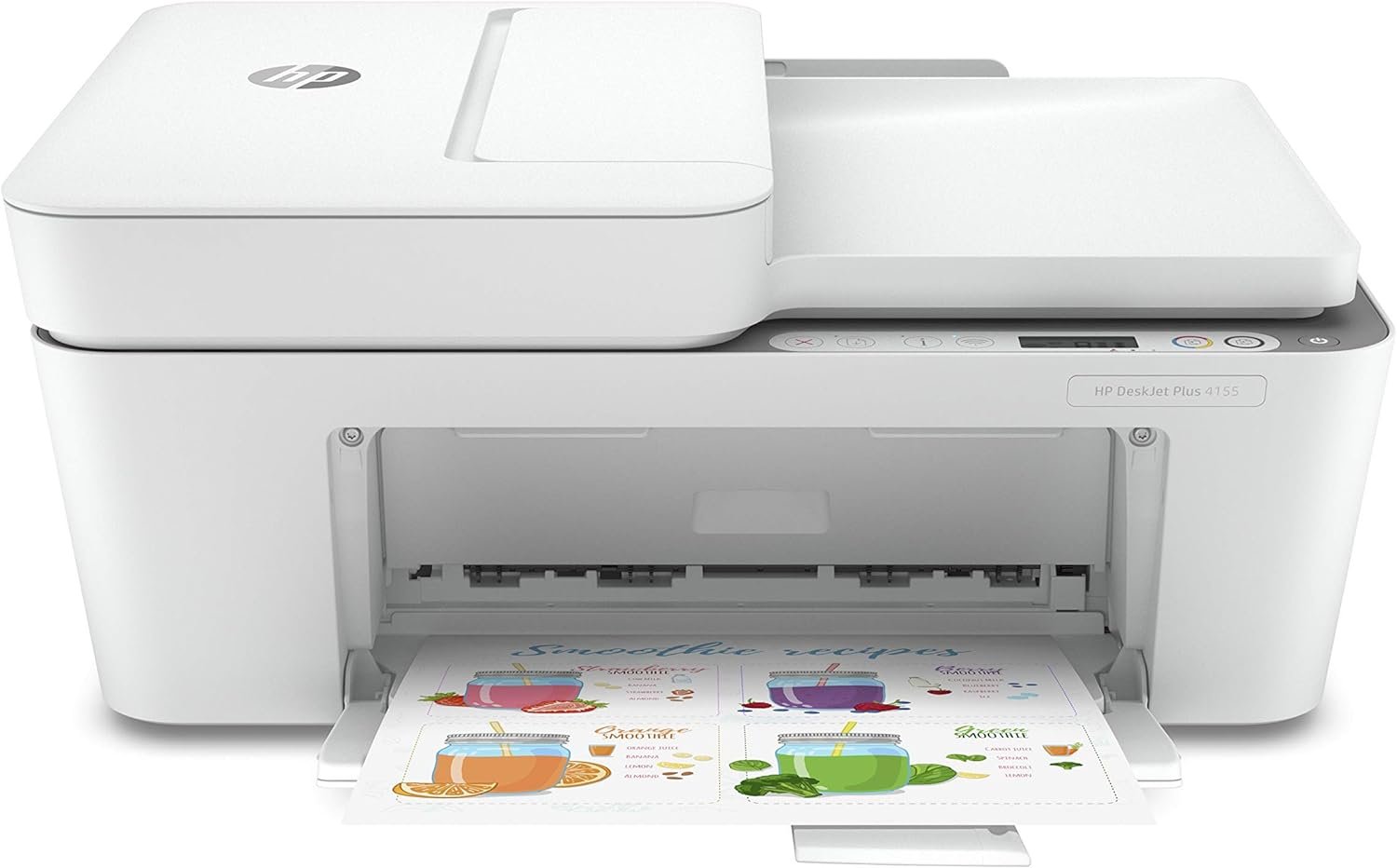
HP DeskJet 4155e All-in-One Wireless Color Printer Review: Print Quality, Connectivity, and Efficiency
The Importance of Choosing the Right Printer for Your Workflow
In today’s fast-paced digital environment, the right printer can significantly impact productivity, whether you’re managing a home office, a small business, or a creative workspace. Printers serve as critical tools for tasks ranging from document creation to photo printing, and their performance directly affects workflow efficiency. For users requiring color output, high-resolution prints, and seamless connectivity, selecting a printer that balances speed, reliability, and cost-efficiency is essential. The HP DeskJet 4155e All-in-One Wireless Color Printer (26Q90A) aims to meet these demands with its integrated printing, scanning, and copying capabilities, along with modern connectivity options. However, the decision to adopt this printer depends on factors such as print quality expectations, media compatibility, and long-term maintenance considerations. This review evaluates the HP DeskJet 4155e based on its technical specifications, user-centric features, and industry benchmarks to help potential buyers determine whether it aligns with their specific printing needs.
Quick Overview
| Feature | Details |
|---|---|
| Printer Type | Inkjet All-in-One |
| Supported Functions | Print, Scan, Copy, Fax |
| Print Resolution | 4800 x 1200 dpi color, 1200 x 1200 dpi black-and-white |
| Print Speed | Up to 5.5 ppm color, 8.5 ppm black-and-white |
| Media Sizes | 3 x 5 to 8.5 x 11 inches |
| Connectivity | Bluetooth, Wi-Fi (dual-band), USB |
| Duty Cycle | Designed for moderate-volume use |
| Ink System | Four-color inkjet with HP Instant Ink subscription |
| Warranty | 90-day limited warranty |
The HP DeskJet 4155e combines versatility with modern connectivity, making it suitable for users who prioritize color printing, mobile access, and integrated multifunctionality. Its dual-band Wi-Fi and Bluetooth capabilities ensure reliable wireless performance, while the HP Instant Ink subscription model offers predictable ink costs for frequent users. However, the printer’s design and specifications cater primarily to home or small office environments, rather than high-volume commercial applications.

Print Quality and Resolution: Meeting Color and Text Demands
The HP DeskJet 4155e delivers color prints at a resolution of 4800 x 1200 dpi, which is sufficient for most home and small business applications. This resolution ensures sharp text and vibrant colors, making it suitable for tasks such as creating marketing materials, printing photos, or producing professional-looking documents. The printer’s black-and-white output achieves 1200 x 1200 dpi, which is ideal for text-heavy documents where clarity and legibility are priorities. For users requiring high-resolution prints, the printer’s capabilities align with industry standards for consumer-grade inkjet printers. However, its performance may fall short for professional photography or high-end graphic design work, which often demands higher resolution and more precise color management.

Color Accuracy and Media Compatibility
The printer’s color output is optimized for standard paper types, including plain paper and glossy photo paper, which are supported by its media size range of 3 x 5 to 8.5 x 11 inches. While the color accuracy is adequate for general use, users who require precise color calibration for commercial printing may find the printer lacking. The HP DeskJet 4155e does not include advanced color management features such as ICC profile support, which is typically found in higher-end printers. This limitation means that the printer’s color output is best suited for personal or small business applications rather than professional photography or print-on-demand services.
Text Clarity and Monochrome Performance
For text-based documents, the printer’s 1200 x 1200 dpi black-and-white resolution ensures crisp, legible output. This makes it well-suited for tasks such as printing invoices, reports, or forms where readability is critical. The printer’s monochrome performance is consistent with its design for moderate-volume use, and it does not exhibit significant issues with smudging or ink bleeding on standard paper. However, users who frequently print large volumes of monochrome documents may notice a slight decrease in print speed compared to dedicated laser printers, which are typically faster for high-volume black-and-white printing.
Connectivity Options and Device Compatibility: Seamless Integration
The HP DeskJet 4155e offers a range of connectivity options, including dual-band Wi-Fi, Bluetooth, and a USB port, ensuring compatibility with a variety of devices. Dual-band Wi-Fi improves network stability by utilizing both 2.4 GHz and 5 GHz frequency bands, which is particularly beneficial for users with congested home networks. The inclusion of Bluetooth technology allows for direct printing from smartphones and tablets, reducing the need for intermediary steps during mobile printing. This feature is especially useful for users who frequently print documents on-the-go or share files via cloud storage services like Dropbox or Google Drive.

Mobile Printing and App Integration
The HP Smart app enhances the printer’s connectivity by enabling seamless integration with mobile devices. Users can print, scan, and copy documents directly from their smartphones or tablets, eliminating the need for a physical computer connection. The app also supports third-party software, allowing for greater flexibility in workflow management. However, the app’s effectiveness depends on the user’s familiarity with mobile printing protocols and the stability of their wireless network. While the app provides a user-friendly interface, it may not offer the same level of customization as dedicated printer management software found in enterprise-grade devices.
USB and Network Stability
The printer’s USB port provides a reliable wired connection for users who prefer direct printing or need to transfer files from older devices. The dual-band Wi-Fi ensures that the printer remains connected to the network even in environments with multiple connected devices. However, users who rely on high-speed data transfers may find the USB port’s performance limited compared to more advanced interfaces found in professional-grade printers. The printer’s network stability is generally reliable, but its performance in highly complex or industrial environments may not meet the demands of large-scale operations.
Ink Management and Cost Efficiency: Balancing Affordability and Sustainability
The HP DeskJet 4155e employs a four-color inkjet system, which is well-suited for a wide range of printing tasks. The printer’s HP Instant Ink subscription model allows users to receive ink automatically when supplies are low, reducing the risk of print interruptions. This model is particularly beneficial for users who print frequently and prefer a predictable cost structure. However, the subscription model requires a long-term commitment, which may not appeal to users who prefer to purchase ink in bulk or use alternative refill methods.

Ink Cost and Subscription Model
The HP Instant Ink subscription offers up to 50% savings on ink compared to traditional purchasing models, making it an attractive option for users with consistent printing needs. The subscription model also ensures that users always have ink on hand, eliminating the need to monitor ink levels manually. However, the cost of the subscription may be a drawback for users who print infrequently or prefer to manage their ink usage without ongoing commitments. The printer’s ink system is designed for moderate-volume use, and its efficiency may not be optimal for users with high print demands.
Sustainability and Eco-Friendly Features
The HP DeskJet 4155e includes eco-friendly design elements, such as the use of 20% recycled plastic in its construction. This feature aligns with growing consumer demand for sustainable products and reduces the environmental impact of the printer. However, the printer’s energy consumption is relatively low, with a wattage of 1 watt, which is typical for modern inkjet printers. While the energy efficiency is commendable, users who prioritize energy-saving features may find the printer’s specifications insufficient compared to more advanced models with additional power-saving modes.
Durability and Workload Capacity: Designed for Moderate Use
The HP DeskJet 4155e is designed for moderate-volume use, making it suitable for home offices and small businesses that do not require high-speed, high-volume printing. The printer’s duty cycle is optimized for users who print between 100 to 200 pages per month, which is ideal for everyday tasks such as printing reports, invoices, and personal documents. The printer’s 35-page automatic document feeder (ADF) enhances efficiency for scanning and copying tasks, reducing the need for manual handling of documents. However, its workload capacity is not suitable for heavy-duty commercial environments, where printers with higher duty cycles and more robust components are typically required.

Reliability and Maintenance Requirements
The printer’s reliability is generally consistent with its intended use, and its 90-day limited warranty reflects the manufacturer’s confidence in its performance. The printer’s maintenance requirements are minimal, with the ADF and ink system designed for easy cleaning and refilling. However, users who require extended warranty coverage or additional support may find the 90-day warranty insufficient for long-term use. The printer’s design prioritizes simplicity and ease of use, which is beneficial for users who prefer a straightforward setup process without complex maintenance routines.
Longevity and Environmental Factors
The HP DeskJet 4155e’s longevity is influenced by its design for moderate use and the quality of its components. While the printer is built to withstand typical home and small business environments, its durability may be compromised in settings with high humidity or extreme temperatures. Users in such environments may need to take additional precautions to ensure the printer’s longevity. The printer’s components, including the ADF and ink cartridges, are designed for standard operating conditions, which aligns with its intended use case.

Pros & Cons
Pros
- High Print Resolution: The 4800 x 1200 dpi color output ensures sharp, vibrant prints suitable for most home and small business needs.
- Dual-Band Wi-Fi and Bluetooth: These connectivity options provide reliable wireless performance and seamless mobile printing capabilities.
- HP Instant Ink Subscription: The subscription model offers cost savings and ensures consistent ink availability for frequent users.
- Integrated All-in-One Functionality: The printer’s ability to print, scan, copy, and fax in one device enhances workflow efficiency.
- User-Friendly Design: The intuitive HP Smart app and simple setup process make the printer accessible for users of all skill levels.
- Eco-Friendly Construction: The use of recycled plastic in the printer’s design supports sustainability efforts and reduces environmental impact.
Cons
- Limited Warranty Duration: The 90-day limited warranty may not provide sufficient coverage for long-term use or unexpected repairs.
- Subscription Dependency: The HP Instant Ink subscription model requires a long-term commitment, which may not suit users who prefer to manage ink costs independently.
- Moderate Workload Capacity: The printer is designed for moderate-volume use and may not meet the demands of high-volume commercial environments.
- No Advanced Color Management: The lack of ICC profile support means the printer may not produce precise color output for professional photography or print-on-demand services.
- USB Port Limitations: The USB port’s performance may not match the speed and reliability of more advanced interfaces found in professional-grade printers.
- Environmental Sensitivity: The printer’s components may be affected by extreme temperatures or humidity, requiring additional maintenance in certain environments.
Final Verdict: Who This Printer Is Best For (and Who Should Skip It)
The HP DeskJet 4155e All-in-One Wireless Color Printer is best suited for home users, small businesses, and individuals who require a versatile, user-friendly printer for everyday tasks such as printing reports, invoices, and photos. Its high print resolution, reliable connectivity, and integrated all-in-one functionality make it an excellent choice for users who value convenience and simplicity. The HP Instant Ink subscription model also appeals to frequent printers who want predictable ink costs and minimal maintenance.
However, users with high-volume printing needs, such as those in commercial environments or large offices, may find the HP DeskJet 4155e insufficient for their requirements. The printer’s moderate workload capacity and limited warranty duration make it unsuitable for heavy-duty use. Additionally, users who prioritize advanced color management, energy-saving features, or extended warranty coverage may prefer alternative printers that offer more robust specifications and support. Overall, the HP DeskJet 4155e is a reliable and efficient option for its intended use case, but its limitations should be carefully considered before making a purchase decision.

Frequently Asked Questions (FAQs)
What is the print resolution of the HP DeskJet 4155e?
The HP DeskJet 4155e offers a maximum print resolution of 4800 x 1200 dpi for color prints and 1200 x 1200 dpi for black-and-white prints. This resolution is suitable for most home and small business applications, ensuring sharp text and vibrant colors for general use.
Does the HP DeskJet 4155e support wireless printing?
Yes, the HP DeskJet 4155e includes dual-band Wi-Fi and Bluetooth connectivity, allowing users to print wirelessly from smartphones, tablets, and computers. The HP Smart app enhances this functionality by enabling seamless mobile printing and document sharing.
How does HP Instant Ink work with the HP DeskJet 4155e?
HP Instant Ink is a subscription-based ink service that automatically orders ink when supplies are low. This model ensures users always have ink available for their printing needs, with up to 50% savings on ink compared to traditional purchasing methods. A subscription is required for this feature.
What media sizes does the HP DeskJet 4155e support?
The HP DeskJet 4155e supports media sizes ranging from 3 x 5 inches to 8.5 x 11 inches, including standard plain paper and glossy photo paper. This compatibility makes it suitable for a wide range of printing tasks, from documents to photos.
What is the warranty coverage for the HP DeskJet 4155e?
The HP DeskJet 4155e comes with a 90-day limited warranty, which covers defects in materials and workmanship. This warranty is designed for moderate-volume use and may not provide extended coverage for long-term or heavy-duty applications.
Can the HP DeskJet 4155e handle high-volume printing?
The HP DeskJet 4155e is designed for moderate-volume use, with a workload capacity suitable for home offices and small businesses. It is not recommended for high-volume commercial environments that require higher duty cycles and more robust printing capabilities.
What connectivity options are available for the HP DeskJet 4155e?
The HP DeskJet 4155e offers dual-band Wi-Fi, Bluetooth, and a USB port for connectivity. These options provide flexibility for users who prefer wireless printing, mobile access, or direct computer connections.
Is the HP DeskJet 4155e suitable for professional photography?
The HP DeskJet 4155e is not designed for professional photography due to its lack of advanced color management features such as ICC profile support. While it produces adequate color output for general use, it may not meet the precision requirements of professional photographers or print-on-demand services.