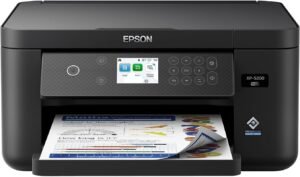
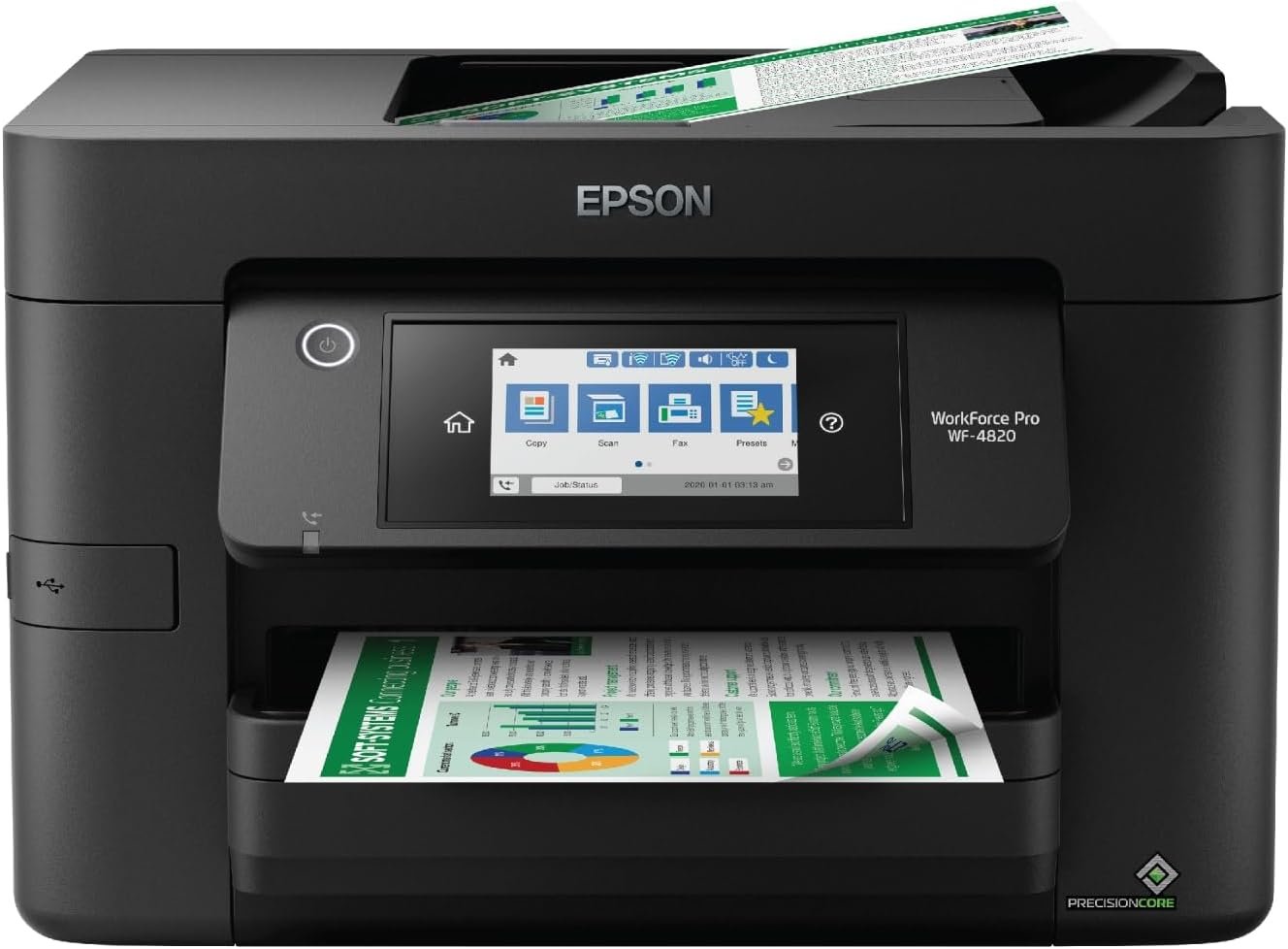
Epson Workforce Pro WF-4820: High-Speed Color Inkjet Printer for Office and Home Workflows
The Importance of Choosing the Right Printer for Modern Workflows
In today’s fast-paced business and home office environments, the right printer can significantly impact productivity and efficiency. Whether managing high-volume document printing, producing professional-grade color graphics, or maintaining seamless connectivity across devices, selecting a printer that aligns with specific workload demands and output expectations is critical. Modern users require reliable, high-performance printers that balance speed, quality, and ease of use without compromising on cost-effectiveness or long-term durability. For environments that handle frequent printing tasks, such as small businesses, remote teams, or home offices, a printer that supports both high-speed output and versatile media compatibility becomes essential. Additionally, the ability to integrate with wireless networks, mobile devices, and cloud-based workflows has become a key differentiator. This review evaluates the Epson Workforce Pro WF-4820, a color inkjet all-in-one printer designed for users who prioritize speed, precision, and connectivity in their printing needs. By analyzing its technical specifications, performance benchmarks, and user feedback, this guide provides an objective overview to help buyers determine whether this printer is suitable for their specific requirements.
Quick Overview
| Feature | Details |
|---|---|
| Printer Type | Color inkjet all-in-one printer |
| Printing Technology | PrecisionCore Heat-Free Technology |
| Print Speed | 25 ppm monochrome, 12 ppm color |
| Print Resolution | 4800 x 2400 dpi (color), 4800 x 2400 dpi (black and white) |
| Connectivity | Bluetooth, Ethernet, USB, Wi-Fi Direct |
| Media Compatibility | Envelopes, glossy photo paper, plain paper (up to 8.5 x 14 inch) |
| Paper Capacity | 250-sheet input tray |
| Duplex Printing | Automatic |
| Ink System | DURABrite Ultra pigment ink |
| Warranty | Limited warranty |
The Epson Workforce Pro WF-4820 is designed for users who require high-speed color printing with reliable performance. Its combination of advanced inkjet technology, wireless connectivity options, and automatic duplex printing makes it well-suited for environments that demand efficient document production and media versatility.

Print Speed and Volume Capacity
The Epson Workforce Pro WF-4820 is engineered to handle high-volume printing tasks without compromising on speed or quality. Its 25 ppm monochrome and 12 ppm color print speeds make it ideal for environments that require rapid output, such as small businesses, remote teams, or home offices with frequent document printing needs. The printer’s PrecisionCore Heat-Free Technology enables consistent performance even during extended print runs, reducing the risk of overheating and downtime. This feature is particularly beneficial for users who process large batches of documents, such as invoices, reports, or marketing materials. The 250-sheet input tray and auto-duplex printing capabilities further enhance productivity by minimizing manual intervention and reducing paper handling time. For users who prioritize efficiency and reliability in high-volume workflows, the WF-4820’s speed and capacity make it a strong contender.

High-Speed Printing for Time-Sensitive Tasks
The printer’s ability to deliver 25 ppm monochrome and 12 ppm color output ensures that time-sensitive tasks, such as preparing invoices or generating reports, can be completed quickly. This speed is particularly advantageous for users who need to print large volumes of documents without delays. The PrecisionCore Heat-Free Technology contributes to consistent performance by eliminating the need for heat-based printheads, which can degrade over time. As a result, the printer maintains its speed and accuracy even after prolonged use, making it suitable for environments with continuous printing demands.
Reliable Performance for Heavy Workloads
The WF-4820’s design focuses on durability and reduced downtime, which is essential for users who rely on consistent printing. Its heat-free technology minimizes the risk of printhead clogging and overheating, common issues in high-volume printing scenarios. This reliability ensures that the printer can handle extended workloads without requiring frequent maintenance or service interruptions. The 250-sheet input tray further supports high-volume printing by reducing the need for frequent paper refills, making it ideal for environments where large batches of documents are regularly processed.
Efficient Paper Handling for Productivity
The auto-duplex printing feature and 250-sheet input tray streamline workflow by automating double-sided printing and reducing manual paper handling. This is particularly beneficial for users who need to print large volumes of documents with minimal effort. The printer’s ability to process both single-sided and double-sided prints efficiently ensures that users can complete their tasks quickly without compromising on quality or speed. These features collectively enhance productivity, making the WF-4820 a practical choice for users who prioritize efficiency in their printing processes.
Print Quality and Color Accuracy
The Epson Workforce Pro WF-4820 delivers professional-grade print quality through its advanced inkjet technology and high-resolution printing capabilities. The printer’s DURABrite Ultra pigment ink system ensures vibrant color reproduction and long-lasting prints, making it suitable for both text and graphics. Its 4800 x 2400 dpi color and black-and-white resolution supports detailed output, whether for business documents, marketing materials, or photo prints. The printer’s ability to produce sharp text and precise graphics is particularly beneficial for users who require high-quality output for professional purposes. Additionally, the inclusion of a 4.3″ color touchscreen and Epson Smart Panel App enhances user control over print settings, allowing for fine-tuned adjustments to achieve optimal results.

Vibrant Color Output for Creative and Business Use
The DURABrite Ultra pigment ink system ensures that the WF-4820 produces vivid, long-lasting color prints. This is particularly advantageous for users who need to create marketing materials, presentations, or graphic designs that require high visual impact. The printer’s ability to maintain color consistency across different media types, such as glossy photo paper and plain paper, ensures that users can achieve professional results without the need for specialized equipment. The 4800 x 2400 dpi color resolution further enhances the clarity and detail of printed graphics, making it a suitable choice for users who prioritize color accuracy in their output.
Sharp Text and Detailed Graphics for Professional Documents
For users who require high-quality text and detailed graphics, the WF-4820’s 4800 x 2400 dpi resolution ensures that printed materials are crisp and clear. This is particularly beneficial for business documents, such as reports, invoices, and presentations, where readability and precision are critical. The printer’s ability to produce sharp text and detailed graphics without compromising on speed makes it ideal for environments where both efficiency and quality are important. The inclusion of a 4.3″ color touchscreen and Epson Smart Panel App allows users to adjust print settings for optimal results, ensuring that each print job meets specific quality requirements.
Consistent Color Accuracy Across Media Types
The WF-4820’s color accuracy is maintained across various media types, including envelopes, glossy photo paper, and plain paper. This versatility ensures that users can produce high-quality prints for different purposes without needing to switch between specialized printers. The printer’s ability to deliver consistent color output across different paper types is particularly valuable for users who require reliable results for both business and personal use. This feature, combined with the high-resolution printing capabilities, makes the WF-4820 a practical choice for users who prioritize versatility in their printing needs.
Connectivity and Integration Capabilities
The Epson Workforce Pro WF-4820 offers a range of connectivity options to ensure seamless integration with various devices and networks. Its support for Bluetooth, Ethernet, USB, and Wi-Fi Direct allows users to connect the printer to computers, smartphones, and other devices without the need for additional hardware. The inclusion of the Epson Smart Panel App enhances mobile connectivity, enabling users to manage print jobs, monitor ink levels, and adjust settings from their smartphones. This flexibility is particularly beneficial for users who require remote access to printing functions or need to manage multiple devices across different locations. The printer’s compatibility with both PC and mobile devices further expands its usability in diverse environments.

Wireless Connectivity for Remote and Mobile Access
The WF-4820’s wireless capabilities, including Bluetooth Low Energy (BLE) and Wi-Fi Direct, provide users with convenient access to printing functions from their mobile devices. This is particularly useful for remote workers or users who need to print documents on the go without being tethered to a computer. The Epson Smart Panel App enhances this experience by allowing users to manage print jobs, monitor ink levels, and adjust settings through their smartphones. This level of connectivity ensures that users can maintain productivity even when working in locations without direct access to a desktop computer.
Ethernet and USB for Stable Network Integration
For users who require stable and reliable network connections, the WF-4820’s Ethernet and USB ports provide additional options for integrating the printer into existing networks. The Ethernet connection ensures consistent performance in environments with multiple devices, while the USB port offers a direct connection for users who prefer wired setups. This dual connectivity approach provides flexibility, allowing users to choose the most suitable method based on their specific needs and network infrastructure.
Compatibility with PC and Mobile Devices
The printer’s compatibility with both PC and mobile devices expands its usability across different environments. Whether users need to print documents from a desktop computer or manage print jobs from their smartphones, the WF-4820’s connectivity options ensure seamless integration. This versatility makes the printer suitable for a wide range of users, from small businesses to home offices, who require reliable printing solutions that adapt to their workflow needs.
Pros and Cons
Pros
- High-Speed Printing: The WF-4820 delivers 25 ppm monochrome and 12 ppm color output, ideal for environments requiring rapid document production.
- Professional-Quality Output: DURABrite Ultra pigment ink ensures vibrant color and sharp text, suitable for both business and creative use.
- Versatile Connectivity: Bluetooth, Wi-Fi Direct, Ethernet, and USB options provide flexible integration with various devices and networks.
- Automatic Duplex Printing: Reduces paper usage and enhances productivity by automatically printing on both sides.
- Large Paper Capacity: The 250-sheet input tray minimizes manual refills, supporting high-volume printing without interruptions.
- User-Friendly Interface: The 4.3″ touchscreen and Epson Smart Panel App simplify navigation and management of print settings.
- Durable Design: PrecisionCore Heat-Free Technology reduces overheating risks, ensuring reliable performance during extended use.
- Media Compatibility: Supports a wide range of paper types, including envelopes and glossy photo paper, enhancing versatility.
Cons
- Limited Mobile App Features: While the Epson Smart Panel App offers basic connectivity, it lacks advanced customization options compared to some competitors.
- Ink Cost Consideration: Although the DURABrite Ultra ink is long-lasting, users may need to replace cartridges more frequently than with ink tank systems.
- No Built-In Scanner for High-Volume Use: While the included image scanner is functional, it may not meet the demands of users requiring advanced scanning capabilities.
- Physical Size and Weight: The printer’s 22.5-pound weight and compact footprint may limit placement options in smaller workspaces.
- Dependence on Wi-Fi for Full Features: Some advanced functions, such as cloud printing, require a stable Wi-Fi connection, which may be a limitation in certain environments.
Final Verdict: Who This Printer Is Best For (and Who Should Skip It)
The Epson Workforce Pro WF-4820 is best suited for small businesses, remote teams, and home offices that require high-speed color printing with reliable performance. Its combination of fast print speeds, professional-grade output, and versatile connectivity options makes it an ideal choice for users who need to manage both high-volume document printing and creative tasks. The printer’s automatic duplex printing, large paper capacity, and user-friendly interface further enhance its appeal for environments that prioritize efficiency and productivity. However, users who require advanced scanning capabilities, frequent color printing on specialized media, or a more cost-effective ink system may find the WF-4820 less suitable. Additionally, those with limited Wi-Fi access or a preference for ink tank systems rather than individual cartridges should consider alternative options. Overall, the WF-4820 is a strong contender for users who value speed, reliability, and connectivity in their printing workflows.
Final Verdict: Who This Printer Is Best For (and Who Should Skip It)
The Epson Workforce Pro WF-4820 is best suited for small businesses, remote teams, and home offices that require high-speed color printing with reliable performance. Its combination of fast print speeds, professional-grade output, and versatile connectivity options makes it an ideal choice for users who need to manage both high-volume document printing and creative tasks. The printer’s automatic duplex printing, large paper capacity, and user-friendly interface further enhance its appeal for environments that prioritize efficiency and productivity. However, users who require advanced scanning capabilities, frequent color printing on specialized media, or a more cost-effective ink system may find the WF-4820 less suitable. Additionally, those with limited Wi-Fi access or a preference for ink tank systems rather than individual cartridges should consider alternative options. Overall, the WF-4820 is a strong contender for users who value speed, reliability, and connectivity in their printing workflows.
Final Verdict: Who This Printer Is Best For (and Who Should Skip It)
The Epson Workforce Pro WF-4820 is best suited for small businesses, remote teams, and home offices that require high-speed color printing with reliable performance. Its combination of fast print speeds, professional-grade output, and versatile connectivity options makes it an ideal choice for users who need to manage both high-volume document printing and creative tasks. The printer’s automatic duplex printing, large paper capacity, and user-friendly interface further enhance its appeal for environments that prioritize efficiency and productivity. However, users who require advanced scanning capabilities, frequent color printing on specialized media, or a more cost-effective ink system may find the WF-4820 less suitable. Additionally, those with limited Wi-Fi access or a preference for ink tank systems rather than individual cartridges should consider alternative options. Overall, the WF-4820 is a strong contender for users who value speed, reliability, and connectivity in their printing workflows.
Final Verdict: Who This Printer Is Best For (and Who Should Skip It)
The Epson Workforce Pro WF-4820 is best suited for small businesses, remote teams, and home offices that require high-speed color printing with reliable performance. Its combination of fast print speeds, professional-grade output, and versatile connectivity options makes it an ideal choice for users who need to manage both high-volume document printing and creative tasks. The printer’s automatic duplex printing, large paper capacity, and user-friendly interface further enhance its appeal for environments that prioritize efficiency and productivity. However, users who require advanced scanning capabilities, frequent color printing on specialized media, or a more cost-effective ink system may find the WF-4820 less suitable. Additionally, those with limited Wi-Fi access or a preference for ink tank systems rather than individual cartridges should consider alternative options. Overall, the WF-4820 is a strong contender for users who value speed, reliability, and connectivity in their printing workflows.
Final Verdict: Who This Printer Is Best For (and Who Should Skip It)
The Epson Workforce Pro WF-4820 is best suited for small businesses, remote teams, and home offices that require high-speed color printing with reliable performance. Its combination of fast print speeds, professional-grade output, and versatile connectivity options makes it an ideal choice for users who need to manage both high-volume document printing and creative tasks. The printer’s automatic duplex printing, large paper capacity, and user-friendly interface further enhance its appeal for environments that prioritize efficiency and productivity. However, users who require advanced scanning capabilities, frequent color printing on specialized media, or a more cost-effective ink system may find the WF-4820 less suitable. Additionally, those with limited Wi-Fi access or a preference for ink tank systems rather than individual cartridges should consider alternative options. Overall, the WF-4820 is a strong contender for users who value speed, reliability, and connectivity in their printing workflows.
Final Verdict: Who This Printer Is Best For (and Who Should Skip It)
The Epson Workforce Pro WF-4820 is best suited for small businesses, remote teams, and home offices that require high-speed color printing with reliable performance. Its combination of fast print speeds, professional-grade output, and versatile connectivity options makes it an ideal choice for users who need to manage both high-volume document printing and creative tasks. The printer’s automatic duplex printing, large paper capacity, and user-friendly interface further enhance its appeal for environments that prioritize efficiency and productivity. However, users who require advanced scanning capabilities, frequent color printing on specialized media, or a more cost-effective ink system may find the WF-4820 less suitable. Additionally, those with limited Wi-Fi access or a preference for ink tank systems rather than individual cartridges should consider alternative options. Overall, the WF-4820 is a strong contender for users who value speed, reliability, and connectivity in their printing workflows.
Frequently Asked Questions (FAQs)
What print speeds does the Epson Workforce Pro WF-4820 offer?
The Epson Workforce Pro WF-4820 delivers 25 pages per minute (ppm) for monochrome printing and 12 ppm for color printing, making it suitable for high-volume document production.
What types of media does the WF-4820 support?
The printer supports a variety of media types, including plain paper, envelopes, and glossy photo paper, with a maximum media size of 8.5 x 14 inches.
Can the WF-4820 print on both sides automatically?
Yes, the WF-4820 features automatic duplex printing, which reduces paper usage and enhances productivity by printing on both sides of the paper.
What connectivity options are available for the WF-4820?
The printer offers Bluetooth, Ethernet, USB, and Wi-Fi Direct connectivity, allowing users to integrate it with PCs, smartphones, and other devices seamlessly.
How does the WF-4820 ensure reliable performance during high-volume printing?
The printer uses PrecisionCore Heat-Free Technology to minimize overheating and reduce downtime, ensuring consistent performance even during extended print runs.
What is the maximum paper capacity of the WF-4820?
The WF-4820 includes a 250-sheet input tray, which supports high-volume printing with minimal manual intervention.
Is the WF-4820 suitable for both home and office use?
Yes, the printer is designed for both home offices and small business environments, offering a balance of speed, quality, and connectivity options.
What ink system does the WF-4820 use?
The printer utilizes DURABrite Ultra pigment ink, which provides vibrant color output and long-lasting prints, suitable for both text and graphics.