
The Importance of Choosing the Right Printer
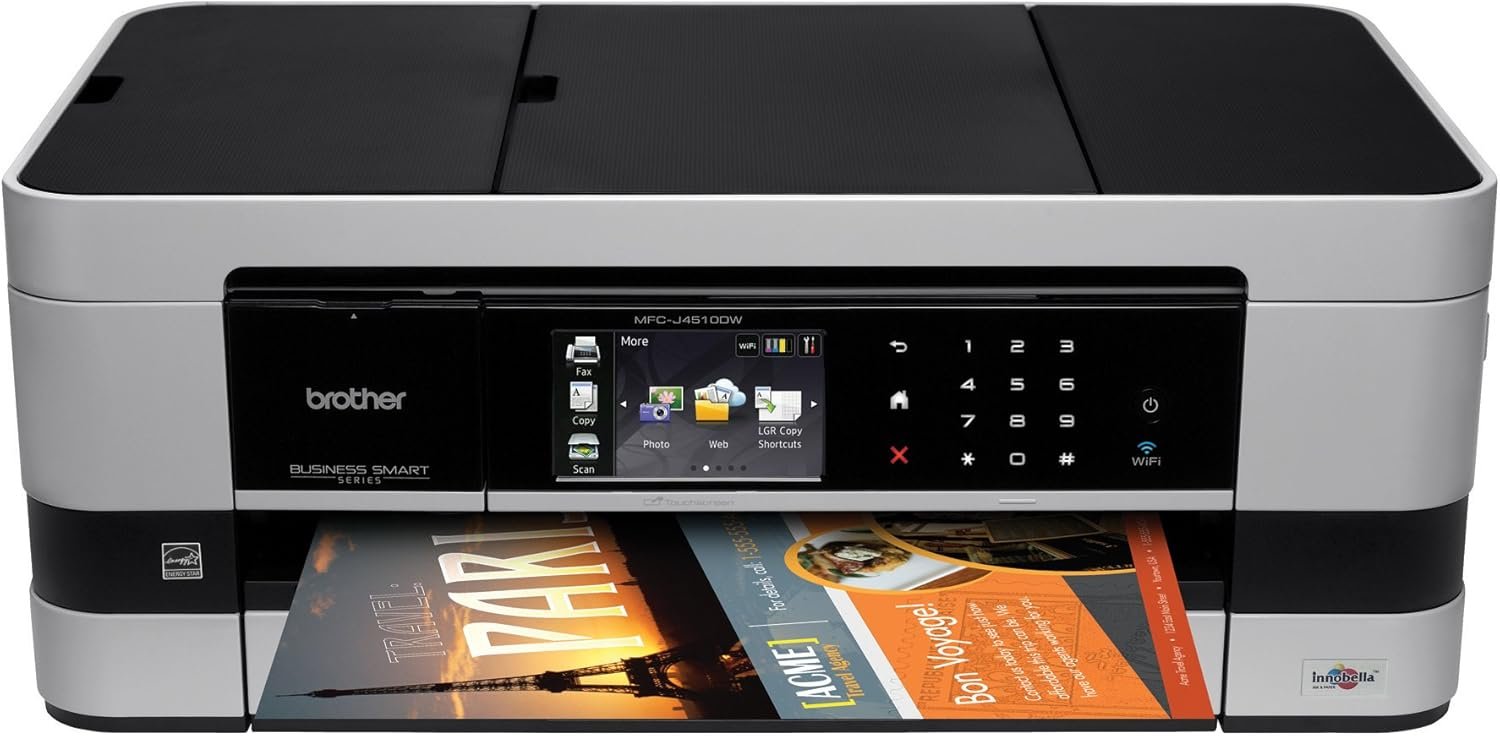
In today’s digital landscape, printers remain essential for both personal and professional workflows. Whether for home use, small business operations, or office environments, selecting the right printer can significantly impact productivity and cost efficiency. Printers must balance speed, print quality, and reliability while accommodating diverse media types and connectivity needs. For users requiring color output, such as photographers, graphic designers, or educators, a printer’s ability to produce vibrant, accurate colors is critical. Conversely, businesses prioritizing high-volume printing may focus on speed and duty cycle capabilities. The Brother MFCJ4510DW represents a multifunctional solution that addresses these varied demands through its combination of color printing, scanning, copying, and faxing capabilities. However, understanding the technical specifications and operational constraints of such a device is crucial for making an informed decision. This review evaluates the MFCJ4510DW’s performance across key buyer decision factors, including print quality, connectivity, media compatibility, and long-term maintenance requirements. By analyzing its engineering design and industry benchmarks, we provide a comprehensive assessment of its suitability for different usage scenarios.
Quick Overview
| Feature | Details |
|---|---|
| Printer Type | Color inkjet multifunction printer |
| Functions | Print, copy, scan, fax |
| Print Resolution | 4800×1200 dpi (color), 4800×1200 dpi (black and white) |
| Print Speed | Up to 27 pages per minute (color), 35 pages per minute (monochrome) |
| Media Sizes | 8.5″ x 11″, 11″ x 17″ |
| Connectivity | Ethernet, USB 2.0, WiFi Direct, Wireless 802.11 b/g/n |
| Duplex Printing | Automatic |
| Ink System | Inkjet with color cartridges |
| Warranty | Extended warranty |
| Dimensions | 11.4 x 18.9 x 7.3 inches |
| Weight | 20.5 pounds |
The Brother MFCJ4510DW combines color printing, scanning, copying, and faxing in a compact design, making it suitable for home offices and small businesses. Its automatic duplex printing and support for both letter and legal-sized paper enhance productivity. The multifunctional capabilities reduce the need for separate devices, optimizing workspace efficiency. However, users should consider the printer’s inkjet technology and media compatibility when evaluating its long-term cost-effectiveness.

Print Quality and Color Accuracy
The MFCJ4510DW’s color printing capabilities are defined by its inkjet technology and high-resolution output. The printer supports 4800×1200 dpi color resolution, which is suitable for producing detailed graphics and photographs. Its inkjet system uses color cartridges to deliver vibrant, accurate color reproduction, making it ideal for creative professionals and educators. The printer’s ability to handle both plain paper and transparencies provides flexibility for different media needs. However, users should be aware that inkjet printers typically require regular maintenance to ensure consistent color quality over time.

Color Accuracy and Media Compatibility
The MFCJ4510DW’s color accuracy is influenced by its inkjet print engine and the type of media used. The printer supports a variety of paper types, including plain paper and transparencies, allowing for versatile output options. Its high-resolution color printing ensures that images and graphics maintain clarity and detail. However, the use of specialty media may affect print quality, as some materials may not be compatible with standard inkjet inks. Users should consider the printer’s media compatibility when selecting materials for their print jobs.
Print Durability and Longevity
The durability of the MFCJ4510DW’s color prints depends on factors such as the type of ink used and the environmental conditions in which the printer operates. Inkjet printers generally produce prints that are suitable for short-term use, as the ink may fade over time if exposed to sunlight or moisture. The printer’s design includes a built-in ink system that minimizes the risk of clogging, but regular maintenance is recommended to ensure consistent print quality. Users should also be aware that the printer’s inkjet technology may require more frequent cartridge replacements compared to laser printers.
Connectivity and Network Integration
The MFCJ4510DW’s connectivity options are a key factor in its suitability for modern work environments. The printer supports Ethernet, USB 2.0, WiFi Direct, and Wireless 802.11 b/g/n, providing multiple ways to connect to a network or a single device. This versatility makes the printer ideal for users who require remote access or integration with mobile devices. The printer’s Web Connect TouchScreen Interface allows for seamless interaction with cloud-based services, such as Google Docs and Dropbox, enhancing its functionality for both personal and professional use.
Wireless and Ethernet Capabilities
The MFCJ4510DW’s wireless connectivity options, including WiFi Direct and 802.11 b/g/n, enable users to print from mobile devices without the need for a traditional network setup. This feature is particularly beneficial for users who need to print on the go. The Ethernet port provides a stable connection for high-volume printing, making the printer suitable for office environments where consistent performance is essential. However, users should consider the potential for network congestion when using wireless connectivity for multiple devices.
Integration with Cloud Services
The printer’s Web Connect TouchScreen Interface allows for integration with popular cloud services, such as Google Docs and Dropbox. This feature enhances the printer’s functionality by enabling users to print directly from cloud-stored documents without the need for intermediate steps. The integration with social media platforms like Facebook and Flickr also provides convenience for users who frequently share images. However, the reliance on cloud services may require a stable internet connection, which could be a limitation in areas with unreliable connectivity.
Productivity and Workload Capacity
The MFCJ4510DW’s productivity is determined by its print speed and duty cycle capabilities. The printer can handle up to 27 pages per minute in color and 35 pages per minute in monochrome, making it suitable for moderate to high-volume printing. Its automatic duplex printing feature helps reduce paper usage, which is beneficial for both cost savings and environmental considerations. The printer’s design includes a 150-sheet output tray and a 150-sheet input tray, which can accommodate a variety of print jobs without requiring frequent manual intervention.
Duty Cycle and Recommended Volume
The MFCJ4510DW’s duty cycle is designed to handle a range of printing tasks, making it suitable for both home and small business environments. The printer’s recommended volume is appropriate for users who require regular printing without the need for industrial-grade equipment. However, users should be aware that the printer’s inkjet technology may have limitations in terms of long-term durability compared to laser printers. Regular maintenance and proper usage can help extend the printer’s lifespan and ensure consistent performance.
Paper Handling and Tray Options
The MFCJ4510DW’s paper handling capabilities include a 150-sheet output tray and a 150-sheet input tray, which can accommodate a variety of paper sizes and types. The printer’s design allows for easy loading and unloading of paper, which is beneficial for users who frequently handle different media types. The inclusion of a 11″ x 17″ bypass tray provides additional flexibility for printing large-format documents. However, users should consider the potential for paper jams or misfeeds, which can occur with certain paper types or when using the bypass tray.
Pros & Cons
Pros
- Color Printing Capabilities: The MFCJ4510DW’s high-resolution color printing is suitable for producing detailed graphics and photographs, making it ideal for creative professionals and educators.
- Versatile Connectivity Options: The printer supports multiple connectivity methods, including Ethernet, USB 2.0, WiFi Direct, and Wireless 802.11 b/g/n, providing flexibility for different usage scenarios.
- Automatic Duplex Printing: The printer’s automatic duplex feature helps reduce paper usage, offering cost savings and environmental benefits.
- Integration with Cloud Services: The Web Connect TouchScreen Interface allows for seamless integration with cloud-based platforms, enhancing the printer’s functionality for both personal and professional use.
- Multifunctional Design: The combination of printing, scanning, copying, and faxing in a single device reduces the need for multiple machines, optimizing workspace efficiency.
Cons
- Inkjet Technology Limitations: The printer’s inkjet system may require more frequent cartridge replacements compared to laser printers, which could affect long-term cost-effectiveness.
- Potential for Paper Jams: The inclusion of a bypass tray and support for large-format media may increase the risk of paper jams or misfeeds, requiring careful handling.
- Dependence on Cloud Services: The integration with cloud-based platforms may require a stable internet connection, which could be a limitation in areas with unreliable connectivity.
- Limited Longevity for Color Prints: The printer’s inkjet technology may result in color fading over time, especially when exposed to environmental factors like sunlight or moisture.
- Maintenance Requirements: Regular maintenance is necessary to ensure consistent print quality and prevent issues such as clogging or misfeeds.
Final Verdict: Who This Printer Is Best For (and Who Should Skip It)
The Brother MFCJ4510DW is best suited for users who require a multifunctional printer with color printing capabilities, such as small business owners, educators, and creative professionals. Its versatile connectivity options and integration with cloud services make it ideal for environments where remote access and mobile printing are essential. The automatic duplex printing feature also offers cost savings and environmental benefits for users who prioritize paper efficiency. However, the printer may not be the best choice for users who require high-volume printing or long-term durability, as its inkjet technology may have limitations in terms of long-term cost-effectiveness and print longevity. Additionally, users in areas with unreliable internet connectivity may find the cloud integration features less beneficial. Overall, the MFCJ4510DW is a suitable choice for moderate to high-volume printing needs, provided users are willing to invest in regular maintenance and consider the limitations of inkjet technology.
Frequently Asked Questions (FAQs)
What print resolution does the Brother MFCJ4510DW offer?
The Brother MFCJ4510DW provides a maximum color print resolution of 4800×1200 dpi, ensuring detailed and vibrant output for photos and graphics. Its black and white print resolution also reaches 4800×1200 dpi, making it suitable for high-quality text and images.
Can the Brother MFCJ4510DW handle large-format printing?
Yes, the printer supports 11″ x 17″ media size through its bypass tray, allowing for large-format printing. This makes it suitable for users who need to print posters, banners, or other oversized documents.
What connectivity options does the Brother MFCJ4510DW support?
The printer offers Ethernet, USB 2.0, WiFi Direct, and Wireless 802.11 b/g/n connectivity. These options provide flexibility for both wired and wireless printing, making it compatible with a wide range of devices and networks.
How does the Brother MFCJ4510DW integrate with cloud services?
The printer’s Web Connect TouchScreen Interface allows seamless integration with cloud services such as Google Docs, Dropbox, Facebook, and Flickr. This feature enables users to print directly from cloud-stored documents without the need for intermediate steps.
What is the maximum print speed of the Brother MFCJ4510DW?
The printer can print up to 27 pages per minute in color and 35 pages per minute in monochrome. These speeds are suitable for moderate to high-volume printing tasks, making it efficient for both home and small business use.
Does the Brother MFCJ4510DW support automatic duplex printing?
Yes, the printer includes an automatic duplex printing feature that prints on both sides of the paper. This helps reduce paper usage and offers cost savings for users who prioritize environmental considerations.
What are the media compatibility options for the Brother MFCJ4510DW?
The printer supports a variety of media types, including plain paper and transparencies. Its ability to handle different paper sizes and types provides flexibility for various printing needs, from standard documents to specialized materials.
What maintenance is required for the Brother MFCJ4510DW?
Regular maintenance, such as cleaning the print head and ensuring proper ink flow, is recommended to maintain consistent print quality. Users should also be aware of the need for periodic cartridge replacements to avoid clogging and ensure optimal performance.