Canon PIXMA TR8620a Review: All-in-One Printer for Home and Office Workflows
The Importance of Choosing the Right Printer for Modern Workflows
In today’s fast-paced digital environment, selecting the right printer is critical for maintaining productivity and efficiency. Whether managing home office tasks, handling business correspondence, or creating professional documents, the performance of a printer can significantly impact workflow speed and output quality. Modern users demand versatility, reliability, and seamless integration with their digital ecosystems. A printer that supports multiple functions—such as printing, scanning, copying, and faxing—can reduce the need for multiple devices, saving space and cost. Additionally, the ability to handle various media types, including glossy photo paper and standard office paper, ensures that the printer meets diverse printing needs. Print speed, duty cycle, and connectivity options also play a vital role in determining suitability for different environments. For home users, a printer with intuitive controls and smart features can enhance convenience, while office environments require robust performance and minimal maintenance. Understanding these factors helps users make informed decisions that align with their specific requirements, ensuring that their printing solutions are both efficient and effective.
Quick Overview
| Feature | Details |
|---|---|
| Printer Type | All-in-One Inkjet Printer |
| Supported Functions | Print, Copy, Scan, Fax |
| Print Resolution | 4800 x 1200 dpi (color), 600 dpi (black-and-white) |
| Print Speed | 15 ppm (monochrome), 10 ppm (color) |
| Media Sizes | 8.5 x 11.7, 8.5 x 14.0 inches |
| Connectivity | USB, Wi-Fi |
| Ink System | Pigment-based ink |
| Duty Cycle | 1,000 pages |
| Auto Document Feeder | Yes |
| Dual-Sided Printing | Yes |
| Warranty | 90 days limited warranty |
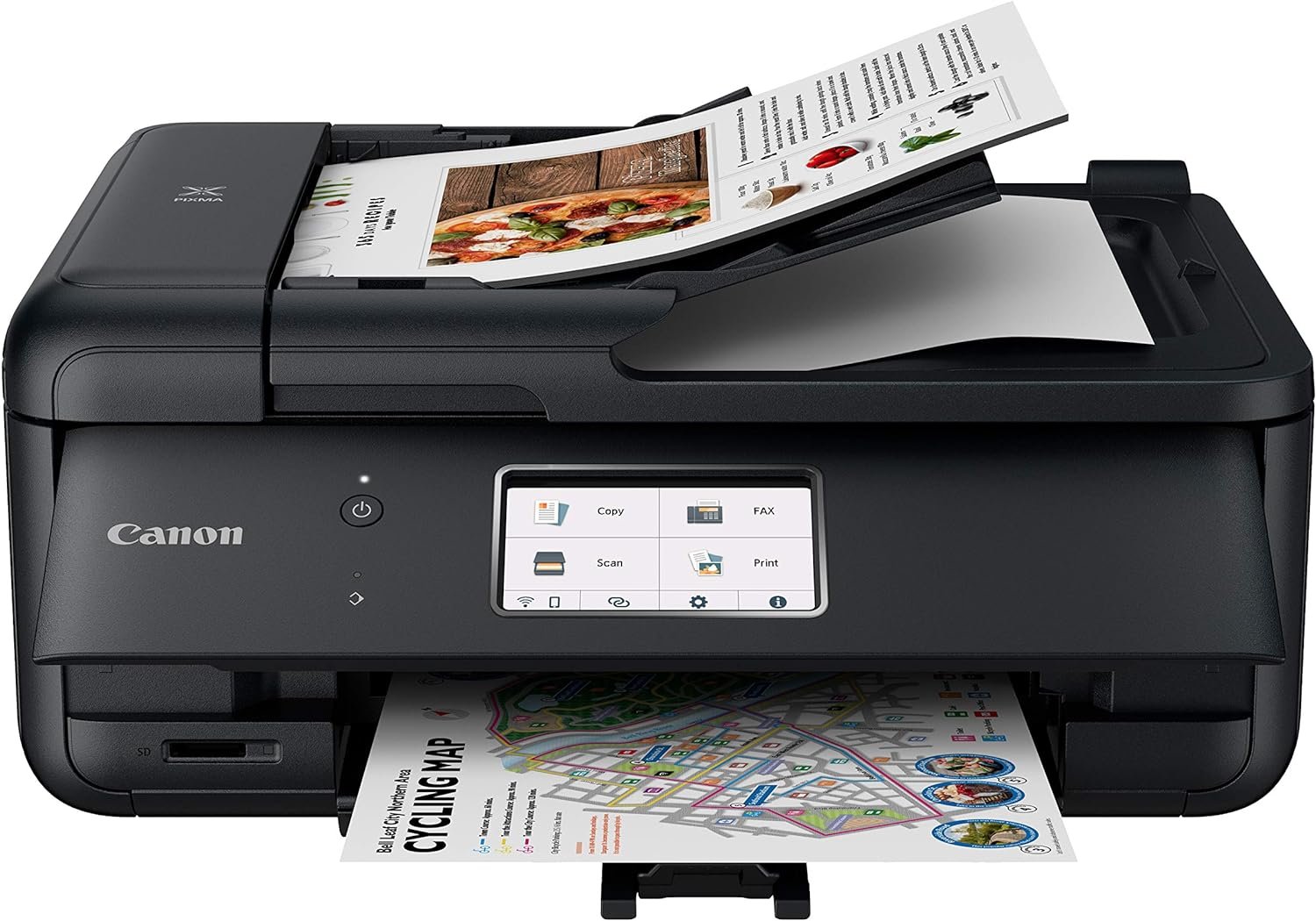
The Canon PIXMA TR8620a is designed to meet the needs of home and small office users by combining essential functions into a single device. Its 15 ppm monochrome print speed and 10 ppm color print speed ensure efficient document processing, while the 4800 x 1200 dpi resolution delivers sharp text and detailed graphics. The dual-sided printing capability and auto document feeder enhance productivity by reducing manual handling. With connectivity options like USB and Wi-Fi, the printer integrates seamlessly with modern digital workflows, making it a practical choice for users seeking a multifunctional solution.

Print Quality and Resolution: Meeting Diverse Output Needs
The Canon PIXMA TR8620a leverages pigment-based ink technology to produce high-quality prints suitable for both text and graphics. Its maximum color print resolution of 4800 x 1200 dpi ensures sharp, vibrant output for photographs and detailed documents, while the 600 dpi black-and-white resolution provides clear, legible text. This combination makes the printer ideal for users who require versatility in output types, such as home users printing photos and business documents. The pigment-based ink system also offers better lightfastness compared to dye-based inks, ensuring that printed materials retain their quality over time. However, users should note that pigment inks may require more frequent printhead cleaning to maintain optimal performance, as they can clog nozzles if not properly maintained. The printer’s ability to handle glossy photo paper and standard office paper further expands its applicability, allowing users to produce professional-looking prints for both personal and professional use.

Media Compatibility and Print Output Flexibility
The TR8620a supports a range of media sizes, including 8.5 x 11.7 and 8.5 x 14.0 inches, making it suitable for standard letter-sized documents and larger photo prints. This flexibility allows users to adapt the printer to different tasks without needing multiple devices. The supported media types, such as glossy photo paper, enable high-quality photo printing, which is particularly beneficial for users who frequently produce visual content. However, the printer’s ability to handle specialty papers may be limited compared to higher-end models, which could be a consideration for users with specific paper requirements. The printer’s dual-sided printing capability also enhances efficiency by reducing paper usage, which is advantageous for both cost-conscious users and those aiming to minimize environmental impact.
Resolution Performance and Text Clarity
The 4800 x 1200 dpi color resolution ensures that printed graphics and images are crisp and detailed, making the TR8620a suitable for creative projects and professional presentations. The 600 dpi black-and-white resolution provides clear, readable text, which is essential for documents, reports, and correspondence. This dual-resolution approach allows the printer to handle both high-detail images and clean text efficiently. However, users should be aware that higher resolution settings may increase print time and ink usage, which could affect overall cost-effectiveness. The printer’s ability to maintain consistent resolution across different media types further enhances its reliability for varied printing tasks.
Connectivity and Integration: Seamless Digital Workflow
The Canon PIXMA TR8620a offers USB and Wi-Fi connectivity options, enabling seamless integration with modern digital workflows. The USB port provides a direct connection for users who prefer a wired setup, ensuring stable and reliable data transfer. Wi-Fi connectivity allows for wireless printing from smartphones, tablets, and computers, enhancing convenience for users who are frequently on the move. The printer’s compatibility with AirPrint and Android devices expands its usability, as users can print from their mobile devices without the need for additional software. However, the absence of Ethernet connectivity may limit its suitability for environments requiring high-speed network printing. The printer’s support for voice control through Alexa integration also adds a layer of convenience, allowing users to manage tasks such as ink level monitoring and reordering without manual intervention. This feature is particularly beneficial for users who prioritize smart home integration and automation.

Wireless Printing and Cross-Device Compatibility
The TR8620a’s Wi-Fi connectivity enables wireless printing from a variety of devices, including smartphones, tablets, and computers, without the need for a physical connection. This feature is especially advantageous for users who work in environments where mobility is key, as it allows for quick and easy printing from anywhere within the network range. The printer’s compatibility with AirPrint and Android devices ensures that users can leverage existing printing capabilities without additional setup. However, users should be aware that wireless printing may be subject to network latency and interference, which could affect print speed and reliability. The printer’s support for voice commands through Alexa further enhances its integration with smart home ecosystems, making it a convenient choice for users who rely on voice-activated devices.
Network-Ready Features and Smart Integration
As a network-ready printer, the TR8620a can be integrated into a home or office network, allowing multiple users to access its functions simultaneously. This feature is particularly beneficial for small businesses or households with multiple users who need to share printing resources. The printer’s ability to connect to Alexa enables users to receive notifications about ink levels and place smart reorders, which helps in maintaining consistent ink supply without manual intervention. However, the reliance on Alexa for smart reorders may be a drawback for users who prefer not to use voice-activated assistants. The printer’s compatibility with Android devices also ensures that users can take advantage of mobile printing features without additional configuration, making it a versatile option for modern workflows.
Print Speed and Duty Cycle: Handling Workload Demands
The Canon PIXMA TR8620a delivers a monochrome print speed of 15 ppm and a color print speed of 10 ppm, making it suitable for moderate to high-volume printing tasks. These speeds ensure that documents are processed efficiently, reducing wait times for users who need to print multiple pages. The printer’s 1,000-page duty cycle indicates that it is designed for regular use but may not be ideal for high-volume environments that require continuous operation. This duty cycle is appropriate for home office users and small businesses with moderate printing needs, as it balances performance with longevity. However, users with heavy printing requirements, such as those in large offices or commercial settings, may find the duty cycle limiting. The printer’s ability to handle both monochrome and color printing efficiently makes it a practical choice for users who require versatility in their printing tasks.

Duty Cycle and Longevity Considerations
The 1,000-page duty cycle of the TR8620a suggests that it is built for regular, but not continuous, use. This specification is suitable for home users and small offices where printing demands are not extremely high. However, users with higher volume requirements may need to consider printers with a higher duty cycle to avoid potential wear and tear on the print engine. The printer’s design ensures that it can handle regular use without significant degradation in performance, making it a reliable option for everyday tasks. The duty cycle also indicates that the printer is not intended for industrial or high-volume environments, where more robust printers with extended duty cycles are typically required.
Print Speed and Efficiency in Different Tasks
The TR8620a’s print speed is optimized for both text and graphics, ensuring that users can complete printing tasks efficiently. The 15 ppm monochrome speed is suitable for printing documents, reports, and correspondence, while the 10 ppm color speed is adequate for producing high-quality photos and graphics. The printer’s ability to handle both print types without significant speed reduction makes it a versatile option for users with varied printing needs. However, users should be aware that print speed may vary depending on the complexity of the document and the media type used. For instance, printing high-resolution images on glossy paper may take longer than printing standard text documents. This variability in print speed is a normal characteristic of inkjet printers and should be considered when evaluating the printer’s suitability for specific tasks.

Pros & Cons
Pros
- Multifunctionality: The TR8620a combines printing, scanning, copying, and faxing into a single device, reducing the need for multiple peripherals.
- High Print Resolution: The 4800 x 1200 dpi color resolution ensures sharp, detailed output for photos and graphics, while the 600 dpi black-and-white resolution provides clear text.
- Dual-Sided Printing: The auto duplex feature enhances efficiency by reducing paper usage and minimizing environmental impact.
- Smart Integration: Compatibility with Alexa allows for voice-activated notifications and smart reorders, improving convenience for users.
- Versatile Media Support: The printer handles a range of media types, including glossy photo paper and standard office paper, expanding its applicability for different tasks.
- Wireless Connectivity: Wi-Fi and AirPrint support enable seamless printing from mobile devices and computers without the need for physical connections.
- User-Friendly Interface: The touch screen and intuitive controls simplify navigation and operation for users of all experience levels.
- Reliable Performance: The printer’s design and specifications indicate it is built for regular use, making it a dependable option for home and small office environments.
Cons
- Limited Duty Cycle: The 1,000-page duty cycle may not be sufficient for high-volume environments, making it less suitable for commercial or industrial use.
- Ink Consumption: Pigment-based ink, while offering good lightfastness, may require more frequent printhead cleaning to maintain performance and could lead to higher ink usage over time.
- No Ethernet Connectivity: The absence of Ethernet support may limit its suitability for environments requiring high-speed network printing.
- Smart Reorder Dependency: While Alexa integration is convenient, it may not be ideal for users who prefer not to rely on voice-activated assistants for reordering supplies.
- Limited Specialty Paper Support: The printer’s media compatibility may be restricted compared to higher-end models, potentially limiting its use for specialized printing tasks.
- Print Speed Variability: Print speed may decrease when handling complex documents or high-resolution images, which could affect efficiency for certain tasks.
Final Verdict: Who This Printer Is Best For (and Who Should Skip It)
The Canon PIXMA TR8620a is an excellent choice for home users and small businesses with moderate printing needs. Its multifunctionality, high print resolution, and smart integration features make it a practical solution for everyday tasks such as printing documents, photos, and scanning. The dual-sided printing capability and versatile media support further enhance its appeal for users who require flexibility in their printing workflows. However, the printer may not be suitable for high-volume environments or users who require extended duty cycles. Additionally, those who prefer not to use voice-activated assistants for reordering supplies or who need specialized paper compatibility may find the TR8620a less than ideal. Overall, the TR8620a offers a balanced combination of performance and convenience, making it a reliable option for users seeking a versatile all-in-one printer for home and small office use.

Frequently Asked Questions (FAQs)
What print resolution does the Canon PIXMA TR8620a offer?
The Canon PIXMA TR8620a provides a maximum color print resolution of 4800 x 1200 dpi, ensuring sharp and detailed output for photos and graphics. It also offers a 600 dpi black-and-white resolution for clear text printing.
How does the Canon PIXMA TR8620a handle glossy photo paper?
The printer is designed to work with glossy photo paper, delivering vibrant and detailed prints. Its pigment-based ink system enhances color longevity, making it suitable for high-quality photo printing.
Can the Canon PIXMA TR8620a be used for business documents?
Yes, the TR8620a is suitable for business documents due to its 600 dpi black-and-white resolution, which ensures clear and legible text. It also supports wireless printing, making it convenient for office environments.
What connectivity options are available for the TR8620a?
The Canon PIXMA TR8620a offers USB and Wi-Fi connectivity, allowing for both wired and wireless printing. It is compatible with AirPrint and Android devices, enhancing its versatility for different user needs.
Is the Canon PIXMA TR8620a suitable for high-volume printing?
The TR8620a has a 1,000-page duty cycle, which is appropriate for moderate use but may not be sufficient for high-volume environments. It is better suited for home users and small businesses with regular, but not continuous, printing needs.
Can the Canon PIXMA TR8620a be integrated with smart home devices?
Yes, the TR8620a supports integration with Alexa, allowing users to receive ink level notifications and place smart reorders. This feature enhances convenience for users who utilize voice-activated assistants.
What media sizes does the Canon PIXMA TR8620a support?
The TR8620a can handle media sizes up to 8.5 x 14.0 inches, making it suitable for standard letter-sized documents and larger photo prints. This versatility allows users to adapt the printer to different printing tasks.
Does the Canon PIXMA TR8620a have an auto document feeder?
Yes, the TR8620a includes an auto document feeder, which simplifies scanning and copying tasks by automatically feeding documents through the printer.