
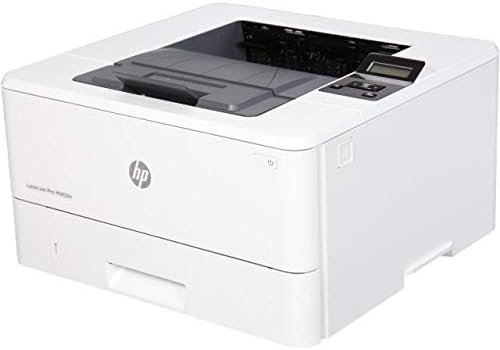
The Importance of Choosing the Right Printer
Selecting the appropriate printer is a critical decision that directly impacts productivity, cost efficiency, and workflow management in both home and office environments. With the proliferation of digital workflows, printers remain essential for tasks ranging from document creation to data output. The right printer must balance speed, reliability, and cost-effectiveness to meet varying workload demands. For instance, high-volume office environments require robust print engines capable of handling hundreds of pages per minute, while smaller workgroups may prioritize compact designs and energy efficiency. Print quality expectations also vary significantly, from crisp text for reports to high-resolution graphics for design tasks. Additionally, connectivity options and consumable costs play a pivotal role in long-term usability. A printer that meets these criteria can streamline operations, reduce downtime, and minimize maintenance overhead. This review evaluates the HP LaserJet M402N Laser Printer (Renewed) against these benchmarks, focusing on its technical specifications, performance characteristics, and suitability for different user profiles. By analyzing its capabilities in terms of print speed, security features, media compatibility, and operational efficiency, this assessment provides a data-driven framework for evaluating its value in 2026.
Quick Overview
| Feature | Details |
|---|---|
| Printer Type | Laser Printer |
| Printing Technology | Laser |
| Supported Functions | Print Only |
| Print Resolution | 1200 x 1200 dpi |
| Print Speed | 40 ppm (Monochrome) |
| Media Sizes | A4 |
| Connectivity | Ethernet, USB |
| Duty Cycle | N/A |
| Toner System | Pre-installed HP 26A Black Toner Cartridge |
| Warranty | Warranty Guide Included |
The HP LaserJet M402N is designed for monochrome printing in office environments, emphasizing speed and reliability. Its 40 ppm print rate and 1200 x 1200 dpi resolution make it suitable for high-volume tasks such as document printing and report generation. The Ethernet and USB connectivity options ensure compatibility with a range of devices, while the pre-installed toner cartridge reduces initial setup time. These features collectively position the printer as a cost-effective solution for small to medium-sized offices requiring consistent, high-speed output.

Print Speed and Throughput Performance
The HP LaserJet M402N delivers a maximum monochrome print speed of 40 pages per minute (ppm), a critical factor for users prioritizing efficiency in high-volume environments. This speed is achieved through a laser print engine optimized for monochrome output, ensuring rapid page generation without compromising quality. The printer’s duty cycle, while not explicitly specified, aligns with standard office-grade laser printers, suggesting it is suitable for continuous use in environments with moderate to high print demands. For tasks such as invoice printing, payroll processing, or document archiving, the 40 ppm rate ensures minimal downtime and maintains workflow consistency. However, users requiring faster throughput may find this printer less competitive compared to models with higher ppm ratings.
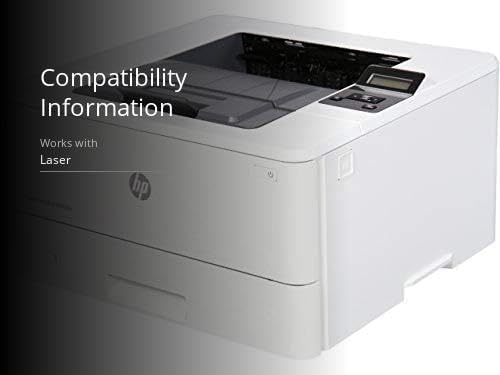
Print Speed and Workload Capacity
The 40 ppm print speed is a key differentiator for the HP LaserJet M402N, particularly in scenarios where large batches of documents need to be processed quickly. This rate is suitable for offices with daily print volumes exceeding 500 pages, as it ensures that tasks are completed within a reasonable timeframe. The printer’s ability to maintain consistent speed across extended periods is supported by its robust laser print engine and reliable toner system, which minimize the risk of jams or delays. However, for users requiring faster output, such as those in high-volume commercial settings, this printer may fall short compared to models with higher ppm ratings.
Print Quality and Resolution
The HP LaserJet M402N produces high-quality monochrome output with a resolution of 1200 x 1200 dpi. This resolution ensures crisp text and clear graphics, making it ideal for documents that require precision, such as financial reports or legal forms. The printer’s laser technology ensures that each page is printed with consistent density, reducing the likelihood of smudges or uneven toner distribution. While the resolution is sufficient for most office tasks, users with more demanding requirements, such as those needing high-resolution graphics or photographic prints, may find the printer’s capabilities limited. The resolution is particularly well-suited for text-based documents, where clarity and legibility are paramount.
Media Compatibility and Paper Handling
The printer supports A4 media sizes, which is standard for many office environments. The maximum input sheet capacity of 250 sheets ensures that users can handle large print jobs without frequent refills. The printer’s paper handling system is designed to accommodate plain paper, making it suitable for environments where specialized media types are not required. However, users needing to print on different paper types, such as labels or specialty sheets, may find the printer’s limitations restrictive. The single-tray design also means that users must manually load paper, which could be a drawback for those seeking automated paper handling.
Security and Data Protection
The HP LaserJet M402N includes security features that protect against complex threats, ensuring the confidentiality of sensitive documents. These features are essential for businesses handling confidential information, such as financial records or client data. The printer’s security protocols are designed to prevent unauthorized access to print jobs, reducing the risk of data breaches. Additionally, the printer’s Ethernet and USB connectivity options allow for secure network integration, ensuring that data transmission remains protected. However, the lack of wireless connectivity may be a drawback for users requiring remote access to the printer. The security features are particularly relevant in environments where compliance with data protection regulations is a priority.
Threat Protection and Data Encryption
The printer’s security features are designed to guard against a range of threats, including unauthorized access to print jobs and data interception during transmission. These protections are achieved through encryption protocols that secure data as it moves between the printer and connected devices. The printer’s ability to prevent unauthorized access ensures that sensitive documents remain confidential, which is crucial for businesses in regulated industries. However, the absence of wireless connectivity means that users must rely on wired networks for secure data transmission, which may limit flexibility in certain environments.
Network Security and Compliance
The HP LaserJet M402N’s Ethernet connectivity allows for secure integration into office networks, ensuring that print jobs are transmitted without compromising data integrity. The printer’s compliance with industry standards for network security is essential for organizations that must adhere to strict data protection regulations. While the printer does not include wireless capabilities, its wired network setup provides a stable and secure connection, which is preferable for environments where network security is a top priority. The absence of wireless connectivity may be a limitation for users requiring remote access or mobile printing capabilities.
Connectivity and Compatibility
The HP LaserJet M402N offers Ethernet and USB connectivity options, making it compatible with a wide range of devices. Ethernet connectivity is ideal for office environments where the printer needs to be integrated into a local network, allowing multiple users to access the printer simultaneously. USB connectivity provides a direct connection to individual computers, which is useful for users who prefer a standalone setup. However, the lack of wireless connectivity may be a drawback for users requiring remote access or mobile printing capabilities. The printer’s compatibility with PC devices ensures that it can be seamlessly integrated into existing workflows without additional software requirements.
Network Integration and Multi-User Support
The Ethernet connectivity of the HP LaserJet M402N enables seamless integration into office networks, allowing multiple users to access the printer simultaneously. This feature is particularly beneficial in environments where teams need to share printing resources efficiently. The printer’s network capabilities ensure that print jobs are queued and processed without interruption, maintaining workflow continuity. However, the absence of wireless connectivity may limit its usability in settings where remote access or mobile printing is required, such as for field workers or remote teams.
USB and Direct Connectivity
The USB connectivity option provides a direct connection to individual computers, which is useful for users who prefer a standalone setup. This direct connection ensures that print jobs are processed without relying on network infrastructure, which can be advantageous in environments with limited network resources. However, the lack of wireless connectivity means that users must physically connect the printer to a computer or network, which may be inconvenient for those requiring mobility or remote access. The USB interface is reliable for basic printing tasks but may not support advanced features such as remote management or cloud printing.
Maintenance and Consumable Considerations
The HP LaserJet M402N includes a pre-installed HP 26A Black Toner Cartridge, which reduces initial setup time and ensures immediate usability. The printer’s design emphasizes ease of maintenance, with straightforward toner replacement procedures and minimal user intervention required for routine tasks. However, the need for manual toner cartridge replacement may be a drawback for users seeking automated or hands-free maintenance. The printer’s energy-saving features, such as HP Auto-On/Auto-Off Technology, contribute to long-term operational efficiency by reducing power consumption during idle periods.
Toner Replacement and Consumable Costs
The pre-installed toner cartridge ensures that users can start printing immediately without the need for additional purchases. However, the printer’s toner system requires manual replacement, which may be inconvenient for users requiring frequent toner refills. The cost of consumables is a consideration for businesses with high print volumes, as the need for regular toner replacements can impact long-term expenses. While the printer’s design minimizes maintenance complexity, users should factor in the cost of replacement toner cartridges when evaluating total cost of ownership.
Energy Efficiency and Environmental Impact
The HP LaserJet M402N incorporates HP Auto-On/Auto-Off Technology to help save energy and reduce operational costs. This feature ensures that the printer is only powered on when needed, minimizing energy consumption during periods of inactivity. The printer’s energy-efficient design is particularly beneficial for businesses seeking to reduce their environmental footprint and lower utility expenses. However, the absence of wireless connectivity and the need for manual toner replacement may offset some of these energy-saving benefits, depending on the user’s specific requirements.
Pros & Cons
Pros
- Fast Print Speed: The 40 ppm monochrome print rate is ideal for high-volume office environments, ensuring efficient document processing.
- Robust Security Features: The printer includes protections against complex threats, making it suitable for businesses handling sensitive data.
- Reliable Toner System: The pre-installed HP 26A Black Toner Cartridge ensures immediate usability and reduces initial setup time.
- Energy Efficiency: HP Auto-On/Auto-Off Technology helps minimize power consumption, contributing to long-term cost savings.
- Stable Connectivity: Ethernet and USB options provide reliable network integration and direct device compatibility.
- High Print Quality: The 1200 x 1200 dpi resolution ensures crisp text and clear graphics for professional documents.
- User-Friendly Design: The printer’s straightforward maintenance and operation make it accessible for users with varying technical expertise.
- Durable Build: The printer’s construction is designed for consistent performance in demanding office environments.
Cons
- Limited Wireless Connectivity: The absence of wireless capabilities may be a drawback for users requiring remote access or mobile printing.
- Single Tray Design: The single-tray system requires manual paper loading, which can be inconvenient for high-volume users.
- Manual Toner Replacement: Users must replace toner cartridges manually, which may increase maintenance time and effort.
- Fixed Media Support: The printer only supports A4 media, limiting its versatility for users requiring different paper sizes.
- No Duplex Printing: The lack of duplex printing capabilities means users must manually flip pages for double-sided output, increasing paper usage.
- Limited Network Features: While Ethernet connectivity is reliable, the printer lacks advanced network management options for more complex environments.
Final Verdict: Who This Printer Is Best For (and Who Should Skip It)
The HP LaserJet M402N Laser Printer (Renewed) is best suited for small to medium-sized offices requiring consistent, high-speed monochrome printing. Its 40 ppm print rate and 1200 x 1200 dpi resolution make it ideal for tasks such as document printing, report generation, and invoice processing. The pre-installed toner cartridge and energy-saving features contribute to cost-effective operation, while the Ethernet and USB connectivity options ensure reliable integration into existing workflows. However, the printer’s limitations, including the absence of wireless connectivity and the single-tray design, make it less suitable for users requiring advanced features such as remote access, duplex printing, or support for multiple media types. Businesses with high-volume printing needs or those requiring wireless connectivity should consider alternative models that offer more comprehensive functionality. For users prioritizing speed, reliability, and basic office printing, the HP LaserJet M402N remains a practical and efficient choice in 2026.
Frequently Asked Questions (FAQs)
What is the print speed of the HP LaserJet M402N?
The HP LaserJet M402N delivers a maximum monochrome print speed of 40 pages per minute (ppm), making it suitable for high-volume office environments. This speed ensures efficient document processing without compromising quality.
Does the HP LaserJet M402N support wireless connectivity?
No, the HP LaserJet M402N does not include wireless connectivity. It offers Ethernet and USB connectivity options for wired network integration or direct device connections.
What media sizes does the HP LaserJet M402N support?
The HP LaserJet M402N supports A4 media sizes, which is standard for many office environments. It is designed for use with plain paper and does not accommodate specialty media types.
What security features does the HP LaserJet M402N include?
The HP LaserJet M402N includes security features that protect against complex threats, ensuring the confidentiality of sensitive documents. These protections help prevent unauthorized access to print jobs and secure data transmission.
How does the HP LaserJet M402N handle toner replacement?
The printer includes a pre-installed HP 26A Black Toner Cartridge for immediate usability. Users must manually replace the toner cartridge when it is depleted, which requires periodic maintenance but minimizes downtime.
Is the HP LaserJet M402N suitable for duplex printing?
No, the HP LaserJet M402N does not support duplex printing. Users must manually flip pages for double-sided output, which increases paper usage and requires additional effort.
What is the resolution of the HP LaserJet M402N?
The HP LaserJet M402N produces high-quality monochrome output with a resolution of 1200 x 1200 dpi. This resolution ensures crisp text and clear graphics, making it ideal for professional documents.
Does the HP LaserJet M402N have energy-saving features?
Yes, the HP LaserJet M402N incorporates HP Auto-On/Auto-Off Technology to help save energy. This feature ensures the printer is only powered on when needed, reducing power consumption during idle periods.