
The Importance of Choosing the Right Printer
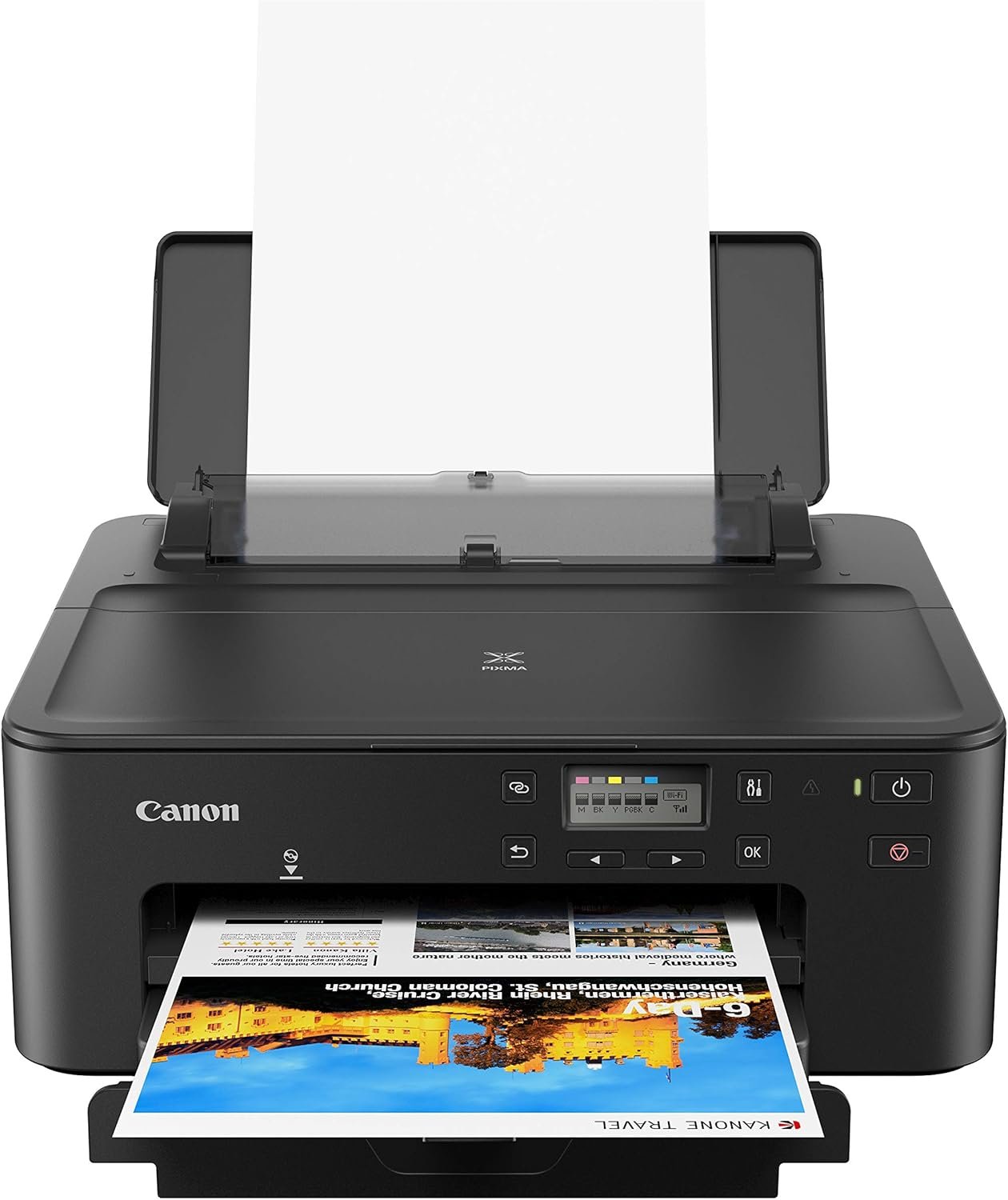
In today’s fast-paced digital environment, the role of a printer extends far beyond simple document duplication. Whether for home use, small office operations, or mobile workflows, selecting the right printer can significantly impact productivity, cost efficiency, and user satisfaction. Printers vary widely in technology, performance, and feature sets, making it essential to align these attributes with specific usage requirements. For example, a home user may prioritize ease of use and mobile connectivity, while a small business might focus on print speed and media versatility. The Canon PIXMA TS702a Wireless Single Function Printer represents a strategic balance between these needs, offering a compact, energy-efficient device tailored for everyday printing tasks. Its design emphasizes simplicity, with features like AirPrint and Mopria compatibility enabling seamless integration with mobile devices. However, understanding how these specifications translate to real-world performance is critical for making an informed decision. This review evaluates the TS702a’s capabilities across key buyer decision factors, including print quality, connectivity, efficiency, and maintenance, to determine its suitability for different environments and workflows.
Quick Overview
| Feature | Details |
|---|---|
| Printer Type | Inkjet Printer |
| Supported Functions | Print, Scan |
| Print Resolution | 4800 x 1200 dpi (color), 4800 x 1200 dpi (black and white) |
| Print Speed | 10 ppm (color), 15 ppm (monochrome) |
| Media Sizes | 7 x 10, 8 x 10, Legal (8.5 x 14 inches) |
| Connectivity | Ethernet, USB, Wireless (AirPrint, Mopria) |
| Duty Cycle | 1,500 pages per month |
| Ink System | Hybrid Ink (dye for color, pigment for black) |
| Warranty | 1-Year Limited Warranty |
| Dimensions | 14.4″D x 14.7″W x 6.3″H |
| Weight | 14.4 pounds |
| Included Components | Multi-Purpose Tray, Setup CD, Standard Ink Tanks, Power Cord |
The Canon PIXMA TS702a combines compact design with functional versatility, making it well-suited for users who require reliable, straightforward printing without advanced features. Its hybrid ink system and automatic duplex printing capabilities enhance efficiency, while wireless connectivity simplifies integration with mobile devices. These attributes position it as a practical choice for home offices and small-scale environments where simplicity and cost-effectiveness are priorities.

Print Quality and Resolution

Color and Monochrome Output
The Canon PIXMA TS702a delivers high-resolution output through its 4800 x 1200 dpi color and monochrome print engines. This resolution ensures sharp text and detailed graphics, making it suitable for both everyday documents and basic photo printing. The hybrid ink system, which combines dye-based inks for vibrant colors and pigment-based black ink for crisp text, contributes to its versatility. While not designed for professional photo printing, the printer’s color accuracy and tonal range meet standard expectations for home and office use. The 16-bit color depth further enhances the precision of color reproduction, though users should note that the printer’s capabilities are optimized for standard paper sizes rather than large-format media.
Photo Printing and Media Compatibility
The TS702a supports photo printing through its 4″ x 6″ photo paper sample pack, which is included in the package. While it lacks dedicated photo printing modes or specialized settings for fine art prints, the printer’s ability to handle standard photo paper sizes (up to 8.5 x 14 inches) makes it functional for casual photo printing. The printer’s media compatibility is limited to plain paper and standard photo paper, with no support for glossy or specialty media. This constraint may affect users who require more advanced photo printing options. The automatic duplex printing feature helps reduce paper usage, aligning with sustainability goals without compromising print quality.
Connectivity and Mobile Integration

Wireless Printing Capabilities
The Canon PIXMA TS702a’s wireless connectivity options, including AirPrint and Mopria, enable seamless printing from iOS and Android devices. These protocols allow users to print directly from smartphones and tablets without the need for additional software or drivers, streamlining the workflow for mobile users. The printer’s Ethernet and USB ports provide wired connectivity for desktop computers, ensuring compatibility with a wide range of devices. While the wireless features are convenient for on-the-go printing, the absence of a dedicated mobile app beyond the Canon PRINT app limits customization options for advanced users. The printer’s reliance on standard wireless protocols also means it may experience connectivity issues in environments with weak Wi-Fi signals or multiple devices.
App Integration and User Experience
The Canon PRINT app enhances the printer’s usability by allowing users to manage print jobs, monitor ink levels, and scan documents directly from their mobile devices. The app’s interface is intuitive, with straightforward options for accessing print settings and device status. However, the app’s functionality is limited to basic operations, as the printer does not support advanced features like cloud printing or remote device management. Users who require more granular control over printing tasks may find the app’s capabilities insufficient. The printer’s reliance on app-based interaction also means that users without mobile devices may face challenges in accessing certain features, such as scanning or adjusting print settings.
Efficiency and Maintenance

Duplex Printing and Paper Management
The Canon PIXMA TS702a’s automatic duplex printing feature reduces paper consumption by up to 50%, aligning with eco-friendly practices and cost-saving goals. This functionality is particularly beneficial for users who frequently print documents with double-sided pages, such as reports or forms. The printer’s 350-sheet input tray accommodates moderate print volumes, making it suitable for environments with regular, but not high-volume, printing needs. However, the lack of a dedicated duplex tray or manual feeding option may limit its effectiveness for users who require more complex paper handling, such as printing on specialty media or large-format sheets.
Ink System and Consumable Costs
The TS702a’s hybrid ink system, which combines dye-based color inks with pigment-based black ink, offers a balance between vibrancy and longevity. The pigment black ink is designed to resist fading and smudging, making it ideal for documents that require durability. However, the printer’s ink system is not optimized for high-volume printing, as the standard ink tanks are relatively small compared to those in more robust inkjet models. Users who frequently print large quantities may find the ink costs prohibitive, though the printer’s energy-efficient design helps offset some of these expenses. The inclusion of standard ink tanks in the package ensures immediate usability, but long-term users may need to invest in additional ink supplies to maintain consistent output.

Pros & Cons
Pros
- Wireless Connectivity: AirPrint and Mopria compatibility enables seamless printing from mobile devices without additional software.
- Hybrid Ink System: Combines dye inks for vibrant colors with pigment black ink for sharp text and durability.
- Automatic Duplex Printing: Reduces paper usage by up to 50%, promoting cost efficiency and sustainability.
- Compact Design: Lightweight and space-efficient, suitable for home offices and small workspaces.
- Energy Efficiency: Meets Energy Star and EPEAT Silver standards, reducing environmental impact.
- User-Friendly App Integration: The Canon PRINT app simplifies device management and print job monitoring.
Cons
- Limited Media Compatibility: Supports only standard paper and photo paper, excluding specialty media types.
- No Fax Capability: Lacks advanced features like faxing, which may be a drawback for certain users.
- Moderate Print Speed: While adequate for everyday use, the printer may struggle with high-volume or time-sensitive tasks.
- Ink Costs: Standard ink tanks are relatively small, potentially increasing long-term operating expenses.
- Connectivity Limitations: Reliance on standard wireless protocols may lead to connectivity issues in complex networks.
- No Dedicated Mobile App: The Canon PRINT app offers basic functionality, lacking advanced customization options.
Final Verdict: Who This Printer Is Best For (and Who Should Skip It)
The Canon PIXMA TS702a Wireless Single Function Printer is best suited for home users and small office environments where simplicity, cost-effectiveness, and ease of use are prioritized. Its wireless connectivity, hybrid ink system, and automatic duplex printing make it an ideal choice for everyday printing tasks such as documents, forms, and casual photos. The printer’s compact design and energy efficiency further enhance its appeal for users seeking a low-maintenance, eco-friendly solution. However, the TS702a is not recommended for high-volume printing environments or users requiring advanced features like faxing, specialty media support, or cloud integration. Its moderate print speed and limited ink capacity may also be drawbacks for users with demanding printing needs. Overall, the TS702a represents a practical, straightforward option for those who value reliability and ease of use over advanced capabilities.

Frequently Asked Questions (FAQs)
Is the Canon PIXMA TS702a suitable for home use?
The Canon PIXMA TS702a is well-suited for home use, offering wireless printing, automatic duplex functionality, and a compact design that fits well in small spaces. Its hybrid ink system and energy-efficient features make it a practical choice for everyday printing tasks like documents, forms, and casual photos.
Can the Canon PIXMA TS702a print photos?
The Canon PIXMA TS702a can print photos using standard photo paper, though it lacks dedicated photo printing modes or advanced settings for fine art prints. The 4″ x 6″ photo paper sample pack included in the package is ideal for casual photo printing.
What connectivity options does the Canon PIXMA TS702a offer?
The Canon PIXMA TS702a supports wireless printing via AirPrint and Mopria protocols, as well as Ethernet and USB for wired connections. This ensures compatibility with a wide range of devices, including smartphones, tablets, and desktop computers.
How does the hybrid ink system affect print quality?
The hybrid ink system in the Canon PIXMA TS702a combines dye inks for vibrant colors with pigment-based black ink for sharp text and durability. This balance ensures good color accuracy and text clarity, though the printer is not optimized for professional photo printing.
What is the print speed of the Canon PIXMA TS702a?
The Canon PIXMA TS700a prints at 10 pages per minute in color and 15 pages per minute in monochrome. These speeds are adequate for everyday use but may be slower for high-volume or time-sensitive tasks.
Does the Canon PIXMA TS702a support duplex printing?
Yes, the Canon PIXMA TS702a includes an automatic duplex printing feature that reduces paper usage by up to 50%. This functionality is ideal for users who frequently print double-sided documents.
What are the limitations of the Canon PIXMA TS702a?
The Canon PIXMA TS702a has limited media compatibility, supporting only standard paper and photo paper. It also lacks advanced features like faxing and cloud printing, making it less suitable for high-volume or specialized printing environments.
How long is the warranty for the Canon PIXMA TS702a?
The Canon PIXMA TS702a comes with a 1-year limited warranty, providing basic coverage for manufacturing defects and malfunctions. Extended support options may be available through Canon’s service channels.