
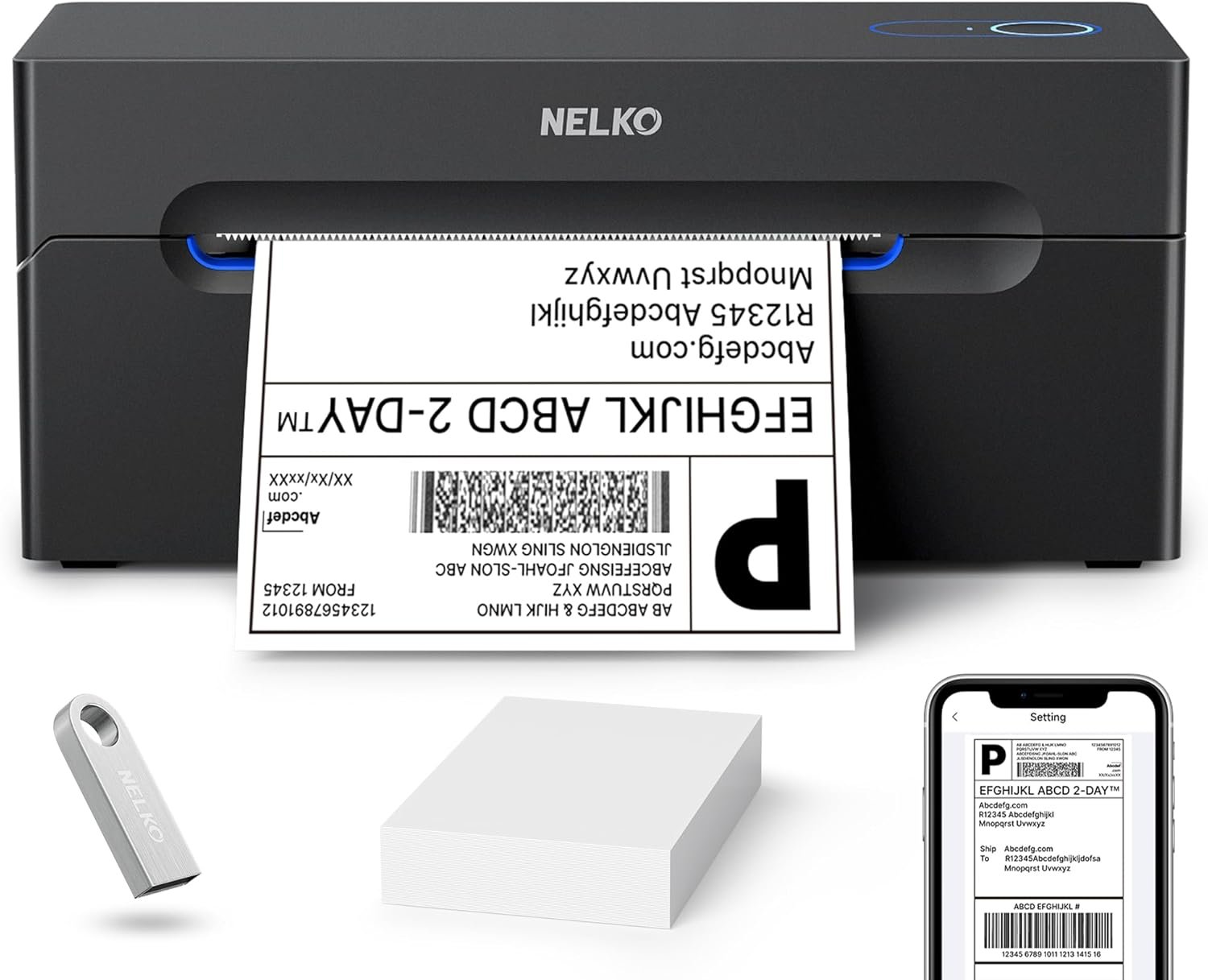
The Importance of Choosing the Right Label Printer
In today’s fast-paced business environment, the efficiency of printing operations can significantly impact productivity and customer satisfaction. Whether managing an e-commerce warehouse, a small retail store, or a home-based business, the ability to quickly and reliably produce shipping labels, price tags, and inventory markers is critical. A high-performing label printer must balance speed, reliability, and versatility to meet the demands of diverse tasks. Thermal label printers, such as the Nelko PL70e-BT, have gained popularity for their ability to produce crisp, durable prints without the need for ink or toner. This makes them ideal for environments where frequent label printing is required, such as online marketplaces, logistics hubs, and retail operations. However, selecting the right printer requires careful consideration of factors like connectivity options, print resolution, media compatibility, and long-term support. A printer that meets these criteria can streamline workflows, reduce errors, and ensure consistent output, making it an essential tool for small businesses and independent sellers. Understanding these requirements is key to evaluating whether the Nelko PL70e-BT is the right choice for your printing needs.
Quick Overview
| Feature | Details |
|---|---|
| Printer Type | Thermal label printer |
| Printing Technology | Thermal direct printing |
| Print Resolution | 203 x 203 DPI |
| Print Speed | 72 sheets per minute (4×6 labels) |
| Media Compatibility | Fanfold and roll labels (1.54″-4.1″ wide) |
| Connectivity | Bluetooth, USB |
| Supported Platforms | iOS 13+, Android, Windows 7+, Mac OS, Chrome OS |
| Warranty | 2-year warranty |
| Dimensions | 9″D x 6″W x 5″H |
| Weight | 1.4 kilograms |
| Included Components | Printer, power cable, USB cable, power adapter, USB-C for Mac, user manual, 50pcs 4×6 labels |
The Nelko PL70e-BT is designed for users who need a compact, reliable solution for printing shipping labels and small-format tags. Its thermal printing technology eliminates the need for ink or toner, reducing maintenance and operational costs. The dual connectivity options—Bluetooth and USB—ensure flexibility in setup, while the high print speed and resolution support efficient label production for e-commerce, warehouse, and retail applications. These features make it a practical choice for businesses requiring frequent label printing without the overhead of traditional inkjet or laser printers.

Connectivity Options and Device Compatibility
The Nelko PL70e-BT’s dual connectivity options—Bluetooth and USB—offer users flexibility in how they integrate the printer into their workflow. Bluetooth connectivity enables wireless printing from iOS devices running iOS 13 or later and Android devices, while USB connections provide a reliable alternative for Windows, Mac OS, and Chrome OS users. For Mac users with M1 or M2 CPUs, the printer requires the NELKO app for Bluetooth pairing, as direct Bluetooth settings may not work. This setup ensures compatibility across a wide range of devices, making it suitable for both home and small business environments. The printer’s ability to connect seamlessly with e-commerce platforms like Amazon, eBay, Shopify, and Etsy further enhances its utility for online sellers. Additionally, the inclusion of a USB-C cable for Mac users addresses potential compatibility issues, ensuring a smooth setup process. These connectivity features make the PL70e-BT a versatile option for users who need to print labels from multiple devices without the need for additional hardware.

Bluetooth and USB Integration
Bluetooth connectivity simplifies wireless printing for users who prefer mobile convenience. By pairing the printer with the NELKO app, users can print labels from smartphones or tablets without the need for physical cables. This is particularly beneficial for small businesses that require on-the-go printing for order fulfillment or inventory management. However, the reliance on the NELKO app for Bluetooth pairing may pose a challenge for users unfamiliar with the setup process, as direct Bluetooth settings are not supported. For users who prefer wired connections, the USB port provides a stable and straightforward alternative. The USB interface is compatible with Windows, Mac OS, and Chrome OS, ensuring broad device support. The inclusion of a dedicated USB-C cable for Mac users further streamlines the setup, addressing potential compatibility issues with newer Apple devices. These connectivity options collectively enhance the printer’s accessibility, making it suitable for a variety of user scenarios.
Cross-Platform Compatibility
The Nelko PL70e-BT’s compatibility with multiple operating systems and devices is a significant advantage for users who manage diverse work environments. Its support for iOS, Android, Windows, Mac OS, and Chrome OS ensures that the printer can be integrated into both personal and professional workflows. For instance, e-commerce sellers can use the printer with Shopify or Etsy to generate shipping labels directly from their mobile devices, while warehouse managers can leverage its USB connectivity for desktop-based label creation. The printer’s ability to work with cloud-based shipping platforms like ShipStation and Shippo further simplifies the printing process, reducing the need for manual data entry. However, the reliance on the NELKO app for Bluetooth connections may limit its usability for users who prefer direct Bluetooth pairing. This limitation is offset by the robust USB connectivity, which provides a reliable alternative for users who prioritize stability over wireless convenience.
Setup and User Experience
The Nelko PL70e-BT is designed with user convenience in mind, offering a streamlined setup process that minimizes configuration challenges. The included U-Disk provides drivers, tutorials, and troubleshooting guides, ensuring that users can quickly begin using the printer without technical barriers. This is particularly beneficial for small business owners or home users who may not have extensive technical expertise. The printer’s compact size and lightweight design also make it easy to position in limited spaces, such as office desks or retail counters. Additionally, the automatic paper return feature and intelligent self-test function contribute to a smoother user experience by reducing the likelihood of jams or misfeeds. These design elements collectively enhance the printer’s usability, making it a practical choice for users who value ease of setup and reliable performance.
Print Speed and Efficiency for High-Volume Use
The Nelko PL70e-BT’s thermal direct printing technology enables it to achieve a print speed of 150 mm/s, translating to up to 72 sheets of 4×6 labels per minute. This high-speed output is ideal for businesses that require frequent label printing, such as e-commerce warehouses, shipping centers, and retail operations. The printer’s ability to process large volumes of labels quickly helps reduce downtime and improve overall efficiency. For instance, an online seller processing hundreds of orders daily can benefit from the printer’s speed in generating shipping labels for multiple shipments. Additionally, the 203 DPI resolution ensures that printed labels remain clear and legible, even when printed at high speeds. This combination of speed and quality makes the PL70e-BT a suitable option for users who need to produce a high volume of labels without compromising on print clarity. However, the printer’s performance is optimized for 4×6 labels, and users requiring different label sizes may need to adjust settings or use compatible media to maintain print quality.

Thermal Direct Printing Technology
Thermal direct printing technology is a key factor in the Nelko PL70e-BT’s efficiency and reliability. Unlike traditional inkjet or laser printers, this method uses heat to produce images on thermal paper, eliminating the need for ink or toner. This not only reduces maintenance costs but also ensures that printed labels are free from smudges or fading, as they do not require a separate ink supply. The printer’s thermal direct system is designed to produce high-quality labels with sharp text and clear barcodes, making it suitable for applications such as shipping labels, price tags, and inventory markers. The absence of ink or toner also simplifies the printing process, as users only need to replace thermal paper rolls or fanfold labels, rather than managing complex ink cartridges or toner supplies. These advantages make the PL70e-BT an attractive option for businesses that prioritize cost-effective, low-maintenance printing solutions.
Media Compatibility and Label Sizes
The Nelko PL70e-BT supports a wide range of label sizes, from 1.54″ to 4.1″ in width, accommodating both fanfold and roll labels. This versatility allows users to print labels for various applications, including shipping, product tagging, and classroom use. The printer’s ability to handle different label formats ensures that it can meet the diverse needs of small businesses and home users. For example, a retail store may require 3×2 labels for product tags, while an e-commerce seller might need 2×1 labels for small parcel shipments. The printer’s compatibility with multiple label sizes also reduces the need for additional hardware, as users can switch between label types without changing the printer’s configuration. However, it is essential to select the correct label size when printing to ensure proper alignment and print quality. This requirement emphasizes the importance of user awareness in setting up the printer for optimal performance.
Duty Cycle and Workload Capacity
The Nelko PL70e-BT is designed to handle continuous printing tasks, with a duty cycle that supports high-volume operations. The printer’s thermal direct technology and robust internal components ensure that it can operate reliably for extended periods without overheating or experiencing mechanical failures. This makes it suitable for environments where label printing is a regular part of daily operations, such as warehouses or shipping centers. The printer’s ability to process up to 500 labels in a single run further enhances its efficiency, reducing the need for frequent maintenance or paper changes. However, users should be mindful of the printer’s workload capacity and avoid overloading it with excessive print jobs, as this could impact print quality or lead to mechanical wear. Proper usage and maintenance are essential to maximizing the printer’s lifespan and ensuring consistent performance.

Pros and Cons of the Nelko PL70e-BT
Pros
- Thermal Direct Printing: Eliminates the need for ink or toner, reducing maintenance and operational costs while ensuring smudge-free, fade-resistant labels.
- High Print Speed: Achieves up to 72 sheets per minute for 4×6 labels, making it suitable for high-volume label printing in e-commerce and logistics environments.
- Dual Connectivity Options: Supports both Bluetooth and USB connections, offering flexibility for users who prefer wireless or wired printing setups.
- Compatibility with E-commerce Platforms: Works seamlessly with Amazon, eBay, Shopify, Etsy, and other online marketplaces, streamlining shipping label creation.
- Compact Design: Its small footprint and lightweight build make it ideal for home offices, retail counters, and small business spaces.
- Included Setup Tools: The U-Disk provides drivers, tutorials, and troubleshooting guides, simplifying the initial configuration process for users.
- Durable Build: The printer’s construction ensures long-term reliability, with features like automatic paper return and intelligent self-test enhancing operational stability.
- Wide Label Compatibility: Supports multiple label sizes and formats, allowing users to adapt the printer to various printing needs without additional hardware.
Cons
- Limited Color Printing: The printer only supports monochrome output, which may not be suitable for applications requiring colored labels or graphics.
- USB-Only for Mac Users: Mac users with M1 or M2 CPUs must use the NELKO app for Bluetooth pairing, as direct Bluetooth settings are not supported, which may complicate the setup process.
- Dependence on Software: The printer’s Bluetooth functionality relies on the NELKO app, which may pose challenges for users who prefer direct device pairing without additional software.
- No Built-In Scanner: The printer lacks a built-in scanner, requiring users to rely on external devices for label data input, which could increase setup complexity.
- Media-Specific Printing: The printer is optimized for thermal paper and fanfold labels, limiting its versatility for users who need to print on other media types.
- Warranty Duration: While the printer comes with a 2-year warranty, some users may prefer longer coverage, especially for high-volume operations.
- Print Quality Variability: While the 203 DPI resolution ensures clear text, print quality may degrade if users do not select the correct label size or media type.
Final Verdict: Who This Printer Is Best For (and Who Should Skip It)
The Nelko PL70e-BT is an excellent choice for small businesses, e-commerce sellers, and home users who require a reliable, cost-effective solution for printing shipping labels, price tags, and inventory markers. Its thermal direct printing technology, high-speed output, and dual connectivity options make it well-suited for environments where frequent label printing is necessary. The printer’s compact design and compatibility with major e-commerce platforms further enhance its appeal for users who need to integrate it into existing workflows. Additionally, the included setup tools and 2-year warranty provide peace of mind for users who may be new to label printing. However, the printer may not be the best fit for users who require color printing, need to print on non-thermal media, or prefer a more straightforward setup without software dependencies. Its reliance on the NELKO app for Bluetooth pairing and limited media compatibility could also be drawbacks for users with specific printing needs. Overall, the PL70e-BT is a practical and efficient option for users prioritizing speed, reliability, and cost-effectiveness in their label printing tasks.

Frequently Asked Questions (FAQs)
Can the Nelko PL70e-BT print color labels?
The Nelko PL70e-BT is a thermal label printer that only supports monochrome output. It does not have the capability to print in color, making it suitable for applications that require black-and-white labels such as shipping and pricing tags.
How long does the Nelko PL70e-BT warranty last?
The Nelko PL70e-BT comes with a 2-year warranty, providing coverage for manufacturing defects and ensuring long-term reliability for users who require consistent label printing performance.
Can the Nelko PL70e-BT print on non-thermal media?
The Nelko PL70e-BT is specifically designed for thermal paper and fanfold labels. It does not support printing on non-thermal media such as regular paper or glossy stock, which limits its versatility for users requiring different media types.
Is the Nelko PL70e-BT compatible with Mac M1 or M2 processors?
The Nelko PL70e-BT is compatible with Mac M1 or M2 processors, but users must connect via the NELKO app instead of direct Bluetooth settings. This ensures seamless integration with Apple devices while maintaining the printer’s functionality.
What label sizes does the Nelko PL70e-BT support?
The Nelko PL70e-BT supports label sizes ranging from 1.54″ to 4.1″ in width, including common sizes like 4×6, 3×2, 3×1, and 2×1. Users must select the correct label size to ensure proper printing and alignment.
Can the Nelko PL70e-BT be used for classroom or retail labeling?
Yes, the Nelko PL70e-BT is suitable for classroom use and retail applications. Its ability to print clear text and barcodes makes it ideal for creating price tags, product labels, and educational materials in both home and business environments.
Does the Nelko PL70e-BT require a dedicated computer for operation?
No, the Nelko PL70e-BT can be operated via Bluetooth from iOS and Android devices, as well as USB connections from Windows, Mac, and Chrome OS. This flexibility allows users to print labels without the need for a dedicated computer.
How does the Nelko PL70e-BT handle label jams or misfeeds?
The Nelko PL70e-BT features an automatic paper return mechanism and intelligent self-test functions to detect and resolve minor issues. These features help prevent jams and misfeeds, ensuring smoother printing operations for users.