

The Importance of Choosing the Right Printer
In today’s fast-paced digital environment, the role of a printer extends beyond mere document reproduction. Whether for home use, office efficiency, or on-the-go productivity, selecting the right printer involves balancing print quality, speed, connectivity, and maintenance requirements. For users who prioritize portability, thermal printing technology offers a compelling alternative to traditional inkjet or laser systems. This review evaluates the Phomemo M08F Portable Thermal Printer, focusing on its suitability for diverse printing needs. Key considerations include print resolution, media compatibility, connectivity options, and long-term usability. By analyzing technical specifications and industry benchmarks, this guide helps users determine if this thermal printer aligns with their workflow demands. From students requiring quick print access to professionals needing mobile printing solutions, understanding these factors ensures informed purchasing decisions. The analysis also explores how the printer’s design and features address common printing challenges while adhering to industry standards for performance and reliability.
Quick Overview
| Feature | Details |
|---|---|
| Printer Type | Thermal printer |
| Printing Technology | Thermal printing using thermal paper |
| Supported Functions | Print only |
| Print Resolution | 203×203 DPI (black and white) |
| Media Sizes | 8.5 x 11 inches (letter) |
| Connectivity | Bluetooth, USB |
| Duty Cycle | Continuous use with thermal paper |
| Ink System | Inkless (thermal paper only) |
| Warranty | Manufacturer support |
| Included Components | 10 sheets thermal paper, USB cable, carry case |
The Phomemo M08F is designed for users seeking a compact, wireless printing solution. Its thermal printing technology eliminates the need for ink or toner, simplifying maintenance and reducing consumable costs. The printer’s compatibility with Bluetooth and USB ensures flexibility in device connections, while its support for letter-sized thermal paper caters to both personal and professional printing needs. These specifications position the M08F as a viable option for users prioritizing portability and ease of use.

Portability and Design Considerations
The Phomemo M08F’s compact design and lightweight construction make it ideal for users who require a mobile printing solution. Weighing 1.58 pounds and measuring 12.01 x 1.34 x 2.56 inches, the printer is easy to carry and store, making it suitable for travel, home, and office environments. The inclusion of a carry case further enhances its portability, allowing users to transport the device without additional effort. The printer’s dimensions and weight are optimized for users who need to print on the go, such as students or professionals with frequent travel needs. However, its size may limit its use in space-constrained environments, such as small home offices or crowded workspaces.

Battery Life and Power Requirements
The M08F operates on two AAA batteries, which are included in the package. This power source provides a convenient solution for users who need to print without access to electrical outlets. The battery life, while not explicitly detailed in specifications, is likely influenced by the printer’s thermal printing technology, which consumes less power than inkjet or laser systems. Users should consider the need for periodic battery replacements, as thermal paper requires continuous feeding during operation. For extended use, a USB charging cable is provided, allowing the printer to draw power from a computer or wall adapter. This dual-power approach ensures flexibility, though the reliance on batteries may be a drawback for users prioritizing uninterrupted operation.
Thermal Paper Compatibility and Usage
The M08F’s reliance on thermal paper is a defining characteristic of its design. Thermal paper is a cost-effective alternative to traditional ink or toner, with each sheet priced at approximately $0.12. This low-cost consumable makes the printer attractive for users who require frequent printing, such as students or small businesses. However, thermal paper has limitations, including sensitivity to heat and light, which can cause fading over time. Users should be aware that the printer does not support regular copy paper, restricting its use to specific applications. The printer’s ability to handle 140 sheets at a time also caters to users with moderate printing volumes, though high-volume users may need to manage consumables more frequently.
Physical Design and Ergonomics
The M08F’s physical design is tailored for ease of use and portability. The printer features a straightforward interface with minimal physical controls, relying on the Phomemo app for setup and operation. This design reduces the need for manual adjustments, making it user-friendly for individuals with varying technical expertise. The printer’s compact size and included carry case are particularly beneficial for users who need to transport it between locations. However, the lack of a dedicated power button or status indicators may be a drawback for users accustomed to more traditional printers with tactile feedback. The overall design prioritizes simplicity and mobility, aligning with the product’s intended use cases.
Print Quality and Resolution Performance
The Phomemo M08F delivers consistent print quality suitable for text and basic graphics, though its thermal printing technology has inherent limitations. The printer supports a maximum black-and-white resolution of 203×203 DPI, which is adequate for standard documents but may fall short for high-resolution images or detailed graphics. Thermal printing produces images that are generally clear and legible, though the lack of pigment-based inks means the output is less vibrant than inkjet or laser prints. Users should be aware that thermal paper is prone to fading over time, particularly when exposed to heat or direct sunlight. This characteristic makes the printer more suitable for short-term documents rather than long-term archival purposes. The printer’s ability to produce sharp text and simple diagrams aligns with its intended use for educational materials, receipts, or quick print jobs.

Text and Graphics Output
For users prioritizing text clarity, the M08F’s 203×203 DPI resolution provides legible output for standard documents, invoices, and forms. The thermal printing process ensures that text remains crisp and well-defined, though the lack of toner or ink means there is no toner-based contrast. This can result in slightly less pronounced text compared to laser printers, which use toner for sharper edges. The printer’s performance with graphics is limited, as thermal paper does not support color printing. Users requiring high-quality graphics or photographs may find this printer unsuitable, as the output lacks the vibrancy and detail of inkjet or laser systems. However, for basic diagrams, charts, or line art, the M08F offers a practical solution.
Document Clarity and Durability
The M08F’s thermal printing process ensures that printed documents remain clear and readable under normal conditions. However, the durability of thermal paper is a critical consideration. Exposure to heat, light, or moisture can cause the printed content to fade or become illegible over time. This limitation makes the printer less suitable for long-term storage or archival purposes. Users should be mindful of environmental factors when using the M08F, as the longevity of printed materials depends on proper storage conditions. Despite these limitations, the printer’s ability to produce sharp text and simple graphics makes it a viable option for users who prioritize quick, low-maintenance printing.
Connectivity and Compatibility
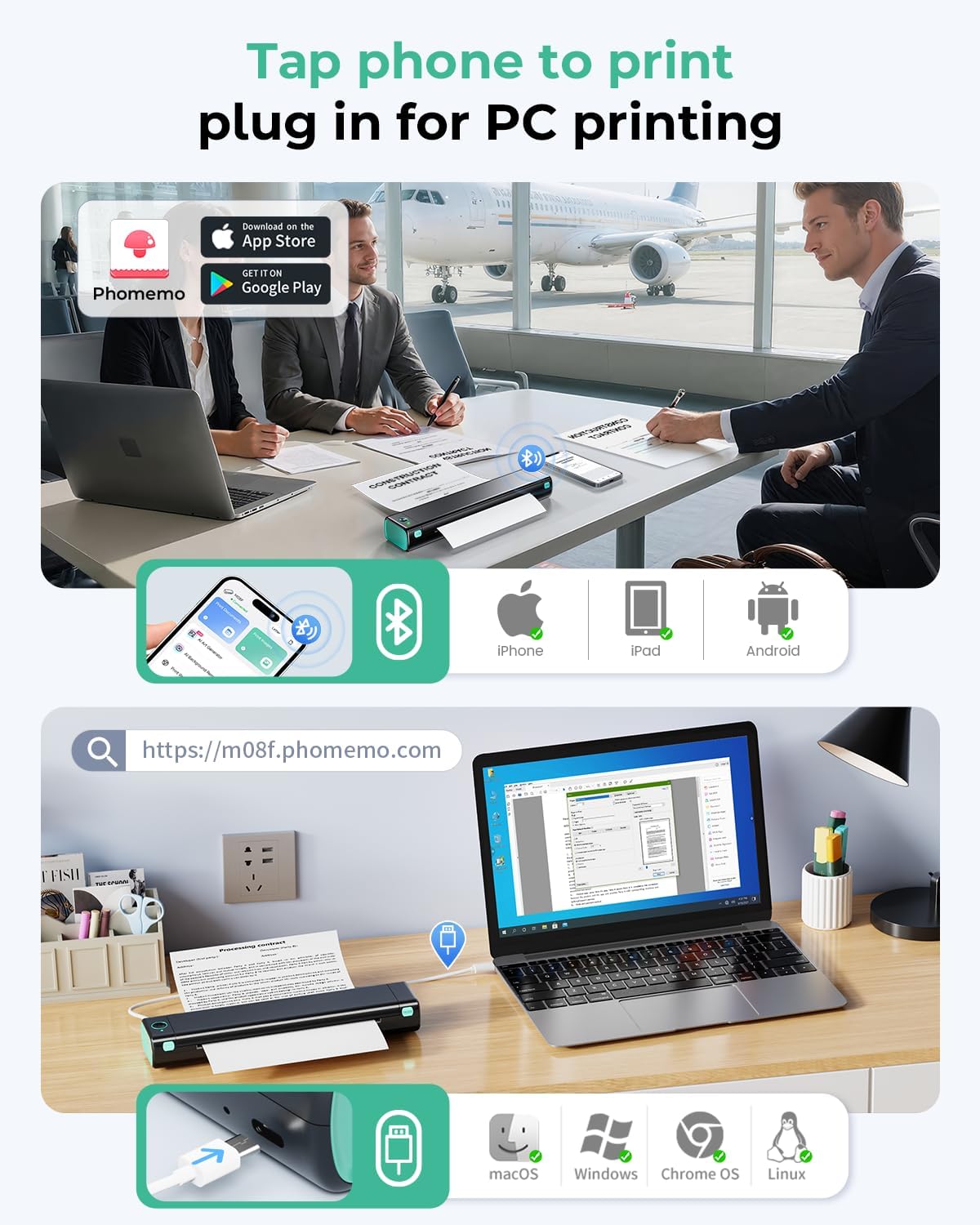
The Phomemo M08F offers versatile connectivity options, including Bluetooth and USB, which enhance its usability across different environments. The Bluetooth feature allows users to print wirelessly from smartphones, tablets, or laptops, eliminating the need for physical connections. However, the printer’s Bluetooth connectivity is contingent on the Phomemo app, which acts as an intermediary between the device and the printer. This setup may introduce slight delays in pairing or printing, though the process is generally straightforward. The USB connection provides an alternative for users who prefer a direct link, particularly for desktop computers. While USB printing is reliable, the printer’s reliance on the Phomemo app for Bluetooth pairing may be a drawback for users who prefer more direct device-to-printer communication.
Device Compatibility and Setup
The M08F’s compatibility with a wide range of devices, including iOS, Android, Windows, and macOS, ensures broad accessibility. However, the setup process requires users to download and install the Phomemo app, which may be an additional step for those unfamiliar with mobile printing applications. The app’s user interface is designed to simplify the pairing process, though some users may encounter connectivity issues if the app is not updated to the latest version. The printer’s USB connection requires the installation of specific drivers, which are available on the manufacturer’s website. While this process is generally straightforward, users with limited technical expertise may find it challenging to navigate. Overall, the printer’s connectivity options provide flexibility, though the reliance on the Phomemo app may affect the user experience for some.
Wireless Printing Limitations
Although the M08F supports Bluetooth printing, its wireless capabilities are limited to the Phomemo app, which may restrict compatibility with third-party applications. This limitation means users cannot print directly from certain apps or operating systems without additional configuration. Additionally, the printer’s Bluetooth range is not specified in the product documentation, which could impact its usability in larger spaces. For users who require seamless wireless printing without the need for an intermediary app, the M08F may not be the optimal choice. However, the printer’s USB connection provides a reliable alternative for users who prioritize direct device printing.

Pros & Cons
Pros
- Portability: The M08F’s compact design and lightweight construction make it ideal for travel, home, and office use. Its included carry case enhances portability, allowing users to transport the printer easily.
- Inkless Operation: The thermal printing technology eliminates the need for ink or toner, reducing maintenance and consumable costs. This feature is particularly beneficial for users seeking a low-maintenance printing solution.
- Wireless Connectivity: The Bluetooth feature enables wireless printing from smartphones and tablets, though it requires the Phomemo app for pairing. This setup simplifies the printing process for users who prefer mobile printing.
- Cost-Effective Consumables: The use of thermal paper, priced at approximately $0.12 per sheet, offers a cost-effective alternative to traditional ink cartridges. This makes the printer attractive for users with frequent printing needs.
- Versatile Compatibility: The printer supports a wide range of devices, including iOS, Android, Windows, and macOS, ensuring broad accessibility for users with different computing preferences.
Cons
- Thermal Paper Limitations: The M08F’s reliance on thermal paper introduces constraints, such as sensitivity to heat and light, which can cause fading over time. This limits the printer’s suitability for long-term document storage.
- Battery Dependency: The printer operates on two AAA batteries, which may require frequent replacements for extended use. While a USB charging cable is provided, users may prefer a more permanent power solution.
- Limited Print Resolution: The 203×203 DPI resolution is adequate for text and basic graphics but may fall short for high-resolution images or detailed graphics, making it less suitable for professional photography or complex designs.
- App-Dependent Connectivity: The Bluetooth pairing process requires the Phomemo app, which may introduce additional steps or compatibility issues for users who prefer direct device-to-printer communication.
- USB Driver Requirements: While USB printing is reliable, the need to install specific drivers on Windows devices may be a drawback for users with limited technical expertise.
Final Verdict: Who This Printer Is Best For (and Who Should Skip It)
The Phomemo M08F Portable Thermal Printer is best suited for users who prioritize portability, ease of use, and low-maintenance printing. Its compact design and inkless operation make it an excellent choice for students, travelers, and professionals who need to print on the go. The printer’s versatility in connecting to smartphones, tablets, and computers via Bluetooth or USB ensures broad accessibility, while the cost-effective thermal paper consumables appeal to users with frequent printing needs. However, the M08F is not ideal for users requiring high-resolution prints, long-term document storage, or direct device-to-printer connectivity without an intermediary app. Individuals who prioritize archival quality, color printing, or advanced graphics capabilities should consider alternative options. Overall, the M08F offers a practical solution for users seeking a mobile, low-maintenance printing solution that aligns with its technical specifications and intended use cases.
Frequently Asked Questions (FAQs)
Can the Phomemo M08F print on regular paper?
The Phomemo M08F is designed for thermal paper only. It does not support regular copy paper, as its thermal printing technology requires specialized paper for image formation.
How long does the battery last on the Phomemo M08F?
Battery life depends on usage patterns, but the printer uses two AAA batteries. A USB charging cable is provided for continuous operation when connected to a power source.
Is the Phomemo M08F compatible with all smartphones and tablets?
The printer works with iOS and Android devices through the Phomemo app. Windows and macOS users can connect via USB, though specific drivers may be required for optimal performance.
What is the maximum print speed of the Phomemo M08F?
The printer achieves a maximum monochrome print speed of 4.25 pages per minute, suitable for standard documents and forms but not high-volume printing tasks.
Can the Phomemo M08F print color documents?
No, the M08F is a monochrome thermal printer. It does not support color printing, as thermal paper lacks the pigments necessary for vibrant color output.
How many sheets can the Phomemo M08F handle at once?
The printer can accommodate up to 140 sheets of thermal paper, making it suitable for moderate printing volumes but requiring frequent consumable management for high-demand use.
Does the Phomemo M08F require a separate printer driver?
USB printing requires specific drivers, which are available on the manufacturer’s website. Bluetooth printing is managed through the Phomemo app, eliminating the need for additional drivers.
What are the limitations of thermal paper used with the Phomemo M08F?
Thermal paper is sensitive to heat, light, and moisture, which can cause fading over time. This makes the printer less suitable for long-term document storage or archival purposes.