
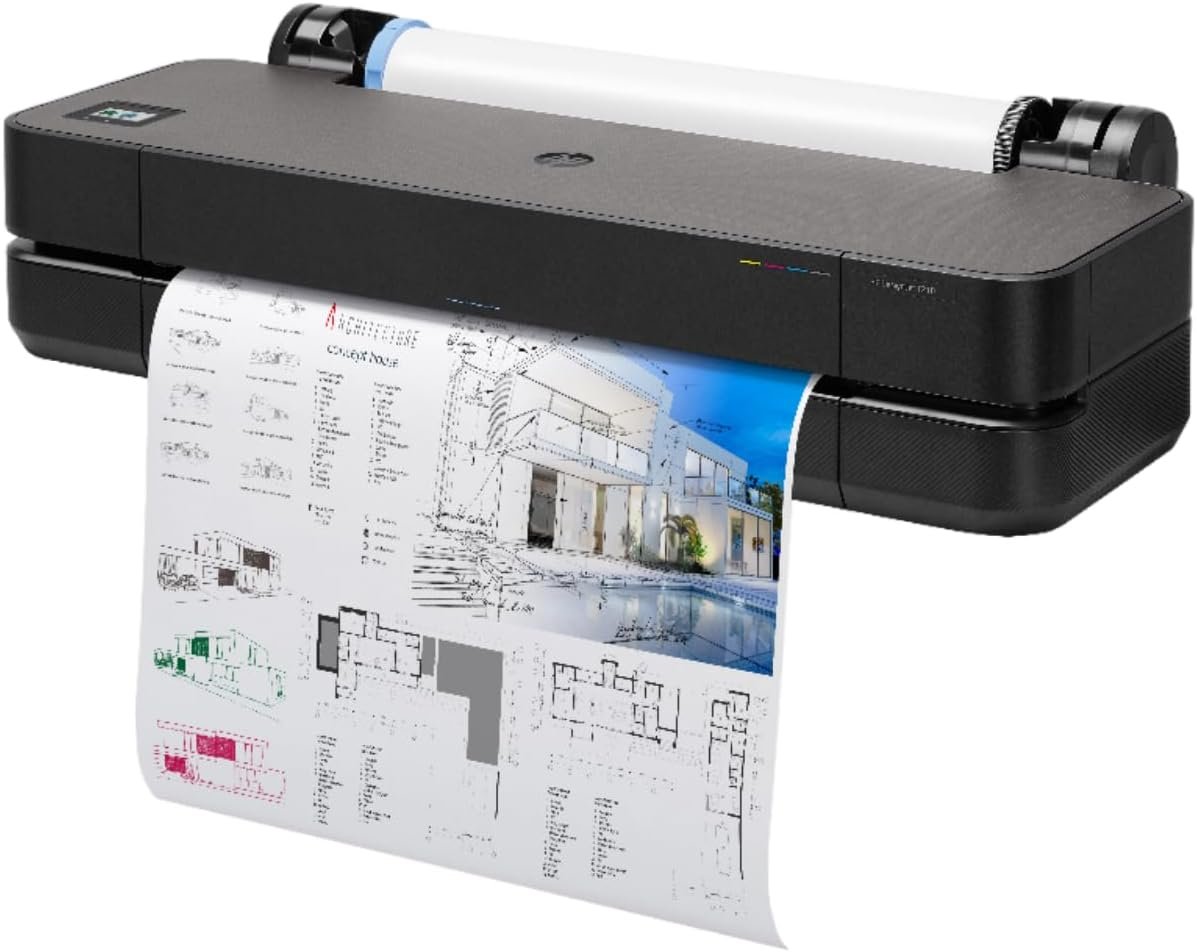
The Importance of Choosing the Right Printer for Technical and Creative Workflows
Selecting the appropriate printer is critical for professionals who rely on high-quality, accurate output for technical drawings, architectural blueprints, and detailed visual projects. In 2026, the demand for precision printing has grown significantly across industries such as engineering, architecture, and graphic design. A printer must not only deliver sharp, consistent results but also support the unique requirements of large-format media, multi-page jobs, and seamless integration with digital workflows. Whether creating intricate CAD designs or producing high-resolution posters, the right printer can streamline production, reduce errors, and ensure that every print meets professional standards. This review evaluates the HP DesignJet T210 24-inch plotter printer, a device designed to balance performance, versatility, and ease of use for users who prioritize accuracy and efficiency. By analyzing its technical specifications, media compatibility, connectivity options, and operational capabilities, this assessment provides a comprehensive guide to help professionals determine if the HP DesignJet T210 aligns with their specific printing needs.
Quick Overview
| Feature | Details |
|---|---|
| Printer Type | Inkjet Plotter Printer |
| Print Technology | Pigment and Dye-Based Inkjet |
| Maximum Print Speed | 1.3 ppm (Color/Black & White) |
| Print Resolution | 2400 x 1200 dpi (Color), 2400 x 1200 dpi (Black & White) |
| Media Sizes | Up to 24-inch wide media rolls, 13 x 19-inch sheets |
| Media Handling | Sheet feed, roll feed, automatic horizontal cutter |
| Connectivity | Gigabit Ethernet, Hi-Speed USB 2.0, Wi-Fi Direct, Wi-Fi 802.11 b/g/n |
| Ink System | HP Bright Office Inks (Pigment and Dye-Based) |
| Warranty | 2-Year Extended Warranty with Remote/Onsite Support |
| Power Consumption | 6 Watts |
| Dimensions | 11″D x 40″W x 17″H |
| Weight | 60.01 Pounds |
The HP DesignJet T210 is engineered for users who require precise, large-format printing with minimal setup. Its dual media handling capabilities and high-resolution output make it suitable for technical drawings, maps, and detailed posters. The printer’s connectivity options ensure compatibility with a wide range of devices, while its energy-efficient design and included software tools enhance productivity for professionals working in architectural, engineering, or graphic design environments.

Print Quality and Resolution: Precision for Technical and Creative Applications
The HP DesignJet T210 delivers high-resolution output that meets the demands of technical and creative workflows. Its 2400 x 1200 dpi color and black-and-white resolution ensures sharp, detailed prints that are ideal for architectural blueprints, engineering schematics, and high-quality posters. The printer’s pigment and dye-based ink system provides excellent color accuracy and longevity, making it suitable for both indoor signage and outdoor applications. For users requiring precise line quality and crisp text, the printer’s ability to maintain consistent density across large media sizes is a key advantage. The inclusion of HP Bright Office Inks further enhances line accuracy and color gamut, ensuring that technical drawings and renderings retain their clarity and detail. However, the printer’s resolution may not be sufficient for ultra-high-definition photographic prints, which are better suited to dedicated photo printers with higher dpi capabilities.

Color Accuracy and Gamut
The HP DesignJet T210 uses HP Bright Office Inks to achieve a color gamut that covers 65% of the sRGB color space, making it well-suited for professional-grade prints that require accurate color reproduction. This is particularly beneficial for users creating posters, maps, and signage where color consistency is critical. The printer’s ability to maintain consistent color output across large media sizes ensures that designs retain their vibrancy and detail without noticeable gradients or banding. For technical applications such as CAD drawings, the printer’s precise line quality and sharp text rendering are essential for maintaining clarity and readability, even when printing at high resolutions.
Text and Line Quality
The printer’s focus on technical accuracy is evident in its ability to produce crisp, clear text and fine lines. The 2400 x 1200 dpi resolution ensures that even small details in line drawings or architectural plans are rendered with precision. This is particularly important for professionals who require exact measurements and clean, unambiguous lines in their prints. The printer’s ink system also contributes to its line accuracy, as the pigment and dye-based inks minimize color bleeding and ensure that lines remain sharp and defined. However, users working with extremely fine details or intricate patterns may find that the printer’s resolution is slightly limited compared to specialized high-end plotter printers.
Print Speed and Throughput: Balancing Efficiency and Workload Capacity
The HP DesignJet T210 is designed to handle large-format printing tasks efficiently, with a maximum print speed of 1.3 pages per minute (ppm) for both color and black-and-white prints. While this speed may not match the rapid output of some dedicated large-format printers, it is well-suited for users who prioritize precision over speed. The printer’s ability to process multi-page jobs quickly, combined with its dual media handling capabilities, makes it ideal for environments where large batches of technical drawings or posters are required. The 45-second initial page print time ensures that users can start their jobs quickly, reducing downtime between print runs. However, for users with extremely high-volume printing needs, the printer’s throughput may be a limiting factor, particularly when dealing with complex or high-resolution files.

Duty Cycle and Workload Capacity
The HP DesignJet T210 is built to support a wide range of printing workloads, with a duty cycle that accommodates both moderate and heavy use. Its 500 MB onboard memory helps manage large print jobs efficiently, ensuring that the printer can handle complex files without compromising performance. The printer’s ability to switch between sheet and roll feed modes automatically simplifies the printing process, especially for users who work with multiple media types. However, the printer’s energy consumption of 6 watts is relatively low, which may be a consideration for users with very high-volume printing requirements. For environments where continuous, high-speed printing is necessary, the HP DesignJet T210 may not be the most optimal choice compared to dedicated high-speed large-format printers.
Multi-Page and Multi-Size Printing
One of the key advantages of the HP DesignJet T210 is its ability to handle multi-page and multi-size printing seamlessly. The printer’s design allows users to print multiple jobs in a single session without the need to manually switch media sources, which saves time and reduces the risk of errors. The included HP Click software further enhances this capability by enabling users to drag and drop files directly into the print queue, streamlining the workflow. The printer’s support for both 24-inch wide media rolls and 13 x 19-inch sheets also provides flexibility for users who require different media sizes for their projects. However, the printer’s ability to manage very large or complex multi-page jobs may be limited compared to specialized large-format printers with more advanced memory and processing capabilities.
Connectivity and Workflow Integration: Seamless Device Compatibility
The HP DesignJet T210 offers a range of connectivity options that make it compatible with a wide array of devices and workflows. Its Gigabit Ethernet, Hi-Speed USB 2.0, and Wi-Fi Direct/802.11 b/g/n capabilities ensure that users can print from desktop computers, laptops, tablets, and smartphones without interruption. The inclusion of the HP Smart app allows users to manage their printing tasks remotely, making it easier to print from anywhere while maintaining control over print settings and job queues. The printer’s support for HP Click software also simplifies the process of creating and printing posters, as users can access professionally designed templates and drag-and-drop files directly into the print queue. However, the printer’s reliance on specific HP software may be a drawback for users who prefer more flexible or open-source workflow solutions.
Remote Printing and Mobile Access
The HP DesignJet T210’s Wi-Fi Direct and Wi-Fi 802.11 b/g/n connectivity options enable users to print from mobile devices without the need for a traditional network setup. This is particularly useful for professionals who need to print on the go, such as architects or engineers working on-site. The HP Smart app allows users to manage print jobs from their smartphones or tablets, providing a convenient way to access and control printing tasks remotely. However, the printer’s mobile printing capabilities are limited to HP-specific applications, which may not be ideal for users who prefer cross-platform or third-party printing solutions. The printer’s ability to integrate with existing RIP software workflows is also a consideration for users who rely on specialized print management systems.
Software Integration and Workflow Efficiency
The HP DesignJet T210 is equipped with a suite of software tools designed to enhance workflow efficiency and reduce manual input. HP Click software, included with the printer, simplifies the process of creating and printing posters by providing access to templates, vector graphics, and photo libraries. The HP Print Preview for Windows feature allows users to preview their prints before sending them to the printer, reducing the risk of errors and wasted materials. Additionally, the printer’s support for HP DesignJet Utility for Windows and HP Support Assistant ensures that users can manage their printing tasks effectively, even when working with complex file types. However, the printer’s reliance on HP-specific software may limit its compatibility with non-HP applications or workflows that require more flexibility.
Pros and Cons
Pros
- High-Resolution Output: The 2400 x 1200 dpi color and black-and-white resolution ensures sharp, detailed prints suitable for technical drawings and posters.
- Dual Media Handling: The ability to switch between 24-inch wide media rolls and 13 x 19-inch sheets provides flexibility for different project requirements.
- 2-Year Warranty: The extended warranty includes remote and onsite support, ensuring long-term reliability and peace of mind.
- Energy Efficiency: The 6-watt power consumption makes the printer suitable for environments where energy usage is a concern.
- Seamless Connectivity: Gigabit Ethernet, USB 2.0, and Wi-Fi options allow for easy integration with a wide range of devices and workflows.
- HP Click Software: The included software simplifies poster creation and print management, reducing manual input and errors.
- Remote Printing Capabilities: The HP Smart app enables users to manage print jobs from mobile devices, enhancing productivity and convenience.
- Automated Media Handling: The automatic horizontal cutter and sheet/roll switch reduce manual intervention, improving workflow efficiency.
Cons
- Limited Print Speed: The 1.3 ppm print speed may not be sufficient for high-volume or complex print jobs requiring faster output.
- Software Dependency: The reliance on HP-specific software may limit compatibility with third-party or open-source applications.
- Moderate Duty Cycle: While the printer handles moderate to heavy workloads, it may not be ideal for environments with extremely high-volume printing needs.
- No Duplex Printing: The lack of duplex printing capability means users must manually print on both sides of the media, increasing material costs.
- Media Compatibility Limitations: While the printer supports a range of media types, its performance with ultra-high-resolution photographic prints may be suboptimal compared to dedicated photo printers.
- Limited Mobile Integration: The printer’s mobile printing capabilities are restricted to HP-specific applications, which may not meet the needs of users requiring cross-platform solutions.
Final Verdict: Who This Printer Is Best For (and Who Should Skip It)
The HP DesignJet T210 24-inch plotter printer is an excellent choice for professionals in architecture, engineering, and graphic design who require precise, high-resolution printing for technical drawings, maps, and posters. Its dual media handling, 2-year warranty, and seamless connectivity options make it a reliable and efficient solution for environments where accuracy and flexibility are critical. The printer’s ability to switch between sheet and roll feed modes automatically simplifies the printing process, while the included HP Click software enhances workflow efficiency for users creating posters and visual projects. However, the printer may not be the best fit for users with extremely high-volume printing needs or those who require ultra-fast output. Additionally, the lack of duplex printing and limited mobile integration may be drawbacks for users seeking more advanced features or cross-platform compatibility. For those prioritizing precision, versatility, and ease of use, the HP DesignJet T210 is a strong contender in the large-format printing market.
Frequently Asked Questions (FAQs)
What media sizes does the HP DesignJet T210 support?
The HP DesignJet T210 supports up to 24-inch wide media rolls for large-format printing and 13 x 19-inch sheets for wide-format prints. The included automatic sheet feeder accessory allows for seamless switching between media types.
How does the HP DesignJet T210 handle different media types?
The printer features sheet feed, roll feed, and automatic horizontal cutter capabilities, allowing users to switch between media types without manual intervention. This ensures consistent and efficient printing across various media formats.
What connectivity options are available for the HP DesignJet T210?
The printer offers Gigabit Ethernet, Hi-Speed USB 2.0, and Wi-Fi Direct/802.11 b/g/n connectivity options, enabling seamless integration with desktop computers, laptops, tablets, and smartphones.
Can the HP DesignJet T210 print on both sides of the media?
The HP DesignJet T210 does not support automatic duplex printing. Users must manually print on both sides of the media, which may increase material costs and require additional setup steps.
What software is included with the HP DesignJet T210?
The printer comes with HP Click software for poster creation, HP Smart app for remote printing, and HP Print Preview for Windows to preview prints before printing. These tools enhance workflow efficiency and user experience.
How long is the warranty for the HP DesignJet T210?
The HP DesignJet T210 includes a 2-year extended warranty with remote and onsite support, ensuring long-term reliability and peace of mind for users.
Is the HP DesignJet T210 suitable for high-volume printing?
While the HP DesignJet T210 is designed for moderate to heavy workloads, its print speed of 1.3 ppm may not be sufficient for environments requiring extremely high-volume or complex print jobs. Users with very high-volume needs may find it less optimal compared to dedicated high-speed large-format printers.
Can the HP DesignJet T210 be used for photo printing?
The HP DesignJet T210 is not optimized for ultra-high-resolution photo printing. Its pigment and dye-based ink system and 2400 x 1200 dpi resolution are better suited for technical drawings, maps, and posters rather than photographic prints.