Brother MFC-L5915DW Laser All-in-One Printer Review: Product Analysis for 2026
The Importance of Choosing the Right Printer
In 2026, the demand for reliable, high-performance printers continues to grow across office environments, small businesses, and professional workspaces. Whether handling daily print tasks, managing document workflows, or supporting remote collaboration, selecting the right printer can significantly impact productivity and operational efficiency. Modern printers must balance speed, print quality, connectivity, and cost-effectiveness to meet diverse user needs. For busy offices requiring high-volume output, laser printers remain the preferred choice due to their fast print speeds, low operating costs, and durable performance. Monochrome laser printers like the Brother MFC-L5915DW are particularly valued for their ability to handle large workloads while maintaining consistent output quality. This review evaluates the Brother MFC-L5915DW based on its technical specifications, functional capabilities, and suitability for various work environments, helping users make informed decisions about their printing needs.
Quick Overview
| Feature | Details |
|---|---|
| Printer Type | Monochrome Laser All-in-One |
| Print Technology | Laser |
| Print Speed | Up to 50 ppm (black and white) |
| Print Resolution | 1200 x 1200 dpi (black and white) |
| Media Sizes | 8.5 x 14 inches, legal-sized documents |
| Connectivity | Ethernet, USB, Dual-Band WiFi |
| Duplex Printing | Yes (print, copy, scan) |
| Toner System | TN920UXXL ultra high-yield cartridge |
| Input Capacity | 250-sheet tray |
| Scanner Function | 70-page auto document feeder, 56 ipm scanning |
| Touchscreen | 5″ color display |
| Warranty | Limited warranty |
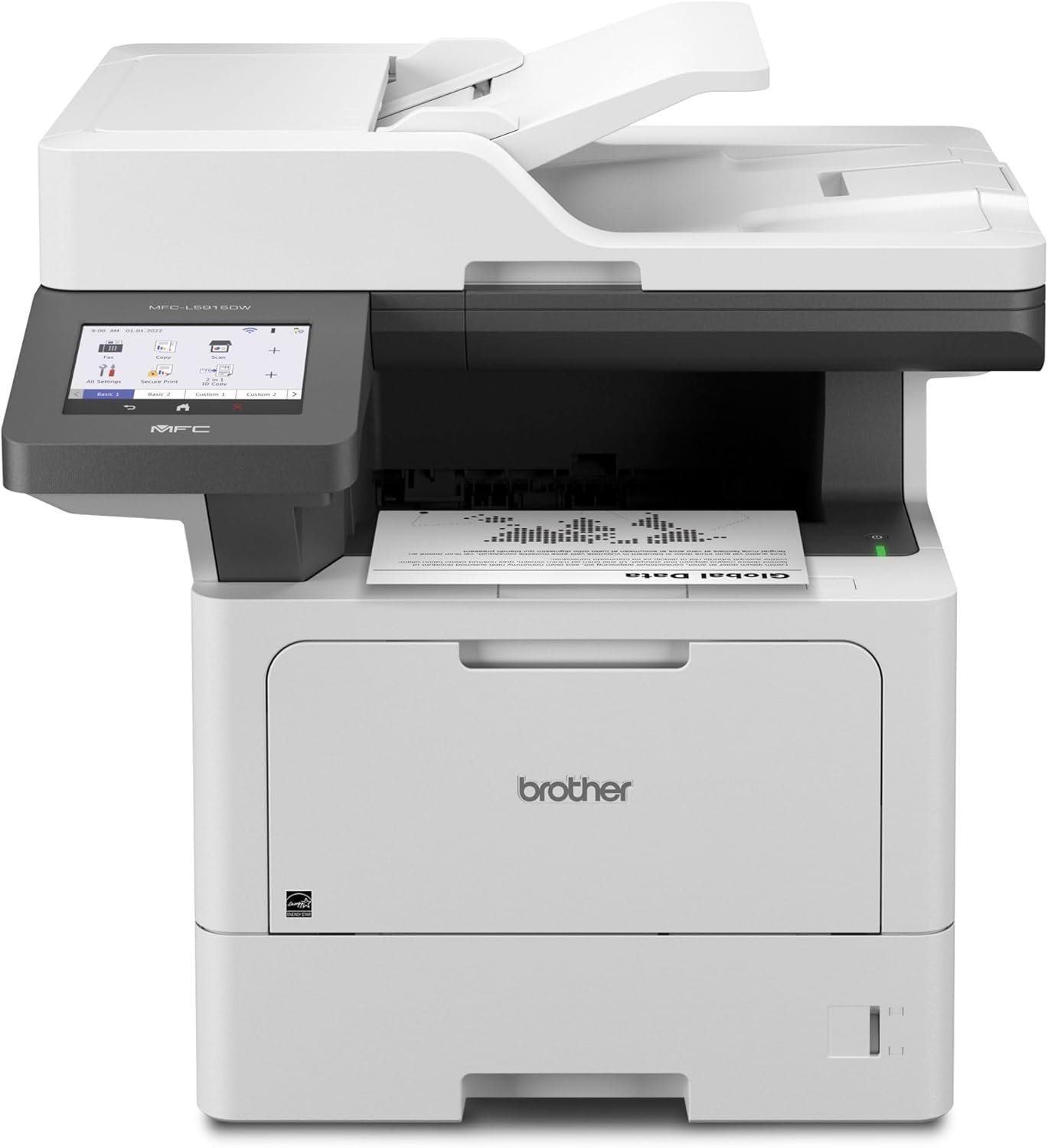
The Brother MFC-L5915DW combines high-speed printing, advanced connectivity, and multifunctional capabilities to support office environments requiring efficient document management. Its laser technology ensures consistent output quality, while the dual-band WiFi and Ethernet ports provide flexible network integration. The auto duplex feature reduces paper usage, and the large document feeder simplifies scanning tasks, making it suitable for small businesses and workgroups.

Print Speed and Productivity
The Brother MFC-L5915DW is designed for environments where high-volume printing is essential. Its 50 ppm monochrome print speed ensures rapid output for large document batches, making it ideal for offices with frequent print demands. This print speed is achieved through a laser print engine optimized for monochrome output, which minimizes the time required to process and transfer toner to the page. The printer’s ability to handle up to 150 pages per minute in duplex mode further enhances productivity by reducing the need for manual page flipping. For users requiring consistent throughput, the MFC-L5915DW’s performance aligns with industry benchmarks for laser printers in the same price range. However, its print speed is best suited for environments with moderate to high workloads, as it may not match the output of higher-end models in extreme volume scenarios.
High-Speed Monochrome Printing
The printer’s 50 ppm print speed is a key factor in its suitability for busy offices. This rate is achieved through a laser print engine that efficiently processes print jobs, ensuring minimal downtime between tasks. The print resolution of 1200 x 1200 dpi provides sharp, clear text and graphics, which is critical for professional documents. While the speed is impressive, it is important to note that the printer’s performance is optimized for monochrome output, which may not be suitable for users requiring color printing. The high-speed capability is particularly beneficial for environments where quick turnaround times are necessary, such as legal offices or administrative departments.
Duty Cycle and Workload Capacity
The MFC-L5915DW is designed to handle daily print volumes up to 50,000 pages per month, which makes it suitable for small to mid-sized offices. This duty cycle ensures that the printer can operate continuously without overheating or degrading performance. The printer’s internal cooling system and durable components are engineered to support long-term use, reducing the likelihood of mechanical failures. However, users with extremely high-volume needs may find the duty cycle insufficient compared to industrial-grade printers, which can handle higher monthly page counts. For most small business environments, the MFC-L5915DW’s workload capacity is adequate, provided the printer is used within its recommended limits.
Connectivity and Network Integration
The Brother MFC-L5915DW offers multiple connectivity options to support flexible network integration. Its built-in Gigabit Ethernet port ensures stable, high-speed connections for wired networks, while dual-band WiFi provides reliable wireless access for mobile and remote users. The dual-band capability allows the printer to operate on both 2.4 GHz and 5 GHz frequencies, reducing interference and improving connection stability. This is particularly beneficial in environments with multiple wireless devices, such as modern office spaces or shared workspaces. The printer’s USB 2.0 ports enable direct connectivity to computers or USB flash drives, making it easy to print from local storage devices.

Dual-Band WiFi and Network Performance
The dual-band WiFi feature enhances the printer’s ability to maintain a stable connection in environments with high wireless traffic. By utilizing both 2.4 GHz and 5 GHz bands, the printer can avoid congestion and ensure consistent data transfer rates. This is especially important for users who rely on wireless printing for mobile devices, as it reduces the likelihood of print job interruptions. The printer’s network capabilities are further supported by its Ethernet port, which provides a reliable alternative for users prioritizing wired connections. The combination of these options makes the MFC-L5915DW suitable for both small offices and larger workgroups with complex network setups.
USB and Cloud Connectivity
In addition to Ethernet and WiFi, the MFC-L5915DW supports USB printing, allowing users to connect directly to the printer from a computer or USB flash drive. This is useful for users who prefer direct printing without relying on a network connection. The printer also includes cloud printing capabilities, enabling users to print from popular cloud services such as Google Drive and Dropbox. These features enhance the printer’s versatility, making it suitable for environments where users need to access print functions from multiple devices. However, the absence of support for newer cloud protocols may limit its compatibility with certain services, which could be a consideration for users with specific cloud integration needs.
Scanning and Document Management
The Brother MFC-L5915DW’s 70-page auto document feeder (ADF) is a key feature for users requiring efficient scanning capabilities. The ADF allows for single-pass, two-sided scanning at a speed of 56 ipm, which is ideal for processing large volumes of documents quickly. This feature is particularly beneficial for offices that frequently need to digitize paper records, as it reduces the time required for manual scanning. The large document glass accommodates legal-sized documents, expanding the printer’s versatility for different document types. The inclusion of a 5″ color touchscreen display enhances the user experience by providing intuitive navigation and access to advanced scanning functions.

High-Capacity Scanning and Document Handling
The 70-page ADF ensures that users can process multiple documents at once, reducing the need for manual intervention. The ability to scan both sides of a document in a single pass improves efficiency, particularly for users who need to digitize double-sided forms or reports. The printer’s scanning resolution of 1200 x 600 dpi ensures that the scanned documents retain high clarity, which is essential for archival purposes. The large document glass also accommodates oversized pages, making the printer suitable for environments that handle a variety of document sizes. However, the ADF’s capacity is limited to 70 pages, which may be insufficient for users requiring higher-volume scanning capabilities.
Integration with Cloud Services and Mobile Printing
The MFC-L5915DW supports cloud printing services, allowing users to print documents directly from platforms like Google Drive, Dropbox, and Microsoft OneDrive. This feature is particularly useful for remote workers who need to access print functions from their mobile devices. The printer’s compatibility with cloud services is enhanced by its dual-band WiFi and Ethernet connectivity, ensuring seamless integration with digital workflows. Additionally, the touchscreen interface provides a user-friendly way to manage scanning tasks and access cloud-based printing options. While these features improve the printer’s versatility, the absence of support for certain niche cloud platforms may limit its appeal for users with specific integration needs.

Pros & Cons
Pros
- High-Speed Monochrome Printing: The 50 ppm print speed ensures rapid output for large document batches, making it ideal for busy offices.
- Dual-Band WiFi and Ethernet Connectivity: The printer’s dual-band WiFi and Gigabit Ethernet port provide stable, high-speed network integration for both wired and wireless environments.
- Large Document Feeder: The 70-page ADF and legal-sized document glass accommodate a wide range of document types, improving scanning efficiency.
- Auto Duplex Printing: The built-in duplex feature reduces paper usage and enhances productivity by printing on both sides of the page.
- Cloud Printing Support: The printer’s compatibility with cloud services like Google Drive and Dropbox enables seamless integration with digital workflows.
- Durable Construction: The printer’s design and internal cooling system support long-term operation, reducing the likelihood of mechanical failures.
Cons
- Limited Color Printing: The printer is optimized for monochrome output, which may not be suitable for users requiring color printing capabilities.
- Smaller ADF Capacity: The 70-page ADF may be insufficient for users needing to scan larger volumes of documents.
- No Support for Advanced Cloud Protocols: The printer’s cloud printing capabilities are limited to certain platforms, which may restrict its compatibility with newer services.
- Higher Power Consumption: The printer’s 600-watt wattage is relatively high, which may impact energy costs in environments with extended usage.
- No Fax Functionality: The absence of a fax feature may be a drawback for users requiring traditional fax capabilities.
Final Verdict: Who This Printer Is Best For (and Who Should Skip It)
The Brother MFC-L5915DW is best suited for small to mid-sized offices and workgroups that require high-speed monochrome printing, efficient scanning, and reliable network integration. Its 50 ppm print speed, dual-band WiFi, and 70-page ADF make it an excellent choice for environments where productivity and document management are priorities. The printer’s support for cloud services and USB connectivity further enhances its versatility for modern workspaces. However, users with color printing needs, high-volume scanning requirements, or specific cloud integration preferences may find the MFC-L5915DW less suitable. Additionally, the printer’s higher power consumption and lack of fax functionality may make it a less ideal choice for certain specialized applications. Overall, the MFC-L5915DW is a strong option for users seeking a balance between performance, connectivity, and cost-effectiveness in a monochrome laser printer.

Frequently Asked Questions (FAQs)
What is the maximum print speed of the Brother MFC-L5915DW?
The Brother MFC-L5915DW offers a maximum monochrome print speed of 50 pages per minute (ppm), making it suitable for high-volume office environments. This speed is achieved through a laser print engine optimized for efficient toner transfer and page processing.
Does the Brother MFC-L5915DW support wireless printing?
Yes, the MFC-L5915DW includes dual-band WiFi connectivity, allowing users to print wirelessly from devices on both 2.4 GHz and 5 GHz networks. This feature ensures stable connections in environments with high wireless traffic.
What types of documents can the printer scan?
The MFC-L5915DW’s 70-page auto document feeder (ADF) can scan a variety of document types, including legal-sized pages. It supports single-pass, two-sided scanning at 56 pages per minute (ipm), ideal for processing large volumes of paper records.
Is the printer compatible with cloud printing services?
The MFC-L5915DW supports cloud printing through integration with services like Google Drive, Dropbox, and Microsoft OneDrive. This allows users to print documents directly from these platforms, enhancing remote work capabilities.
What is the recommended toner cartridge for the MFC-L5915DW?
The Brother MFC-L5915DW is compatible with the TN920UXXL ultra high-yield toner cartridge, which provides up to 18,000 pages of printing. A TN760U toner cartridge is also available for users requiring a lower page yield.
What is the duty cycle of the printer?
The MFC-L5915DW is designed to handle daily print volumes up to 50,000 pages per month, making it suitable for small to mid-sized offices. This duty cycle ensures reliable performance over extended periods of use.
Does the printer support duplex printing?
Yes, the MFC-L5915DW includes an auto duplex printing feature that prints on both sides of the page, reducing paper usage and enhancing productivity for document workflows.
What connectivity options are available for the printer?
The MFC-L5915DW offers multiple connectivity options, including Gigabit Ethernet for wired connections, dual-band WiFi for wireless access, and USB 2.0 ports for direct printing from computers or USB flash drives.