
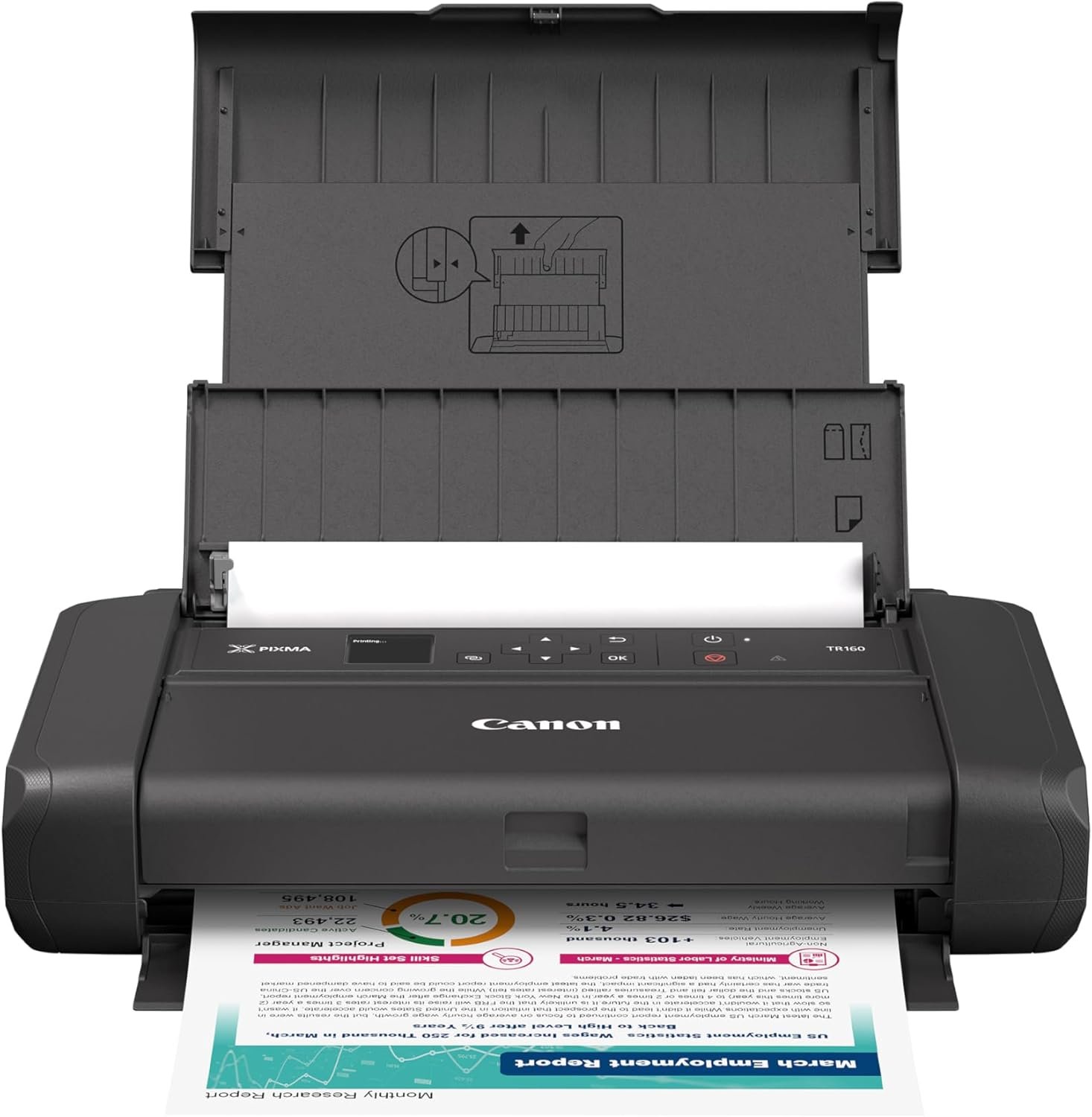
The Importance of Choosing the Right Printer for Your Needs
In today’s fast-paced environments, the ability to produce high-quality documents, photos, and graphics quickly and reliably is essential for both personal and professional use. Whether you’re managing a small business, running a creative project, or simply need to print at home, selecting the right printer can significantly impact productivity and satisfaction. Printers vary widely in design, performance, and functionality, making it critical to evaluate factors such as print quality, speed, connectivity, and portability. For users who require mobility, a lightweight and compact printer with wireless capabilities can offer unmatched convenience. Conversely, those with high-volume printing needs may prioritize speed and duty cycle capacity. Understanding these trade-offs helps ensure that your printing solution aligns with your specific workflow and expectations. This review explores the Canon PIXMA TR160 Wireless Portable Printer, a device designed to balance portability with reliable output, and examines how it meets the needs of modern users across various environments.
Quick Overview
| Feature | Details |
|---|---|
| Printer Type | Inkjet |
| Connectivity | USB, Wireless Direct, Canon PRINT App, AirPrint, Mopria |
| Print Technology | 5-Color Hybrid Ink System |
| Supported Functions | Print Only |
| Print Resolution | 4800 x 1200 DPI (Color), 4800 DPI (Black & White) |
| Media Sizes | 3.5″ x 3.5″, 4″ x 6″, 5″ x 5″, 5″ x 7″, 7″ x 10″, 8″ x 10″, Letter (8.5″ x 11″), Legal (8.5″ x 14″), U.S. #10 Envelopes, Card Size |
| Connectivity Options | USB Type-C, Wireless Direct |
| Duty Cycle | Not specified, but 50-sheet input tray supports intermittent use |
| Ink System | CLI-36 Dye-Based Color Ink Tank, PGI-35 Pigment-Based Black Ink Tank |
| Warranty | Limited warranty |
The Canon PIXMA TR160 is designed for users who value portability and simplicity. Its compact size, wireless connectivity, and 50-sheet input tray make it suitable for home use, travel, or small office environments. The 5-color hybrid ink system supports high-quality color prints, while the 4800 x 1200 DPI resolution ensures sharp text and vibrant graphics. The printer’s lightweight design and optional battery make it ideal for users who need to print on the go, though its limited media size options may restrict its use for certain professional applications.

Portability and Design: A Lightweight Solution for On-the-Go Printing
The Canon PIXMA TR160 Wireless Portable Printer is engineered with portability in mind, making it an excellent choice for users who need to print from multiple locations. Its lightweight design and compact form factor allow it to fit easily into a backpack or travel bag, ensuring it can accompany you wherever you go. The printer’s 50-sheet input tray provides sufficient capacity for intermittent use without requiring frequent refills, which is particularly beneficial for users who print infrequently or in short bursts. The inclusion of an optional battery further enhances its mobility, enabling printing in environments without access to a power source. However, the battery life is not explicitly detailed in the specifications, which may raise concerns for users requiring extended wireless printing sessions. The printer’s 1.44″ OLED display offers a simple interface for monitoring ink levels, printer status, and basic settings, though its monochrome design may limit its utility for users who rely on visual feedback during complex print tasks.

Compact and Lightweight for Travel and Mobility
The PIXMA TR160’s compact dimensions (12.7″D x 7.3″W x 2.6″H) and lightweight weight (4.5 pounds) make it highly portable, ideal for travelers, students, or professionals who need to print while on the move. Its design allows for easy storage and transport without compromising functionality. The 50-sheet input tray ensures that users can print multiple pages at once, reducing the need for frequent reloading. However, the lack of a built-in power adapter means users must rely on the optional battery or a USB connection, which may limit its use in situations where power sources are unavailable. The printer’s streamlined design also simplifies setup and operation, making it accessible for users with varying levels of technical expertise.
Wireless Connectivity and Direct Printing Capabilities
The PIXMA TR160 offers multiple connectivity options, including USB Type-C, wireless direct printing, and compatibility with the Canon PRINT app, Apple AirPrint, and Mopria Print Service. This versatility ensures that users can print from a wide range of devices, including smartphones, tablets, and computers, without requiring a wireless router. The wireless direct mode allows for seamless printing even in environments where a router is not available, which is particularly useful for users in remote locations or during travel. While these connectivity options enhance convenience, they may also introduce complexity for users unfamiliar with wireless printing protocols, requiring additional setup steps to ensure compatibility with their devices.
User-Friendly Interface and Display
The 1.44″ monochrome OLED display provides a clear and intuitive interface for managing print settings, checking ink levels, and monitoring printer status. This feature is especially valuable for users who prefer a visual confirmation of their print tasks without relying on mobile apps. However, the display’s limited size and monochrome design may make it challenging to read in low-light conditions or for users who require detailed status information. The simplicity of the interface ensures that even less tech-savvy users can operate the printer with minimal effort, though advanced users may find the lack of customization options limiting.
Print Quality and Resolution: High-Definition Output for Versatile Use
The Canon PIXMA TR160 Wireless Portable Printer delivers high-quality prints with its 5-color hybrid ink system, which includes both dye-based color ink and pigment-based black ink. This combination allows for vibrant color reproduction and sharp, long-lasting black text. The printer’s maximum print resolution of 4800 x 1200 DPI ensures that both text and graphics are rendered with precision, making it suitable for a wide range of applications, from professional documents to creative projects. The inclusion of borderless printing capabilities expands its versatility, enabling users to produce high-quality photos and flyers without visible white borders. However, the printer’s maximum media size of 8.5 x 14 inches may limit its use for larger format prints, which could be a drawback for users requiring extensive photo or poster printing.

Sharp Text and Vibrant Color Reproduction
The 5-color hybrid ink system in the PIXMA TR160 is optimized for producing sharp, crisp text and vibrant, accurate color reproduction. The dye-based color ink contributes to rich, saturated colors, while the pigment-based black ink ensures longevity and resistance to fading. This combination is particularly beneficial for users who need to print marketing materials, brochures, or other documents that require high visual impact. The 4800 x 1200 DPI resolution further enhances the clarity of text and graphics, making the printer suitable for both everyday use and more demanding applications. However, the printer’s performance in producing gradients or complex color blends may be limited by the specific ink formulation, which could affect its suitability for professional photography or graphic design work.
Borderless Printing and Photo Quality
The PIXMA TR160 supports borderless printing on compatible media, allowing users to create high-quality photos and promotional materials without visible white borders. This feature is particularly advantageous for users who need to print event invitations, social media graphics, or personal photos. The printer’s ability to produce sharp, detailed images makes it a good choice for casual photographers or small business owners looking to print marketing materials. However, the lack of support for larger format borderless prints may restrict its use for certain creative applications. Additionally, the printer’s performance with glossy photo paper may vary depending on the specific paper type and print settings, which could affect the final output quality for users who prioritize photo printing.
Media Compatibility and Print Quality Variability
The PIXMA TR160 supports a range of media types, including glossy photo paper, which is ideal for producing high-quality prints. However, the printer’s compatibility with other media types, such as matte or textured paper, is not explicitly detailed in the specifications, which may limit its use for certain printing needs. The maximum media size of 8.5 x 14 inches is suitable for standard letter-sized documents and photos but may not accommodate larger format prints. Users who require versatility in media types and sizes may find the PIXMA TR160 less suitable for their needs, as it does not support the broader range of media options available in more advanced printers.
Connectivity and Compatibility: Seamless Integration with Modern Devices
The Canon PIXMA TR160 Wireless Portable Printer is designed to integrate seamlessly with a variety of devices, offering multiple connectivity options to suit different user preferences. Its support for wireless direct printing allows users to connect to the printer without a wireless router, making it ideal for environments where a network is not available. The printer’s compatibility with the Canon PRINT app, Apple AirPrint, and Mopria Print Service ensures that users can print from smartphones, tablets, and computers with ease. However, the reliance on these specific protocols may limit its compatibility with other print services or operating systems, which could be a drawback for users who prefer a more universal printing solution.

Wireless Direct Printing and No-Router Connectivity
The PIXMA TR160’s wireless direct printing feature enables users to connect their devices to the printer without requiring a wireless router. This is particularly useful for users who need to print in locations where a router is not available, such as during travel or in remote areas. The simplicity of this connectivity method reduces the need for complex setup processes, making it accessible for users with varying levels of technical expertise. However, the lack of support for more advanced wireless protocols, such as Wi-Fi Protected Setup (WPS), may limit its usability for users who prefer more secure or streamlined wireless connections.
Compatibility with Mobile and Desktop Devices
The printer’s compatibility with the Canon PRINT app, Apple AirPrint, and Mopria Print Service ensures that users can print from a wide range of devices, including smartphones, tablets, and computers. This versatility is particularly beneficial for users who need to print on the go or from multiple devices. However, the absence of support for other print services or operating systems may restrict its use for users who rely on alternative printing solutions. Additionally, the need to install and configure specific apps or services may add an extra step to the printing process, which could be a drawback for users who prioritize simplicity and ease of use.
Cloud Printing and Remote Access
While the PIXMA TR160 does not explicitly support cloud printing, its compatibility with the Canon PRINT app and Mopria Print Service allows users to print from the cloud through these third-party services. This feature provides a level of flexibility for users who need to print from remote locations or access print jobs from mobile devices. However, the lack of native cloud printing support may limit the printer’s integration with certain cloud-based workflows, which could be a consideration for users who rely heavily on cloud storage and printing solutions.
Ink System and Consumables: Efficient and Cost-Effective Printing
The Canon PIXMA TR160 Wireless Portable Printer utilizes a 5-color hybrid ink system, combining dye-based color ink with pigment-based black ink to achieve a balance between vibrant color reproduction and long-lasting black text. This ink formulation is designed to provide efficient printing with minimal waste, making it suitable for users who prioritize cost-effectiveness. The printer’s included ink cartridges are compatible with a range of media types, including glossy photo paper, which enhances its versatility for different printing needs. However, the lack of detailed information on ink consumption rates or refill options may raise concerns for users who require precise cost management or long-term printing solutions.

Hybrid Ink System for Balanced Performance
The 5-color hybrid ink system in the PIXMA TR160 is optimized for producing vibrant color prints while maintaining the durability of black text. The dye-based color ink contributes to rich, saturated colors, while the pigment-based black ink ensures longevity and resistance to fading. This combination is particularly beneficial for users who need to print marketing materials, brochures, or other documents that require high visual impact. However, the printer’s performance in producing gradients or complex color blends may be limited by the specific ink formulation, which could affect its suitability for professional photography or graphic design work.
Ink Cartridge Compatibility and Refill Options
The PIXMA TR160 uses CLI-36 Dye-Based Color Ink Tanks and PGI-35 Pigment-Based Black Ink Tanks, which are designed for efficient printing with minimal waste. These ink cartridges are compatible with a range of media types, including glossy photo paper, which enhances the printer’s versatility for different printing needs. However, the lack of detailed information on ink consumption rates or refill options may raise concerns for users who require precise cost management or long-term printing solutions. The absence of a refillable ink system could also limit the printer’s sustainability for users who prioritize eco-friendly printing practices.
Consumable Costs and Long-Term Use
The PIXMA TR160’s ink system is designed for cost-effective printing, with the hybrid ink formulation reducing the need for frequent replacements. However, the lack of detailed information on ink consumption rates or refill options may make it difficult for users to accurately estimate long-term costs. The printer’s reliance on dedicated ink tanks rather than refillable cartridges could also limit its appeal for users who prefer more flexible consumable options. Additionally, the printer’s limited media size options may further impact its cost-effectiveness for users requiring high-volume printing or specialized media types.

Pros & Cons
Pros
- Portable and Lightweight Design: The PIXMA TR160’s compact size and lightweight build make it ideal for travel and on-the-go printing, fitting easily into a backpack or travel bag.
- Wireless Connectivity: Support for wireless direct printing and compatibility with Canon PRINT, AirPrint, and Mopria Print Service ensures seamless printing from smartphones, tablets, and computers without a router.
- High-Quality Print Output: The 5-color hybrid ink system and 4800 x 1200 DPI resolution deliver sharp text and vibrant color reproduction, suitable for both everyday documents and creative projects.
- User-Friendly Interface: The 1.44″ OLED display provides a simple and intuitive way to monitor ink levels and printer status, enhancing ease of use.
- Borderless Printing Capabilities: The printer supports borderless printing on compatible media, allowing users to create high-quality photos and promotional materials without visible white borders.
- Durable and Reliable: The printer’s design and components are built for intermittent use, making it suitable for home or small office environments.
Cons
- Limited Media Size Options: The maximum media size of 8.5 x 14 inches restricts its use for larger format prints, which may be a drawback for users requiring extensive photo or poster printing.
- No Duplex Printing: The lack of duplex printing functionality means users must manually flip pages for double-sided printing, which could be inconvenient for high-volume use.
- Battery Life Unclear: The optional battery is not detailed in specifications, raising concerns about its longevity for extended wireless printing sessions.
- Limited Connectivity Options: While the printer supports multiple connectivity methods, its reliance on specific protocols may limit compatibility with other print services or operating systems.
- No Native Cloud Printing: The absence of native cloud printing support may restrict integration with cloud-based workflows, requiring users to rely on third-party apps.
- Consumable Costs: The dedicated ink tanks and lack of refill options may impact long-term cost-effectiveness for users requiring frequent printing or specialized media types.
Final Verdict: Who This Printer Is Best For (and Who Should Skip It)
The Canon PIXMA TR160 Wireless Portable Printer is best suited for users who prioritize portability and simplicity in their printing needs. Its lightweight design, wireless connectivity, and 50-sheet input tray make it an excellent choice for home users, travelers, and small business owners who need to print on the go. The high-quality print output and borderless printing capabilities further enhance its appeal for those who require versatility in their printing tasks. However, the printer may not be ideal for users with high-volume printing needs, as its limited media size options and lack of duplex printing functionality could hinder efficiency. Additionally, the absence of native cloud printing support and unclear battery life may deter users who rely on advanced connectivity or extended wireless printing sessions. Overall, the PIXMA TR160 is a reliable and user-friendly option for its target audience, though its limitations make it less suitable for more demanding or specialized printing environments.

Frequently Asked Questions (FAQs)
What is the maximum print size supported by the Canon PIXMA TR160?
The Canon PIXMA TR160 supports media sizes up to 8.5 x 14 inches, including letter and legal sizes, as well as U.S. #10 envelopes and card stock. However, it does not support larger format prints, which may limit its use for extensive poster or photo printing.
Can the Canon PIXMA TR160 print borderless photos?
Yes, the PIXMA TR160 supports borderless printing on compatible media, allowing users to create high-quality photos and promotional materials without visible white borders. This feature is particularly useful for event invitations, social media graphics, and personal photos.
How does the Canon PIXMA TR160 handle wireless printing?
The PIXMA TR160 offers wireless direct printing, enabling users to connect their devices to the printer without a wireless router. It is also compatible with the Canon PRINT app, Apple AirPrint, and Mopria Print Service, providing seamless printing from smartphones, tablets, and computers.
What type of ink system does the Canon PIXMA TR160 use?
The PIXMA TR160 utilizes a 5-color hybrid ink system, combining dye-based color ink with pigment-based black ink. This formulation ensures vibrant color reproduction and long-lasting black text, making it suitable for both everyday documents and creative projects.
Is the Canon PIXMA TR160 suitable for high-volume printing?
The PIXMA TR160 is designed for intermittent use with a 50-sheet input tray, making it more suitable for home or small office environments rather than high-volume commercial printing. Its lack of duplex printing functionality and limited media size options may hinder efficiency for frequent, large-scale printing tasks.
What are the connectivity options for the Canon PIXMA TR160?
The PIXMA TR160 offers USB Type-C connectivity, wireless direct printing, and compatibility with the Canon PRINT app, Apple AirPrint, and Mopria Print Service. These options provide flexibility for users who need to print from various devices, though they may require additional setup for optimal performance.
Does the Canon PIXMA TR160 support duplex printing?
No, the PIXMA TR160 does not support duplex printing. Users must manually flip pages for double-sided printing, which could be inconvenient for high-volume or frequent printing tasks.
What is the battery life of the Canon PIXMA TR160’s optional battery?
The battery life of the PIXMA TR160’s optional battery is not specified in the product details, which may raise concerns about its longevity for extended wireless printing sessions. Users requiring long-term mobility should consider this limitation when evaluating the printer’s suitability.