
The Importance of Choosing the Right Printer for Professional Output
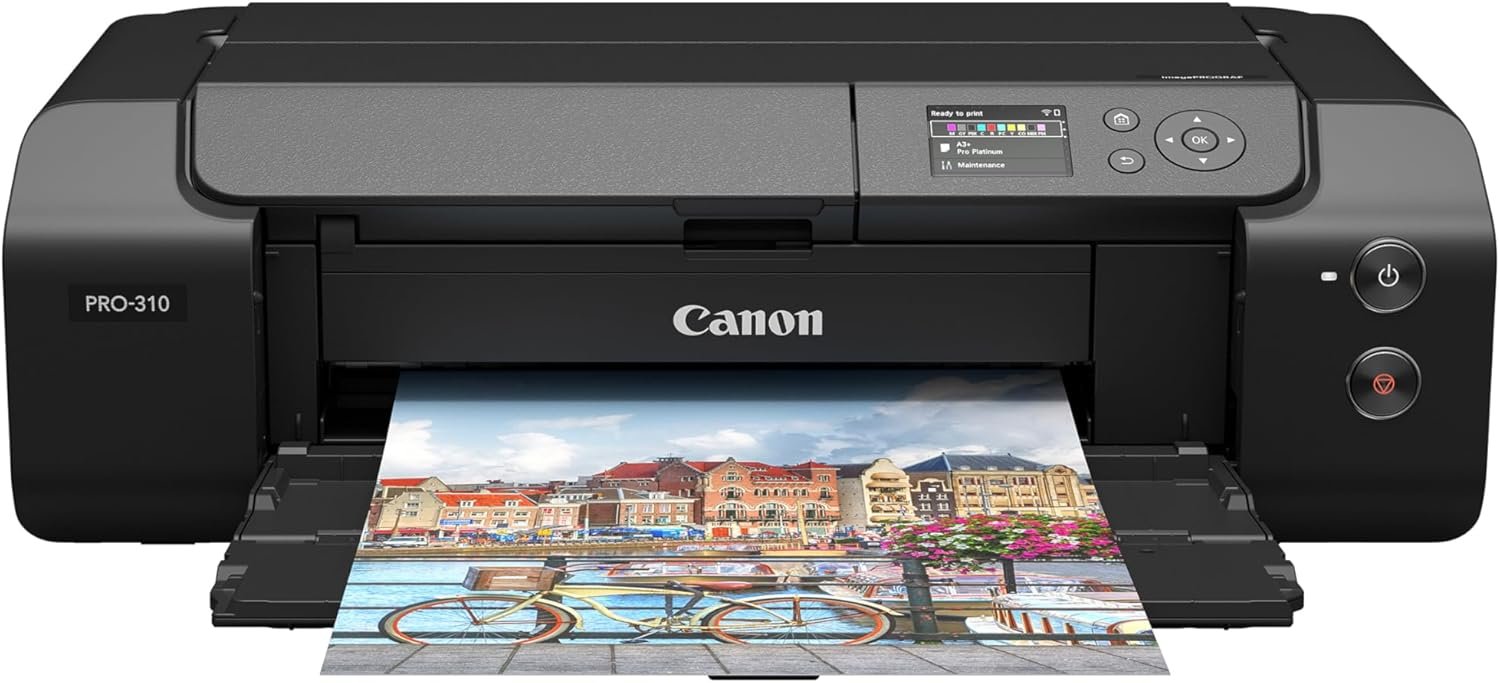
In today’s creative and professional environments, the right printer can make or break an artist’s workflow. Whether you’re a photographer, graphic designer, or fine art enthusiast, the demand for high-quality, consistent output is non-negotiable. Printers must balance precision, speed, and reliability while adapting to varying media types and environmental conditions. For professionals, the stakes are higher: a single misprint can compromise a client’s project or a gallery exhibition. The Canon imagePROGRAF PRO-310 addresses these challenges by integrating advanced pigment-based ink technology, precise print resolution, and intuitive design. Its capabilities extend beyond basic printing, offering tools for color calibration, media compatibility, and workflow efficiency. However, selecting the right printer requires evaluating factors like print quality, speed, media support, connectivity, and long-term maintenance. This review examines how the PRO-310 aligns with these criteria, helping users determine if it meets the demands of professional and semi-professional print workflows.
Quick Overview
| Feature | Details |
|---|---|
| Printer Type | Inkjet Photo Printer |
| Print Technology | Pigment-based Ink System |
| Maximum Print Speed (Color) | 2 ppm |
| Max Printspeed Monochrome | 2 ppm |
| Print Resolution | 1200 x 1200 dpi (Color/Black & White) |
| Media Sizes | 3.5” x 3.5”, 4” x 6”, 5” x 7”, 7” x 10”, 8” x 10”, Letter, Legal, 13” x 19”, Custom (up to 13” x 129”) |
| Connectivity | Wi-Fi, Ethernet, USB |
| Ink System | 9 Color + Chroma Optimizer Pigment-Based Inks |
| Warranty | Limited |
| Dimensions | 28.7”D x 18.6”W x 14.04”H |
| Weight | 31.6 Pounds |
| Included Components | Inkjet Cartridges, Paper |
The Canon imagePROGRAF PRO-310 is designed for users requiring high-resolution, archival-quality prints on fine art and photographic media. Its combination of pigment-based inks, precise resolution, and connectivity options makes it suitable for both studio and remote workflows. The printer’s capabilities align with professional expectations for color accuracy, media versatility, and long-term reliability.

Print Quality and Color Accuracy
The Canon imagePROGRAF PRO-310’s 9-color plus Chroma Optimizer pigment-based ink system is a cornerstone of its performance. This configuration allows for expanded color gamuts and deeper black density, crucial for producing gallery-quality prints. The Matte Black ink enhances dark area reproduction, ensuring consistent tonal range across different paper types. For photographers and fine artists, this system provides the necessary tools to achieve high dynamic range and precise color rendering. The printer’s 1200 x 1200 dpi resolution ensures sharp detail, particularly in high-contrast or gradient-rich images. However, the slower print speed may impact workflows requiring rapid output.

Ink System and Media Compatibility
The 9-color plus Chroma Optimizer ink system is engineered to produce vibrant, long-lasting prints. Pigment-based inks are known for their resistance to fading and water damage, making them ideal for archival use. The Matte Black ink enhances shadow detail, contributing to a more nuanced print. The printer supports a wide range of media sizes, including standard photo paper, fine art paper, and custom-cut sheets. This versatility allows users to experiment with different textures and finishes without compromising print quality. However, the lack of dual-sided printing may limit efficiency for certain applications.
Color Calibration and Output Consistency
The PRO-310’s color management capabilities are essential for achieving consistent results. The printer’s built-in calibration tools and compatibility with standard color profiles ensure that prints match digital proofs. The 3.0-inch color LCD monitor provides real-time feedback on ink levels and print settings, aiding in fine-tuning output. While the printer’s color accuracy is well-documented in technical specifications, the absence of built-in profiling tools may require additional software investment for advanced users. This limitation could affect workflows that demand precise color matching without external calibration.
Black and White Print Performance
The Matte Black ink system significantly improves black density and tonal range in monochrome prints. This is particularly beneficial for photographers focusing on black-and-white photography, as it allows for richer shadows and smoother gradients. The printer’s 1200 x 1200 dpi resolution ensures sharp detail even in monochrome output. However, the slower print speed may be a drawback for users requiring rapid black-and-white prints. The lack of dual-sided printing also restricts the printer’s efficiency for high-volume monochrome workflows.
Connectivity and Workflow Integration
The Canon imagePROGRAF PRO-310’s connectivity options are tailored for professional environments. Its Wi-Fi, Ethernet, and USB ports support seamless integration into both wired and wireless workflows. The Wi-Fi capability is particularly valuable for users who need to print remotely, such as photographers working from multiple locations. The Ethernet port ensures stable, high-speed data transfer for large print jobs, which is critical in busy studios. However, the absence of mobile printing features like Bluetooth or cloud connectivity may limit its appeal for users requiring on-the-go printing capabilities.

Network and Device Compatibility
The PRO-310’s Ethernet and Wi-Fi connectivity enable it to integrate into existing network infrastructures, making it suitable for office and studio environments. The printer’s compatibility with standard print protocols ensures it works with a wide range of devices, including desktops, laptops, and mobile devices. However, the lack of built-in mobile printing features like Apple AirPrint or Google Cloud Print may require additional setup for users relying on wireless devices. This limitation could affect workflows where quick, unattended printing is essential.
Remote Management and Monitoring
The 3.0-inch color LCD monitor provides users with direct access to printer status, ink levels, and settings adjustments. This feature is particularly useful for managing print jobs without needing to access a computer or mobile device. However, the printer’s remote management capabilities are limited compared to more advanced models. While the LCD monitor offers basic diagnostics, users requiring detailed remote monitoring may need to rely on third-party software or networked management systems. This could be a consideration for users with complex print workflows.

Pros & Cons
Pros
- The 9-color plus Chroma Optimizer ink system delivers exceptional color accuracy and archival durability.
- The 1200 x 1200 dpi resolution ensures sharp detail in both color and monochrome prints.
- The 3.0-inch color LCD monitor provides real-time status updates and settings adjustments.
- The printer supports a wide range of media sizes, from standard photo paper to custom-cut sheets.
- The pigment-based inks resist fading and water damage, making them ideal for long-term archival use.
- The Ethernet and Wi-Fi connectivity options enable stable, high-speed printing in networked environments.
- The Matte Black ink enhances shadow detail and tonal range in black-and-white prints.
Cons
- The maximum print speed of 2 ppm may be too slow for high-volume workflows.
- The lack of dual-sided printing reduces efficiency for certain applications.
- The printer does not support built-in color profiling tools, requiring additional software investment.
- The absence of mobile printing features like Bluetooth or cloud connectivity may limit remote printing capabilities.
- The printer’s remote management capabilities are limited compared to more advanced models.
- The 31.6-pound weight and large footprint may make it less suitable for compact workspaces.
Final Verdict: Who This Printer Is Best For (and Who Should Skip It)
The Canon imagePROGRAF PRO-310 is best suited for photographers, fine artists, and professionals requiring high-resolution, archival-quality prints on a variety of media. Its pigment-based ink system, precise resolution, and color management tools make it an excellent choice for studio environments where print quality is paramount. The printer’s connectivity options also support integration into networked workflows, which is valuable for users managing multiple print jobs. However, its slower print speed and limited remote management features may make it less ideal for users requiring rapid output or advanced networked printing capabilities. Additionally, the printer’s size and weight may be a drawback for users with limited workspace. For those prioritizing speed and mobility, alternative models with faster print speeds and more flexible connectivity options may be more appropriate.

Frequently Asked Questions (FAQs)
What type of ink does the Canon imagePROGRAF PRO-310 use?
The Canon imagePROGRAF PRO-310 uses a 9-color plus Chroma Optimizer pigment-based ink system. This configuration enhances color accuracy, provides a wide color gamut, and ensures archival durability through resistance to fading and water damage.
What media sizes does the Canon imagePROGRAF PRO-310 support?
The PRO-310 supports a wide range of media sizes, including standard photo paper, fine art paper, and custom-cut sheets up to 13″ x 129″. This versatility allows users to experiment with different textures and finishes without compromising print quality.
How does the Canon imagePROGRAF PRO-310 handle color calibration?
The printer’s built-in calibration tools and compatibility with standard color profiles ensure that prints match digital proofs. The 3.0-inch color LCD monitor provides real-time feedback on ink levels and print settings, aiding in fine-tuning output.
What connectivity options are available for the Canon imagePROGRAF PRO-310?
The PRO-310 offers Ethernet, Wi-Fi, and USB connectivity. These options enable seamless integration into both wired and wireless workflows, supporting stable, high-speed printing in networked environments.
Is the Canon imagePROGRAF PRO-310 suitable for black-and-white prints?
Yes, the Matte Black ink system significantly improves black density and tonal range in monochrome prints. This is particularly beneficial for photographers focusing on black-and-white photography, as it allows for richer shadows and smoother gradients.
What are the limitations of the Canon imagePROGRAF PRO-310?
The printer has a maximum print speed of 2 ppm, which may be too slow for high-volume workflows. It also lacks dual-sided printing and built-in color profiling tools, requiring additional software investment for advanced users.
What is the weight and size of the Canon imagePROGRAF PRO-310?
The PRO-310 weighs 31.6 pounds and has dimensions of 28.7″D x 18.6″W x 14.04″H. Its size and weight may make it less suitable for compact workspaces, though it is designed for professional environments requiring stability and durability.
Can the Canon imagePROGRAF PRO-310 be used for remote printing?
The PRO-310 supports Wi-Fi and Ethernet connectivity, enabling remote printing in networked environments. However, it lacks built-in mobile printing features like Bluetooth or cloud connectivity, which may require additional setup for wireless device integration.