
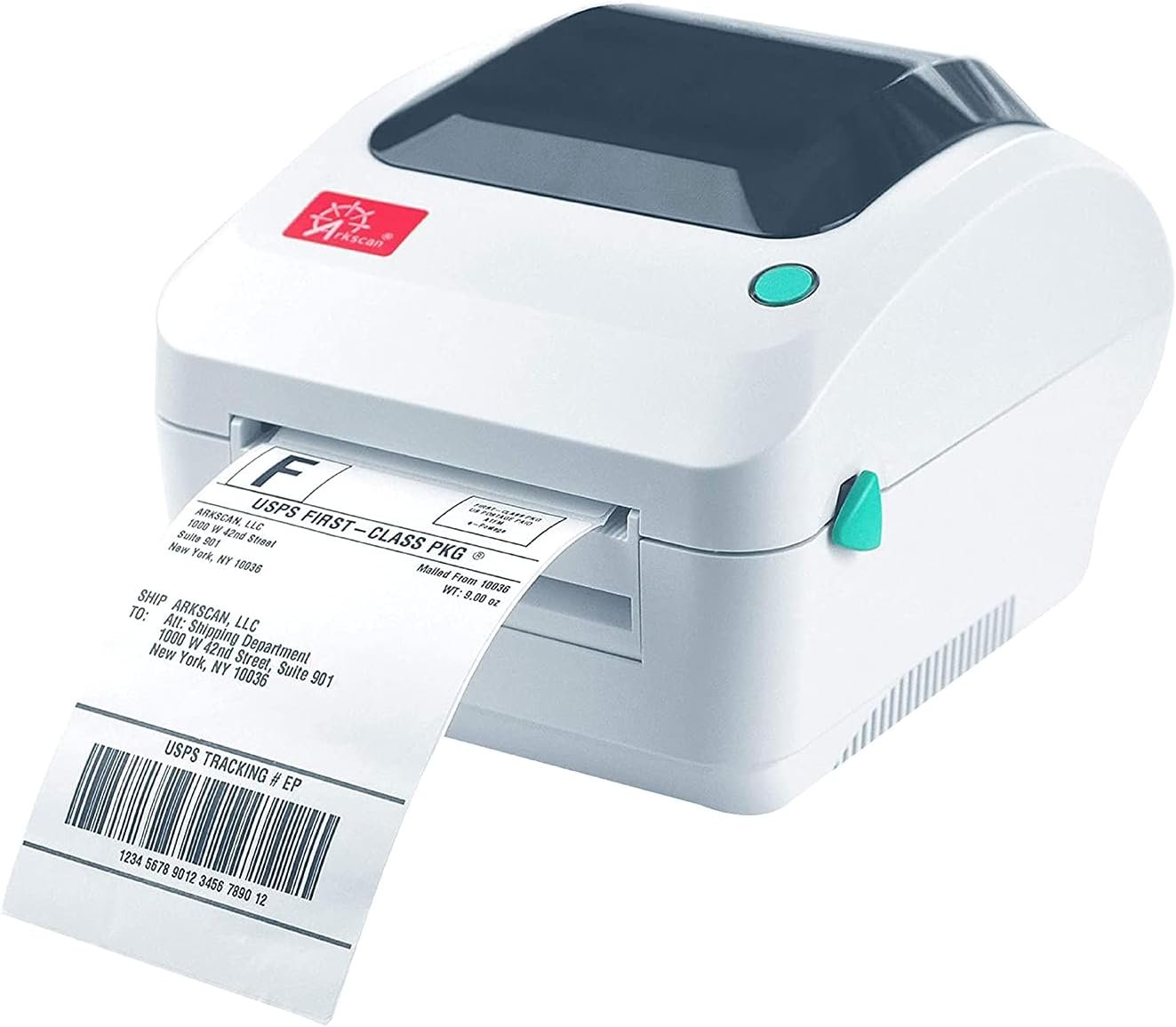
The Importance of Choosing the Right Printer for Modern Workflows
In today’s fast-paced business environment, selecting the right printer can significantly impact operational efficiency. Whether managing a small e-commerce store or handling large-scale logistics, the performance of your printing equipment directly affects order fulfillment, customer satisfaction, and overall productivity. Modern printing needs often require specialized solutions that balance speed, reliability, and compatibility with digital workflows. For businesses relying on shipping label generation, the Arkscan 2054A emerges as a compelling option, but understanding its technical capabilities and limitations is critical for making an informed decision. This review evaluates the printer’s specifications, design, and industry positioning to help users determine if it aligns with their specific requirements. From the types of media it supports to its integration with shipping platforms, this analysis provides a comprehensive overview of the Arkscan 2054A’s strengths and potential trade-offs.
Quick Overview
| Feature | Details |
|---|---|
| Printer Type | Direct thermal label printer |
| Supported Functions | Printing shipping labels, product labels, barcode labels, and general-purpose labels |
| Print Resolution | 203 dpi (standard) |
| Print Speed | 5 inches per second |
| Media Sizes | 0.75″–4.25″ width, 0.4″–90″ length |
| Connectivity | USB 2.0 (Windows, Mac, Chromebook, Android) |
| Duty Cycle | 100,000 labels per month (continuous operation) |
| Media Compatibility | Direct thermal labels, Zebra-compatible labels, Arkscan-compatible labels |
| Software | BarTender UltraLite (Windows only) |
| Warranty | 1-year limited warranty |
The Arkscan 2054A is designed for users requiring high-speed, reliable label printing with minimal maintenance. Its direct thermal technology eliminates the need for ink or toner, making it ideal for environments where frequent label generation is necessary. The printer’s compatibility with major shipping platforms and support for both roll and fanfold paper formats provide flexibility for different operational needs. However, its limitations in media versatility and color printing capabilities should be carefully considered for specialized applications.

Compatibility with Major Shipping Platforms
The Arkscan 2054A’s ability to integrate with a wide range of shipping platforms is a key factor for e-commerce and logistics professionals. This printer supports popular services such as Amazon Seller Central, eBay, Etsy, Shopify, and FedEx Ship Manager, among others. Its compatibility with these platforms ensures seamless label generation for order fulfillment, inventory tracking, and shipping management. For businesses relying on automated workflows, the printer’s integration capabilities reduce manual input and minimize errors in label creation. The printer’s support for direct thermal labels also aligns with the requirements of most major shipping carriers, which often mandate thermal paper for label printing.

Integration with E-Commerce and Logistics Systems
The Arkscan 2054A’s compatibility with platforms like Shopify and ShipStation allows users to generate shipping labels directly from their order management systems. This integration streamlines the fulfillment process, reducing the need for manual label creation and improving accuracy. The printer’s support for multiple label sizes, including 4×6 inches and 4×8.25 inches, ensures flexibility for different carrier requirements. However, users should verify that their specific platform’s API or integration tools are compatible with the printer’s communication protocols to avoid potential setup challenges.
Support for Third-Party Labeling Services
In addition to direct platform integration, the Arkscan 2054A supports third-party labeling services such as EasyPost, Stamps Desktop, and Endicia Dazzle. This compatibility is particularly valuable for businesses using multiple shipping providers or requiring specialized label formats. The printer’s ability to handle labels from UPS WorldShip and FedEx websites ensures that users can maintain consistency across different shipping channels. However, the reliance on direct thermal labels means that users must ensure they have access to compatible media for all supported services.
Print Speed and Duty Cycle
The Arkscan 2054A’s print speed of 5 inches per second is sufficient for most shipping label applications, particularly when handling standard 4×6-inch labels. This speed allows for rapid label generation, which is essential in high-volume environments such as warehouses or e-commerce fulfillment centers. The printer’s duty cycle of 100,000 labels per month indicates that it is designed for continuous operation, making it suitable for businesses with consistent label printing needs. However, users should be aware that the printer’s performance may degrade under extreme workloads, as its design prioritizes reliability over peak speed in high-volume scenarios.

Handling of High-Volume Workloads
For businesses that require frequent label printing, the Arkscan 2054A’s duty cycle of 100,000 labels per month provides a clear benchmark for its operational capacity. This specification suggests that the printer is capable of handling the demands of a mid-sized e-commerce operation or a small logistics hub. However, users should consider the printer’s thermal paper consumption rate, as direct thermal labels degrade over time when exposed to heat or light. This limitation may affect long-term label retention in environments with fluctuating temperatures.
Performance in Continuous Operation
The printer’s design for continuous operation is evident in its thermal printing mechanism, which minimizes moving parts and reduces the risk of mechanical failure. This makes it well-suited for environments where the printer is used regularly, such as a shipping warehouse or a fulfillment center. However, users should ensure that the printer is placed in a stable environment to avoid overheating, which could impact its longevity and performance over time.
Media Support and Label Compatibility
The Arkscan 2054A’s support for a wide range of media types and label formats is a significant advantage for users with diverse printing needs. The printer accommodates both roll paper and fanfold paper, providing flexibility for different label sizes and applications. Its compatibility with direct thermal labels, Zebra-compatible labels, and Arkscan-compatible labels ensures that users can select the most appropriate media for their specific use case. However, the lack of color printing capabilities may limit its use in applications requiring colored labels or graphics.

Roll vs. Fanfold Paper Support
The printer’s ability to accept roll paper loaded internally and fanfold paper loaded from the back offers users flexibility in managing different label formats. This dual-paper support is particularly beneficial for businesses that require varying label sizes or need to print labels on demand. However, users should be aware that the printer’s design for roll paper may make fanfold paper handling less intuitive, requiring careful setup to avoid misfeeds or jams.
Compatibility with Standard Label Sizes
The Arkscan 2054A’s support for standard label sizes such as 4×6 inches, 4×8.25 inches, and 4×6.75 inches aligns with the requirements of most major shipping carriers. This compatibility ensures that users can generate labels that meet the specifications of platforms like UPS and FedEx. However, users should verify that their specific carrier’s label size requirements are supported by the printer to avoid potential issues during label generation.
Software Integration and Design Tools
The inclusion of BarTender UltraLite Label Design Software (Windows only) is a notable feature of the Arkscan 2054A, providing users with a comprehensive tool for label creation. This software allows for full design capabilities, including text, graphics, and barcode generation, which is essential for businesses requiring customized labels. However, the software’s restriction to Windows may limit its accessibility for users relying on macOS or Chromebook environments.

BarTender UltraLite Features
BarTender UltraLite offers a range of design features that simplify the creation of shipping labels, product labels, and warehouse labels. Its support for serializing capabilities is particularly useful for businesses tracking inventory or managing batch numbers. The software’s integration with the printer ensures that labels can be generated quickly and accurately, reducing the risk of errors in label creation. However, users should be aware that the software’s limitations in advanced graphic design may affect its suitability for highly customized label requirements.
Cross-Platform Software Limitations
While the BarTender UltraLite software provides robust label design capabilities, its restriction to Windows operating systems may be a drawback for users who rely on macOS or Chromebook environments. This limitation could affect the printer’s usability for businesses with a mixed device ecosystem or those preferring cross-platform software solutions. Users should consider alternative label design tools if they require software compatibility across multiple operating systems.

Pros & Cons
Pros
- Multi-Platform Compatibility: The Arkscan 2054A supports Windows, macOS, Chromebook, and Android devices via USB, making it versatile for different user environments.
- Direct Thermal Technology: Eliminates the need for ink or toner, reducing maintenance and operational costs over time.
- Wide Media Support: Accommodates both roll and fanfold paper, allowing flexibility in label size and format.
- Integrated Label Design Software: BarTender UltraLite provides advanced design capabilities for creating custom labels and barcodes.
- High Print Speed: 5 inches per second ensures efficient label generation for high-volume operations.
- Reliable Duty Cycle: Designed for continuous use, supporting up to 100,000 labels per month.
- Support for Major Shipping Platforms: Integration with Amazon, eBay, Shopify, and other platforms simplifies order fulfillment.
Cons
- Limited Media Versatility: Only supports direct thermal labels, which may not be suitable for all applications requiring color or durability.
- Windows-Only Software: BarTender UltraLite is exclusive to Windows, limiting accessibility for macOS and Chromebook users.
- No Color Printing: Lacks support for color labels, which may be a drawback for businesses requiring branded or visually distinct labels.
- Potential Thermal Paper Degradation: Direct thermal labels degrade over time when exposed to heat or light, affecting long-term label retention.
- Setup Complexity: Dual-paper support (roll and fanfold) may require careful configuration to avoid misfeeds or jams.
- No Built-In Connectivity Options: Relies solely on USB for connectivity, which may be less convenient for users requiring wireless or network printing capabilities.
Final Verdict: Who This Printer Is Best For (and Who Should Skip It)
The Arkscan 2054A is an excellent choice for e-commerce businesses, logistics operations, and small to mid-sized fulfillment centers that require reliable, high-speed label printing. Its compatibility with major shipping platforms, support for direct thermal labels, and integration with BarTender UltraLite make it well-suited for environments where efficiency and accuracy are critical. The printer’s design for continuous operation and 100,000-label monthly duty cycle ensure it can handle the demands of high-volume shipping tasks.
However, users who require color printing, advanced graphic design capabilities, or cross-platform software support may find the Arkscan 2054A less suitable. The printer’s reliance on direct thermal labels and its Windows-only software limitation could be significant drawbacks for businesses with specific design or operational requirements. Additionally, users needing wireless connectivity or more versatile media options should consider alternative printers that offer greater flexibility in these areas.
Frequently Asked Questions (FAQs)
Is the Arkscan 2054A compatible with Windows, Mac, and Chromebook?
Yes, the Arkscan 2054A supports USB connectivity for Windows, macOS, Chromebook, and Android devices. This compatibility ensures seamless integration with various operating systems commonly used in e-commerce and logistics environments.
What types of labels can the Arkscan 2054A print?
The printer supports direct thermal labels, Zebra-compatible labels, and Arkscan-compatible labels. It is designed to handle standard shipping label sizes such as 4×6 inches and 4×8.25 inches, meeting the requirements of most major shipping carriers.
Does the Arkscan 2054A require ink or toner?
No, the Arkscan 2054A uses direct thermal printing technology, which eliminates the need for ink or toner. This reduces maintenance costs and simplifies the printing process for high-volume label generation.
Can the Arkscan 2054A print color labels?
No, the Arkscan 2054A does not support color printing. It is designed for monochrome thermal labels, making it suitable for applications where black-and-white labels are sufficient for shipping and tracking purposes.
What is the print speed of the Arkscan 2054A?
The Arkscan 2054A prints at a speed of 5 inches per second, which is adequate for most shipping label applications. This speed ensures efficient label generation in high-volume environments such as warehouses and e-commerce fulfillment centers.
Is there software included with the Arkscan 2054A?
Yes, the Arkscan 2054A includes BarTender UltraLite Label Design Software for Windows. This software provides full design capabilities for creating custom labels, barcodes, and serialized labels, enhancing the printer’s functionality for specialized printing needs.
What is the duty cycle of the Arkscan 2054A?
The Arkscan 2054A has a duty cycle of 100,000 labels per month, indicating it is designed for continuous operation. This makes it suitable for businesses with consistent label printing requirements, such as logistics operations and e-commerce fulfillment.
Can the Arkscan 2054A use fanfold paper?
Yes, the Arkscan 2054A supports fanfold paper loaded from the back of the printer. This dual-paper support provides flexibility for different label formats and sizes, accommodating various printing needs in a single device.