Brother MFC-L2900DW Laser Printer Review: 36 ppm Monochrome All-in-One for Small Businesses

The Importance of Choosing the Right Printer for Business Operations
In today’s fast-paced business environment, the efficiency of printing operations can significantly impact productivity and workflow. Small businesses often require reliable, high-speed printing solutions that balance performance with cost-effectiveness. Monochrome laser printers are particularly valuable for tasks such as document creation, data management, and internal communication due to their speed, precision, and cost efficiency. When selecting a printer, factors such as print speed, document handling capabilities, connectivity options, and energy efficiency play critical roles in determining long-term value. For organizations with high-volume printing needs, a printer that delivers consistent output quality while minimizing downtime and maintenance requirements is essential. This review evaluates the Brother MFC-L2900DW, a compact all-in-one laser printer designed for small businesses, to assess its suitability for environments demanding reliable, high-speed monochrome printing.
Quick Overview
| Feature | Details |
|---|---|
| Printer Type | Laser Monochrome All-in-One |
| Supported Functions | Print, Scan, Copy, Fax |
| Print Resolution | 1200 x 1200 dpi (Black and White) |
| Maximum Print Speed | 36 ppm (Monochrome) |
| Media Sizes | 8.5 x 14 inch |
| Connectivity | Ethernet, USB 2.0, Dual-band Wi-Fi |
| Duty Cycle | 15,000 pages/month |
| Toner System | Brother Genuine TN830 Series |
| Warranty | 1-year limited warranty |
The Brother MFC-L2900DW combines four essential business functions into a compact footprint, making it ideal for small offices. Its 36 ppm monochrome printing speed and 1200 x 1200 dpi resolution ensure crisp, professional output for text-heavy documents. The printer’s dual-band wireless connectivity and 3.5-inch touchscreen interface provide flexibility for modern workflows, while its energy-efficient design reduces operational costs over time.
Print Speed and Efficiency: Meeting High-Volume Demands
The Brother MFC-L2900DW is engineered for environments requiring rapid, consistent output. Its 36 ppm monochrome print speed ensures that large document sets can be processed quickly, reducing wait times for critical tasks. The printer’s enhanced fuser design contributes to a 22% reduction in electricity consumption compared to previous models, aligning with energy efficiency standards while maintaining performance. This feature is particularly beneficial for businesses aiming to minimize utility costs without compromising productivity.

Energy Efficiency and Operational Costs
The printer’s energy-efficient design is a key consideration for small businesses seeking to reduce environmental impact and operational expenses. The 22% decrease in electricity consumption compared to the MFC-L2750DW model translates to measurable savings over time, especially for high-volume users. The shorter warm-up time from sleep mode further enhances efficiency by reducing idle energy use. These features make the MFC-L2900DW a sustainable choice for organizations prioritizing cost-effective, eco-conscious operations.
First Page Out Time and Warm-Up Performance
The MFC-L2900DW’s improved warm-up time from sleep mode ensures that users can begin printing quickly after periods of inactivity. This is particularly valuable in environments where printers are frequently turned off to conserve energy. The 6.9-second initial page print time supports efficient workflow, allowing users to start tasks without significant delays. These optimizations contribute to the printer’s overall reliability in high-demand settings.
Duty Cycle and Longevity
With a recommended duty cycle of 15,000 pages per month, the MFC-L2900DW is well-suited for small to medium-sized businesses with moderate to high printing volumes. This capacity ensures that the printer can handle daily tasks without frequent maintenance or downtime. The robust build quality and durable components support long-term reliability, making it a cost-effective solution for businesses requiring consistent performance.
Connectivity and Integration: Seamless Workflow Solutions
The MFC-L2900DW’s connectivity options are designed to accommodate modern office environments and mobile workflows. Dual-band wireless (2.4GHz/5GHz) and Ethernet ports provide flexibility for networked printing, while USB 2.0 ensures compatibility with legacy devices. The integrated 3.5-inch touchscreen interface simplifies navigation for tasks such as printing, scanning, and managing cloud-based workflows. These features enhance user experience by reducing setup complexity and enabling efficient task management.

Wireless and Cloud Integration
The printer’s dual-band wireless connectivity supports both 2.4GHz and 5GHz networks, ensuring stable performance even in environments with multiple connected devices. The 3.5-inch touchscreen allows direct access to popular cloud services like Google Drive, Dropbox, and OneNote, streamlining document management. This integration is particularly beneficial for businesses with remote or hybrid work models, as it enables seamless file sharing and collaboration.
Mobile Printing and Remote Access
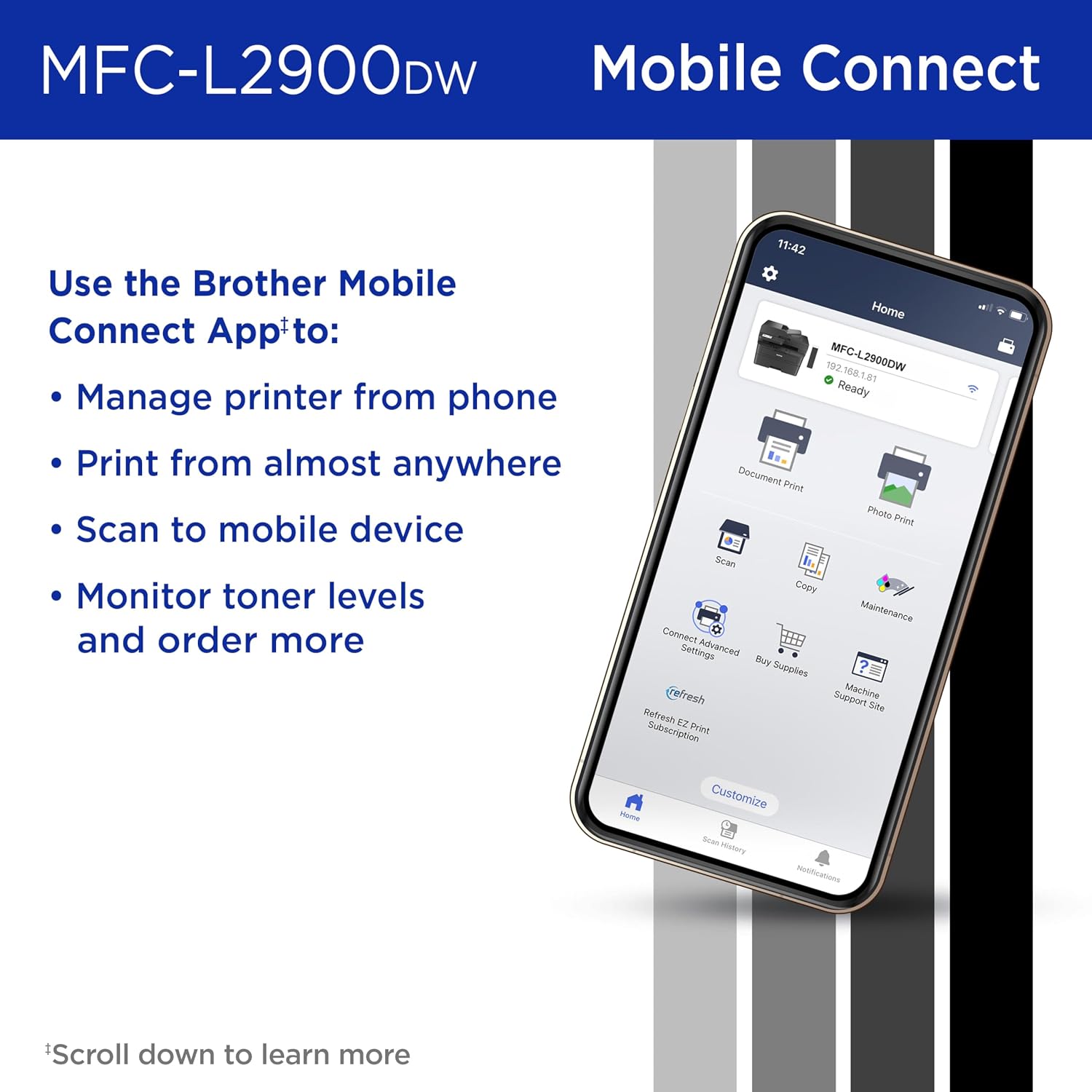
The Brother Mobile Connect app enhances the printer’s versatility by enabling remote printing and scanning from mobile devices. Users can manage toner levels, order supplies, and monitor print jobs from smartphones or tablets, reducing the need for physical interaction with the printer. This feature is ideal for small businesses with distributed teams, as it supports flexible work arrangements without compromising productivity.
Compatibility and Setup
The MFC-L2900DW’s compatibility with a wide range of devices, including PCs, laptops, and smartphones, ensures that it can integrate smoothly into existing office setups. The included quick setup guide and online support resources simplify installation, making it accessible for users with varying technical expertise. These considerations make the printer a practical choice for businesses seeking a reliable, user-friendly solution.
Document Handling and Productivity Features
The MFC-L2900DW’s advanced document handling capabilities are designed to enhance productivity in busy office environments. The 50-page automatic document feeder (ADF) supports efficient scanning and copying of multi-page documents, reducing manual input and saving time. Automatic duplex printing further contributes to cost savings by minimizing paper usage, while the 250-sheet input tray ensures that large print jobs can be completed without frequent refills.

Automatic Duplex Printing and Paper Savings
The printer’s automatic duplex printing function is a significant advantage for businesses aiming to reduce paper consumption. By printing on both sides of each sheet, the MFC-L2900DW helps lower printing costs and environmental impact without compromising print quality. This feature is particularly useful for tasks such as creating reports, invoices, or internal memos, where single-sided printing may not be necessary.
Automatic Document Feeder and Multi-Page Processing
The 50-page ADF allows users to process large volumes of documents with minimal effort, making it ideal for tasks such as scanning multiple pages for archiving or copying multi-page forms. The ADF’s compatibility with 20-lb. paper ensures reliable performance with standard office supplies, while its design reduces the risk of paper jams and misfeeds. These capabilities contribute to the printer’s efficiency in high-volume environments.
Input Tray Capacity and Workflow Optimization
The 250-sheet input tray provides ample capacity for continuous printing, reducing the frequency of paper refills and improving workflow efficiency. This is particularly beneficial for businesses with repetitive print jobs, such as generating daily reports or printing large batches of forms. The tray’s design also supports easy access to paper, minimizing disruptions during printing tasks.
Security and Data Protection
The MFC-L2900DW incorporates advanced security features to protect sensitive business data and ensure secure printing practices. These include encryption for network communications, secure print release options, and access controls to prevent unauthorized use. The printer’s compliance with industry standards such as ENERGY STAR and EPEAT further reinforces its commitment to data security and environmental responsibility.

Network Security and Data Encryption
The printer’s dual-band wireless connectivity supports encrypted data transmission, reducing the risk of unauthorized access to printed documents. Secure print release options allow users to authenticate print jobs before output, ensuring that sensitive information is not left unattended. These features are essential for businesses handling confidential data, such as financial records or client information.
Access Controls and User Management
The MFC-L2900DW’s access control features enable administrators to manage user permissions and restrict printing to authorized personnel. This is particularly useful in shared office environments where multiple users may access the printer. The ability to configure print quotas and monitor usage helps maintain compliance with organizational policies and resource management goals.
Compliance and Environmental Standards
The printer’s ENERGY STAR and EPEAT certifications demonstrate its adherence to strict environmental and energy efficiency standards. These certifications are important for businesses seeking to meet sustainability goals and comply with regulatory requirements. The printer’s energy-efficient design also contributes to long-term cost savings, aligning with corporate responsibility initiatives.

Pros & Cons
Pros
- High Print Speed: The 36 ppm monochrome printing speed ensures efficient handling of large document volumes.
- Energy Efficiency: A 22% reduction in electricity consumption compared to previous models lowers operational costs.
- Dual-band Wireless Connectivity: Supports stable performance in environments with multiple connected devices.
- Automatic Duplex Printing: Reduces paper usage and printing costs without compromising quality.
- Integrated Touchscreen: Simplifies navigation for cloud-based workflows and device management.
- Robust Document Handling: The 50-page ADF and 250-sheet input tray enhance productivity for multi-page tasks.
- Advanced Security Features: Includes encryption and secure print release options for data protection.
- Compatibility with Cloud Services: Direct access to Google Drive, Dropbox, and OneNote streamlines document management.
Cons
- Limited Color Printing: The printer is designed solely for monochrome output, which may not suit businesses requiring color printing.
- No Built-in Fax Function: While faxing is supported, it requires an external phone line and additional setup.
- Dependence on Network Connectivity: Wireless performance may be affected by interference or unstable network conditions.
- Higher Initial Setup Complexity: The touchscreen interface and cloud integration may require time to configure for first-time users.
- Limited Paper Size Support: The maximum media size of 8.5 x 14 inches may not accommodate specialized paper formats.
Final Verdict: Who This Printer Is Best For (and Who Should Skip It)
The Brother MFC-L2900DW is an excellent choice for small businesses requiring a reliable, high-speed monochrome printer with integrated scanning and copying capabilities. Its energy-efficient design, automatic duplex printing, and dual-band wireless connectivity make it well-suited for environments where cost-effectiveness and productivity are priorities. The 3.5-inch touchscreen and cloud integration further enhance its appeal for modern office workflows.
However, this printer may not be ideal for businesses requiring color printing, advanced fax capabilities, or support for specialized paper sizes. Users in environments with unstable network conditions or those needing more complex document handling features may find the MFC-L2900DW less suitable. For businesses prioritizing monochrome printing with a focus on efficiency and sustainability, the MFC-L2900DW offers a compelling solution.
Frequently Asked Questions (FAQs)
What is the maximum print speed of the Brother MFC-L2900DW?
The Brother MFC-L2900DW delivers a maximum monochrome print speed of 36 pages per minute (ppm), making it suitable for high-volume office environments. This speed ensures efficient processing of large document sets without compromising print quality.
Does the printer support duplex printing?
Yes, the Brother MFC-L2900DW includes automatic duplex printing, which prints on both sides of each sheet. This feature helps reduce paper consumption and printing costs while maintaining professional output quality.
What connectivity options are available for the MFC-L2900DW?
The printer supports dual-band wireless (2.4GHz/5GHz), Ethernet, and USB 2.0 connectivity. These options provide flexibility for networked printing and compatibility with a wide range of devices, including PCs, laptops, and mobile devices.
Can the printer handle multi-page documents?
Yes, the MFC-L2900DW is equipped with a 50-page automatic document feeder (ADF), allowing users to scan or copy multi-page documents efficiently. This feature reduces manual input and improves productivity for tasks involving large volumes of paper.
Is the printer energy-efficient?
The Brother MFC-L2900DW features an enhanced fuser design that reduces electricity consumption by 22% compared to its predecessor. This energy-efficient design helps lower operational costs and supports sustainability goals for businesses.
What security features does the printer offer?
The MFC-L2900DW includes advanced security features such as encrypted network communications, secure print release options, and access controls. These features protect sensitive business data and ensure secure printing practices in office environments.
Can the printer integrate with cloud services?
Yes, the printer’s 3.5-inch touchscreen provides direct access to popular cloud services like Google Drive, Dropbox, and OneNote. This integration streamlines document management and enhances workflow efficiency for businesses using cloud-based tools.
What is the recommended duty cycle for the printer?
The Brother MFC-L2900DW is designed for a duty cycle of up to 15,000 pages per month, making it suitable for small to medium-sized businesses with moderate to high printing volumes. This capacity ensures reliable performance in environments with consistent usage.