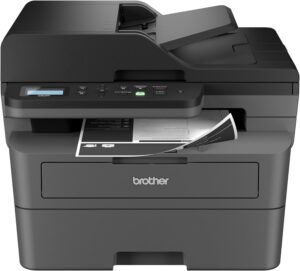
Brother MFC-L3780CDW: Digital Color All-in-One Printer for Small Businesses

The Importance of Choosing the Right Printer for Your Workflow
In today’s fast-paced business environment, selecting the right printer is critical to maintaining productivity and ensuring professional output. Whether you’re managing a small office, a home-based business, or a remote team, the printer you choose must align with your specific needs. From high-speed color printing to secure document handling, the right printer can streamline operations, reduce errors, and enhance the quality of your professional materials. For small businesses, the balance between performance, cost-effectiveness, and ease of use is paramount. A printer that delivers laser-quality output at scale, supports versatile connectivity, and minimizes maintenance overhead can make a significant difference in daily operations. This review evaluates the Brother MFC-L3780CDW, a wireless digital color all-in-one printer designed for small businesses, to determine its suitability for environments requiring consistent, high-quality color printing with integrated scanning, copying, and fax capabilities. By analyzing its technical specifications, supported media types, and operational efficiency, we’ll assess how well this printer meets the demands of modern workspaces.
Quick Overview
| Feature | Details |
|---|---|
| Printer Type | Wireless digital color all-in-one printer |
| Printing Technology | Laser |
| Supported Functions | Print, scan, copy, fax |
| Print Speed | Up to 31 pages per minute (color and monochrome) |
| Print Resolution | 2400 x 600 dpi (black and white), 300 dpi (color) |
| Media Sizes | 3 x 4 inches to 8.5 x 14 inches, 62 x 89 millimeters |
| Supported Media | Card stock, envelopes, glossy photo paper, labels, plain paper |
| Connectivity | Ethernet, NFC, USB, Wi-Fi (dual-band) |
| Duty Cycle | 15,000 pages per month |
| Toner System | Brother Genuine TN229 series (standard, high yield, super high yield) |
| Warranty | 1-year limited warranty with free support |
| Security Features | NFC card reader, encrypted data transmission |
The Brother MFC-L3780CDW combines laser-quality color printing with versatile connectivity options, making it a strong contender for small businesses requiring reliable, high-speed output. Its ability to handle multiple document types and integrate with modern workspaces through wireless and wired connections enhances its appeal for environments where efficiency and quality are priorities.

Print Quality and Laser Technology
The Brother MFC-L3780CDW leverages laser printing technology to deliver consistent, smudge-free output suitable for professional documents. Laser printers are known for their ability to produce sharp text and precise graphics, which is critical for business reports, marketing materials, and client presentations. The printer’s maximum print resolution of 2400 x 600 dpi for black and white documents ensures crisp, clear text, while the 300 dpi color resolution provides adequate detail for color graphics and images. This combination makes the MFC-L3780CDW particularly well-suited for environments where visual clarity and professional appearance are essential.

Laser Printing Advantages
Laser printing technology offers several benefits over inkjet alternatives, particularly for high-volume use. The MFC-L3780CDW’s laser system produces durable prints with minimal smudging, making it ideal for documents that require long-term archival or frequent handling. Additionally, laser printers like the MFC-L3780CDW typically have a longer lifespan and lower maintenance requirements compared to inkjet models, which is a significant advantage for small businesses seeking cost-effective, reliable printing solutions.
Color Accuracy and Media Compatibility
The printer’s color printing capabilities are optimized for business use, with a focus on accurate color reproduction for marketing materials and presentations. While the 300 dpi color resolution may not match the fine detail of high-end photo printers, it is sufficient for most professional applications. The MFC-L3780CDW supports a range of media types, including glossy photo paper and labels, allowing users to create visually appealing documents without the need for specialized equipment.
Text and Graphics Clarity
For text-heavy documents, the MFC-L3780CDW’s 2400 x 600 dpi resolution ensures that fonts remain sharp and legible, even at smaller sizes. This is particularly important for reports, invoices, and other documents where readability is crucial. The printer’s ability to handle both black and white text and color graphics makes it a versatile option for businesses with diverse printing needs.
Print Speed and Workload Capacity
The MFC-L3780CDW is designed for small business environments where efficiency is key. With print speeds of up to 31 pages per minute for both color and monochrome documents, the printer can handle moderate to high-volume workloads without significant delays. This speed is particularly beneficial for tasks such as generating monthly reports, printing marketing materials, or producing multiple copies of client proposals.

High-Speed Printing for Daily Operations
In environments where time is a critical factor, the MFC-L3780CDW’s 31 ppm print speed helps reduce wait times and keeps workflows moving. The printer’s ability to handle both single-pass duplex printing and scanning ensures that users can complete tasks quickly without compromising on quality. This is especially valuable for small offices where multiple users may need access to the printer throughout the day.
Duty Cycle and Long-Term Reliability
The printer’s duty cycle of 15,000 pages per month indicates that it is built for regular, sustained use. This specification suggests that the MFC-L3780CDW is well-suited for small businesses with consistent printing demands, as opposed to intermittent use in home environments. The printer’s robust construction and reliable performance make it a durable choice for environments where frequent printing is required.
Handling Large Print Jobs
For businesses that occasionally need to print large volumes, such as preparing annual reports or client presentations, the MFC-L3780CDW’s high-speed capabilities ensure that these tasks are completed efficiently. The printer’s ability to handle multiple page copies in a single run also reduces the time and effort required to produce large print jobs.
Connectivity Options and Device Compatibility
The MFC-L3780CDW offers a range of connectivity options, including Wi-Fi (dual-band), Ethernet, NFC, and USB, making it compatible with a variety of devices and environments. This versatility ensures that users can integrate the printer into their existing workflows without significant setup challenges.

Wireless and Wired Connectivity
The printer’s dual-band Wi-Fi connectivity (2.4GHz and 5GHz) provides flexibility for users with different network requirements. The inclusion of Ethernet and USB ports ensures that the MFC-L3780CDW can be used in both wired and wireless environments, which is particularly beneficial for small offices with mixed device setups. This adaptability makes the printer suitable for environments where network stability and speed are important considerations.
NFC and Voice Integration
The MFC-L3780CDW’s NFC card reader and voice control compatibility add convenience for users who need quick access to printing functions. The NFC feature allows for secure authentication, which is useful for businesses handling sensitive documents. Voice control integration, while not a primary feature, enhances the printer’s usability in environments where hands-free operation is preferred.
Compatibility with Modern Devices
The printer’s compatibility with laptops, PCs, smartphones, and tablets ensures that it can be integrated into a wide range of workspaces. This broad device support is essential for small businesses where employees may use different devices for printing tasks. The ability to connect via Wi-Fi Direct also simplifies setup for users who prefer direct printing without the need for a central network.

Pros and Cons
Pros
- Laser-Quality Color Printing: The MFC-L3780CDW delivers sharp, smudge-free prints suitable for professional documents and marketing materials.
- High-Speed Output: With print speeds of up to 31 pages per minute, the printer is well-suited for environments requiring rapid document production.
- Versatile Connectivity: The printer supports Wi-Fi (dual-band), Ethernet, NFC, and USB, ensuring compatibility with a wide range of devices and network environments.
- Robust Security Features: The inclusion of an NFC card reader and encrypted data transmission enhances the printer’s security for sensitive business documents.
- Single-Pass Duplex Printing: The automatic duplex feature reduces paper usage and streamlines document creation for both black and white and color printing.
- Long-Lasting Toner System: Brother’s Genuine TN229 series toner is designed for durability, with high-yield options available to reduce long-term costs.
Cons
- Subscription-Based Toner Refills: The Refresh EZ Print Subscription service requires an ongoing monthly fee, which may be a drawback for users who prefer one-time purchases.
- Limited Media Compatibility: While the printer supports a range of media types, it may not handle specialty papers or thick cardstock as effectively as some competitors.
- Weight and Space Requirements: The printer’s weight of 47.8 pounds and larger footprint may make it less suitable for compact home offices or small workspaces.
- Dependence on Internet Connectivity: The Refresh EZ Print Subscription and some advanced features require a stable internet connection, which could be a limitation in areas with unreliable broadband.
- Limited Color Resolution: The 300 dpi color resolution, while adequate for most business use cases, may not meet the demands of high-end graphic design or photo printing.
Final Verdict: Who This Printer Is Best For (and Who Should Skip It)
The Brother MFC-L3780CDW is an excellent choice for small businesses that require consistent, high-quality color printing with integrated scanning, copying, and fax capabilities. Its combination of laser-quality output, high-speed printing, and versatile connectivity options makes it well-suited for environments where efficiency and reliability are priorities. The printer’s ability to handle both black and white and color documents, along with its single-pass duplex feature, ensures that users can produce professional materials without unnecessary paper waste. Additionally, the inclusion of security features like the NFC card reader and encrypted data transmission provides peace of mind for businesses handling sensitive information.
However, the MFC-L3780CDW may not be the best fit for users who prefer one-time toner purchases or have limited internet connectivity. The subscription-based toner refill system, while convenient, may be a drawback for those who want more control over their printing costs. Similarly, the printer’s weight and size may make it less ideal for compact home offices or small workspaces with limited room. For businesses with high-volume printing needs or those requiring advanced color resolution for graphic design, alternative printers with more specialized capabilities may be a better fit. Overall, the MFC-L3780CDW is a strong contender for small businesses seeking a reliable, feature-rich printer that balances performance with ease of use.

Frequently Asked Questions (FAQs)
Does the Brother MFC-L3780CDW produce laser-quality color prints?
Yes, the MFC-L3780CDW uses laser printing technology to deliver sharp, smudge-free color prints. This ensures professional-quality output suitable for business documents, marketing materials, and presentations. The printer’s 2400 x 600 dpi resolution for black and white documents and 300 dpi color resolution provide clear text and adequate detail for most professional applications.
What is the maximum print speed of the Brother MFC-L3780CDW?
The MFC-L3780CDW can print up to 31 pages per minute (ppm) for both color and monochrome documents. This high-speed output is ideal for small businesses that require efficient document production, such as generating reports, invoices, or client proposals without significant delays.
Can the Brother MFC-L3780CDW handle duplex printing?
Yes, the MFC-L3780CDW features automatic single-pass duplex printing, which reduces paper usage and streamlines document creation. This functionality is available for both black and white and color printing, making it convenient for producing professional materials with minimal waste.
What connectivity options does the Brother MFC-L3780CDW offer?
The MFC-L3780CDW supports Wi-Fi (dual-band 2.4GHz and 5GHz), Ethernet, NFC, and USB connectivity. This versatility allows the printer to integrate seamlessly into various work environments, whether through wireless networks, wired connections, or direct device pairing.
Is the Brother MFC-L3780CDW suitable for small office use?
Yes, the MFC-L3780CDW is well-suited for small offices due to its high-speed printing, integrated scanning, and copying capabilities. Its 15,000 pages per month duty cycle indicates it is built for regular, sustained use, making it a reliable choice for environments with consistent printing demands.
What are the toner options for the Brother MFC-L3780CDW?
The MFC-L3780CDW uses Brother Genuine TN229 series toner cartridges, available in standard, high yield, and super high yield options. Users can also opt for the Refresh EZ Print Subscription service, which provides a monthly toner refill plan with a free trial period.
Does the Brother MFC-L3780CDW include security features?
Yes, the MFC-L3780CDW includes security features such as an NFC card reader for badge authentication and encrypted data transmission. These features help protect sensitive business documents from unauthorized access, making the printer suitable for environments with strict data security requirements.
What media types can the Brother MFC-L3780CDW handle?
The MFC-L3780CDW supports a variety of media types, including card stock, envelopes, glossy photo paper, labels, and plain paper. This versatility allows users to create professional-looking documents on different paper types without the need for specialized equipment.