
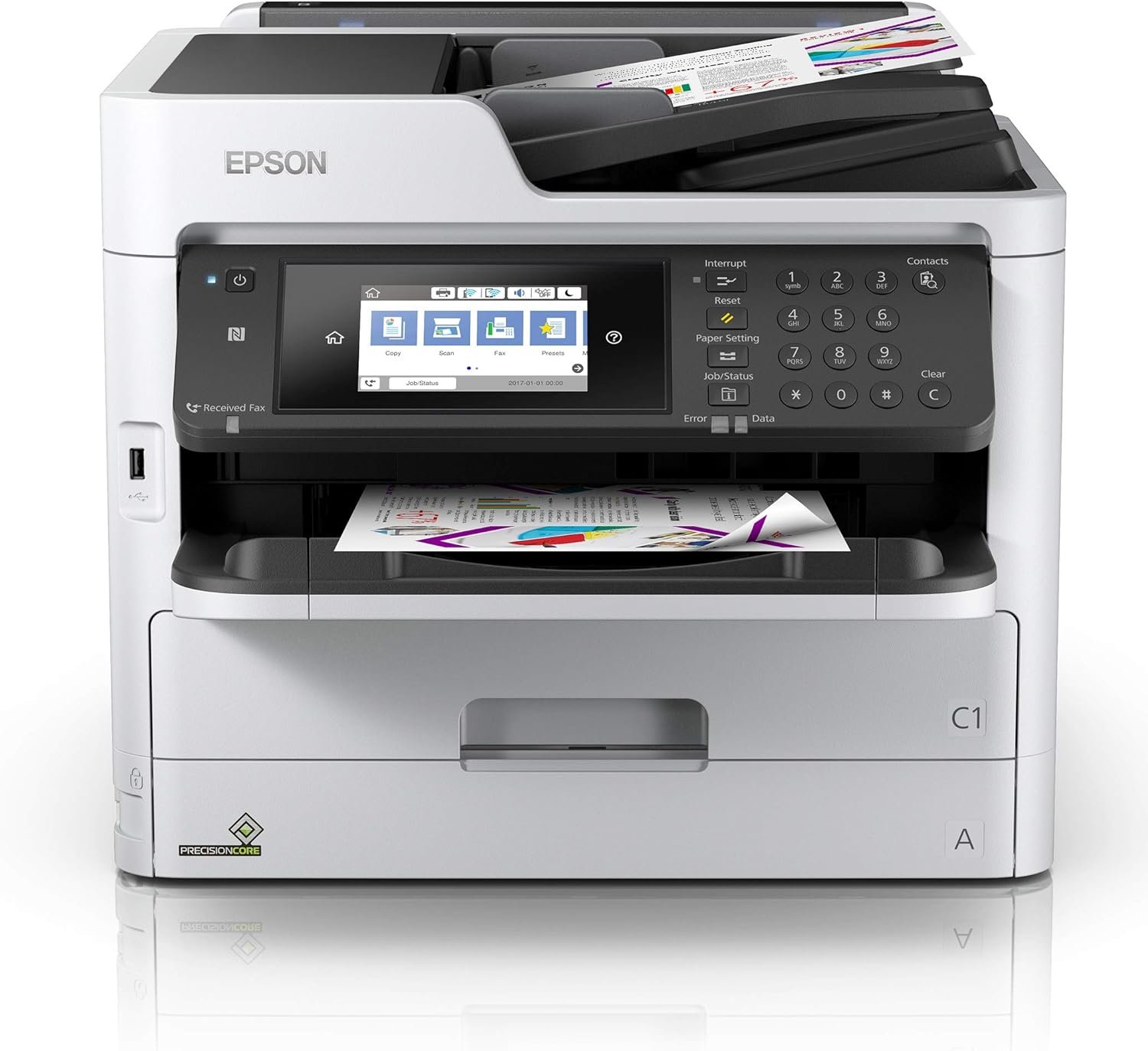
The Importance of Selecting the Right Printer for Modern Workloads
In today’s fast-paced business environment, the choice of a printer can significantly impact productivity, operational efficiency, and cost management. Whether for small office environments, remote teams, or home-based professionals, the right printer must balance speed, reliability, and functionality to meet diverse printing needs. From handling high-volume document workflows to supporting multifunctional tasks like scanning and copying, modern printers must adapt to evolving user demands. Printers like the Epson Workforce Pro WF-C5710 are engineered to address these challenges by integrating advanced inkjet technology with versatile connectivity options. However, selecting the optimal printer requires careful evaluation of factors such as print speed, media compatibility, maintenance requirements, and long-term cost efficiency. This review provides an in-depth analysis of the WF-C5710’s capabilities, helping users determine if it aligns with their specific operational requirements.
Quick Overview
| Feature | Details |
|---|---|
| Printer Type | Network Multifunction Color Printer |
| Printing Technology | Inkjet (Liquid Ink) |
| Supported Functions | Print, Scan, Copy, Fax |
| Print Resolution | 2400 x 1200 dpi (Color/Black & White) |
| Maximum Print Speed | 24 ISO ppm (Color), 24 ISO ppm (Monochrome) |
| Media Sizes | 8.5 x 47.2 inches (Maximum) |
| Media Types | Paper (Plain) |
| Connectivity | Ethernet, USB, Wireless |
| Automatic Document Feeder | 50-Page Duplex ADF |
| Ink System | Replaceable Ink Pack System |
| Duty Cycle | 250-300 Pages per Run |
| Warranty | Limited Warranty |
The Epson Workforce Pro WF-C5710 combines color printing capabilities with multifunctional features, making it suitable for environments requiring both document management and creative output. Its inkjet technology and network connectivity support efficient workflows, while the ADF enhances productivity for high-volume tasks. These specifications position it as a viable option for small to medium-sized offices, though its suitability depends on specific operational needs.

Print Speed and Efficiency: Balancing Performance with Practicality
The Epson Workforce Pro WF-C5710 is designed to deliver high-speed printing without requiring a warm-up period, ensuring immediate readiness for print jobs. Its maximum color print speed of 24 ISO ppm and monochrome speed of 24 ISO ppm are competitive for color multifunction printers in the mid-range segment. These speeds are achieved through Epson’s advanced inkjet technology, which optimizes droplet placement for consistent output. However, the printer’s performance is most effective when handling moderate to high-volume workflows, as its duty cycle of 250-300 pages per run suggests it is optimized for environments with regular, but not excessive, print demands. For users requiring faster color printing, the WF-C5710’s speed may fall short compared to dedicated color laser printers, which typically offer higher ppm rates for large-scale document production.

Color Printing Performance and Resolution
The WF-C5710’s color printing capabilities are supported by a resolution of 2400 x 1200 dpi, which ensures sharp text and detailed graphics. This resolution is suitable for most business and office applications, including reports, presentations, and marketing materials. However, it may not meet the demands of professional photographers or graphic designers who require higher resolution for print output. The printer’s color accuracy is further enhanced by Epson’s proprietary ink technology, which minimizes color bleeding and improves vibrancy. While the color output is consistent with standard office use, users expecting ultra-high-definition prints may find the resolution limitations restrictive.
Monochrome Printing Efficiency
For black-and-white printing, the WF-C5710 delivers a resolution of 2400 x 1200 dpi, which is adequate for text documents and forms. The printer’s monochrome speed of 24 ISO ppm is efficient for everyday office tasks, though it may lag behind laser printers in high-volume environments. The lack of a dedicated monochrome ink system could impact the longevity of the color ink cartridges if frequent black-and-white printing is required. This design choice prioritizes color versatility but may affect cost efficiency for users with heavy monochrome usage.
Duty Cycle and Workload Capacity
The printer’s duty cycle of 250-300 pages per run indicates it is designed for moderate to high-volume environments. This capacity is suitable for small to medium-sized offices, but users with extremely high print demands may need a printer with a higher duty cycle. The WF-C5710’s ability to handle continuous printing without significant downtime makes it a reliable option for businesses with regular workflows. However, its performance in extremely high-volume scenarios may be limited compared to industrial-grade printers with larger duty cycles.
Connectivity and Network Integration: Seamless Device Compatibility
The Epson Workforce Pro WF-C5710 offers versatile connectivity options, including Ethernet, USB, and wireless (Wi-Fi) interfaces, enabling seamless integration into both wired and wireless networks. This flexibility is particularly beneficial for small businesses and remote teams that require printers to be accessible from multiple devices. The printer’s Ethernet port supports stable network connections, while the wireless functionality allows for easy setup without the need for physical cables. However, the absence of Wi-Fi Direct or mobile printing capabilities via Bluetooth may limit its appeal to users seeking additional connectivity options. The printer’s compatibility with a wide range of devices, including laptops and PCs, ensures broad usability across different operating systems and environments.

Network Configuration and Remote Access
The WF-C5710’s network capabilities are enhanced by its support for remote printing and administrative controls, which are essential for managing print jobs from multiple locations. Users can access the printer’s settings and monitoring functions through a web interface, allowing for centralized management of print queues and security configurations. This feature is particularly useful for businesses with distributed teams, as it enables administrators to oversee printer status and adjust settings remotely. However, the complexity of network configuration may pose a challenge for users with limited IT expertise, requiring additional setup time and technical knowledge.
Device Compatibility and User Experience
The printer’s compatibility with a variety of devices ensures that it can be integrated into existing office setups without significant modifications. Its support for both USB and Ethernet connections provides flexibility in deployment, while the wireless option simplifies mobility for users who need to print from mobile devices. The printer’s user interface, accessible via touch controls and remote management tools, is designed for ease of use, though some users may find the interface less intuitive compared to more modern printers with advanced touchscreen displays. Overall, the connectivity options and device compatibility make the WF-C5710 a practical choice for environments requiring networked printing solutions.
Media Support and Output Quality: Versatility in Printing Tasks
The Epson Workforce Pro WF-C5710 is designed to handle a range of media types, primarily focusing on standard paper formats. Its maximum media size of 8.5 x 47.2 inches allows for printing on letter-sized and legal-sized paper, making it suitable for most office documents. However, the printer’s support for specialty media such as glossy photo paper or thick cardstock is limited, which may restrict its use in creative or professional printing scenarios. The printer’s ability to handle duplex printing through its automatic document feeder (ADF) enhances efficiency for tasks requiring two-sided output, though the ADF’s capacity of 50 pages is adequate for small to medium-volume jobs.

Print Quality for Different Media Types
The WF-C5710’s print quality is optimized for standard office paper, delivering consistent results for text documents, reports, and basic graphics. The printer’s ability to produce sharp text and clear images is supported by its high-resolution print heads and inkjet technology. However, when printing on thicker or textured media, users may notice variations in ink adhesion and print consistency. The printer’s performance on specialty media is not explicitly detailed in its specifications, which suggests it may not be ideal for users requiring high-quality photo or cardstock printing.
Duplex Printing and Document Management
The inclusion of an automatic duplex printing feature improves workflow efficiency by reducing paper usage and minimizing the need for manual intervention. The ADF’s ability to handle 50 pages at a time is sufficient for most office tasks, though users with larger document volumes may need a printer with a higher ADF capacity. The printer’s duplex printing functionality is particularly beneficial for businesses aiming to reduce paper costs and environmental impact, though the quality of duplex output may vary depending on the type of paper used.
Media Compatibility and Maintenance Considerations
The WF-C5710’s media compatibility is limited to standard paper types, which may be a drawback for users requiring support for alternative media. The printer’s design does not include features for handling specialty papers, which could limit its versatility in creative or specialized printing environments. Additionally, the use of liquid ink requires regular maintenance to prevent clogging, though the replaceable ink pack system is designed to minimize intervention. Users should consider the printer’s media limitations when evaluating its suitability for specific printing tasks.

Pros & Cons
Pros
- High-Speed Printing: The WF-C5710 delivers color and monochrome print speeds of up to 24 ISO ppm, making it suitable for moderate to high-volume office environments.
- Versatile Connectivity: Ethernet, USB, and wireless options provide flexible network integration, supporting both wired and wireless printing setups.
- Automatic Document Feeder: The 50-page ADF enhances productivity for tasks requiring two-sided printing, scanning, and copying.
- Replaceable Ink Pack System: This system reduces maintenance frequency and offers cost savings compared to traditional ink cartridges.
- Security Features: Built-in administrative controls and status management functions help protect sensitive business data.
- Dual-Sided Printing: The automatic duplex feature reduces paper consumption and supports eco-friendly printing practices.
Cons
- Limited Media Compatibility: The printer is optimized for standard paper types, which may restrict its use for specialty media like photo paper or cardstock.
- Lower Color Resolution: While the 2400 x 1200 dpi resolution is adequate for most office tasks, it may fall short for professional graphic design or photography applications.
- Moderate Duty Cycle: The 250-300 pages per run capacity is suitable for small to medium-sized offices but may not meet the demands of high-volume printing environments.
- No Wi-Fi Direct or Bluetooth: The lack of these connectivity options may limit its appeal to users seeking additional mobile printing capabilities.
- Maintenance Requirements: The liquid ink system requires periodic cleaning to prevent clogging, which could increase maintenance efforts for some users.
Final Verdict: Who This Printer Is Best For (and Who Should Skip It)
The Epson Workforce Pro WF-C5710 is best suited for small to medium-sized offices, remote teams, and professionals requiring a reliable color multifunction printer with versatile connectivity. Its high-speed printing, automatic duplex features, and replaceable ink system make it an efficient choice for environments with moderate to high-volume document workflows. The printer’s security features and network integration also enhance its appeal for businesses prioritizing data protection and centralized management. However, users with extremely high print demands, those requiring support for specialty media, or those needing advanced connectivity options like Wi-Fi Direct or Bluetooth may find the WF-C5710 less suitable. For users seeking higher resolution color output or a dedicated laser printer for large-scale document production, alternative models may offer more specialized capabilities.
Frequently Asked Questions (FAQs)
What is the maximum print speed for color documents on the Epson Workforce Pro WF-C5710?
The WF-C5710 can print color documents at a maximum speed of 24 ISO ppm, which is suitable for moderate to high-volume office environments. This speed is achieved through Epson’s advanced inkjet technology, ensuring consistent output without a warm-up period.
Does the Epson Workforce Pro WF-C5710 support wireless printing?
Yes, the WF-C5710 offers wireless connectivity via Wi-Fi, allowing users to print from laptops, PCs, and other compatible devices without the need for physical cables. However, it does not support Wi-Fi Direct or Bluetooth for additional mobile printing options.
What types of media can the WF-C5710 handle?
The printer is optimized for standard paper types, including plain paper, and can handle media sizes up to 8.5 x 47.2 inches. It does not support specialty media such as glossy photo paper or thick cardstock, which may limit its versatility for creative printing tasks.
How does the replaceable ink pack system benefit users?
The replaceable ink pack system minimizes maintenance requirements and offers up to 45% lower total printing costs compared to traditional ink cartridges. This system reduces the frequency of interventions, making it more cost-effective for regular office use.
What is the duty cycle of the Epson Workforce Pro WF-C5710?
The printer’s duty cycle is rated for 250-300 pages per run, which is suitable for small to medium-sized offices with regular printing needs. It is designed to handle continuous printing without significant downtime but may not meet the demands of high-volume environments.
Can the WF-C5710 handle duplex printing?
Yes, the WF-C5710 features automatic duplex printing, which reduces paper consumption and supports eco-friendly printing practices. This feature is ideal for businesses aiming to minimize costs and environmental impact.
What connectivity options are available for the WF-C5710?
The printer offers Ethernet, USB, and wireless (Wi-Fi) connectivity options, providing flexible network integration. This allows users to print from multiple devices and manage print jobs remotely through a web interface.
Does the WF-C5710 include security features for business use?
Yes, the printer includes advanced security features such as administrative controls for security, accessibility, status management, and maintenance. These functions help protect sensitive business data and ensure secure printing practices.