HP Envy 6555e All-in-One Printer Review: Inkjet Performance, Connectivity, and Home Office Suitability
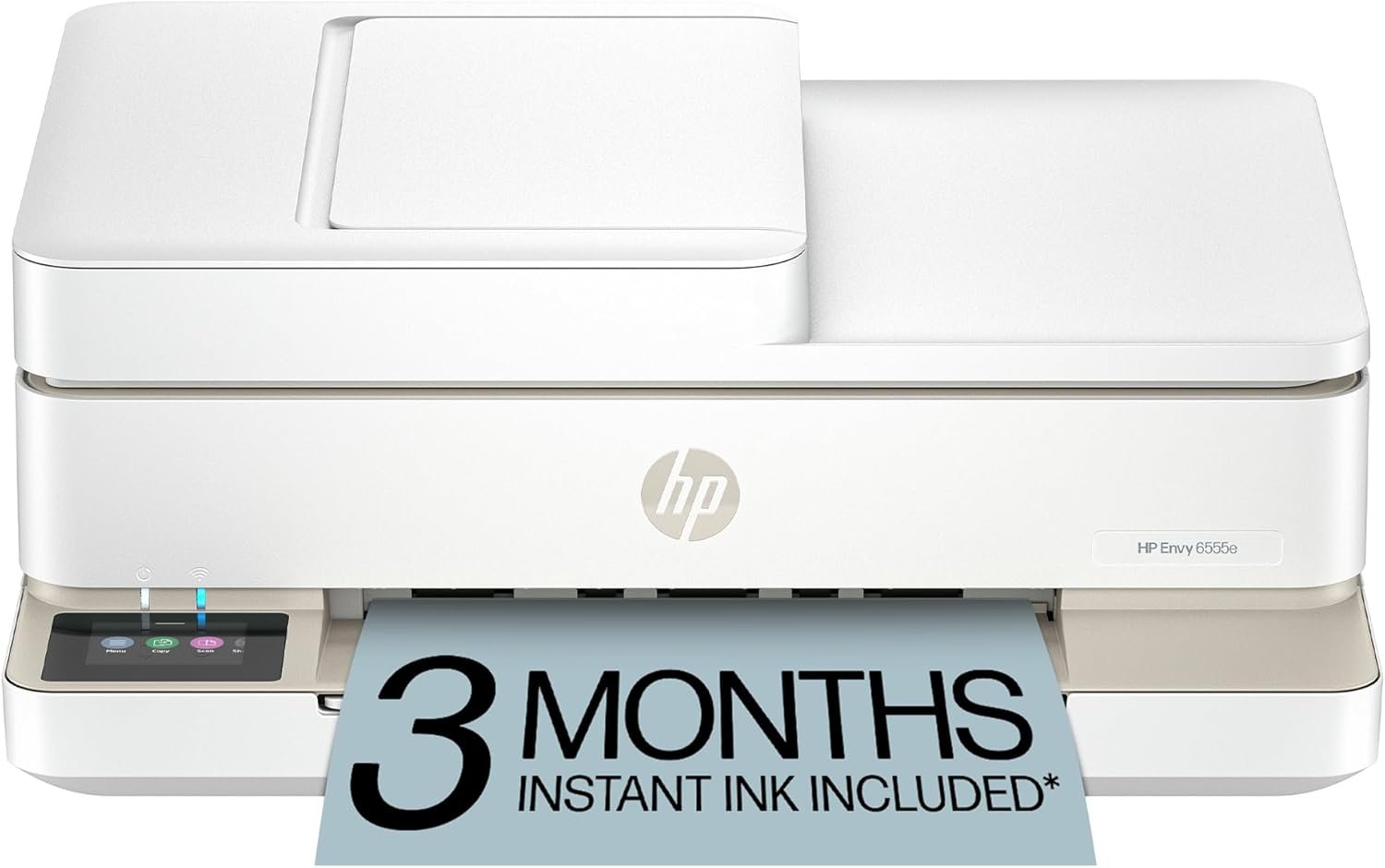
The Importance of Choosing the Right Printer for Your Needs
Selecting the appropriate printer is a critical decision that directly impacts productivity, cost efficiency, and user satisfaction. In 2026, households and small businesses face diverse printing demands, from high-resolution photo printing to reliable document management. The right printer must balance speed, output quality, and connectivity options to match specific workflows. For instance, a home office may require duplex printing and mobile compatibility, while a commercial setting might prioritize high-volume reliability and low maintenance. Printers like the HP Envy 6555e must meet these expectations without compromising on features like automatic document feeding or wireless connectivity. Understanding the technical specifications, supported media types, and duty cycle limitations ensures users select a device that aligns with their workload. This review evaluates the HP Envy 6555e based on its inkjet technology, print resolution, connectivity options, and suitability for home and small business environments. By analyzing these factors, users can determine whether this all-in-one printer meets their requirements for speed, quality, and long-term cost-effectiveness.
Quick Overview
| Feature | Details |
|---|---|
| Printer Type | Inkjet All-in-One Printer |
| Supported Functions | Print, Scan, Copy, Duplex Printing |
| Print Resolution | 1200 x 1200 dpi (Color/Black and White) |
| Print Speed | 7 ppm (Color), 10 ppm (Monochrome) |
| Supported Media Sizes | 3 x 5 in to 8.5 x 12 in |
| Connectivity | Wi-Fi (802.11a/b/g/n/ac), Mobile Printing |
| Ink System | Color Inkjet with HP Instant Ink Eligibility |
| Duty Cycle | Designed for home and small office use |
| Warranty | 90-Day Limited Warranty |
| Memory Storage | 256 MB |
| Dimensions | 14.21 x 17.05 x 6.73 in |
| Weight | 13.5 lbs |
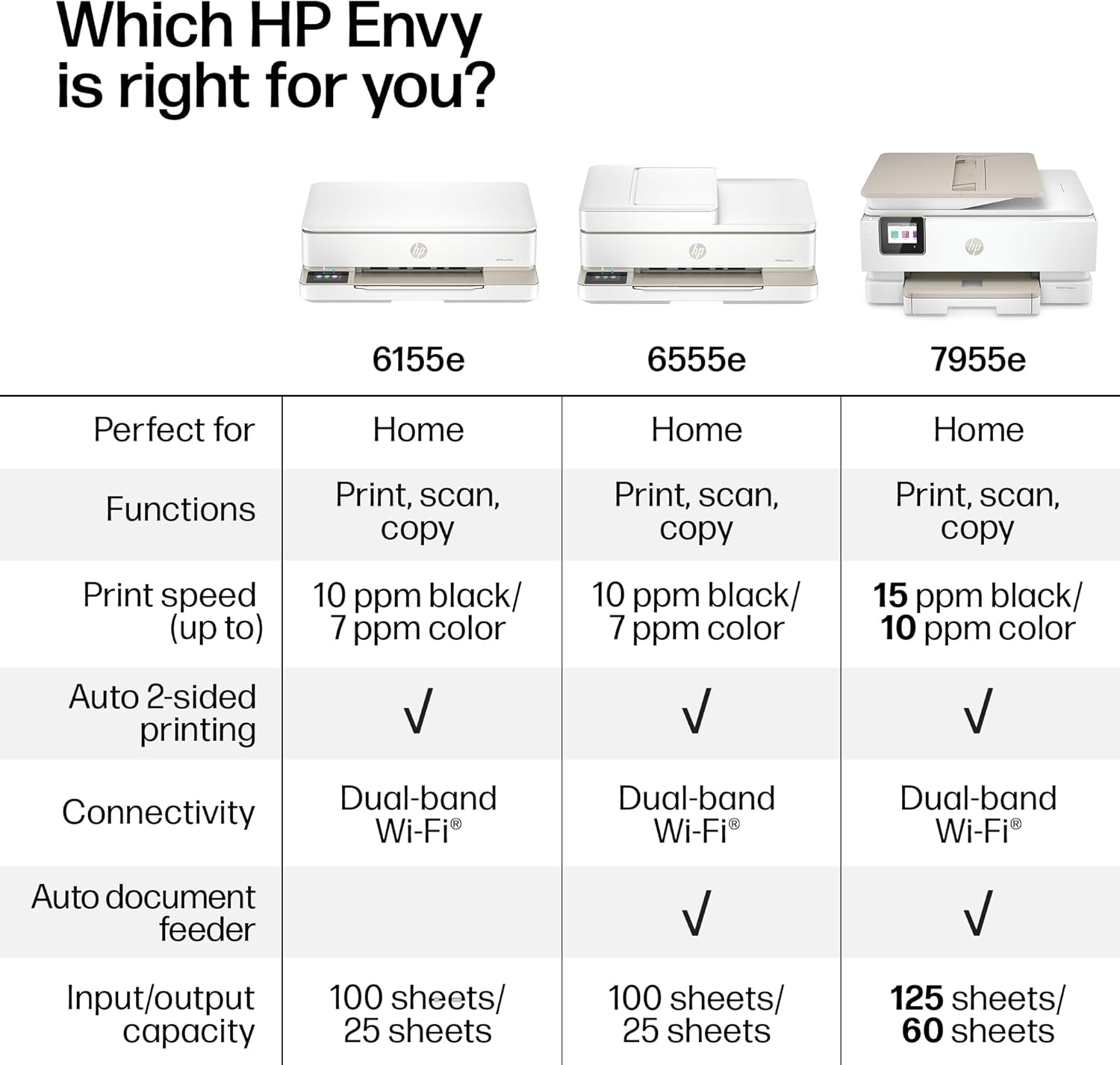
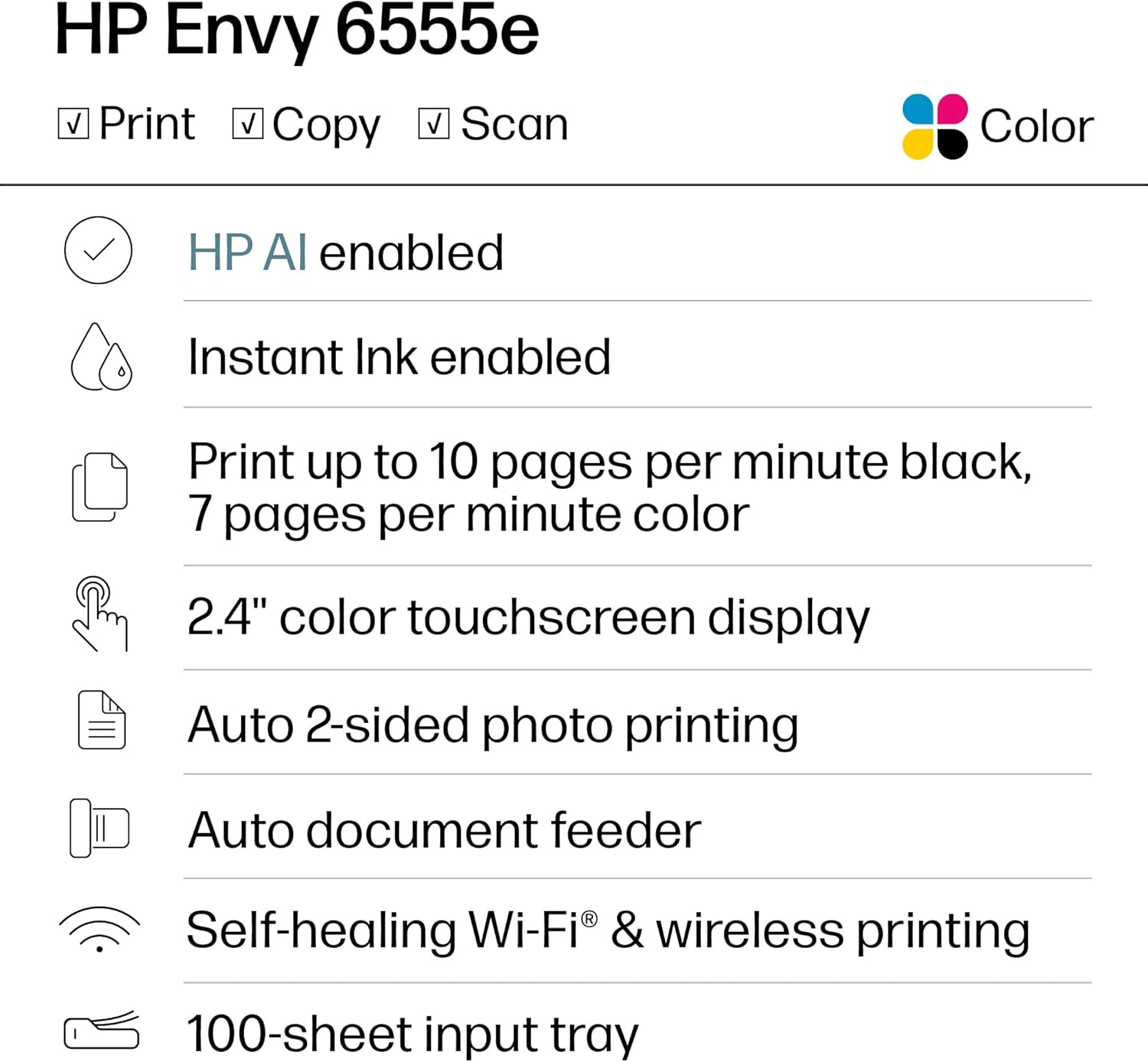
The HP Envy 6555e is engineered for users who need a versatile, compact all-in-one printer that supports high-quality photo printing and basic document management. Its wireless connectivity and touchscreen interface make it ideal for home environments, while its duplex printing and automatic document feeder cater to small office workflows. The printer’s ink system and resolution specifications ensure consistent output for both text and graphics, though its performance may vary with high-volume printing tasks.

Print Quality and Resolution: Meeting Home and Office Demands
The HP Envy 6555e’s print quality is defined by its 1200 x 1200 dpi resolution, which ensures sharp text and detailed graphics. This resolution is suitable for home users who print photos, documents, and basic graphics, but may not meet the demands of professional photographers or high-volume print shops. The printer supports a range of media sizes, including standard letter and legal paper, as well as specialty photo paper, allowing users to produce borderless prints and panoramic photos. Its color ink system includes cyan, magenta, yellow, and black, which are optimized for True to Screen photo printing using the P3 color space. However, the printer’s ink formulation and drying time may affect the longevity of printed materials, particularly for outdoor or high-traffic applications.

Photo Printing Capabilities
The HP Envy 6555e is designed to handle photo printing with features like borderless printing and panoramic photo support. It can produce 5×5 and 4×12 inch prints, making it a viable option for users who need to create high-quality personal or small business photos. The printer’s ability to print double-sided 4×6 inch photos and cards adds versatility for home users. However, the resolution and ink coverage may not match the performance of dedicated photo printers, which often use specialized inks and higher-resolution print heads. For users prioritizing photo quality, the Envy 6555e is a reasonable choice for casual use but may fall short for professional photography.
Text and Document Output
For text and document printing, the Envy 6555e delivers consistent results with its 1200 dpi resolution. This makes it suitable for home offices that require clear, legible documents for emails, invoices, or reports. The printer’s duplex printing feature reduces paper usage, which is beneficial for users aiming to minimize costs. However, the printer’s monochrome print speed of 10 ppm may be slower than laser printers used in small businesses. While this is acceptable for low-volume printing, it could be a limitation for users with higher document output requirements.
Connectivity and Mobile Integration: Wireless and Cloud Features
The HP Envy 6555e’s connectivity options are a key factor in its suitability for modern home and office environments. The printer supports Wi-Fi (802.11a/b/g/n/ac), allowing seamless integration with wireless networks and mobile devices. This enables users to print from smartphones, tablets, or computers without the need for physical cables. The inclusion of HP’s cloud services, such as Scan to HP Cloud, enhances remote accessibility, though these features require a stable internet connection. The printer’s touchscreen interface simplifies navigation for users who prefer direct control over settings and functions. However, the reliance on wireless connectivity may introduce latency or compatibility issues in environments with limited or unstable Wi-Fi networks.
Mobile Printing and Device Compatibility
The Envy 6555e is compatible with a range of mobile devices, including iOS and Android smartphones, as well as Windows and macOS computers. Its support for mobile printing via Wi-Fi and cloud services makes it a convenient option for users who frequently print from their phones or tablets. The printer’s ability to scan to email and cloud storage platforms adds value for users who need to digitize documents on the go. However, the printer’s reliance on wireless connectivity may limit its use in environments where wired connections are preferred or required, such as certain small office setups.
Network and Security Considerations
As a wireless printer, the Envy 6555e requires users to configure it on a secure Wi-Fi network. While the printer’s setup process is straightforward, users must ensure their network meets the printer’s connectivity requirements to avoid performance issues. The printer does not include advanced security features like encryption for wireless connections, which may be a concern for users prioritizing data privacy. However, the lack of complex security protocols is typical for consumer-grade printers and does not significantly impact the device’s usability for home or small business applications.
Performance and Reliability: Duty Cycle and Maintenance
The HP Envy 6555e is designed for home and small office use, with a duty cycle that supports moderate printing volumes. Its 90-day limited warranty indicates that HP anticipates lower usage compared to commercial printers, which often have higher-duty cycles. The printer’s ink system and automatic document feeder contribute to its reliability, though users should be aware of the potential for ink drying or clogging if the printer is left unused for extended periods. The 256 MB of memory storage is sufficient for basic operations but may not support advanced features like large document caching or high-speed printing in high-volume scenarios.
Ink System and Consumables
The Envy 6555e uses a color inkjet system with HP’s Instant Ink program, which provides a 3-month trial of ink cartridges. This feature is beneficial for users who want to avoid the upfront cost of purchasing ink, though the long-term cost may be higher than traditional ink cartridges. The printer’s ink formulation is optimized for everyday use, but users who print frequently may need to replace cartridges more often. The included HP 68 Setup cartridges are suitable for initial use, but performance may degrade over time without proper maintenance.
Longevity and Maintenance Requirements
The printer’s reliability is supported by its design for home and small business environments, but users should be prepared for occasional maintenance tasks. The automatic document feeder and touchscreen interface reduce the need for manual intervention, though periodic cleaning of the print head and ink cartridges is recommended to prevent clogs. The printer’s weight and compact size make it easy to position in a home office, but its 13.5-pound mass may require careful handling during setup. Overall, the Envy 6555e is a dependable device for moderate printing needs, though its longevity may be affected by usage patterns and maintenance practices.

Pros & Cons
Pros
- Versatile All-in-One Functionality: The Envy 6555e combines printing, scanning, and copying into a single device, making it ideal for home users who need multiple functions in a compact form factor.
- High-Resolution Photo Printing: With 1200 x 1200 dpi resolution and support for borderless and panoramic prints, the printer delivers quality results for casual photo printing.
- Wireless Connectivity: The inclusion of Wi-Fi (802.11a/b/g/n/ac) and mobile printing capabilities ensures seamless integration with modern devices and networks.
- User-Friendly Interface: The touchscreen interface simplifies navigation and management of printing tasks, enhancing the user experience for less tech-savvy individuals.
- HP Instant Ink Trial: The 3-month free ink trial reduces initial costs for users who may be hesitant to invest in ink cartridges upfront.
- Duplex Printing: The automatic two-sided printing feature helps reduce paper consumption, which is beneficial for home offices aiming to minimize expenses.
Cons
- Limited High-Volume Performance: The printer is designed for home and small office use, which may not meet the demands of users with high-volume printing requirements.
- Ink Cost Considerations: While the HP Instant Ink trial is convenient, the long-term cost of ink may be higher than traditional cartridges, especially for frequent users.
- Connectivity Reliance: The printer’s performance depends on a stable Wi-Fi network, which may introduce latency or compatibility issues in environments with unreliable internet connections.
- Limited Security Features: The lack of advanced wireless security protocols may be a concern for users prioritizing data privacy and network security.
- Maintenance Requirements: Periodic cleaning of the print head and ink cartridges is necessary to prevent clogging, which may be inconvenient for users who prefer minimal maintenance.
Final Verdict: Who This Printer Is Best For (and Who Should Skip It)
The HP Envy 6555e is an excellent choice for home users and small businesses with moderate printing needs. Its combination of wireless connectivity, high-resolution photo printing, and all-in-one functionality makes it ideal for environments where versatility and ease of use are priorities. The touchscreen interface and HP Instant Ink trial add convenience, particularly for users who are new to printer technology or prefer a low-maintenance solution. However, the printer may not be suitable for users with high-volume printing requirements or those who need advanced security features for their network. For individuals who frequently print documents or photos and require a reliable, low-cost solution, the Envy 6555e offers a balanced combination of performance and accessibility. Conversely, users who prioritize speed, durability, or advanced networking capabilities may find this printer less suitable for their needs.

Frequently Asked Questions (FAQs)
What is the print resolution of the HP Envy 6555e?
The HP Envy 6555e offers a print resolution of 1200 x 1200 dpi for both color and black-and-white prints. This resolution ensures sharp text and detailed graphics, making it suitable for home and small business use.
Can the HP Envy 6555e print borderless photos?
Yes, the HP Envy 6555e supports borderless photo printing on compatible media, allowing users to create high-quality, edge-to-edge prints for personal or small business use.
What connectivity options does the HP Envy 6555e support?
The HP Envy 6555e supports Wi-Fi (802.11a/b/g/n/ac) and mobile printing, enabling seamless integration with wireless networks and devices like smartphones and tablets.
Does the HP Envy 6555e include a 3-month ink trial?
Yes, the HP Envy 6555e comes with a 3-month free ink trial through HP Instant Ink, reducing initial costs for users who may be hesitant to purchase ink upfront.
What is the maximum media size supported by the HP Envy 6555e?
The HP Envy 6555e supports media sizes up to 8.5 x 12 inches, making it suitable for printing standard letter and legal-sized documents as well as specialty photo paper.
Is the HP Envy 6555e suitable for duplex printing?
Yes, the HP Envy 6555e features automatic duplex printing, which helps reduce paper usage and is ideal for users aiming to minimize costs in home or small office environments.
What is the warranty coverage for the HP Envy 6555e?
The HP Envy 6555e comes with a 90-day limited warranty, which covers defects in materials and workmanship under normal use conditions.
Can the HP Envy 6555e be used for scanning and copying?
Yes, the HP Envy 6555e includes an automatic document feeder and supports scanning and copying functions, making it a versatile all-in-one printer for home and small business users.