

The Importance of Choosing the Right Printer
In today’s fast-paced world, selecting the right printer is essential for meeting diverse printing needs across home, office, and mobile environments. Whether you’re capturing memories for personal use, producing professional-grade documents, or managing high-volume workflows, the right printer can significantly impact productivity and output quality. Printers vary widely in technology, speed, and media compatibility, making it crucial to align specifications with specific tasks. For instance, a portable photo printer designed for casual use may not suffice for a busy office requiring consistent color accuracy and high-speed output. Similarly, a laser printer optimized for text documents may lack the precision needed for photographic prints. Understanding these distinctions helps users avoid mismatches between printer capabilities and workload demands. This review focuses on the Kodak Mini 2 Retro 4PASS Portable Photo Printer, evaluating its suitability for home, school, and travel scenarios. By analyzing its technical specifications, connectivity options, and media compatibility, this assessment provides a data-driven framework for evaluating whether this printer meets the needs of users prioritizing portability and photo quality.
Quick Overview
| Feature | Details |
|---|---|
| Printer Type | Portable photo printer |
| Printing Technology | Dye sublimation |
| Print Resolution | 300 Dots Per Inch (Color/Black & White) |
| Print Speed | 1 page per minute (Color/Monochrome) |
| Media Size | 2.1 x 3.4 inches |
| Connectivity | Bluetooth (Android/iOS) |
| Ink Type | Dye-based inks |
| Battery Life | 15 hours (on a single charge) |
| Maximum Sheet Capacity | 30 sheets |
| Included Components | Battery, photo paper |
| Weight | 7.1 ounces |
| Dimensions | 3″D x 5″W x 1″H |
The Kodak Mini 2 Retro 4PASS combines portability with photo-quality output, making it ideal for users who prioritize convenience and creative customization. Its compact size and Bluetooth connectivity allow for seamless integration with smartphones and tablets, while the 4PASS technology ensures durable, water-resistant prints. These features position it as a practical solution for casual photographers, students, and travelers seeking to preserve memories without compromising on quality.

Portability and Design for On-the-Go Use
The Kodak Mini 2 Retro 4PASS’s compact and lightweight design is a key consideration for users who prioritize mobility. Weighing only 7.1 ounces, the printer is easily transportable for school activities, travel, and field trips. Its dimensions of 3″D x 5″W x 1″H make it simple to store in a backpack or carry in a pocket, ensuring accessibility without sacrificing functionality. The inclusion of a built-in battery further enhances its portability, eliminating the need for a power source during use. This design philosophy aligns with the growing demand for printers that can seamlessly integrate into mobile lifestyles. The printer’s single-tray configuration and limited sheet capacity of 30 sheets reflect its focus on convenience rather than high-volume printing. While this may not suit users requiring continuous output, it ensures the device remains lightweight and easy to manage for sporadic use.

Battery Life and Power Efficiency
The Kodak Mini 2 Retro 4PASS relies on a single AA battery, which provides up to 15 hours of continuous operation. This battery life is sufficient for most casual printing scenarios, such as printing photos during a school trip or travel itinerary. However, users should note that the printer’s power efficiency is optimized for low-volume use rather than extended, high-frequency printing. The reliance on batteries also means that the printer is not suitable for environments where a constant power source is available, as it lacks a USB charging port. This design choice prioritizes portability over extended operational time, making it ideal for users who prioritize mobility over long-term usage.
Connectivity and Device Compatibility
The printer’s Bluetooth connectivity simplifies pairing with smartphones and tablets, enabling users to print photos instantly without additional hardware. This feature is particularly advantageous for users who prefer wireless convenience over wired connections. However, the printer’s compatibility is limited to Android and iOS devices, excluding other operating systems such as Windows or macOS. This restriction may affect users who rely on a broader range of devices for printing. Additionally, the lack of a USB port means that the printer cannot be connected to computers for direct file transfers, further emphasizing its focus on mobile-first use cases.
Print Quality and Media Compatibility
The Kodak Mini 2 Retro 4PASS’s print quality is a critical factor for users who prioritize photo output. The 4PASS technology enables the printer to produce high-quality, water-resistant prints by applying multiple layers of color during the printing process. This method ensures that the final output is durable and resistant to fingerprints, making it suitable for preserving memories in various environments. The printer’s resolution of 300 Dots Per Inch (DPI) is adequate for producing clear, detailed images, though it may not match the precision of higher-end photo printers. The use of dye-based inks also contributes to the vibrancy of the prints, though these inks are generally less fade-resistant compared to pigment-based alternatives. This trade-off is acceptable for casual use but may not meet the demands of professional photographers requiring long-term archival quality.

Media Compatibility and Print Options
The printer is designed to work with glossy photo paper, which is essential for achieving the best results with its dye sublimation technology. The supported media size of 2.1 x 3.4 inches allows for standard photo prints, though users should note that the printer does not support larger formats. The ability to choose between border and borderless photo types provides flexibility for personalization, such as adding handwritten notes to border-style prints or creating larger, more impactful borderless photos. However, the limited media compatibility and fixed print size may restrict users who require more versatile printing options. The printer’s single-tray design also means that users must manually load each sheet, which could be inconvenient for high-volume printing.
Durability and Environmental Resistance
The Kodak Mini 2 Retro 4PASS’s durability is influenced by its use of dye-based inks and the 4PASS laminating process. While the prints are water-resistant and fingerprint-proof, the overall device is not designed for harsh environmental conditions. The printer’s plastic construction and lack of protective casing make it susceptible to damage if dropped or exposed to extreme temperatures. This durability profile is suitable for casual use but may not meet the requirements of users who need a more rugged device for outdoor or industrial environments. Additionally, the reliance on batteries means that the printer’s operational lifespan is limited by the battery’s charge, further affecting its long-term reliability.
Connectivity and User Experience
The Kodak Mini 2 Retro 4PASS’s Bluetooth connectivity simplifies the printing process by allowing users to pair their smartphones or tablets with the device without additional hardware. This wireless feature is particularly beneficial for users who prioritize convenience over wired connections. However, the printer’s compatibility is limited to Android and iOS devices, excluding other operating systems such as Windows or macOS. This restriction may affect users who rely on a broader range of devices for printing. Additionally, the lack of a USB port means that the printer cannot be connected to computers for direct file transfers, further emphasizing its focus on mobile-first use cases. The printer’s app interface provides basic editing tools and frame designs, enabling users to customize their photos before printing. While these features enhance the user experience for casual users, they may not offer the advanced editing capabilities required by professional photographers.
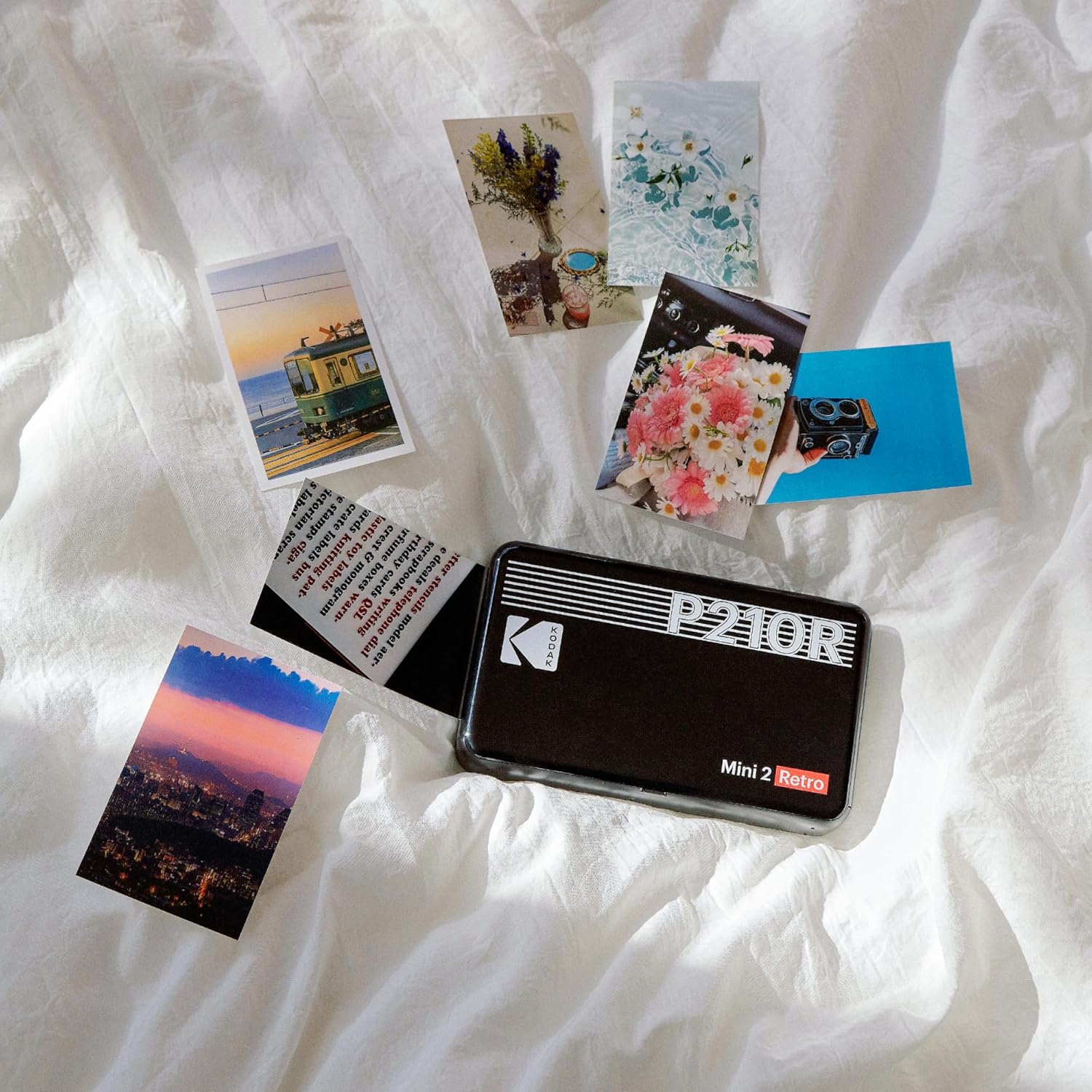
App Integration and Customization
The Kodak photo printer app allows users to edit photos and select from a variety of frame designs, making it ideal for personalizing prints for projects like scrapbooking or journaling. The app’s interface is straightforward, enabling users to adjust settings such as print size and photo type without requiring advanced technical skills. However, the app’s functionality is limited to basic editing tools, which may not satisfy users seeking more advanced customization options. The app also serves as a control hub for managing the printer’s settings, though its capabilities are constrained by the printer’s hardware limitations. This balance between simplicity and functionality makes the app suitable for casual users but less appealing to those requiring more advanced features.
User Experience and Workflow Integration
The printer’s integration with mobile devices streamlines the printing workflow, allowing users to print photos instantly without the need for additional hardware. This seamless connectivity is particularly advantageous for users who frequently capture and share photos on the go. However, the lack of a USB port and limited media compatibility may create workflow challenges for users who require more versatile printing options. The printer’s single-tray design also means that users must manually load each sheet, which could be inconvenient for high-volume printing. Despite these limitations, the printer’s user-friendly design and wireless connectivity make it a practical solution for users prioritizing convenience over advanced functionality.

Pros & Cons
Pros
- Portable Design: Weighing only 7.1 ounces, the Kodak Mini 2 Retro 4PASS is easy to carry for travel, school activities, and field trips, making it ideal for users who prioritize mobility.
- High-Quality Photo Output: The 4PASS technology ensures prints are water-resistant, fingerprint-proof, and vibrant, meeting the needs of casual photographers and memory preservation.
- Wireless Connectivity: Bluetooth integration allows for seamless pairing with Android and iOS devices, eliminating the need for additional hardware and simplifying the printing process.
- Customization Options: The accompanying app provides basic editing tools and frame designs, enabling users to personalize prints for scrapbooking, journaling, and other creative projects.
- Battery-Powered Operation: The built-in battery offers up to 15 hours of continuous use, making it suitable for scenarios where a power source is not readily available.
- User-Friendly Interface: The app-based control system is straightforward, allowing users to adjust settings and manage prints without requiring advanced technical skills.
Cons
- Limited Media Compatibility: The printer is restricted to glossy photo paper and a single media size of 2.1 x 3.4 inches, limiting its versatility for users requiring more flexible printing options.
- Single-Tray Design: The lack of multiple trays means users must manually load each sheet, which can be inconvenient for high-volume printing or continuous use.
- No USB Connectivity: The absence of a USB port restricts the printer’s ability to connect to computers for direct file transfers, limiting workflow flexibility.
- Battery Dependency: While the built-in battery enhances portability, it also means the printer’s operational lifespan is limited by the battery’s charge, affecting long-term reliability.
- No Advanced Editing Features: The app’s basic editing tools may not satisfy users seeking more advanced customization options for professional or creative projects.
- Durability Concerns: The plastic construction and lack of protective casing make the printer susceptible to damage if dropped or exposed to harsh environments, affecting its long-term reliability.
Final Verdict: Who This Printer Is Best For (and Who Should Skip It)
The Kodak Mini 2 Retro 4PASS Portable Photo Printer is best suited for users who prioritize portability and casual photo printing. Its lightweight design, wireless connectivity, and 4PASS technology make it an ideal choice for students, travelers, and casual photographers who need to print memories on the go. The ability to customize prints with frame designs and basic editing tools adds value for users interested in creative personalization. However, the printer’s limitations in media compatibility, workflow flexibility, and durability make it unsuitable for high-volume printing environments or users requiring advanced features. Professionals needing archival-quality prints or those who rely on a broader range of devices for printing may find this printer lacking. Ultimately, the Kodak Mini 2 Retro 4PASS is a practical solution for its intended use cases but may not meet the demands of users seeking more robust or versatile printing capabilities.

Frequently Asked Questions (FAQs)
What is the Kodak Mini 2 Retro 4PASS best suited for?
The Kodak Mini 2 Retro 4PASS is ideal for casual users who prioritize portability and photo printing. It is well-suited for students, travelers, and individuals who need to print memories on the go, offering high-quality, water-resistant prints with its 4PASS technology.
Can the Kodak Mini 2 Retro 4PASS print borderless photos?
Yes, the Kodak Mini 2 Retro 4PASS offers both border and borderless photo options. Borderless prints allow for larger, more impactful images, while border-style prints provide space for handwritten notes or additional design elements.
How long does the Kodak Mini 2 Retro 4PASS battery last?
The built-in battery provides up to 15 hours of continuous operation, making it suitable for scenarios where a power source is not readily available. However, battery life may vary depending on usage patterns and environmental conditions.
What types of media does the Kodak Mini 2 Retro 4PASS support?
The printer is designed to work with glossy photo paper, which is essential for achieving the best results with its dye sublimation technology. It does not support other media types or larger formats beyond the specified 2.1 x 3.4 inches.
Is the Kodak Mini 2 Retro 4PASS compatible with all devices?
The Kodak Mini 2 Retro 4PASS is compatible with Android and iOS devices via Bluetooth. It does not support other operating systems such as Windows or macOS, and lacks a USB port for direct computer connectivity.
Can the Kodak Mini 2 Retro 4PASS be used for high-volume printing?
The Kodak Mini 2 Retro 4PASS is not designed for high-volume printing. Its single-tray configuration and limited sheet capacity of 30 sheets make it more suitable for sporadic use rather than continuous, high-frequency printing tasks.
What are the limitations of the Kodak Mini 2 Retro 4PASS app?
The Kodak photo printer app provides basic editing tools and frame designs for personalization. However, it does not offer advanced editing features, making it less suitable for users requiring more sophisticated customization options for professional or creative projects.
How durable is the Kodak Mini 2 Retro 4PASS?
The printer’s plastic construction and lack of protective casing make it susceptible to damage if dropped or exposed to harsh environments. While it is suitable for casual use, it may not meet the durability requirements of users needing a more rugged device for industrial or outdoor applications.