
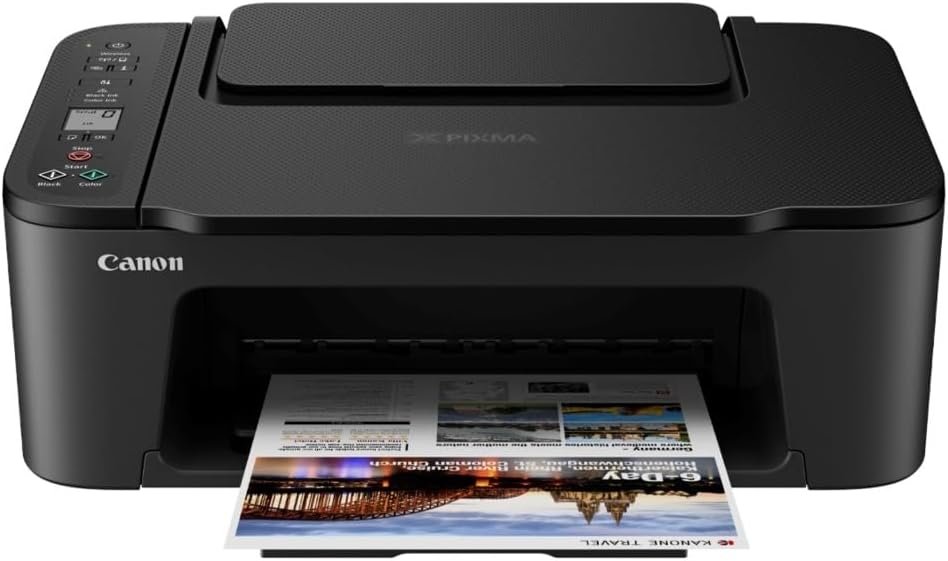
The Importance of Choosing the Right Printer
Selecting the right printer can significantly impact productivity and efficiency in both home and office environments. Whether you need to print documents, create professional-quality photos, or scan important files, the right printer must balance performance, reliability, and ease of use. Modern printing needs often require devices that can adapt to varying workloads, from occasional home use to light office tasks. A printer must not only meet basic functionality requirements but also integrate seamlessly with digital workflows, support diverse media types, and maintain consistent output quality over time. For users prioritizing wireless connectivity, compact design, and multi-functionality, the Canon PIXMA TS3720 offers a compelling solution. This printer is engineered for home users and small offices, combining print, scan, and copy capabilities with a user-friendly interface and versatile media support. Its hybrid ink system and wireless connectivity options make it suitable for both everyday tasks and occasional photo printing. Understanding the technical specifications and usage scenarios of the PIXMA TS3720 is essential for determining whether it aligns with specific printing needs and expectations.
Quick Overview
| Feature | Details |
|---|---|
| Printer Type | Inkjet All-in-One |
| Supported Functions | Print, Scan, Copy |
| Print Resolution | Up to 4800 x 1200 dpi |
| Print Speed | 7.7 ppm (black), 4 ppm (color) |
| Media Sizes | 8.5 x 14 inches, Legal |
| Connectivity | USB, Wi-Fi |
| Duty Cycle | 1,500 pages/month |
| Ink System | Hybrid (Pigment Black + Dye-Based Colors) |
| Warranty | 1-year limited warranty |
| Memory | 64 MB |
| Weight | 8.7 pounds |
| Tray Capacity | 60 sheets |
The Canon PIXMA TS3720 is designed for users who require a compact, multifunctional printer with wireless capabilities. Its hybrid ink system ensures sharp text and vibrant colors, while the 60-sheet rear tray reduces frequent paper refills. The printer’s connectivity options allow seamless integration with both desktop and mobile devices, making it ideal for home and small office environments. The 1.5-inch LCD screen simplifies navigation, and the included ink cartridges provide a balance between cost-effectiveness and print quality. These features collectively support a wide range of printing tasks, from document printing to photo creation, without compromising on reliability or ease of use.

Connectivity and Wireless Integration
The Canon PIXMA TS3720’s wireless capabilities make it a versatile choice for users seeking seamless device integration. The printer supports both Wi-Fi and USB connectivity, allowing for flexible setup options. Wi-Fi connectivity enables users to print from smartphones, tablets, and computers without the need for physical cables, streamlining workflows for home and small office environments. The printer’s compatibility with the Canon PRINT app further enhances mobile printing convenience, enabling users to manage print jobs, monitor ink levels, and access additional features directly from their devices. USB connectivity provides a reliable alternative for users who prefer direct, high-speed data transfer. The printer’s support for both wired and wireless options ensures adaptability to different user preferences and network environments. For users prioritizing mobility and remote access, the wireless integration of the PIXMA TS3720 offers significant advantages. However, the reliance on a stable Wi-Fi connection may present challenges in environments with limited or unreliable network coverage.

Wireless Printing Capabilities
The PIXMA TS3720’s Wi-Fi connectivity allows for seamless printing from mobile devices, eliminating the need for physical cables. This feature is particularly beneficial for users who frequently print from smartphones or tablets, as it reduces the time and effort required to set up print jobs. The Canon PRINT app enhances the wireless experience by providing a centralized interface for managing print settings, monitoring ink levels, and accessing additional features such as cloud printing. These capabilities make the printer well-suited for users who value convenience and flexibility in their printing workflows. However, the effectiveness of wireless printing depends on the stability of the Wi-Fi network, which may vary depending on the user’s environment.
USB Connectivity and Direct Printing
For users who prefer a direct connection, the PIXMA TS3720’s USB port offers a reliable alternative. USB connectivity ensures fast data transfer rates and eliminates potential latency issues associated with wireless networks. This makes the printer ideal for tasks that require high-speed printing, such as printing large documents or multiple pages at once. The USB interface also simplifies the setup process, as users can connect the printer directly to their computers without the need for additional software installation. While USB printing is generally more stable than wireless options, it may lack the convenience of mobile printing capabilities. The combination of USB and Wi-Fi connectivity ensures that the PIXMA TS3720 can accommodate a wide range of user preferences and technical requirements.
Print Quality and Ink System
The Canon PIXMA TS3720’s hybrid ink system is a key factor in its ability to deliver high-quality prints for both text and images. The printer uses a combination of pigment-based black ink and dye-based color inks, which work together to produce sharp text and vibrant, long-lasting colors. Pigment black ink is ideal for producing crisp, high-contrast text, while dye-based color inks provide a wide color gamut and rich, photo-quality results. This dual-ink system ensures that users can print documents with clear, professional-looking text and high-resolution photos with accurate color reproduction. The printer’s ability to produce sharp black text and vivid colors makes it suitable for both everyday printing tasks and occasional photo printing. However, the use of dye-based inks may result in slightly reduced longevity compared to pigment-based inks, which could be a consideration for users who prioritize long-term print durability.

Hybrid Ink System Performance
The hybrid ink system of the PIXMA TS3720 is designed to optimize print quality for a variety of media types and print tasks. Pigment black ink provides excellent contrast and clarity for text, making it ideal for documents and business materials. Dye-based color inks, on the other hand, offer a wide range of colors and smooth gradients, making them well-suited for photo printing and graphic design applications. The combination of these two ink types allows the printer to handle both text and image printing with high precision. Users can expect consistent print quality across different media, including glossy photo paper, plain paper, and envelopes. The ink system’s ability to produce sharp text and vivid colors ensures that the printer can meet the demands of both everyday use and occasional creative projects.
Media Versatility and Print Output
The PIXMA TS3720’s support for a wide range of media types makes it a versatile choice for users with varying printing needs. The printer is capable of printing on glossy photo paper, plain paper, envelopes, and even banners, thanks to its ability to handle media up to 8.5 x 14 inches. This versatility is particularly beneficial for users who frequently print on different paper types or require specialized media for specific tasks. The printer’s ability to produce high-quality prints on a variety of media ensures that it can accommodate both standard documents and creative projects. However, the printer’s maximum media size of 8.5 x 14 inches may limit its suitability for users who require larger print sizes. The combination of media versatility and print quality makes the PIXMA TS3720 a strong contender for users who need a printer that can handle a wide range of printing tasks.
Media Versatility and Print Output
The Canon PIXMA TS3720’s ability to handle a wide range of media types is a significant advantage for users with diverse printing needs. The printer supports glossy photo paper, plain paper, envelopes, and even banners, allowing users to print on different media without the need for specialized equipment. This versatility is particularly useful for users who frequently switch between document printing and photo creation, as it eliminates the need for multiple printers or additional accessories. The printer’s compatibility with media up to 8.5 x 14 inches further enhances its flexibility, enabling users to print on larger formats without compromising print quality. However, the printer’s maximum media size may not be sufficient for users who require larger prints, such as posters or banners. The ability to print on a variety of media types ensures that the PIXMA TS3720 can meet the demands of both standard and specialized printing tasks.

Print Speed and Throughput
The PIXMA TS3720’s print speeds are designed to balance efficiency with quality, making it suitable for both everyday use and occasional high-volume printing. The printer can produce up to 7.7 pages per minute in black mode and 4 pages per minute in color mode, which is adequate for most home and small office environments. These speeds ensure that users can complete print jobs quickly without compromising on print quality. The printer’s ability to handle a variety of media types and print tasks efficiently makes it well-suited for users who require a reliable, all-in-one solution. However, the color print speed may be slower compared to dedicated color printers, which could be a consideration for users who frequently print in color. The printer’s print speeds are optimized for a balance between performance and quality, ensuring that it can meet the needs of most users without requiring frequent maintenance or adjustments.
Duty Cycle and Workload Capacity
The PIXMA TS3720 is designed to handle a duty cycle of up to 1,500 pages per month, making it suitable for light to moderate printing workloads. This capacity ensures that the printer can support the needs of home users and small offices without requiring frequent maintenance or replacement of consumables. The printer’s ability to handle a variety of media types and print tasks efficiently contributes to its overall reliability and longevity. However, users with higher printing demands, such as those in busy office environments or those requiring frequent large-volume printing, may find the duty cycle insufficient. The printer’s workload capacity is optimized for users who prioritize consistency and reliability over high-speed printing, making it an ideal choice for those with moderate printing needs.

Pros & Cons
Pros
- Wireless Connectivity: The PIXMA TS3720 supports both Wi-Fi and USB connectivity, offering flexibility for users who prefer wireless printing or direct device connections. This adaptability ensures seamless integration with various devices and environments.
- Hybrid Ink System: The combination of pigment black ink and dye-based color inks allows the printer to produce sharp, high-contrast text and vibrant, photo-quality colors. This dual-ink system enhances versatility for different printing tasks.
- Media Versatility: The printer supports a wide range of media types, including glossy photo paper, plain paper, envelopes, and banners, making it suitable for both standard documents and creative projects.
- User-Friendly Interface: The 1.5-inch LCD screen and simple buttons simplify navigation, allowing users to adjust settings and manage print jobs without technical expertise.
- Compact Design: The printer’s small footprint makes it ideal for home offices and small workspaces, minimizing the need for additional desk space.
- 1-Year Warranty: The included limited warranty provides basic support and peace of mind for users who may require assistance with setup or maintenance.
Cons
- Slower Color Print Speed: The printer’s color print speed of 4 pages per minute may be slower compared to dedicated color printers, which could be a drawback for users who frequently print in color.
- Limited Media Sizes: While the printer supports media up to 8.5 x 14 inches, it may not be suitable for users requiring larger print sizes, such as posters or banners.
- No Duplex Printing: The absence of duplex printing functionality means users must manually flip pages for double-sided prints, which could be inconvenient for high-volume printing tasks.
- 64 MB Memory: The printer’s 64 MB memory capacity is relatively modest, which may affect performance for complex print jobs or large file transfers.
- Single Tray Design: The single rear tray with a 60-sheet capacity reduces the need for frequent paper refills but may not be sufficient for users requiring higher paper capacity.
Final Verdict: Who This Printer Is Best For (and Who Should Skip It)
The Canon PIXMA TS3720 is an excellent choice for home users and small offices that require a compact, multifunctional printer with wireless capabilities. Its hybrid ink system ensures high-quality text and color prints, while the 1.5-inch LCD screen simplifies navigation and settings adjustment. The printer’s support for a wide range of media types and its user-friendly design make it well-suited for occasional photo printing and everyday document tasks. Additionally, the 1-year warranty and reliable connectivity options provide added value for users who prioritize convenience and ease of use.
However, the PIXMA TS3720 may not be ideal for users with high-volume printing needs, such as those in busy office environments or those requiring frequent large-scale prints. The slower color print speed and lack of duplex printing functionality could be drawbacks for users who prioritize efficiency and advanced printing features. Additionally, the printer’s limited media sizes and modest memory capacity may not meet the requirements of users who need specialized printing capabilities or high-performance output. Overall, the PIXMA TS3720 is a strong contender for users seeking a versatile, all-in-one printer that balances quality, reliability, and ease of use in a compact design.

Frequently Asked Questions (FAQs)
What are the connectivity options for the Canon PIXMA TS3720?
The Canon PIXMA TS3720 supports both Wi-Fi and USB connectivity, allowing users to print from computers, smartphones, and tablets. The wireless feature enables seamless mobile printing, while the USB port provides a reliable direct connection for faster data transfer.
What types of media can the Canon PIXMA TS3720 print on?
The PIXMA TS3720 can print on a variety of media types, including glossy photo paper, plain paper, envelopes, and banners. It supports media sizes up to 8.5 x 14 inches, making it versatile for both standard documents and creative projects.
How does the hybrid ink system in the PIXMA TS3720 affect print quality?
The hybrid ink system combines pigment-based black ink for sharp, high-contrast text and dye-based color inks for vibrant, photo-quality colors. This dual-ink approach ensures consistent quality for both text and image printing, meeting the needs of diverse printing tasks.
What is the print speed of the Canon PIXMA TS3720?
The PIXMA TS3720 prints at 7.7 pages per minute in black mode and 4 pages per minute in color mode. These speeds are optimized for a balance between efficiency and print quality, suitable for most home and small office environments.
Does the PIXMA TS3720 support duplex printing?
The Canon PIXMA TS3720 does not support automatic duplex printing. Users must manually flip pages for double-sided prints, which may be less convenient for high-volume printing tasks.
What is the warranty coverage for the Canon PIXMA TS3720?
The PIXMA TS3720 comes with a 1-year limited warranty, providing basic support and peace of mind for users. This warranty covers manufacturing defects and includes access to Canon’s Service and Support network.
Is the PIXMA TS3720 suitable for commercial use?
The PIXMA TS3720 is designed for home use and light office environments. Its duty cycle of up to 1,500 pages per month makes it suitable for moderate printing needs, but it may not meet the requirements of high-volume commercial printing.
How does the PIXMA TS3720 handle media versatility?
The PIXMA TS3720 supports a wide range of media types, including glossy photo paper, plain paper, envelopes, and banners. This versatility allows users to print on different paper types without needing specialized equipment, making it ideal for various printing tasks.