
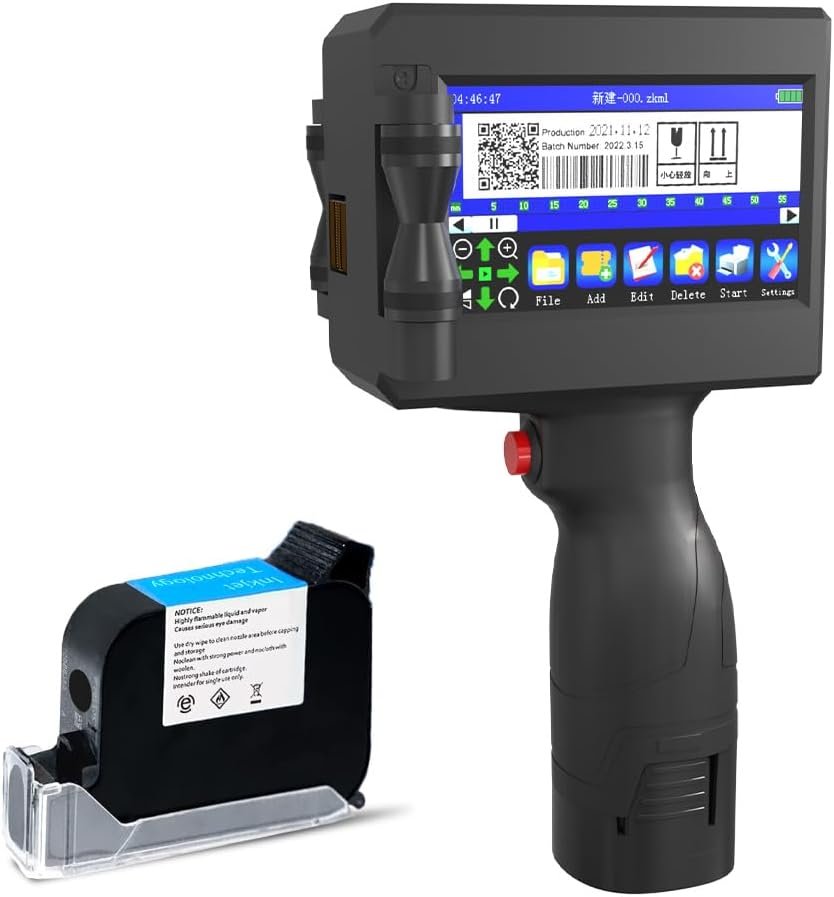
The Importance of Choosing the Right Printer
In today’s fast-paced environments, selecting the right printer can significantly impact productivity and operational efficiency. Whether for home use, small business operations, or field applications, the right printer must balance performance, versatility, and reliability. Printers are often the backbone of data management, requiring consistent output quality, durability, and adaptability to various tasks. For users who need to print on unconventional surfaces or work in mobile environments, a printer’s ability to meet these demands is critical. Factors such as print resolution, media compatibility, connectivity options, and portability all play a role in determining a printer’s suitability for specific use cases. Additionally, the ability to handle high-volume workloads while maintaining consistent performance is essential for long-term reliability. This review evaluates the CHIKYTECH ZK-1691 handheld inkjet printer, focusing on its technical capabilities, user experience, and practical applications. By analyzing its features against industry benchmarks and customer expectations, this guide aims to help users determine whether this printer aligns with their specific needs.
Quick Overview
| Feature | Details |
|---|---|
| Printer Type | Handheld Inkjet Printer |
| Printing Technology | Inkjet |
| Print Resolution | 300 dpi (Black and White/Color) |
| Media Sizes | A5 |
| Connectivity | USB |
| Duty Cycle | Continuous operation with 8-hour battery life |
| Ink System | 42ml Quick-Drying Ink Cartridge (Black) |
| Warranty | 1-Year Limited Warranty |
| Weight | 0.96 Kilograms (2.12 Pounds) |
| Dimensions | 10.2 x 4.5 x 6.9 Inches |
| Languages Supported | 28 Languages |
| Touchscreen | 4.3 Inch High-Definition Touch Screen |
The CHIKYTECH ZK-1691 is designed for users requiring a portable, multi-surface printing solution. Its inkjet technology, combined with a 4.3-inch touchscreen and support for 28 languages, makes it suitable for diverse applications. The printer’s ability to print on unconventional materials like fabric, wood, and metal expands its utility beyond traditional paper-based tasks. While its 300 dpi resolution is adequate for text and basic graphics, it may fall short for high-detail photographic output. The 8-hour battery life and compact design cater to mobile users, though its monochrome output limits color printing capabilities. These specifications position the ZK-1691 as a practical tool for specific use cases, but its limitations may affect its suitability for more demanding environments.

Versatility in Printing Surfaces
The CHIKYTECH ZK-1691’s ability to print on a wide range of surfaces is a standout feature, making it ideal for users who require flexibility in their printing tasks. Unlike traditional desktop printers, which are limited to paper, this handheld model can produce prints on fabric, wood, plastic, and metal. This versatility is achieved through its inkjet technology, which uses quick-drying ink to adhere to various materials. The printer’s design allows for consistent ink application, ensuring that printed content remains legible and durable on non-traditional substrates. However, the effectiveness of printing on these surfaces depends on the material’s texture and absorbency, which may affect print quality and longevity. For example, printing on metal or plastic may require additional drying time to prevent smudging, while fabric surfaces may necessitate specialized inks for durability. This adaptability makes the ZK-1691 suitable for creative industries, manufacturing, and field operations where traditional printing options are unavailable.

Surface Compatibility and Material Constraints
The ZK-1691’s support for printing on unconventional materials is a significant advantage for users working in environments where paper is not the preferred medium. The printer’s inkjet system is engineered to work with a variety of surfaces, though the success of each print depends on the material’s characteristics. For instance, printing on fabric may require a more absorbent ink formulation to ensure the design adheres properly, while metal and plastic surfaces may necessitate a faster-drying ink to prevent smearing. The printer’s 42ml ink cartridge is designed to handle these variations, though users should be aware that some materials may require additional preparation or post-printing treatment to achieve optimal results. This flexibility expands the printer’s utility but also introduces variability in output quality depending on the surface used.
Real-World Applications and Use Cases
The ZK-1691’s versatility in printing surfaces makes it well-suited for a range of applications, from industrial labeling to creative projects. In manufacturing, it can be used to mark parts on metal or plastic surfaces, reducing the need for specialized equipment. For artisans and designers, the ability to print on fabric or wood opens new possibilities for custom creations, such as embroidered textiles or wooden signage. In field operations, the printer’s portability allows for on-site printing of labels, tags, or documentation without access to a desktop printer. However, its monochrome output limits its use for color-based applications, such as branding or marketing materials. Users should also consider the printer’s battery life and media size limitations, as these factors may affect its suitability for high-volume or time-sensitive tasks.
Limitations and Surface-Specific Challenges
While the ZK-1693’s multi-surface printing capability is a major selling point, it comes with certain limitations. The printer’s inkjet technology is optimized for paper and similar materials, and its performance on unconventional surfaces may vary. For example, printing on highly textured or uneven materials like wood may result in inconsistent ink distribution, affecting the final print quality. Additionally, the printer’s 42ml ink cartridge, while sufficient for many tasks, may require frequent refills for extended use on non-paper surfaces. Users should also be mindful of the drying time required for certain materials, as improper drying can lead to smudging or fading. These factors mean that while the ZK-1691 offers significant versatility, its effectiveness depends on the specific materials being used and the user’s ability to manage associated challenges.
Portability and Mobility
The CHIKYTECH ZK-1691’s compact design and built-in battery make it an excellent choice for users who require a portable printing solution. Weighing just 0.96 kilograms (2.12 pounds), the printer is lightweight enough to be carried in a backpack or used in outdoor environments without significant strain. Its ergonomic design enhances usability, allowing users to operate the device comfortably for extended periods. The 8-hour battery life provides sufficient power for most field applications, though users should be aware that continuous printing on non-paper surfaces may drain the battery faster. The printer’s USB connectivity ensures compatibility with a wide range of devices, though its reliance on a single lithium-ion battery means users must carry spare power sources for extended use. This combination of portability and mobility makes the ZK-1691 ideal for applications where traditional desktop printers are impractical, such as construction sites, outdoor events, or remote fieldwork.

Ergonomic Design and User Experience
The ZK-1691’s ergonomic design is a key factor in its usability, particularly for users who need to operate the printer in diverse environments. The device’s lightweight construction and balanced weight distribution reduce fatigue during extended use, making it suitable for tasks that require frequent handling. The 4.3-inch touchscreen provides intuitive navigation, allowing users to edit and customize print content without the need for additional software or accessories. However, the absence of a physical keyboard or buttons may pose challenges for users who prefer tactile input. The printer’s compact size also means that some functions, such as adjusting print settings, may require careful navigation on the touchscreen. Despite these considerations, the ergonomic design enhances the overall user experience, particularly for mobile applications where convenience and ease of use are paramount.
Battery Life and Power Management
The ZK-1691’s built-in lithium-ion battery offers up to 8 hours of continuous operation, which is sufficient for most portable printing tasks. However, the actual battery life may vary depending on usage patterns and environmental conditions. For instance, printing on non-paper surfaces such as fabric or metal may consume more power than printing on paper, potentially reducing the total operating time. Users should also consider that the battery is not rechargeable and requires replacement after a certain number of cycles. While this design choice ensures reliability, it may necessitate frequent battery replacements for users who rely on the printer for extended periods. The printer’s power management features, such as automatic shutdown when not in use, help conserve battery life, but users should still be mindful of power consumption to maximize operational efficiency.
Connectivity and Compatibility
The ZK-1691’s USB connectivity ensures compatibility with a wide range of devices, including computers, tablets, and mobile phones. This feature is particularly beneficial for users who need to print on-the-go or integrate the printer with existing workflows. However, the printer’s reliance on USB ports means that users must have access to a compatible device to operate it, which may limit its use in environments where wireless connectivity is preferred. The absence of Wi-Fi or Bluetooth capabilities restricts the printer’s ability to function independently, requiring users to carry a device for data input. While this design choice simplifies the user experience, it may also introduce limitations for users who require more flexible connectivity options. Overall, the printer’s USB interface provides a reliable solution for most portable printing needs, though its lack of wireless capabilities may affect its suitability for certain applications.
Print Quality and Resolution
The CHIKYTECH ZK-1691 delivers a print resolution of 300 dpi, which is adequate for most text-based and basic graphic printing tasks. This resolution ensures that printed content remains legible and clear, making the printer suitable for applications such as labeling, barcode printing, and simple documentation. The printer’s monochrome output is optimized for high-contrast text and images, though it may not meet the demands of more complex graphical or photographic printing. The 4.3-inch touchscreen allows users to preview and customize print content before printing, reducing the risk of errors. However, the printer’s resolution limitations mean that users should be aware of the expected output quality for specific tasks. For instance, while the ZK-1691 can produce clear text and basic logos, it may struggle with high-detail images or intricate designs that require higher resolution.

Text and Graphic Output
The ZK-1691’s 300 dpi resolution is well-suited for text and simple graphics, ensuring that printed content is legible and visually clear. The printer’s monochrome output is optimized for high-contrast text, making it ideal for applications such as labels, tags, and documentation. Users can also print basic graphics, such as logos or barcodes, with minimal distortion. The 4.3-inch touchscreen allows for real-time preview and customization of print content, reducing the likelihood of errors. However, the printer’s resolution may not be sufficient for more complex graphical elements, such as detailed illustrations or photographs. Users should also consider the printer’s media compatibility, as the quality of the final print may vary depending on the surface being used. For example, printing on fabric or metal may result in a less refined appearance compared to printing on paper.
Photo and Image Printing
While the ZK-1691 is capable of printing basic images, its 300 dpi resolution and monochrome output limit its suitability for high-quality photo printing. The printer’s inkjet technology is designed to produce clear and consistent prints, but the lack of color capabilities means that it cannot reproduce the full range of colors found in photographs. Users who require color printing should consider alternative options, as the ZK-1691 is not equipped to handle color-based tasks. The printer’s ability to print images on unconventional surfaces, such as fabric or wood, may be a benefit for certain creative applications, but the resolution limitations may affect the overall quality of the final product. For users who prioritize image clarity and color accuracy, the ZK-1691 may not be the best choice, though it remains a practical tool for simpler printing needs.
Media Compatibility and Print Quality Variability
The ZK-1691’s ability to print on a variety of surfaces is a significant advantage, but it also introduces variability in print quality depending on the material used. The printer’s inkjet technology is optimized for paper, and while it can handle other surfaces, the results may differ based on the material’s texture and absorbency. For example, printing on fabric may require additional drying time to prevent smudging, while metal or plastic surfaces may necessitate a faster-drying ink formulation. The printer’s 42ml ink cartridge is designed to accommodate these variations, but users should be aware that some materials may require specialized inks or post-printing treatments to achieve optimal results. This variability means that while the ZK-1691 offers versatility, its performance on unconventional surfaces may not always meet the expectations of users seeking consistent print quality.

Pros & Cons
Pros
- Versatile Printing Surfaces: The ZK-1691’s ability to print on fabric, wood, plastic, and metal expands its utility beyond traditional paper-based tasks, making it suitable for creative and industrial applications.
- Portable Design: The lightweight, ergonomic build and built-in battery allow for easy transport and use in outdoor or remote environments, ideal for field operations and mobile printing needs.
- User-Friendly Interface: The 4.3-inch touchscreen provides intuitive navigation, enabling users to edit and customize print content without additional software or accessories.
- Multilingual Support: With support for 28 languages, the printer caters to a global audience, enhancing its usability in international settings or multilingual environments.
- Reliable Connectivity: The USB interface ensures compatibility with a wide range of devices, simplifying data input and reducing the need for additional peripherals.
- Durable Construction: The printer’s robust build and 1-year warranty provide confidence in its long-term reliability, though maintenance requirements should be considered.
Cons
- Limited Color Output: The monochrome printing capability restricts the printer’s use for color-based tasks, such as branding or marketing materials, which may require alternative solutions.
- Resolution Limitations: While 300 dpi is sufficient for text and basic graphics, it falls short for high-detail images or intricate designs, affecting the overall print quality for complex tasks.
- Battery Constraints: The non-rechargeable lithium-ion battery requires replacement after a certain number of cycles, which may be inconvenient for users relying on the printer for extended periods.
- Media-Specific Challenges: Printing on unconventional surfaces may require additional preparation or post-printing treatments, which could affect the final print quality and consistency.
- Limited Warranty Coverage: While the 1-year warranty offers basic support, the lack of extended warranty options may be a drawback for users seeking long-term reliability.
Final Verdict: Who This Printer Is Best For (and Who Should Skip It)
The CHIKYTECH ZK-1691 is best suited for users who require a portable, multi-surface printing solution for specific applications such as labeling, field operations, or creative projects. Its versatility in printing on unconventional materials, combined with a user-friendly touchscreen interface, makes it an attractive option for small businesses, artisans, and professionals working in environments where traditional printers are impractical. The printer’s 8-hour battery life and lightweight design further enhance its usability for mobile tasks. However, the ZK-1691 is not ideal for users who require high-resolution color printing, complex graphic output, or extended printing sessions without frequent battery replacements. Its monochrome output and resolution limitations may also affect its suitability for tasks that demand high-quality images or detailed designs. For users prioritizing color accuracy, durability, or advanced connectivity options, alternative printers with more robust specifications may be a better fit. Overall, the ZK-1691 remains a practical choice for specific use cases, though its limitations should be carefully considered before purchase.
Frequently Asked Questions (FAQs)
What surfaces can the CHIKYTECH ZK-1691 print on?
The ZK-1691 can print on a variety of surfaces including paper, fabric, wood, plastic, and metal. This versatility makes it suitable for creative and industrial applications, though print quality may vary depending on the material’s texture and absorbency.
How long does the battery last on the ZK-1691?
The built-in lithium-ion battery provides up to 8 hours of continuous operation. However, printing on non-paper surfaces may drain the battery faster, and the battery is not rechargeable, requiring replacement after a certain number of cycles.
Can the ZK-1691 print in color?
No, the ZK-1691 is a monochrome printer and does not support color printing. It is designed for high-contrast text and basic graphics, making it suitable for tasks such as labeling and documentation but not for color-based applications.
What is the maximum print resolution of the ZK-1691?
The ZK-1691 offers a print resolution of 300 dpi, which is adequate for text and simple graphics. However, it may not meet the requirements for high-detail images or intricate designs, which may necessitate alternative printing solutions.
Is the ZK-1691 suitable for outdoor use?
The ZK-1691’s compact design and built-in battery make it suitable for outdoor use, though users should be mindful of environmental conditions that may affect battery life and print quality. Its portability and lightweight build are well-suited for field operations and mobile printing tasks.
What languages does the ZK-1691 support?
The ZK-1691 supports 28 languages, making it ideal for international or multilingual environments. This feature enhances its usability for users who need to print in different languages without additional software or translation tools.
How does the touchscreen interface work on the ZK-1691?
The 4.3-inch touchscreen allows users to edit and customize print content directly on the device. This interface provides a user-friendly experience for previewing and adjusting print settings without the need for external software or accessories.
What is the warranty coverage for the ZK-1691?
The ZK-1691 comes with a 1-year limited warranty and lifetime technical support. While this provides basic coverage for defects and malfunctions, users should consider additional warranty options if they require extended protection for long-term use.