
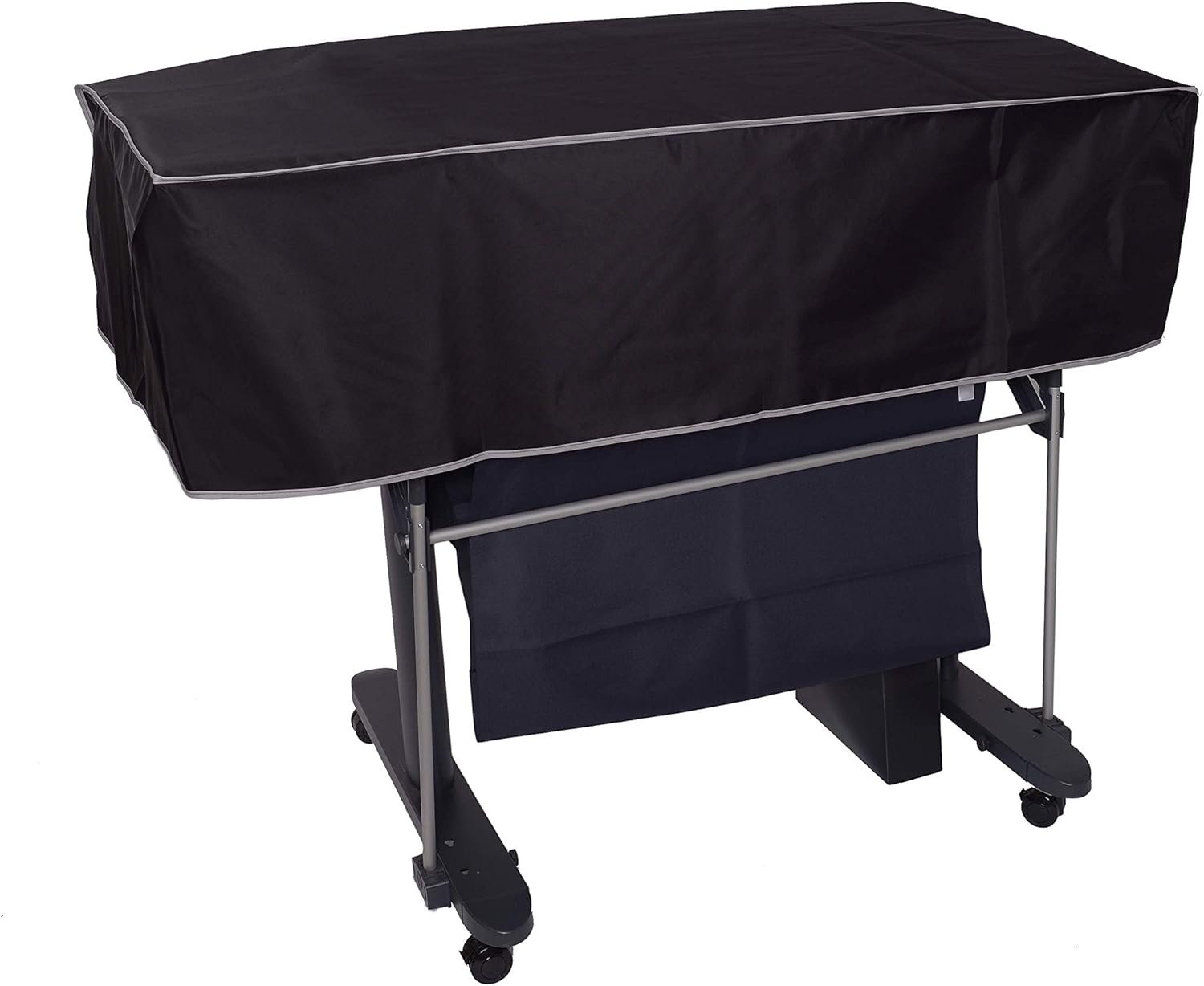
The Importance of Choosing the Right Printer Dust Cover
In the world of large-format printing, protecting your investment from environmental hazards is critical. Dust, moisture, and physical damage can significantly impact the lifespan and performance of high-end plotter printers like the HP DesignJet Studio Wood 36-in model. A reliable dust cover serves as a first line of defense against these risks, ensuring consistent output quality and reducing maintenance costs. Whether you’re a graphic designer, architectural firm, or industrial manufacturer, understanding how a dust cover interacts with your workflow can determine its value. Factors such as material durability, environmental resistance, and compatibility with printer dimensions directly influence its effectiveness. This review evaluates the The Perfect Dust Cover’s ability to meet these criteria, focusing on its role in maintaining printer reliability and extending operational life without compromising usability.
Quick Overview
| Feature | Details |
|---|---|
| Printer Type | HP DesignJet Studio Wood Large Format Wireless Plotter 36-in |
| Material | High-quality waterproof nylon |
| Color | Black |
| Dimensions | 51.9”W x 21.9”D x 15”H |
| Weight | 9 ounces |
| Closure Type | Pull-on design |
| Protection | Anti-static, waterproof, dust-resistant |
| Coverage | Top surface only (does not cover stand) |
| Warranty | Not specified |
This dust cover is specifically engineered for the HP DesignJet Studio Wood model, offering a balance between protection and accessibility. Its pull-on design simplifies installation, while the waterproof nylon material ensures resistance to spills and humidity. The cover’s focus on top-surface protection makes it ideal for environments where the plotter is frequently accessed but requires shielding from contaminants.
Environmental Protection and Durability
Material Composition and Longevity
The Perfect Dust Cover’s use of waterproof nylon ensures resistance to common environmental stressors, including accidental spills and high humidity. This material choice aligns with industry standards for industrial-grade covers, which prioritize durability over aesthetic appeal. The double-stitched construction reinforces structural integrity, reducing the risk of tearing or fraying over time. For users in climates with frequent rain or high ambient moisture, this feature minimizes the need for frequent replacements.
Anti-Static Properties and Surface Safety
The anti-static treatment of the cover prevents the buildup of electrostatic charges, which can attract dust particles and compromise print quality. This is particularly beneficial for printers operating in environments with high particulate exposure, such as construction sites or manufacturing facilities. The cover’s surface remains smooth and non-abrasive, avoiding scratches on the plotter’s finish while maintaining a barrier against contaminants.
Weather Resistance and Outdoor Use
While the cover is not designed for prolonged outdoor exposure, its waterproof rating makes it suitable for short-term use in protected outdoor areas. This could be useful for temporary setups or mobile printing operations where the plotter is occasionally deployed in varying weather conditions. However, extended outdoor use may require additional protective measures, as the cover’s primary function is to shield against indoor hazards rather than extreme weather.
Design Compatibility and User Experience
Precision Fit for HP DesignJet Studio Wood Models
The cover’s dimensions are meticulously tailored to the HP DesignJet Studio Wood 36-in plotter, ensuring a snug fit that minimizes gaps where dust or moisture could ingress. This precision engineering reduces the risk of misalignment, which could otherwise lead to uneven coverage or mechanical stress on the printer’s frame. The cover’s design allows for easy access to the plotter’s control panel and media tray, maintaining workflow efficiency without compromising protection.
Ease of Installation and Maintenance
The pull-on closure system simplifies the process of securing the cover, eliminating the need for zippers, Velcro, or complex fastening mechanisms. This design choice aligns with user preferences for low-maintenance solutions, particularly in environments where frequent access to the printer is required. The cover’s lightweight construction (9 ounces) further enhances usability, reducing the physical effort needed for installation or removal.
Accessibility for Routine Maintenance
While the cover protects the plotter’s top surface, it does not obstruct access to critical components such as the media tray or control panel. This design consideration is crucial for users who perform regular maintenance tasks, as it allows for quick and unobstructed access without the need to fully remove the cover. The cover’s positioning also ensures that the plotter’s stand remains exposed, facilitating stable placement and reducing the risk of accidental tipping.
Performance in High-Volume Environments
Duty Cycle and Longevity Expectations
The cover’s construction materials and design are suited for moderate to high-volume environments, as indicated by its waterproof and anti-static properties. However, its intended use does not extend to continuous, heavy-duty operations where the plotter may be exposed to constant mechanical stress. Users in industrial settings with high print volumes should consider additional protective measures, such as climate-controlled enclosures, to complement the cover’s capabilities.
Impact on Printer Maintenance Costs
By preventing dust accumulation and moisture ingress, the cover reduces the frequency of cleaning and maintenance tasks. This can lead to long-term cost savings by minimizing the need for consumables such as cleaning solutions or replacement parts. However, the cover does not address other maintenance requirements, such as ink or toner replenishment, which remain independent of its presence.
Compatibility with Print Technology
The cover is designed to work seamlessly with the HP DesignJet Studio Wood’s wireless printing capabilities, ensuring that the printer’s connectivity features remain unaffected. Its non-conductive material does not interfere with radio frequency signals, maintaining the plotter’s ability to communicate with other devices. This compatibility is essential for users relying on wireless workflows to manage print jobs remotely.
Pros & Cons
Pros
- Waterproof Construction: The nylon material provides resistance to spills and humidity, protecting the plotter from water damage.
- Anti-Static Treatment: Prevents dust accumulation, maintaining print quality and reducing maintenance needs.
- Precision Fit: Tailored dimensions ensure a snug fit, minimizing gaps where contaminants could enter.
- Easy Installation: Pull-on design simplifies the process of securing and removing the cover.
- Lightweight Design: Reduces physical strain during installation, enhancing user convenience.
- Non-Conductive Material: Does not interfere with the plotter’s wireless connectivity capabilities.
Cons
- Limited Coverage: Only protects the top surface, leaving the stand and other components exposed to environmental factors.
- No Warranty Information: Lack of manufacturer-backed warranty may raise concerns about long-term reliability.
- Not Suitable for Outdoor Use: While waterproof, the cover is not designed for prolonged exposure to extreme weather conditions.
- Does Not Address Consumables: Does not impact ink or toner replenishment requirements, which remain independent of its presence.
- No Integrated Ventilation: May trap moisture in enclosed spaces, requiring additional ventilation solutions.
Final Verdict: Who This Printer Is Best For (and Who Should Skip It)
The Perfect Dust Cover is an excellent choice for users who prioritize environmental protection without sacrificing access to the HP DesignJet Studio Wood plotter’s features. It is particularly well-suited for office environments, design studios, or industrial settings where the printer is frequently used but requires shielding from dust, spills, and humidity. Its waterproof and anti-static properties make it ideal for users in regions with high ambient moisture or those working in environments with frequent particulate exposure.
However, this cover may not be the best fit for users requiring full environmental protection for the entire plotter, including the stand or internal components. Those operating in high-volume, continuous-duty environments may need additional safeguards such as climate-controlled enclosures. Additionally, users who prioritize a comprehensive warranty or extended durability guarantees may find this product lacking in long-term support. Overall, the cover offers a cost-effective solution for moderate to high-volume use where targeted protection is the primary concern.
Frequently Asked Questions (FAQs)
Is the dust cover compatible with all HP DesignJet Studio Wood models?
The cover is specifically designed for the HP DesignJet Studio Wood Large Format Wireless Plotter 36-in model. It may not fit other variants or sizes due to its tailored dimensions.
Can this cover protect against prolonged outdoor use?
While the cover is waterproof, it is not designed for extended outdoor exposure. It provides protection against indoor contaminants but may require additional measures for extreme weather conditions.
Does the cover affect the plotter’s wireless connectivity?
The non-conductive nylon material does not interfere with the plotter’s wireless capabilities, ensuring seamless communication with other devices.
How easy is it to install the cover?
The pull-on closure system simplifies installation, allowing users to secure and remove the cover without complex fastening mechanisms.
What maintenance is required for the cover?
Regular cleaning with a dry cloth is recommended to maintain the cover’s anti-static properties. Avoid harsh chemicals that could degrade the waterproof coating.
Can the cover be used in high-humidity environments?
The waterproof nylon material makes it suitable for high-humidity settings, but prolonged exposure to moisture may require additional ventilation to prevent condensation buildup.
Is there a warranty for the dust cover?
The product description does not specify a warranty. Users should contact the manufacturer for details on support and replacement policies.
Does the cover protect the plotter’s stand?
The cover is designed to protect the plotter’s top surface only. The stand remains exposed, so additional protection may be needed for the base or surrounding areas.