
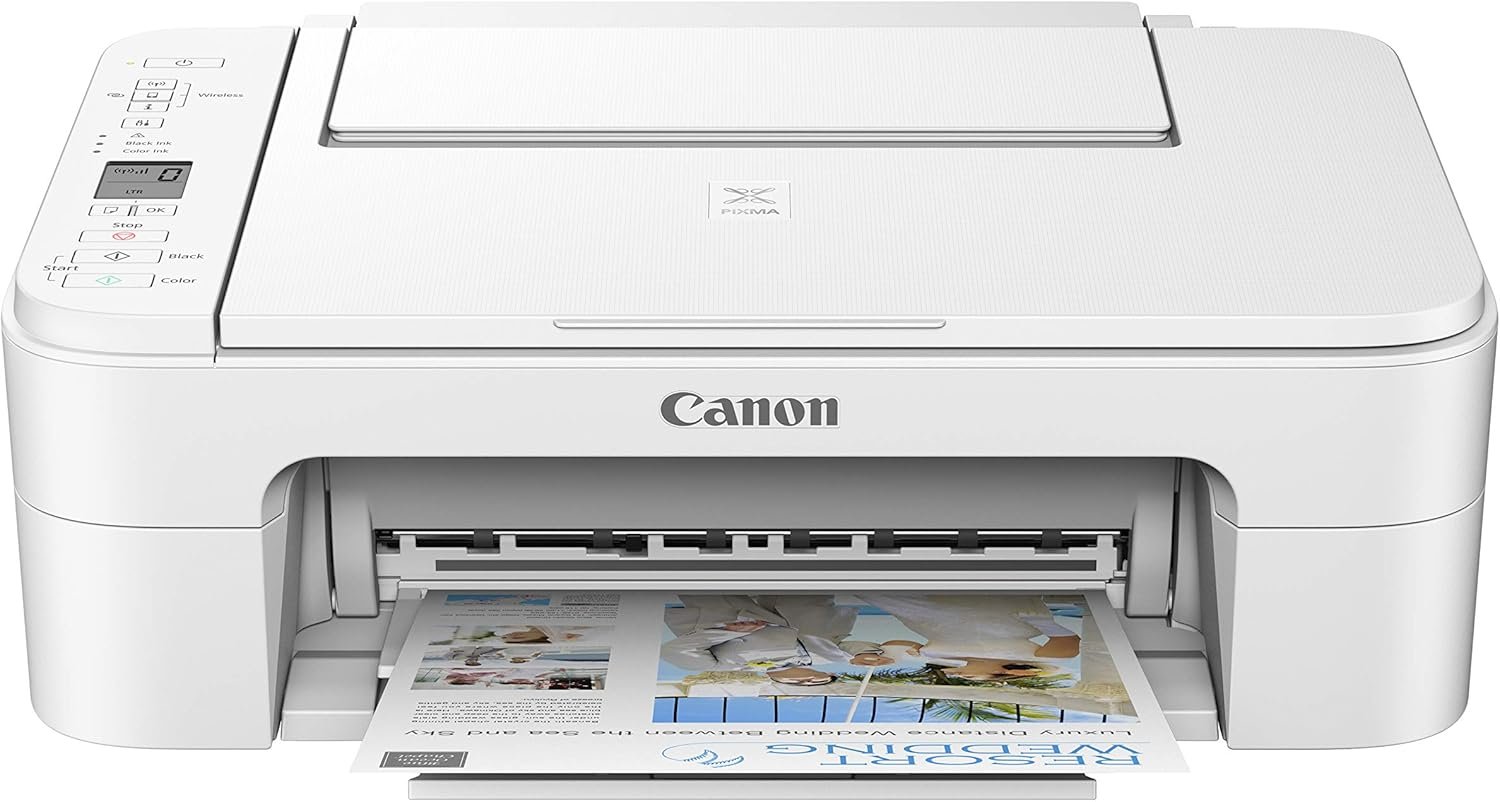
The Importance of Choosing the Right Printer for Your Needs
In today’s fast-paced digital environment, selecting the right printer is critical for both personal and professional productivity. Whether you’re managing household printing tasks, handling office documentation, or requiring specialized imaging capabilities, a printer’s performance directly impacts workflow efficiency and output quality. Modern users demand versatility, reliability, and seamless integration with their digital ecosystems. The Canon Pixma TS3320 White represents a mid-tier all-in-one solution designed to balance these requirements. Its hybrid ink system, wireless connectivity, and multifunctional capabilities make it a compelling option for users seeking simplicity without sacrificing print quality. However, the decision to adopt this printer hinges on understanding its technical specifications, usage scenarios, and long-term maintenance considerations. This review evaluates the TS3320’s performance across key metrics, including print speed, media compatibility, connectivity options, and user experience, to help buyers determine if it aligns with their specific printing needs.
Quick Overview
| Feature | Details |
|---|---|
| Printer Type | Wireless Inkjet All-In-One |
| Printing Technology | Fine Hybrid Inkjet |
| Supported Functions | Print, Scan, Copy |
| Print Resolution | 4800 x 1200 dpi (Color), 600 dpi (Black & White) |
| Media Sizes | 4” x 6”, 5” x 5”, 5” x 7”, Letter (8.5” x 11”), Legal (8.5” x 14”) |
| Connectivity | USB, Wi-Fi, Amazon Alexa |
| Duty Cycle | 5,000 pages/year (Monochrome), 2,500 pages/year (Color) |
| Ink System | 2-Cartridge Fine Hybrid Ink |
| Warranty | Limited Warranty |
| Dimensions | 12.5″D x 17.2″W x 5.8″H |
| Weight | 8.5 pounds |
The Canon Pixma TS3320 White offers a compact, multifunctional design that supports basic printing, scanning, and copying tasks. Its wireless connectivity and Alexa integration simplify setup, while the 2-cartridge ink system ensures consistent color output. However, its media size limitations and lower print speed compared to higher-end models may affect suitability for heavy-duty or specialized printing environments.

Connectivity and Smart Integration: Seamless Device Compatibility
The Canon Pixma TS3320 White prioritizes user convenience through its robust connectivity options, making it ideal for users who value wireless integration and voice-activated commands. The printer’s built-in Wi-Fi and USB ports enable straightforward setup, while compatibility with Amazon Alexa transforms it into a smart home device. This integration allows users to initiate print jobs through voice commands, eliminating the need for physical interaction. The wireless setup process, which requires no computer, streamlines initial configuration, particularly beneficial for users with limited technical expertise. Additionally, the printer supports AirPrint, Mopria Print service, and the Canon Print app, ensuring compatibility with a wide range of iOS and Android devices. For users seeking a printer that blends into a modern, connected lifestyle, the TS3320’s smart features provide a compelling advantage.

Wireless Setup and Alexa Integration
The TS3320’s wireless connectivity simplifies the setup process, requiring only a smartphone for initial configuration. This eliminates the need for a computer, reducing the learning curve for new users. The printer’s compatibility with Amazon Alexa further enhances its usability, allowing voice-activated printing commands. While the Alexa integration is a convenient feature, it may not be essential for all users, particularly those without a smart home ecosystem. The wireless setup ensures that the printer remains accessible across multiple devices, making it suitable for households or small offices with diverse digital needs.
Cross-Device Compatibility and App Support
The TS3320 supports AirPrint, Mopria Print service, and the Canon Print app, ensuring seamless printing from smartphones, tablets, and computers. This broad compatibility is crucial for users who frequently switch between devices, as it eliminates the need for additional software installations. The built-in Wi-Fi and USB ports provide flexibility in connecting to both modern and legacy systems, although the lack of Ethernet support may be a limitation for users requiring wired connectivity. The printer’s ability to handle print jobs from multiple devices enhances its appeal for users with varied digital workflows.
Network Stability and Performance
While the TS3320’s wireless capabilities offer convenience, network stability is a critical factor for consistent performance. The printer’s reliance on Wi-Fi means that users must ensure a stable internet connection to avoid print job delays or failures. Although the manufacturer does not specify detailed network performance metrics, the printer’s design suggests it is optimized for typical home or small office environments. Users in areas with unreliable Wi-Fi may need to consider alternative connectivity options or additional networking equipment to maintain consistent printing operations.
Print Quality and Resolution: Meeting Basic Output Expectations
The Canon Pixma TS3320 White delivers satisfactory print quality for everyday use, with a focus on color accuracy and text clarity. Its 4800 x 1200 dpi color resolution and 600 dpi black-and-white resolution are standard for mid-tier inkjet printers, making it suitable for home use, school projects, and light office tasks. The fine hybrid ink system contributes to smooth gradients and vibrant colors, though the printer’s output may not rival high-end models in terms of photo quality or detail retention. Users prioritizing sharp text and accurate color reproduction will find the TS3320 adequate, but those requiring professional-grade printing may need to consider more advanced options.

Color Accuracy and Gradient Control
The TS3320’s fine hybrid ink system ensures consistent color output, with a focus on delivering vibrant and accurate color reproduction. The 4800 x 1200 dpi resolution allows for detailed images and graphics, though the printer’s ability to handle complex gradients may be limited compared to higher-end models. Users printing photographs or marketing materials may notice slight variations in color depth, but the printer’s performance is well-suited for casual or educational use. The 2-cartridge system simplifies ink replacement and helps maintain color consistency over time.
Text Clarity and Monochrome Output
For text-based printing, the TS3320 provides clear and legible output, with the 600 dpi black-and-white resolution ensuring sharp fonts and minimal smudging. The printer’s monochrome print speed of 7.7 ppm is adequate for basic document printing, though it may fall short for users requiring faster output. The fine inkjet technology contributes to smooth text rendering, making it suitable for school projects, personal correspondence, and light office use. However, users with high-volume text printing needs may find the TS3320’s speed insufficient for demanding workflows.
Photo Printing and Media Compatibility
The TS3320 supports a range of media types, including plain paper and photo paper, with a maximum media size of 8.5 x 14 inches. While the printer can produce decent photo prints, its performance in this area is limited by the fine hybrid ink system, which may not deliver the same level of detail as dedicated photo printers. The included photo paper sample pack provides a starting point for users, but those requiring high-quality photo output may need to invest in specialized media or consider alternative printers with more advanced imaging capabilities.
Print Speed and Workload Capacity: Balancing Performance and Efficiency
The Canon Pixma TS3320 White offers moderate print speeds that are appropriate for home and small office environments, though its performance may not meet the demands of high-volume printing. The color print speed of 4 ppm and monochrome print speed of 7.7 ppm are in line with industry standards for mid-tier inkjet printers. While these speeds are sufficient for everyday tasks, users requiring faster output for large print jobs may find the TS3320’s performance inadequate. The printer’s duty cycle of 5,000 pages/year (monochrome) and 2,500 pages/year (color) indicates it is designed for moderate usage rather than heavy-duty commercial applications.
Color Print Speed and Document Output
The TS3320’s color print speed of 4 ppm is suitable for users printing small to medium-sized documents, such as school projects, personal correspondence, and basic office materials. While this speed is adequate for casual use, it may be perceived as slow for users with frequent color printing needs. The printer’s ability to handle multiple print jobs simultaneously is limited by its design, which is optimized for single-page or small-batch printing rather than high-volume color output.
Monochrome Print Speed and Efficiency
The monochrome print speed of 7.7 ppm is reasonable for users requiring fast black-and-white output, such as for printing reports, invoices, or forms. This speed is competitive with other mid-tier inkjet printers, though it may not match the performance of laser printers for high-volume text printing. The TS3320’s efficiency in handling monochrome tasks is enhanced by its fine inkjet technology, which ensures clean and sharp text without excessive ink usage.
Duty Cycle and Workload Suitability
The TS3320’s duty cycle of 5,000 pages/year (monochrome) and 2,500 pages/year (color) indicates it is designed for moderate usage rather than heavy-duty applications. This makes it well-suited for home users, students, and small offices with limited printing needs. However, users requiring higher print volumes or continuous operation may find the TS3320’s workload capacity insufficient. The printer’s design and component specifications suggest it is optimized for occasional use rather than constant, high-output environments.
Pros and Cons: Evaluating the Canon Pixma TS3320 White
Pros
- Wireless Connectivity: The TS3320’s built-in Wi-Fi and Alexa integration simplify setup and enable seamless printing from multiple devices. This is particularly beneficial for users without a dedicated computer.
- Ease of Use: The printer’s straightforward design and user-friendly interface make it accessible for users with varying levels of technical expertise. The 2-cartridge ink system also reduces the complexity of maintenance.
- Multifunctionality: Supporting print, scan, and copy functions, the TS3320 offers a cost-effective solution for users needing an all-in-one device without additional hardware.
- Compatibility with Smart Home Ecosystems: Integration with Amazon Alexa enhances the printer’s usability in a connected home environment, allowing voice-activated printing commands.
- Affordable Maintenance: The fine hybrid ink system and included ink cartridges provide a cost-effective printing solution for everyday tasks.
- Versatile Media Support: The printer accommodates a range of paper sizes and types, making it suitable for various printing needs, from text documents to basic photo prints.
Cons
- Limited Media Size Support: The maximum media size of 8.5 x 14 inches restricts the printer’s ability to handle larger format prints, which may be a drawback for users requiring specialty media.
- Moderate Print Speeds: The TS3320’s color print speed of 4 ppm and monochrome speed of 7.7 ppm may be perceived as slow for users with high-volume printing needs.
- Manual Duplex Printing: The absence of automatic duplex printing requires users to manually flip pages, which can be inconvenient for high-volume document printing.
- Limited Warranty Coverage: The limited warranty may not provide sufficient support for users requiring extended service or replacement parts.
- No Ethernet Connectivity: The lack of Ethernet support means the printer relies solely on Wi-Fi, which may be a limitation in environments with unstable wireless networks.
Final Verdict: Who This Printer Is Best For (and Who Should Skip It)
The Canon Pixma TS3320 White is an excellent choice for users seeking a simple, multifunctional printer for home or small office use. Its wireless connectivity, Alexa integration, and user-friendly design make it ideal for casual printing tasks, such as school projects, personal correspondence, and light document management. The 2-cartridge ink system and affordable maintenance costs further enhance its appeal for budget-conscious users. However, the TS3320 is not well-suited for heavy-duty printing environments, such as commercial offices or photography studios, due to its moderate print speeds, limited media size support, and manual duplex printing requirements. Users requiring faster output, higher print volume, or advanced imaging capabilities should consider alternative models with more robust performance and extended warranty options.

Frequently Asked Questions (FAQs)
Can the Canon Pixma TS3320 White print from my smartphone?
Yes, the Canon Pixma TS3320 White supports wireless printing from smartphones via AirPrint, Mopria Print service, and the Canon Print app. It also integrates with Amazon Alexa, allowing voice-activated print commands. This makes it convenient for users who frequently print from mobile devices.
What is the maximum print speed of the Canon Pixma TS3320 White?
The Canon Pixma TS3320 White prints at 4 ppm in color and 7.7 ppm in monochrome. These speeds are suitable for everyday printing tasks but may be slower for high-volume or complex print jobs compared to higher-end models.
Does the Canon Pixma TS3320 White support photo printing?
Yes, the TS3320 White can print photos using compatible media such as photo paper. While it is not designed for professional-grade photo printing, it produces satisfactory results for casual or personal use with the included photo paper sample pack.
How easy is it to set up the Canon Pixma TS3320 White?
The TS3320 White offers a streamlined setup process that requires only a smartphone for initial configuration. Its wireless connectivity and Alexa integration simplify the setup, making it accessible even for users with limited technical expertise.
What media sizes can the Canon Pixma TS3320 White handle?
The TS3320 White supports media sizes up to 8.5 x 14 inches, including standard letter and legal sizes. It also accommodates 4” x 6”, 5” x 5”, and 5” x 7” photo paper, making it versatile for various printing needs.
Is the Canon Pixma TS3320 White suitable for home use?
Yes, the TS3320 White is well-suited for home use due to its compact design, wireless connectivity, and multifunctional capabilities. It is ideal for printing documents, photos, and scanning tasks in a home or small office environment.
Does the Canon Pixma TS3320 White have automatic duplex printing?
No, the TS3320 White does not support automatic duplex printing. Users must manually flip pages for double-sided printing, which may be inconvenient for high-volume document printing.
What is the warranty coverage for the Canon Pixma TS3320 White?
The TS3320 White comes with a limited warranty, which may not provide extended support or replacement parts. Users should review the warranty terms to understand the coverage and service options available.